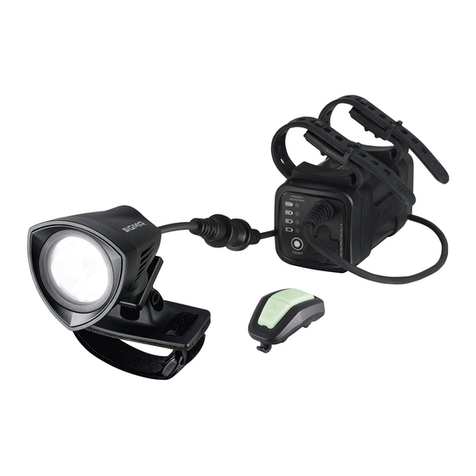
Exposure Lights Six Pack Mk.2 User manual

2012 Owner’s Manual
Six Pack
Mk.2
01
Contents
Before Using your light.
Lights Specication.
Soft Shell Pack Contents.
Quick Release bracket
Helmet Mounting.
Light Operation.
Smart Port technology.
Charging Your Light.
Piggyback Battery.
Remote Switch.
Front & Rear Accessories.
Intelligent Thermal Management.
Maintenance
Features covered in this Manual
Long burn times
LED range
Collimated lens technology
Fully weatherproof
2 year warranty
CFD - Cable Free Design
Forged alloy quick release bracket
One size ts all QR bracket
Fuel gauge battery life indicator
Light mode indicator
Reserve fuel tank
Smart Port Technology
Li-ion batteries
Hardwired batteries
Smart Rechargeing
Charge port storm cap
Piggyback plug in battery option
Remote switch available
White Eye Accessory
RedEye rear light accessory options
RedEye Micro rear light accessory
Intelligent Thermal Management (ITM)
British design & manufacture
3
3
3
2
2
5
5
5
7
7
7
8
9
9
9
9
10
11
12
12
12
13
14
2
3
4
5
6
7
8
9
10
11
12
13
14
02
www.exposurelights.com
Please read all instructions before using your EXPOSURE LIGHT
EXPOSURE LIGHTS - the lightest high output production sports lights.
Designed for high performance, EXPOSURE LIGHTS combine the latest
LED technology with a powerful Lithium Ion battery. Before using, please
familiarise yourself with this manual, so that you understand how to operate
and care for your EXPOSURE LIGHT.
WARNING
EXPOSURE LIGHTS are very powerful lighting systems. Always take care
when operating. Do not look directly into the light. This may cause serious
injury. Do not shine directly at others.
EXPOSURE LIGHTS/USE Ltd. accept no liability for any injuries or other
damages arising from the use of their product in any circumstances.
Important Information
EXPOSURE LIGHTS are weatherproof under normal conditions but are
NOT waterproof.
Do NOT submerge lights. If moisture does appear in the unit do not use it
and contact Exposure’s service department.
Never attempt to disassemble the light unit. This will invalidate your
warranty.
Do not attempt to use any other chargers or batteries with the unit. This will
cause damage and could be dangerous.
Long periods of non-use will lower the voltage of the battery. Please follow
the charging instructions and top-up the charge monthly when not in use.
Warranty
Please register your EXPOSURE LIGHT online at www.exposurelights.com.
IMPORTANT: Keep your proof of purchase from your retailer. You will require
this should you have a claim.
EXPOSURE LIGHTS provide a 2-year warranty to the original owner of
the light unit, brackets and charger. This warranty covers material and
manufacture. Accidental damage and neglect are not covered by warranty.
Modications or improper use also void the warranty.
All EXPOSURE LED’s are covered by lifetime warranty, in accordance with
proper use.
Exposure Lights service department :
Tel: +44 (0)1798 344477
E-mail: [email protected]
03
Exposure Lights Specifi cation
Exposure Lights use collimated Lens technology. These high-tech resin
lenses are speci cally designed to optimise light collection from each LED.
A great deal of time is invested in research to ensure the optimal beam and
output is achieved.
Recommended Operating Temperature Range: -15°C / +40°C
LEDs
(Cree XPG)
High
Output
Battery
(mAh) High Medium Low
weight
(gms)
Six Pack Mk.2 6 1925 15600 3 10 24 445
MaXx-D Mk.4 4 1285 10400 3 10 24 304
Toro Mk.3 3 975 7800 3 10 24 245
Race Mk.6 2 645 5200 3 10 24 192
Strada Mk.3 2 645 5200 3 (dip) 8 244
Diablo Mk.3 3 975 2600 1 3 10 112
Joystick Mk.6 1 325 2600 3 10 24 91
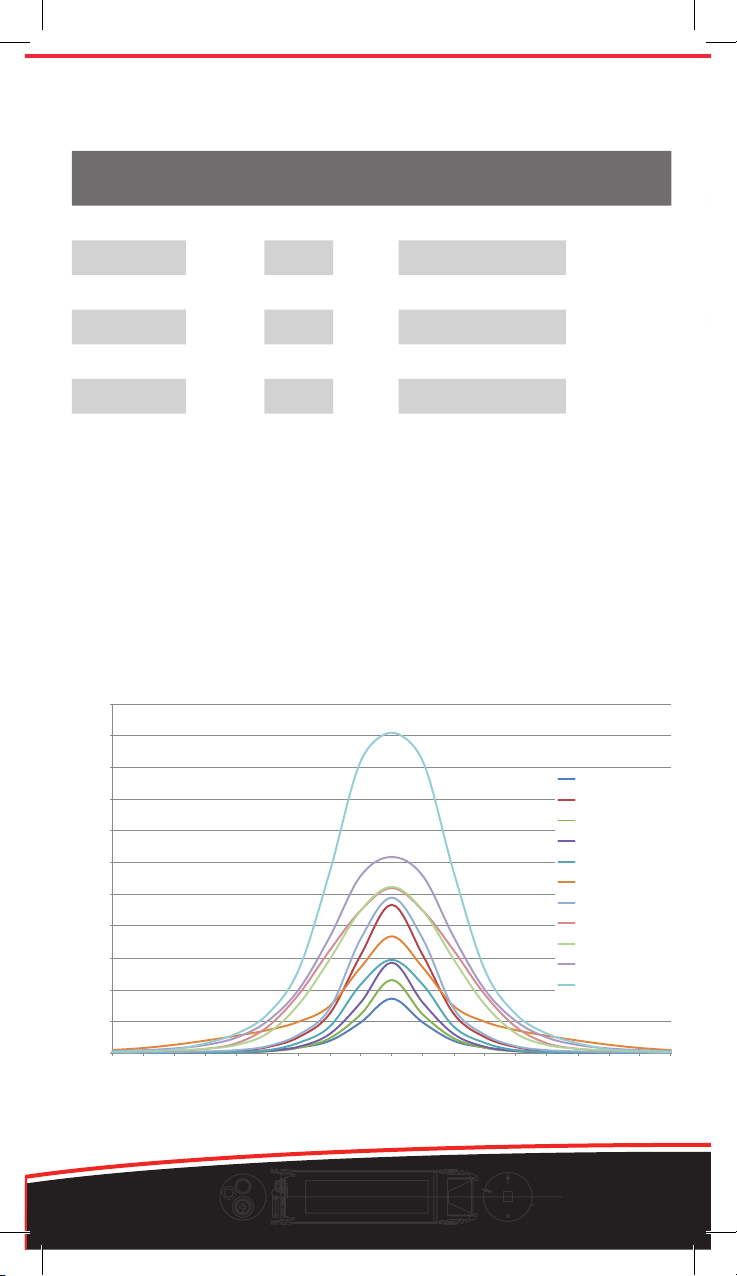
Burntimes by setting
- Light Spread - Degrees from Centre +
Luminous Intensity (Lux) at 1.75 m
04
www.exposurelights.com
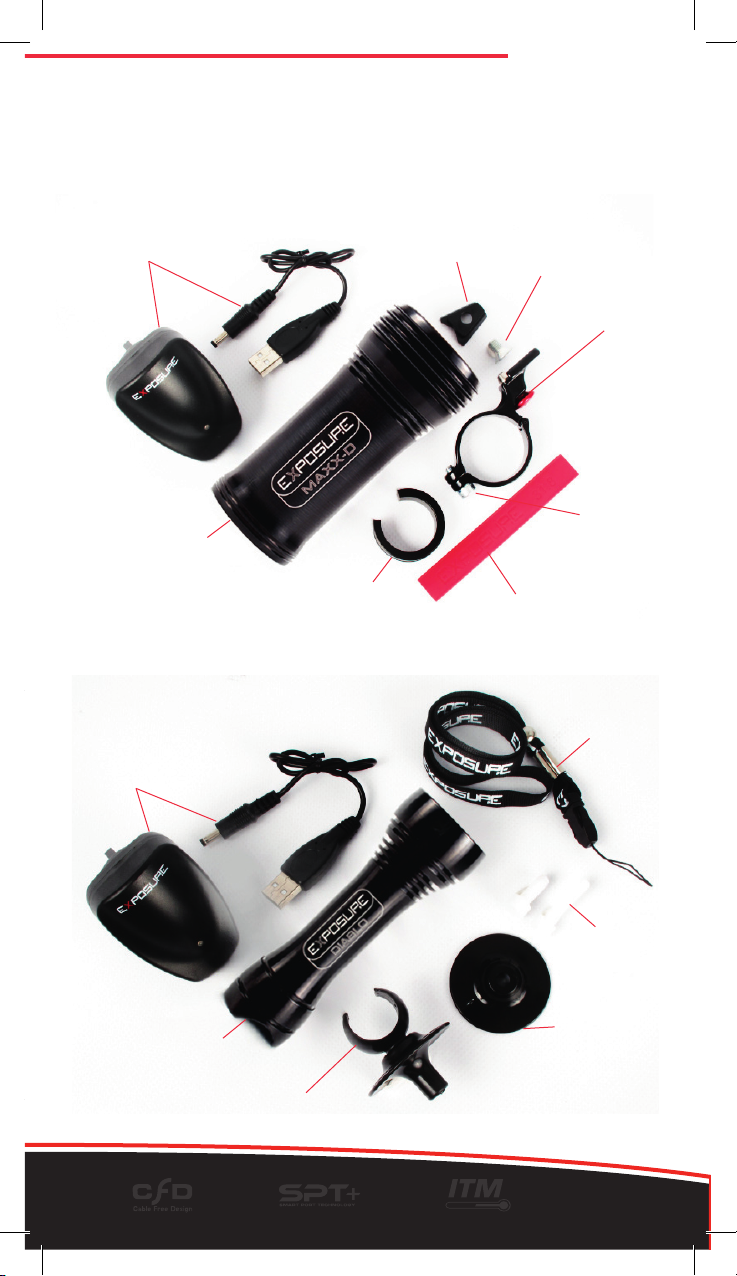
Joystick and Diablo with helmet bracket
Light Unit
QR Handlebar
bracket
Cleat Cleat bolt
Smart Charger
Smart Charger
25.4 – 26.0 spacer Silicone strip for 31.8
Bracket
bolt
Soft Shell Pack Contents
Please ensure that the following contents are included with your purchase. If
any of the items are missing please contact your place of purchase.
Sixpack, MaXx-D, Toro, Race, Strada.
Light Unit
Lanyard
Short & long
nylon blots
Helmet bracket
lower disc
Helmet bracket upper
LEDs
(Cree XPG)
High
Output
Battery
(mAh) High Medium Low
weight
(gms)
Six Pack Mk.2 6 1925 15600 3 10 24 445
MaXx-D Mk.4 4 1285 10400 3 10 24 304
Toro Mk.3 3 975 7800 3 10 24 245
Race Mk.6 2 645 5200 3 10 24 192
Strada Mk.3 2 645 5200 3 (dip) 8 244
Diablo Mk.3 3 975 2600 1 3 10 112
Joystick Mk.6 1 325 2600 3 10 24 91
High

05
1
2
3
4
Quick Release Bracket – Six Pack, MaXx-D, Toro,
Strada, Race, (Diablo and Joystick with clip)
The Exposure QR bracket is a triumph in design that brings to life the full benet of
Exposure’s principle feature, Cable Free Design (CFD). The light unit is easily and
quickly attached and removed. The bracket stays with the bike and the light will be in
the perfect position every time it is attached.
• Mounting to a 31.8mm bar – Remove the spacer from the bracket. Wrap the
supplied Silicone band, (marked Exposure 31.8) around the handlebar and clamp
bracket over the band to protect the bars. Tighten the clamp with a 4mm hex key.
(Maximum 5Nm)
DO NOT OVER TIGHTEN!
• Mounting to a 25.4 or 26mm bar - Clip the plastic spacer over your bar, attach the
bracket over the spacer and tighten the clamp with a 4mm hex key. (Maximum 5 Nm)
1 Attach the cleat to the light unit using
the provided bolt (Already tted to new
lights).
2 Locate the cleat into the V section of
the bracket and slide forward until the
steel pin “clicks” into place
3 To adjust the horizontal angle of the
light, loosen the cleat bolt. A hole in
the bracket enables access to the bolt
when the light is in the bracket. Use a
4mm hex key to adjust and tighten the
bolt securely (Maximum 5Nm)
4 To release the light from the bracket
pull down on the red button and gently
pull back the light with your hand. This
is a simple one-hand operation.
• Warning - Make sure that brake
and gear cables cannot catch on or
interfere with the light or the bracket or
release button.
Racers beware - check number
boards do not interfere with bracket
button. If the steel pin can not pop-up
fully the light will not be fully engaged
to the bracket and may come off.
QR bracket also available as accessory:
EXPQRBK-10 Bracket Only (no cleat or bolt)
EXPQRBKSET Bracket with clip for Joystick/Diablo/Spark
06
www.exposurelights.com
Handlebar clip - Diablo, Joystick, (Spark)
The QR Clip allows you to mount your Joystick, Diablo or Spark light to the Quick
Release bracket.
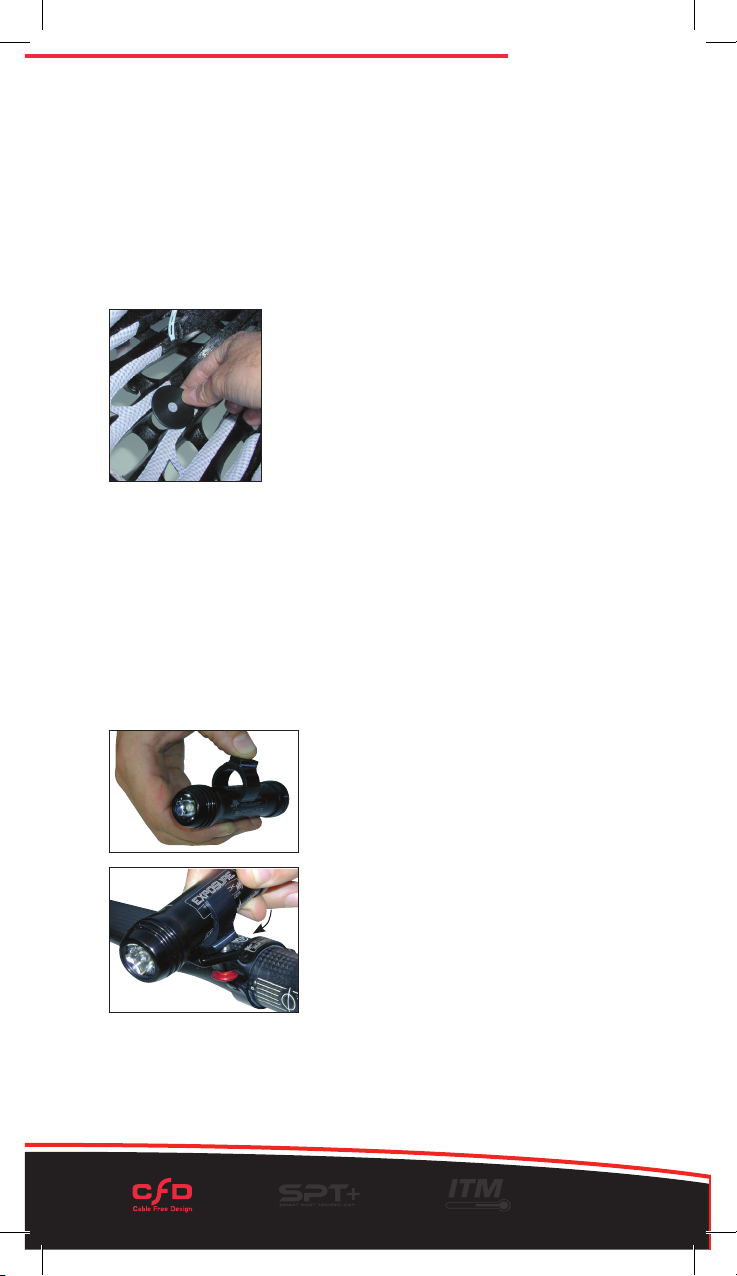
• Simply press the light into the QR clip with the
point of the clip towards the front of the light
• Now engage the clip and light into the QR bracket.
A simple cable tie handlebar bracket is also
available as an accessory, as supplied with the
Spark light.
Helmet Mount – Diablo, Joystick, (Spark)
The highly acclaimed Joystick helmet bracket works as a ball joint, to innately
adjust the position of your light. Follow these instructions for set up and position of
the light for riding. The clamp is made up of three parts: Lower clamp disc, upper
clamp with ball joint socket and a nylon clamp bolt.
• Put the shorter plastic bolt through the lower clamp disc and align with a selected
vent on the inside of your helmet.
• Place the upper clamp through the top of the vent to meet the bolt.
• Tighten the bolt. Take care not to damage
your helmet.
• Use the shorter bolt rst and if not long enough then
go to the longer bolt. Do not use the long bolt on
thinner section helmets, as this will stop the ball joint
j working or possibly pop it out.
• Clip the Joystick body into the top part of
the clamp
• The Joystick can be adjusted by rotating the ball joint
when holding the light and is easy to do when you are riding to get the best position.
We suggest you attach the lanyard through the holes provided at the back of the
light unit and loop the lanyard through a vent in your helmet or round the handlebar
if using it there. This is for added security of your light.
EXPHM - Helmet Mount
EXPQRCLIP - Quick release bracket clip
EXPHBZIP - Handlebar zip-tie bracket

07
Light Operation
Multi Function Button
Located on the back of the light unit is the function button.
This operates the light unit and informs you of the mode
setting and the battery power status.
When the light is on and the function button is pressed, the colour of the button for the
rst two seconds informs you which mode has been selected. Thereafter the colour of
the button is your fuel gauge. See below.
Green (High) – Amber (Medium) – Red (Low)
On the Strada model there are just two main modes
Green (High) – Red (Dipped)
Mode Function
• To turn on the light, double click the button; the light is now operating in the brightest
mode.
• To switch between the constant settings, press the button once.
• To activate the ashing mode, press and hold the button, release immediately after
one ash. The ashing mode can be activated from any of the constant modes. To
return to the high mode, press the button once.
• To turn off the light, press and hold the function button. The light will ash once then
twice and the function button will rapid ash red, release the button and the light will
have switched off.
Fuel Gauge Function
After two seconds the function button becomes the fuel gauge. The colour of the button
now indicates the approximate percentage of battery power left.
Button Battery
Green 100% - 50%
Amber 50% - 25%
Red 25% - 5%
Red Flash 5% - Empty
Function
button
When the battery has only 5% charge remaining in whichever mode, the light will
automatically switch to the low setting and the function button will ash red. Light output
will slowly dim over the next hour and this is the extended burn time on reserve power.
The light level of the Diablo will drop far quicker due to the increased voltage drawn
from the battery.
Mode and Fuel Gauge functions will operate as normal when using a remote switch.
When using a Piggyback Battery the function button will only ash green to indicate the
light is charging.

08
www.exposurelights.com
RedEye Micro
RedEye HelmetRedEye
Smart Port Technology Plus (SPT+)
Each EXPOSURE light has the ability to detect the accessory connected to it. With
“Automatic Accessory Recognition” the accessories can be swapped over in a plug
and play fashion. This allows the user to quickly change between accessories to
adapt to the needs of their surroundings.
With Smart Port Technology Plus there is the option to run various accessories from
the Power Port such as the RedEye rear light or the WhiteEye.
All SPT+ accessories work on 2009 (MaXx-2) models onwards, these lights display the
SPT or SPT+ logo etched on the bodywork of the light. They will NOT work on 2008
MaXx model lights.
If you are a cyclist using an Exposure Light you will be aware of how important it is to
be seen from behind as well as from the front to remain safe from other road users.
SPT+ enables Charge Port to become a Power Port to power the RedEye rear lights or
WhiteEye.
You can not run two Smart Port Technology accessories at the same time.
Charger In-Car Charger
Piggy Back Batteries
Beacon
09
Smart Charging Exposure Lights
Before using your Exposure Light please charge it fully.
Use only genuine Exposure Lights chargers. International chargers, in-car chargers and
USB top-up cables are also available.
EXPOSURE LIGHTS use the highest quality Lithium Ion batteries. This allows them to
be recharged at any point during the discharge cycle. Burn times will not be affected by
multiple re-charging.
Re-charging instructions
• Ensure the light unit is turned off.
• Plug the Smart Charger into the power supply and switch on the supply.
The LED on the charger will show green (operational).
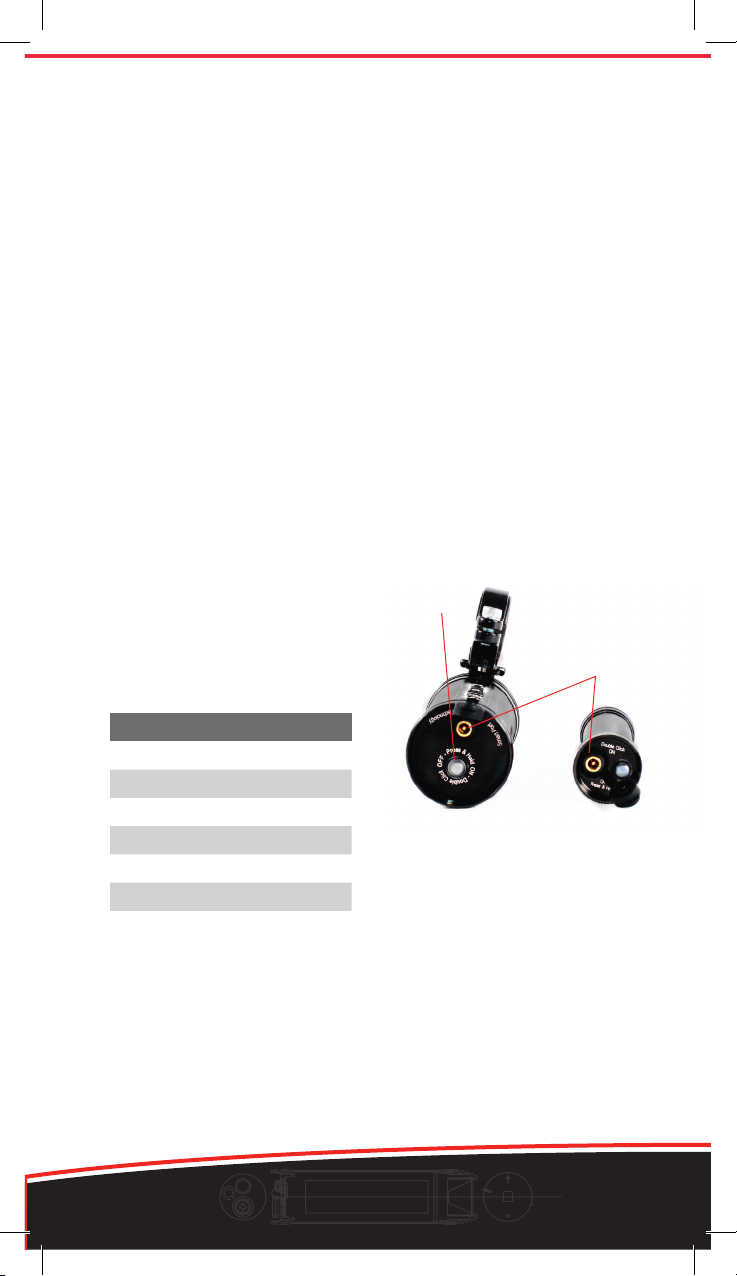
• Remove the storm cap from the charge port then insert the charger
connection plug into the light’s charge port. The charger’s LED will show
red when the light unit is charging.
The function button on the light will continuously ash green to inform you
that the charger is connected and functioning.
From empty the light unit
will rapid charge till full - at
this point the LED on the
charger will go from red to
green.
charge port
function button
Charging Times
Six Pack 24 Hrs
MaXx-D Mk.3 16 Hrs
Toro Mk.2 12 Hrs
Race Mk.5 8 Hrs
Strada Mk.2 8 Hrs
Diablo Mk.2 4 Hrs
Joystick Mk.5 4 Hrs
Long periods of non-use will lower the voltage of the battery. If the unit
is being stored for long periods, please ensure the battery is periodically
charged. We suggest once per month.
Exposure Lights from 2008 (MaXx range) onward use the same Smart
chargers. The new 2012 Smart charger now has USB compatibility.
Table of contents
Other Exposure Lights Bicycle Accessories manuals