
Eton Grundig G5 User manual
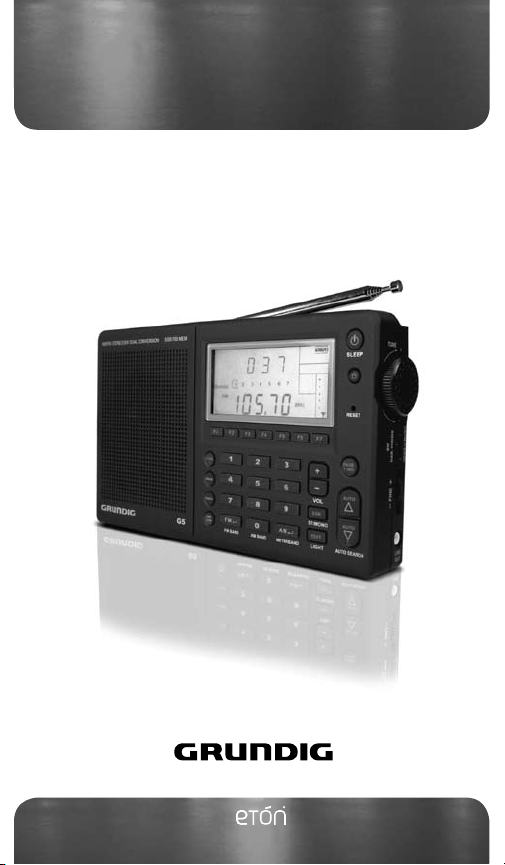
G5 AM/FM STEREO/
MW.SW.LW DUAL CONVERSION
OWNER’S MANUAL
Grundig Radio Line By www.etoncorp.com


DO YOU NEED HELP?
Thank you for purchasing the G5 AM/FM/Shortwave Radio. We
want you to thoroughly enjoy the use of this product. To take ad-
vantage of its many excellent and unique features, we urge you to
carefully read the owner’s manual. If you need help while learning
its operation, please contact us, using the methods below.
Monday-Friday, 8:30 a.m. - 4:00 p.m., North American Pacific Time.
1-800-872-2228 from the U.S.
1-800-637-1648 from Canada
1-650-903-3866, worldwide
FAX: 650-903-3867
Web Site: www.etoncorp.com
Mailing Address:
Etón Corporation
1015 Corporation Way
Palo Alto, CA 94303
USA
G5 OWNER’S MANUAL
1
Grundig Radio Line By

TABLE OF CONTENTS
WHAT THE G5 INCLUDES.....................................................................
G5 FEATURES........................................................................................
DIAGRAMS...........................................................................................
GETTING STARTED................................................................................
• INSTALLING BATTERIES AND BATTERY INFORMATION........................
• AC ADAPTER INFORMATION..............................................................
• CHARGING NI-MH BATTERIES IN THE G5...........................................
BASIC RADIO OPERATION...................................................................
• BEFORE USING THE E5; TURNING THE E5 ON/OFF;
USING THE SLEEP TIMER FEATURE....................................................
• USING THE LOCK FEATURE..............................................................
• VOLUME CONTROLS........................................................................
• USING THE DX/LOCAL SWITCH.........................................................
• SELECTING FM, AM AND SHORTWAVE (SW)....................................
• LISTENING IN FM STEREO...................................................................
• SETTING UP AM AND FM OUTSIDE OF NORTH AMERICA.................
• TUNING IN STATIONS.......................................................................
• BUTTONS...................................................................................
• TUNING KNOB.................................................................................
• DIRECT FREQUENCY ENTRY.............................................................
• AUTO-SCAN TUNING.......................................................................
• SHORTWAVE WITH THE G5..............................................................
• SIGNAL STRENGTH INDICATOR........................................................
CLOCK AND TIMER FEATURES............................................................
• SETTING THE CLOCK........................................................................
1
2
3
4
5
6
4
4
5
7
8
8
9
11
11
12
12
13
13
13
14
15
15
15
15
16
17
19
19
19
2
G5 OWNER’S MANUAL

TABLE OF CONTENTS
• SETTING/ACTIVATING/DEACTIVATING THE ALARMS ......................
WORKING WITH MEMORY................................................................
• STORING STATIONS INTO MEMORY...............................................
• LABELING MEMORY PAGES............................................................
• ACCESSING WHAT IS STORED IN MEMORY....................................
• CHECKING MEMORY CAPACITY.....................................................
• CHECKING PAGES AND MEMORIES................................................
• USING THE PAGE COPY/PASTE FUNCTION......................................
• ERASING MEMORY.........................................................................
• USING THE ATS MEMORY FEATURE.............................................
USING THE LIGHT..............................................................................
USING THE EXTERNAL SHORTWAVE ANTENNA SOCKET....................
STEREO/MONO BUTTON...................................................................
MUSIC/WIDE AND NEWS/NARROW SWITCH.....................................
LINE OUT SOCKET..............................................................................
USING EARPHONES...........................................................................
REAR FOLDING STAND......................................................................
RESET BUTTON..................................................................................
INTRODUCTION TO SHORTWAVE......................................................
TROUBLESHOOTING..........................................................................
WARRANTY AND SERVICE INFORMATION.........................................
7
8
9
10
11
12
13
14
15
16
17
18
22
23
23
23
24
24
24
25
25
26
27
27
27
28
28
28
29
29
30
36
38
3
G5 OWNER’S MANUAL
G5 OWNER’S MANUAL

2 WHAT THE G5 INCLUDES
• AC adapter
• Stereo earphones
• External wire antenna
• Carrying pouch
• Carrying strap (attached)
• Owner’s manual
Note: In the instructions below, numbers in parenthesis (), cor-
respond to the numbered diagrams.
• M-Stereo, AM and Full-Shortwave Coverage (1711-29999 KHz).
• PLL Dual Conversion AM/SW Circuitry With SSB.
• 700 Programmable Memory Presets.
• FM Station Auto Tuning Storage (ATS).
• Alpha-Numeric Four Character Memory Bank Labeling.
• Tunes Via Auto-Scan, Manual-Scan, Direct Key-in Entry and
Tuning Knob.
• Selectable 9/10 kHz AM Tuning Steps.
• Clock, Sleep Timer and Four Programmable Timers (for alarm
or wake-up).
• Weekday Setting.
• World Time Zone Selection.
• Shortwave Narrow/Wide Bandwidth Selection.
• AM/FM News/Music Tone Selection.
• Stereo Earphone Socket.
• Stereo Line-Out Socket.
• Socket For External Shortwave Antenna.
• Display Light.
3 FEATURES
4
G5 OWNER’S MANUAL
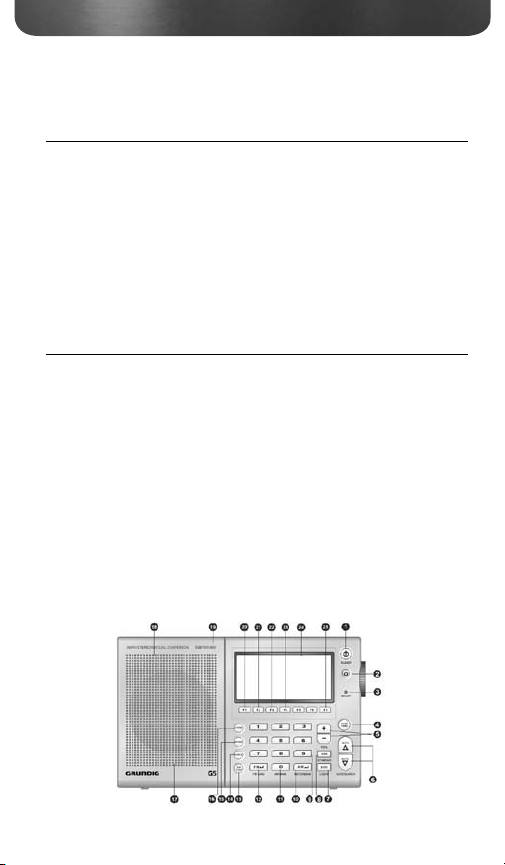
3 FEATURES continued
POWER / SLEEP
HOLD
RESET
PAGE/TIME
VOL+/VOL-
AUTO SCAN
EDIT/BACKLIGHT SWITCH
MONO/STEREO/SSB INDICATOR
0-9 NUMBER BUTTON
METER BAND
AM BAND
FM BAND
TIME-ZONE BUTTON
CHECK BUTTON
ERASE BUTTON
STORE BUTTON
BATTERY COMPARTMENT
(REAR)
SPEAKER
SUPPORT STAND (REAR)
ALARM 1
ALARM 2
ALARM 3
ALARM 4
LCD DISPLAY
CHARGE
1.
2.
3.
4.
5.
6.
7.
8.
9.
10.
11.
12.
13.
14.
15.
16.
17.
18.
19.
20.
21.
22.
23.
24.
25.
• Button Lock Feature.
• Included: Owner’s Manual, One-Year Warranty, AC Adapter/
Charger and Protective Case.
• Internally Recharges Ni-MH Batteries.
• Dimensions: 6-5/8”W x 4-1/8”H x 1-1/8”D (167 x 105 x 27 mm).
• Weight: 12.2 oz. (346 g).
4 DIAGRAMS
5
G5 OWNER’S MANUAL
G5 OWNER’S MANUAL
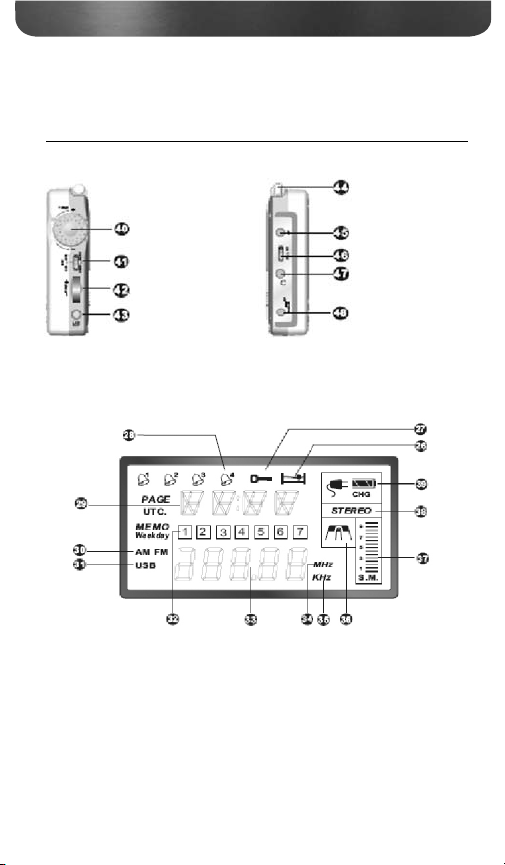
3 DIAGRAMS continued
JOG DIAL WHEEL: Turn the jog dial wheel, combine with other
button can adjust time, frequency, volume and memory operations.
RIGHT SIDE LEFT SIDE
LCD DISPLAY
Jog Dial Wheel
SSB Fine Knob
Line Out
Telescopic Antenna
External Antenna Jack
LOCAL/DX Switch
Earphone Jack
External Power Jack
SLEEP
LOCK
ALARM INDICATOR
INFORMATION AREA
AM/FM
USB
WEEKDAYS/STATION AREA
FREQUENCY
MHz
KHz
WIDE/NARROW
SIGNAL STRENGTH
STEREO/MONO
CHARGE INDICATOR
26.
27.
28.
29.
30.
31.
32.
33.
34.
35.
36.
37.
38.
39.
6
G5 OWNER’S MANUAL
News/Music
Narrow/Wide Switch
4 GETTING STARTED
INSTALLING BATTERIES
The hinged battery compartment (17) is located on the back of the
G5. To open it, apply thumb pressure to the ribbed, down pointing
triangle and slide it about 1/8 inch (about 3 mm) towards the bottom
of the radio, then pull up. Install 4 AA batteries, observing the battery
polarity diagrams inside the compartment. When not using recharge-
able AA batteries, use alkaline or lithium batteries. Lithium AA batter-
ies yield the longest play-time.
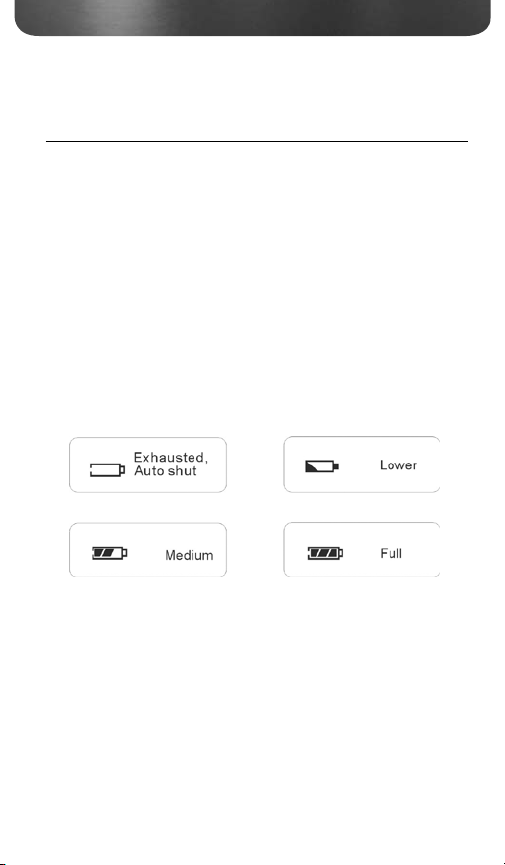
BATTERY STRENGTH INDICATOR
The battery strength indicator appears in the upper right side of the
LCD display (24). When batteries are fresh or fully charged, it appears
solid black. As batteries wear down, the segments become clear from
right to left.
CAUTION! - PREVENTING BATTERY ACID LEAKAGE
To avoid battery acid leakage, only use high quality alkaline, lithium
or rechargeable nickel-metal-hydride batteries. Never use old batteries
and never intermix old with new or different brands or types of
batteries, as this may cause damage to the radio and may result
in an explosion causing injury. When the G5 is not being used for a
long period of time, remove the batteries to avoid leakage. Damage
caused by battery acid leakage is not covered by this product’s war-
ranty. If the batteries leak, don’t throw them away and immediately
contact the manufacturer of the batteries to inquire about their
7
G5 OWNER’S MANUAL
G5 OWNER’S MANUAL

4 GETTING STARTED continued
battery leakage warranty program.
CAUTION! Never attempt to recharge non-rechargeable batteries!
MORE IMPORTANT BATTERY USE INFORMATION
• When using batteries for long periods of time, disconnect the AC
adapter/charger.
• Do not attempt recharging non-rechargeable batteries. Only
recharge rechargeable Ni-MH batteries.
• Replace or recharge batteries when the sound becomes weak and
distorted or the power indicator indicates depleted.
• Stations stored in memory are permanently stored. However, when
power is removed or batteries deplete, the clock reverts to the
default 0:00 setting.
• The clock time will not be lost if batteries are replaced quickly –
within 3 minutes of removal.
POWERING THE G5 WITH THE INCLUDED
AC ADAPTER/CHARGER
To power the G5 with the included AC Adapter/Charger, first plug
it into an AC wall outlet (also called ‘mains’), then plug the tip into
the 6V socket (48) on the lower left side of the G5. Remove any
non-rechargeable batteries from the G5 while using the included AC
Adapter/Charger.
8
G5 OWNER’S MANUAL
Table of contents
Other Eton Radio manuals

Eton
Eton G 5 User manual

Eton
Eton American Red Cross FR350 User manual

Eton
Eton E100 User manual

Eton
Eton FR-300 User manual

Eton
Eton BlackOut Buddy FR100 User manual

Eton
Eton G1000A User manual

Eton
Eton G2000A Operating instructions

Eton
Eton SOLARLINK FR360 User manual

Eton
Eton SOLARLINK FR500 User manual

Eton
Eton Traveler III User manual
Eton
Eton E1 E1 User manual

Eton
Eton SOLARLINKFR370 User manual

Eton
Eton American Red Cross FR350 User manual

Eton
Eton FRX3+ User manual

Eton
Eton Sound 100 User manual

Eton
Eton E100 User manual

Eton
Eton FRX4 User manual

Eton
Eton Traveler III Owner's manual

Eton
Eton FR1000 User manual

Eton
Eton Mini Owner's manual





