Escort SmartCord Live User manual

with
Compatible with Select
ESCORT and Beltronics Detectors
Made for
iPhone 4S, iPhone 4, iPhone 3GS

2
Congratulations! You have just purchased the most innovative and comprehensive radar/laser accessory
available SmartCord Live.
Using Bluetooth® technology, SmartCord Live communicates with your iPhone® mobile digital device via
our exclusive app so you can access your detector settings and manage alerts with just a touch of the
screen. This combination of technologies also gives you access to the most powerful driver alert
network ESCORT Live! (Subscription may apply.)
With ESCORT Live, you and your fellow drivers will instantly communicate all radar/laser encounters
automatically, providing the most up-to-date and accurate protection on the road. Imagine millions of
other drivers helping you Drive Smarter!
You’ll still enjoy all the state-of-the-art performance you’ve come to expect from your detector, but
you’ll also have access to:
• Our exclusive real-time ticket protection network, which warns you of upcoming alerts
received by other users in the area.
• Our DEFENDER® Database, which warns you of verified speed traps, speed cameras, and red
light cameras.
• Our most popular GP -powered features, including speed-limit data for over-speed alerts, live
traffic data for your current location, and TrueLock™ to help eliminate false alerts. You can also
Mark Locations for future reference.
Note: ESCORT Live-enabled feat res are only available while r nning the iPhone application. For detailed
information abo t yo r partic lar detector, please refer to the detector prod ct man al.

3
Contents
SmartCord Live Connections and Controls 4
Registering and Pairing 5
ESCORT Live Features 7
Map View 7
Dashboard View 9
Managing Alerts 11
Reporting an Alert 11
Muting an Alert 13
Locking Out an Alert 14
Unlocking an Alert 15
Marking a Location 15
Unmarking a Location 17
Settings and Preference s 19
Troubleshooting 21
Service 22
4
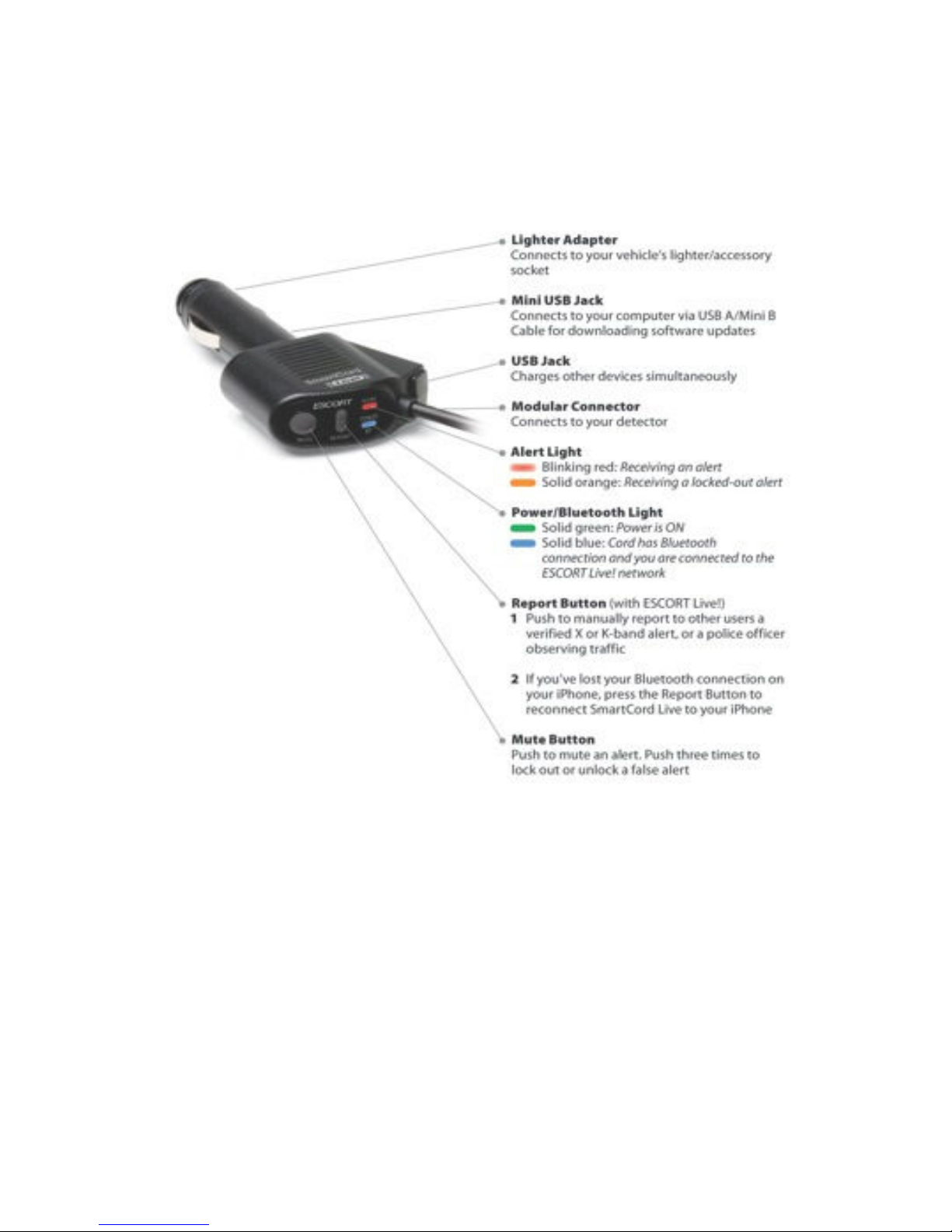
martCord Live Connections and Controls

5
Registering and Pairing
Before downloading ESCORT Live, you must first register your SmartCord Live.
Visit EscortInc.com and click Product Registration.
Note: Be s re to write down the username and password you create, as yo will need this information
to access and download the app.
Pairing Your iPhone with martCord Live
1. Connect SmartCord Live to your detector and your vehicle’s lighter/accessory socket.
2. On your iPhone, enter the Settings menu.
3. Tap General, then Bluetooth.
4. Ensure Bluetooth is ON.
5. SmartCord Live should appear under devices.
6. Tap martCord Live to pair the device to your iPhone.
7. The SmartCord Live Power/Bluetooth Light will turn a solid blue to confirm the connection.
Pairing E CORT Live with Your Detector
Note: If yo own a GPS-powered detector (9500ix or GX65), yo m st first pdate yo r detector software
sing Detector Tools. Visit EscortInc.com or Beltronics.com for instr ctions.
1. Enter the App Store on your iPhone and search for ESCORT Live.
ESCORT Live available in iT nes App Store
2. Follow the onscreen instructions to download.

6
3. When prompted, enter the username and password you created when registering SmartCord
Live at EscortInc.com.
4. Walk through the tutorial and hit the road!
Note: See the Tro bleshooting section of this man al for pairing tips.

7
E CORT Live Features
ESCORT Live offers two user screens. The Map View pinpoints your current location, as well as upcoming alerts and markers, while the
customizable Dashboard View focuses on speed and radar sensitivity and allows access to your iPhone music controls.
Map View
Toggle Views
Speed Limit
Bluetooth Indicator
Compass Heading
Settings
Center Map
Actual Speed &
OverSpeed Alert
(background lights red)
Mark/Report
Live X Band Reported
History
Live Laser Alert
Traffic

8
• Traffic Icon Tap to view current traffic conditions
– Green: >50 mph
– Yellow: 25–50 mph
– Red: <25 mph
– Gray: no data available
• Bluetooth Indicator Lights blue when app is paired with your detector
• peed Limit Posted limit for current location
• Actual peed Background lights red when you have exceeded the speed limit per your OverSpeed Alert settings
• Compass Shows current heading direction (Map View is always North up)
• Live Alert Warns of upcoming alert received or reported by another user. Tap to view when it was received/reported.
– Red: <30 minutes ago
– Orange: 30–60 minutes ago
– Yellow: 60–90 minutes ago
• Marked Location (Blue) Warns of an upcoming speed trap, red light camera, fixed speed camera, or other location you have previously
marked. Tap to unmark.
• Defender Database Location (Red) Warns of upcoming ESCORT-verified speed traps, speed cameras (fixed), and red light cameras
• Mark/Report Icon Tap to mark current location for future warning or to manually report a cop spotted or mobile speed camera in the
area
• History Icon Tap to view alert history (time and location) and mark previous alerts for future warning
• Center Icon Tap to center Map View to your current location
• ettings Icon Tap to edit your app and detector preferences

9
Dashboard View
Traffic
Speed Limit
Toggle Views
Bluetooth Indicator
Detector Sensitivity &
Bar-Graph Alerts
Music Controls
Settings
Display Settings
History
Actual Speed
OverSpeed Alert
(background lights red)
Mark/Report
Compass Heading

10
• Traffic Icon Tap to view current traffic conditions
– Green: >50 mph
– Yellow: 25–50 mph
– Red: <25 mph
– Gray: no data available
• Bluetooth Indicator Lights blue when app is paired with your detector
• peed Limit Posted limit for current location
• Detector ensitivity Tap to change radar/laser detection sensitivity (Highway, Auto, AutoNoX)
• Compass Shows current heading direction
• Actual peed Background and speedometer light red when you have exceeded the speed limit per your OverSpeed Alert settings
• Music Control your song selections while using ESCORT Live
• Mark/Report Icon Tap to mark current location for future warning or to manually report a cop spotted or mobile speed camera in the
area
• History Icon Tap to view alert history (time and location) and mark previous alerts for future warning
• Display Icon Tap to change brightness or color
• ettings Icon Tap to edit your app and detector preferences
Other manuals for SmartCord Live
2
Table of contents
Other Escort Automobile Accessories manuals