
Emotiva LPA-1 User manual

USER’S GUIDE

Table of Contents
Safety Precautions
4
NEC (National Electrical Code) Standards
6
A Note for the Cable Television (CATV) Installer
6
Antenna Grounding Outside the House
6
Thank You for your LPA-1 Purchase
7
Unpacking the LPA-1
8
Inventory
8
Recording the Serial Number
8
Emotiva LPA-1 Seven Channel Ampli er
Emotiva LPA-1 Seven Channel Ampli er Emotiva LPA-1 Seven Channel Ampli er
9
Professional 750 Watt Amplifier Features
9
Front Panel Layout
9
Rear Panel Layout
10
Installation and Connections
11
AC Power Considerations
11
Physical Placement
11
Input Connection Considerations
12
Output Connection Considerations
12
Bridging Channels 6 and 7
12
Connection Tips for Superior Sound
12
Connection Diagrams
13
Connecting a 7.1 Preamp/Processor
13
Connection using a 7 channel preout to LPA-1
13
Connecting a 5.1 Preamp/Processor
14
Connection using a 5.1 channel preout to LPA-1 (including LFE Channel)
14
Connecting a 5.1 and Second Zone System
15
Connection 5 main channels plus a second (2 channel) zone
15
Connecting Multiple Zones
16
Connection of up to 3 distinct (2 channel) zones
16
Connecting an Expanded Second Zone System
17
12V Trigger Connections
18
Speaker Output Connections
18
Series and Parallel Speaker Connections
19

Series
19
Parallel
19
Technical Note about Multiple Speaker Connections
20
Troubleshooting Guide
21
No Sound (from one or more speakers connected to the LPA-1)
21
The amplifier shuts down often or the line circuit breaker trips often
21
Poor Bass Performance From Full Range Speakers connected to the LPA-1
21
Turn-on and turn-off thumps
22
“Hum” Noises in the Speakers
22
Other Probable Causes of Noise
23
One or more RED lights on the Front Panel are Blinking
23
Problems with the whole A/V System
23
LPA-1 Technical Speci cations
24
Limited Warranty
25
Service Assistance for the LPA-1
25
Emotiva Disclosure
25

Page 4
Page 4
Safety Precautions
Read this User’s Guide thoroughly before attempting to install and configure the Emotiva LPA-
1 Amplifier. All the safety and operation instructions should be read before any operation of the
component(s) begin. After successful installation and configuration of the Emotiva LPA-1 Amplifier, be
sure to retain this manual in a safe place for any future reference needs.
All warnings on the Emotiva LPA-1 Amplifier and in these operating instructions should
be followed. Safety is a key component to a long lasting and trouble free installation.
The vast majority of the subsequent safety precautions involve simple common sense. If
you are not comfortable with the installation of audio/video entertainment equipment, it
will be to your benefit to seek the services of a qualified installation professional.
NEVER use the LPA-1 Amplifier near water such as a bathtub, washbowl, kitchen sink, laundry tub,
in a wet basement, or near a swimming pool, etc. There is a risk of electric shock to your body and
permanent damage to the equipment. Electric shock may result in permanent bodily injury or death.
The Emotiva LPA-1 Amplifier should be situated so that its location or installation position does not
interfere with proper ventilation. The Emotiva LPA-1 Amplifier should not be situated on a bed, sofa,
rug, or similar surface that may block any ventilation openings; or placed in a built-in installation such
as a bookcase, cabinet, or closed equipment rack that may impede the flow of air through ventilation
openings. If installed in a closed equipment rack for custom installations, be sure to add forced air
ventilation so that it has adequate air circulation. The Emotiva LPA-1 Amplifier should be situated
away from heat sources such as radiators, or any other devices which produce heat.
The Emotiva LPA-1 Amplifier should be connected to a power supply only of the type described in this
User’s Guide and what is labeled on the LPA-1 component. Power supply cords should be routed so
that they are not in high foot traffic areas or pinched by items placed upon or against them, paying
particular attention to cords at the wall plugs, convenience receptacles, and the point where they
connect into the LPA-1 Amplifier. The power cord of the LPA-1 Amplifier should be unplugged from the
outlet when unused for a long period of time. When it’s time for cleaning the Emotiva LPA-1 Amplifier,
it should be cleaned only as recommended in this User’s Guide. Never spray liquids directly into the
component’s vent openings. Care should be taken so that small objects do not fall into the inside of
the LPA-1 Amplifier.
The following situations require your Emotiva LPA-1 Amplifier is serviced only by qualified service
personnel:
1. The power-supply cord or the plug has been damaged; or
2. Objects have fallen, or liquid has spilled into the component; or
3. The LPA-1 has been exposed to rain; or
4. The LPA-1 does not appear to operate normally or exhibits a marked change in
performance; or
5. The LPA-1 has been dropped, or its enclosure or chassis is damaged.

Page 5
The user should not attempt to service the LPA-1 Amplifier beyond the means described in this
Owner’s Guide. All other servicing should be referred to qualified service personnel.
To prevent electric shock,
do not use this polarized plug with an extension cord,
receptacle or other outlet unless the blades can be fully inserted to prevent blade
exposure.
Pour preevenir les chocs electriques ne pas utiliser cette che polarises avec un
prolongateur, un prise de courant ou une autre sortie de cou rant, sauf si les lames
peuvent titre inserees a fond sans laisser aucune parIIIe a decouvert.
Grounding or Polarization —
Precautions should be taken so that the grounding or polarization
means of the component is not defeated.
This apparatus does not exceed the Class A/Class B (whichever is applicable) limits for radio noise
emissions from digital apparatus as set out in the radio interference regulations of the Canadian
Department of Communications.
ATTENTION — Le present appareil numerique n’emet pas de bruits radioelectriques depassant las
limites applicables aux appareils numeriques de class A/de class B (selon le cas) prescrites dans le
reglement sur le brouillage radioelectrique edicts par les ministere des communications du Canada.
For questions regarding service, please contact:
Toll Free -
(877) EMO-TECH
(877) EMO-TECH (877) EMO-TECH
Website -
www.emotivaaudio.com
If you purchased your unit through AV123 and have service questions, please contact:
AV123
Toll Free -
(877) 543-7500
2150 W. 6th Ave, Suite L
Website -
www.av123.com
Broom eld, CO 80020
e-mail -
WARNING –
TO REDUCE THE RISK OF FIRE OR ELECTRIC SHOCK, DO NOT
EXPOSE THIS APPLIANCE TO RAIN OR MOISTURE.
CAUTION:
TO PREVENT ELECTRIC SHOCK, MATCH WIDE BLADE OF PLUG TO
WIDE SLOT, FULLY INSERT.
ATTENTION:
POUR EVITER LES CHOCS ELECTRIQUES, INTRODUIRE LA LAME LA
PLUS LARGE DE LA FICHE DANS LA BORNE CORRESPONDANTE DE LA PRISE ET
POUSSER JUSQU’AU FOND.

Page 6
Page 6
NEC (National Electrical Code) Standards
A Note for the Cable Television (CATV) Installer
This reminder is to call the CATV system installer’s attention to Article 820-40 of the NEC that
provides guidelines for proper grounding and in particular, specifies that the cable ground shall be
connected to the grounding system of the building as close to the point of cable entry as practical.
Antenna Grounding Outside the House
If an outside antenna is connected to the receiver, be sure the antenna system is grounded so as to
provide some protection against voltage surges and built-up static charges. Article 810 of the National
Electrical Code, ANSI/NFPA 70, provides information with regard to proper grounding of the lead-
in wire to an antenna-discharge unit, connection to grounding electrodes, and requirements for the
grounding electrode. See diagram below.
Always observe proper antenna or satellite dish grounding techniques. When lightning strikes
there is always the possibility that your antenna or dish (mounted high on the roof) can
become a conduit for lightning and electrically damage any equipment to which it’s connected.
Additionally, proper grounding offers safety to the people using the audio/video system in the
event of an electrical problem.

Page 7
Thank You for your LPA-1 Purchase
Dear Home Entertainment Enthusiast,
Thank you for purchasing the Emotiva LPA-1 Amplifier. We sincerely believe that it offers you
outstanding performance and value. Emotiva products are engineered and produced with the highest
quality materials and incorporate the latest technology. We think you will find the Emotiva LPA-1
meets or exceeds your expectations.
The Emotiva LPA-1 is a flexible, high performance amplifier. It has been designed for maximum
performance, ease of use, and installation flexibility. By employing cutting edge technology, the
Emotiva LPA-1 easily power to your speakers at high power levels, at the same time remaining as
efficient as possible, regardless of volume levels. This allows you to fully enjoy audio and video
sources without concern for dynamic headroom during complex musical passages and high level
effects. What’s more, the Emotiva LPA-1 does it all with exceptionally refined cosmetics and a sound
quality that will satisfy even the most discriminating tastes.
The Emotiva LPA-1 features an array of leading edge technologies and all the features necessary
to perform the functions expected of a high end Power Amplifier including a bridgeable 6th and 7th
channel pair.
The Emotiva LPA-1 Power Amplifier is a rock solid component that allows you to control and manage
all of your system’s speakers with 7 amplifier channels in a single amplifier chassis. This makes
installation of your home entertainment system much easier than connecting multiple mono or two
channel amplifiers. At Emotiva, we remember that creating home audio/video products means that
they should be easy to use while delivering unparalleled performance.

Page 8
Page 8
Unpacking the LPA-1
The Emotiva LPA-1 Amplifier should reach you in flawless condition. If you notice any shipping
damage or other issues upon unpacking the unit, please contact your Emotiva Retailer immediately.
Inventory
Included with your LPA-1 amplifier should be an IEC Class 1, 2 prong power cord, and this User’s
Guide. Please take a moment to make sure all the items are there in the packaging.
Gently lift out the unit and remove all the packing material and accessories. This amplifier is heavy,
so please unpack it carefully to avoid unnecessary injury or damage to the amplifier. It is important
to save all the packing materials and the box in case your Emotiva LPA-1 ever needs to be moved or
shipped back to the factory for service.
Make sure that you keep your sales receipt. It is the only way for Emotiva to establish the duration of
your Limited Warranty and it may come in useful for insurance purposes.
Recording the Serial Number
Please read the serial number located on the rear panel and record it below. Also record the place
where you purchased this product and the date of purchase.
Model Number
Serial Number
Place of Purchase
Date of Purchase
LPA-1

Page 9
Emotiva LPA-1 Seven Channel Ampli er
Professional 750 Watt Amplifier Features
• Audiophile quality seven channel multi-channel power ampli er.
• Six 125 watt channels of ampli cation (one channel is con gurable for two channel operation)
• Low noise 1.2 KVA torrid power transformer
• Complementary, discrete power ampli er design incorporating high current, high speed, Toshiba
power devices
• Channel status indicators for standby, operate, and fault
• Con gurable power output as follows: 125 watts/8 ohms x 6 channels or 125 watts/8 ohms x 5
channels plus 2 x 50 watts/8 ohms x 2 channels
• Completely stable into 4 ohm loads
• Signal to Noise Ratio is greater than 100dB, unweighted ref. full output
• THD .03% at rated power, 20Hz – 20kHz
• Fully protected from all fault conditions
• Soft start circuitry
• External trigger turn on
• Soft touch power switch
• 4RU chassis w/ solid milled aluminum faceplate
• IEC power inlet, 120/230 VAC con gurable
Front Panel Layout
Front Panel LED Display
The front panel display contains informative LED lighting to indicate the condition of the LPA-1.
NO LED
=
Amplifier is OFF
BLUE LED
=
Normal Operation
FLASHING RED LED
= Fault Condition
See “Troubleshooting” section for details.
Front Panel Power Switch
This switch provides the ON/OFF control of the
LPA-1 from the front panel. When the unit is
off and in standby mode, the switch illuminates
yellow. Automatic switching is accomplished
with the 3.5mm trigger input on the back panel
using a 3-12VDC control signal.
Rubber Feet
These rubber feet keep the LPA-1 elevated for bottom ventilation as well as for vibration isolation.
Page 10
Page 10
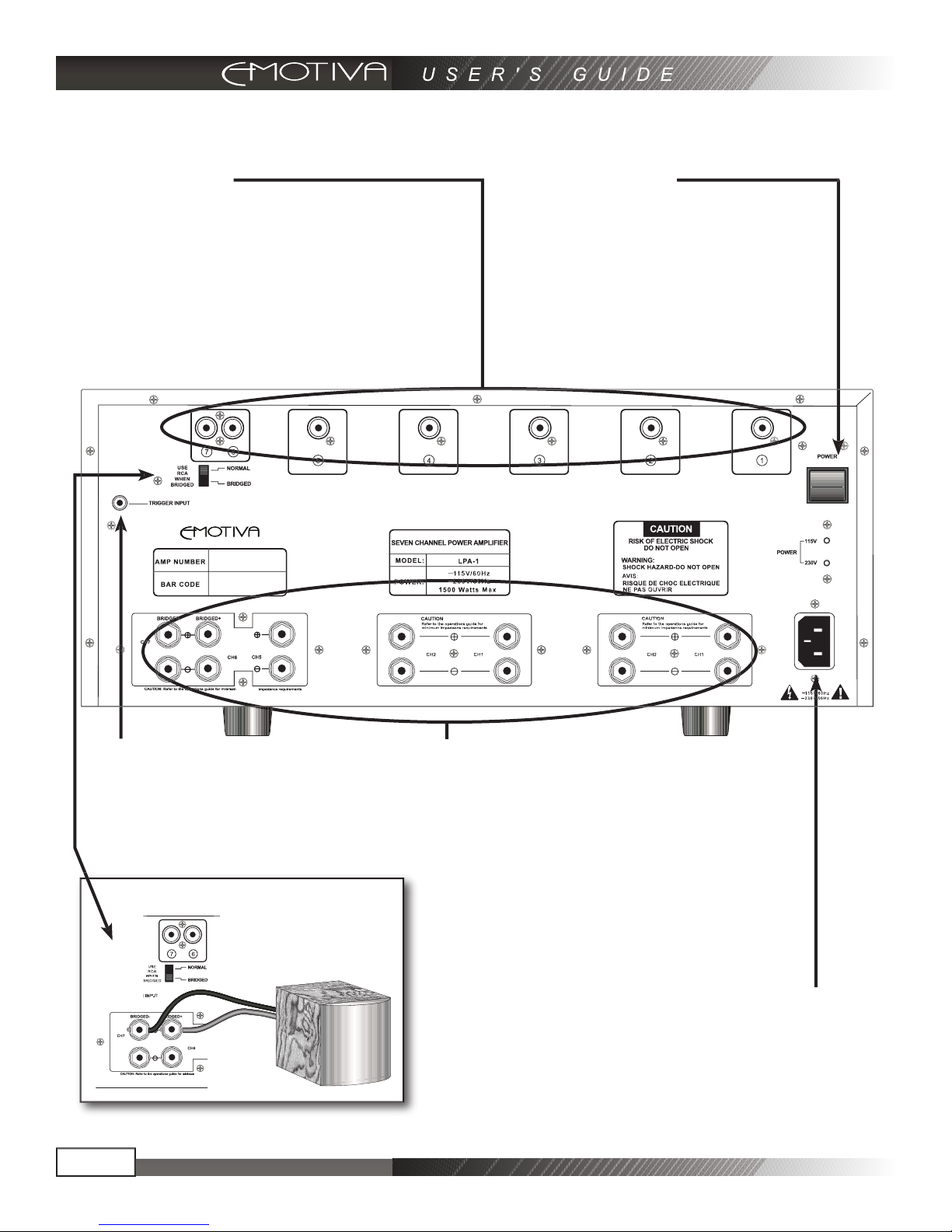
Rear Panel Layout
RCA Audio Inputs
These inputs provide the signal information
for each channel on the LPA-1. Simply
connect them to the appropriate output of the
preamplifier/processor or other preamp level
audio device. Channels 6 and 7 (far left) can
be used as a bridged output, in which case it
only requires an input from channel #6
Master Power Switch
This rocker switch provides the master power
for the LPA-1. After it is in the ON position, the
amplifier can be turned on manually from the
front panel switch or automatically with the
trigger input via 3.5mm input jack.
Channels 6 and 7 Bridged
Remote Turn On Jack
This 3.5mm jack accepts a 3-12 volt input for
remote activation of the LPA-1. This mates
directly with the Emotiva LMC-1 trigger output
and supplied cable. If building your own cable,
center is positive and outer shield is negative.
Speaker Outputs (5 way Binding Posts)
These are the speaker outputs. The 5 way
binding posts accept stripped speaker wire,
banana plugs (single or dual), or spade
connectors. Be sure to observe correct polarity
when connecting speakers and be sure that
the wires do not touch between positive and
negative terminals.
When bridging channels 6 and 7 to a passive
(non powered) subwoofer system, refer to the
diagram at left.
Power Receptacle
Standard IEC 3 prong power receptacle. It
is advised that this amplifier have a direct
connection to a wall outlet. Do not plug into a
“power strip”.
Other manuals for LPA-1
1
Table of contents
Other Emotiva Amplifier manuals

Emotiva
Emotiva Gen 2 XPA-3 User manual

Emotiva
Emotiva XPR-2 User manual

Emotiva
Emotiva LPA-1 User manual

Emotiva
Emotiva SA-250 User manual

Emotiva
Emotiva MPS-1 User manual

Emotiva
Emotiva BasX A-800 User manual

Emotiva
Emotiva XMC-1 User manual

Emotiva
Emotiva XPA-100 User manual

Emotiva
Emotiva XPA-1 User manual

Emotiva
Emotiva XPA-200 User manual

Emotiva
Emotiva XPA-1L User manual

Emotiva
Emotiva XPA GEN3 User manual

Emotiva
Emotiva XDA-1 User manual

Emotiva
Emotiva miniX A-100 User manual

Emotiva
Emotiva Stealth PA-1 User manual

Emotiva
Emotiva UPA-500 User manual

Emotiva
Emotiva XSP-1 User manual

Emotiva
Emotiva IPS-1 User manual

Emotiva
Emotiva UPA-700 User manual

Emotiva
Emotiva USP-1 User manual


