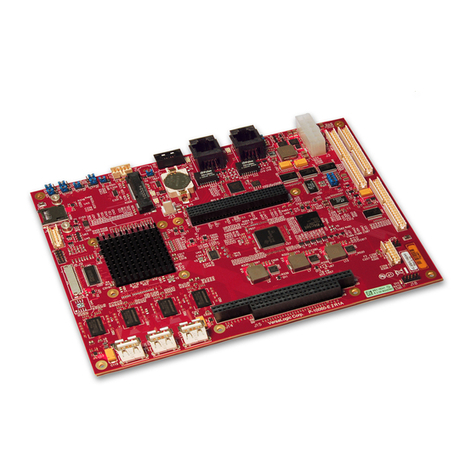
Embedian MXM-6410 User manual

Computer on Module
COM Ports
Two USB Hosts
LCD
Ethernet
CompactFlash
MXM-6410 Firmware Restore Guide

Table of Contents
CHAPTER 1 SYSTEM INFORMATION............................................................................................4
1.1 STARTING EVKM-MXM-6410.......................................................................................................4
1.2 JUMPER SETTING ............................................................................................................................5
1.3 CONNECTORS................................................................................................................................10
CHAPTER 2 FIRMWAREARCHITECTURE.................................................................................13
2.1 FIRMWARE ....................................................................................................................................13
2.2 SWITCHING BOOT OPTION FROM NOR OR NAND.........................................................................13
2.3 FIRMWARE ARCHITECTURE IN NAND FLASH ...............................................................................15
CHAPTER 3 RESTORE THE FIRMWARE IN NAND FLASH.....................................................18
3.1 RESTORE STEPLDR AND EBOOTFROM NOR FLASH ....................................................................18
3.2 RESTORE NK IMAGE FROM EBOOT.............................................................................................28
3.3 RESTORE FIRMWARE IN NAND FLASH FROM SD BOOT ................................................................34
3.3.1. Using PC Tool to Fusing the SD/SDHC card......................................................................34
3.3.2. Using SD boot fusing NAND flash......................................................................................35

System Information
This Chapter gives an introduction of system information
to let users quickly pick up how to setting up the system.
Section include:
zSystem Setup
zJumper Setting
zFirmware architecture in NAND flash

Chapter 1 System Information
This Chapter gives an introduction of hardware information so that users can
quickly set up the system.
1.1 Starting EVKM-MXM-6410
Before starting, please check the jumper to make sure that the jumper
configuration is matching your demand. Figure 1.1 shows the steps.
Figure 1.1 Starting EVKM-MXM-6410
1. Press the MXM-6410 module and screw it tightly.
2. Connect the console port (UART0, CN20 on figure 1.3) to the console
cable, then to a null modem cable and then connect to your PC. Open
up the DNW 0.6c (Click “Connect” at “Serial Port” tab) and set the
baud rate to 115200, 8N1, no hardware flow control. (At
“Configuration” Tab Æ“Options” of DNW program serial port setting.)
3. Connect the backlight invert board power to CN9.
4. Connect the LCD FPC Cable (Top Contact) or LVDS cable.
5. Connect the power cable to power board.

1.2 Jumper Setting
This section gives details of the hardware features of the EVKM-MXM-6410.
These include a description of the switches, jumper settings, connectors and
connector pin outs.
Jumpers
The EVKM-MXM-6410 SBC has a number of jumpers that allow you to
configure your system to suit your application. All use 2mm shorting blocks
(shunts) to select settings. Turn off power of the EVKM-MXM-6410 before
changing the position of a shunt.
Jumper Location
Figure 1.2 Jumper Location

List of Jumpers
The table below lists the function of various jumpers.
Table 1.1 Jumpers
Table 1.1 Jumpers
Label Function
JP1 NOR boot or NAND boot Setting and LCD Scan Direction
Setting
JP2 LCD Power Setting (3.3V or 5V for both TTL and LVDS)
JP3 RS232/422/485 Setting

S1 Reset Button
Jumper Settings
The following tables describe how the jumper shunts to various configurations.
JP1: Location on Board, D1
Table 1.2 NOR Boot or NAND Boot and LCD Scan Direction Setting (JP1)
Table 1.2 NOR Boot or NAND Boot and LCD Scan Direction
Setting
Setting Function
N.C.(Default) NAND Boot
JP1 (1-2) NOR Boot
JP1 (3-4) Pull-High of CN14 Pin 30
JP1 (5-6) Pull-High of CN14 Pin 31
JP2: Location on Board, C1
Table 1.3 LCD VCC Power Setting for CN14 and CN15 (JP2) (from CPU
LVDS and TTL)
Table 1.3 LCD VCC Power Setting for CN14 (JP2) (from CPU LVDS
and TTL)
Setting Function
JP2(1-2)(Default) 3.3V
JP2(3-4) 5V
JP3: Location on Board, B6
Table 1.4 RS232/422/485 Mode Setting
Table 1.4 RS232/422/485 Setting
Setting Function
JP3(1-2)(Default) RS232
JP3(3-4) RS422/RS485 half duplex
JP3(5-6) RS422/RS485 full duplex

Note: If JP3 jumper set to be RS232, the RS232 connector will be CN20
(UART1) header. If JP3 jumper set to be RS422 and RS485, the connector will
be CN22 header. User can only choose one (RS232 or RS422 or RS485) at
the same time.
S1: Location on Board, D6
Table 1.5 Reset Button
Table 1.5 Reset Button
Setting Function
Press Button and
Release Immediately Reset CPU and IO
Setting Jumpers
You configure your board to match the needs of your application by setting
jumpers. A jumper is the simplest kind of electric switch. It consists of two
metal pins and a small metal clip (often protected by a plastic cover) that slides
over the pins to connect them. To "close" a jumper you connect the pins with
the clip.
To "open" a jumper you remove the clip. Sometimes a jumper will have three
pins, labeled 1, 2 and 3. In this case you would connect either pins 1 and 2 or 2
and 3.
The jumper settings are schematically depicted in this manual as follows.

A pair of needle-nose pliers may be helpful when working with jumpers. If you
have any doubts about the best hardware configuration for your application,
contact your local distributor or sales representative before you make any
change.
Generally, you simply need a standard cable to make most connections.

1.3 Connectors
Onboard connectors link the EVKM-MXM-6410 to external devices such as
LCD panel, a keyboard, an audio headset or CompactFlash and to external
communication such as 802.11, USB or Ethernet link. The table below lists the
function of each of the board’s connectors.
Connector Location
Figure 1.3 Connector Location
Table of contents
Other Embedian Single Board Computer manuals