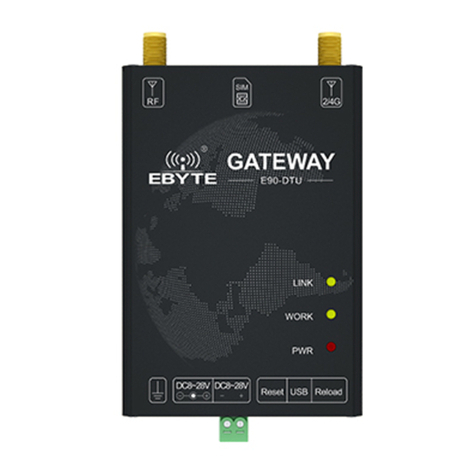
Ebyte E70-DTU User manual

E70-DTU (433NW30-GPRS)

Chengdu Ebyte Electronic Technology Co.,Ltd E70-DTU (433NW30-GPRS) User Manual
Copyright ©2012–2019 Chengdu Ebyte Electronic Technology Co.,Ltd 1
Content
1.OVERVIEW.....................................................................................................................................................................................2
1.1 INTRODUCTION........................................................................................................................................................................... 2
1.2 FEATURES.....................................................................................................................................................................................2
1.3 SYSTEM PARAMETERS.................................................................................................................................................................. 3
1.4 DIMENSION AND INTERFACE DEFINITION..................................................................................................................................... 4
1.5 INTERFACE DEFINITION................................................................................................................................................................ 5
2 QUICK START................................................................................................................................................................................ 6
2.1 HARDWARE PREPARATION AND COMMUNICATION TESTING......................................................................................................... 6
2.2 WORKING MODE AND FUNCTION.............................................................................................................................................. 11
3 APPLICATION MODEL..............................................................................................................................................................14
4 NOTE..............................................................................................................................................................................................15
VERSION HISTORY.......................................................................................................................................................................16
ABOUT US........................................................................................................................................................................................16

Chengdu Ebyte Electronic Technology Co.,Ltd E70-DTU (433NW30-GPRS) User Manual
Copyright ©2012–2019 Chengdu Ebyte Electronic Technology Co.,Ltd 2
1.Overview
1.1 Introduction
E70-DTU (433NW30-GPRS) is a wireless modem to GPRS network server, which realizes the transparent
transmission of Sub-1G and GPRS network data. The star network module integrates the host (coordinator) and
the terminal into one, and includes long-distance and high-rate transmission modes. One host (coordinator)
supports up to 200 nodes to communicate with it, without having to deal with cumbersome networking. The
agreement solves a series of problems caused by the inability of concurrent 433MHz wireless data transmission.
At the same time, the module has built-in power amplifier (PA) and low noise amplifier (LNA), the measured
communication distance can reach 6.5km. On the GPRS network side, the radio supports
LTE-FDD/LTE-TDD/WCDMA/TD-SCDMA/CDMA/GSM wireless communication data transmission,
supporting LTE-FDD, LTE-TDD, DC-HSDPA, HSPA+, HSDPA, HSUPA, WCDMA, TD-SCDMA, CDMA,
EDGE and GPRS network data connections.
E70-DTU (433NW30-GPRS) can be directly connected to the computer host computer through USB cable
and parameter configuration. User-defined parameters can be easily changed without installing a driver. This chapter is a quick
introduction to the E70-DTU (433NW30-GPRS) product. It is the easiest hardware environment to test the E70-DTU (433NW30-GPRS)
network transmission function, which is to realize the two-way transparent transmission of data from the RF module to the network server.
1.2 Features
Meet almost all M2M application needs;
Support data transparent transmission, TCP, UDP network protocol, and heartbeat package, registration package;
Serial port caching is supported. The serial port data can be cached locally before the server is connected;
The maximum downlink rate of GPRS data is 85.6 kbps, and the maximum uplink rate is 85.6 kbps;
Software/hardware double-gate design, stable system, never crash;
Sub-1G radio frequency;
CSMA/CA is supported, which can effectively avoid conflicting carrier multi-channel interception technology;
Supports up to 200 nodes concurrently, without having to deal with cumbersome networking protocols, no need to network via polling;
AES128 data encryption to ensure the reliability of data packets;
Support DSSS spread spectrum technology, similar to LoRa anti-interference, better than traditional GFSK;
Under ideal conditions, the RF radio communication distance can reach 6.5km;
Maximum transmission power 1W, software multi-level adjustable;
Support the global license-free ISM 433MHz band;
Support 5k, 50kbps data transmission rate;
Industrial grade standard design, support for long-term use from -40 to +85 °C;
Use USB to connect to the computer, no need to install the driver, connect to the computer to configure the parameters;
Support 8~28V wide voltage supply, using DC power supply and terminal power supply;
The power supply has good functions such as over-current, over-voltage, and anti-reverse connection.

Chengdu Ebyte Electronic Technology Co.,Ltd E70-DTU (433NW30-GPRS) User Manual
Copyright ©2012–2019 Chengdu Ebyte Electronic Technology Co.,Ltd 3
1.3 System parameters
Parameter
type
Parameter Name
The parameter value
Description
NET
Characteristic
parameters
Support Frequency
Quad-frequency: GSM850, EGSM900,
DCS1800, PCS1900
Module can automatically search frequency
Frequency selection can be set with the AT
command
Conform to GSM Phase 2/2+
-
GPRS Connection
characteristics
GPRS multi-slot class 12 (default)
GPRS multi-slot class 1~12 (configurable)
GPRS mobile station class B
-
GPRS Data features
GPRS data downlink transmission: up to 85.6
KBPS
GPRS uplink data transfer: up to 85.6 KBPS
Coding formats: cs-1, cs-2, cs-3 and cs-4
Supports the PAP (password verification
protocol) protocol commonly used for PPP
connections
Support for protocols commonly used for
CHAP (query handshake authentication
protocol)
The built-in protocols:
TCP/UDP/FTP/PPP/HTTP/NTP/MMS/SMT
P/PING, etc.
Support for unstructured supplementary data
services (USSD)
-
The antenna interface
SMA interface, NET signal output, 50ohm
characteristic impedance
-
Transmission Power
Class 4 (2W):GSM850 and EGSM900
Class 1 (1W):DCS1800 and PCS1900
-
RF
characteristic
parameters
Working mode
coordinator/common node
Can be configured as a coordinator,
common node
Input format
Broadcasting
Default broadcast, configurable as
broadcast, short address + data, long address
+ data
Transmission mode
Long distance
Default long distance, configurable for long
distance, standard transmission
Transmission power
Extreme high
The default is extremely high and can be
configured to be extremely high, high,
medium and low
Concurrent
performance
High
Default high, configurable to low, medium,
high, and very high
Output format
Valid data(transparent)
Default valid data (transparent),
configurable as valid data + long address,
valid data + short address, valid data +
RSSI, valid data + long address + short
address, valid data + long address + RSSI,
valid data + short address +RSSI, valid data
+ long address + short address + RSSI
Restart parameter
60
Default 60, configurable to 0 or 60--65535,
decimal
PANID
65535
Default 65535, configurable to 0-65535,
decimal
Sleep time
6
Default 6,can be set to 2--60
Baud rate
115200 bps
Cannot be changed
Antenna
SMA
RF signal output,50 ohm impedance
System
parameters
Current consumption
(Typical)
43.1392mA@12V
In idle, no transmission
Working temperature
-30℃~+70℃
Extending -40℃~+85℃
Working voltage
DC 8~28V
Recommend 12V/24V
Size
108*75*37mm
Average(antenna not included)

Chengdu Ebyte Electronic Technology Co.,Ltd E70-DTU (433NW30-GPRS) User Manual
Copyright ©2012–2019 Chengdu Ebyte Electronic Technology Co.,Ltd 4
1.4 Dimension and interface definition
3GPP
1 Timeslot
2 Timeslot
4 Timeslot
CS-1
9.05kbps
18.1kbps
36.2kbps
CS-2
13.4kbps
26.8kbps
53.6kbps
CS-3
15.6kbps
31.2kbps
62.4kbps
CS-4
21.4kbps
42.8kbps
85.6kbps

Chengdu Ebyte Electronic Technology Co.,Ltd E70-DTU (433NW30-GPRS) User Manual
Copyright ©2012–2019 Chengdu Ebyte Electronic Technology Co.,Ltd 5
1.5 Interface definition
NO.
Name
Function
1
Grounding screw
Ground connection
2
DC8~28V
Power adapter interface, power supply range 8~28V, recommended 12V/24V
3
DC8~28V-
Power reference ground
4
DC8~28V+
Power input, power supply range 8~28V, 12V/24V is recommended
5
Reset
System reset button
6
USB
Micro USB:parameter configuration interface

Chengdu Ebyte Electronic Technology Co.,Ltd E70-DTU (433NW30-GPRS) User Manual
Copyright ©2012–2019 Chengdu Ebyte Electronic Technology Co.,Ltd 6
7
Reload
Press 4~10s to restore the factory Settings
8
PWR
Red: power indicator
9
WORK
Yellow: data transmission indicator light; The light flashes when there is data transmission
10
LINK
Yellow: network indication, always on when in network
11
NET
4 G/GPRS antenna interface (SMA - K external thread hole, 50 Ω characteristic impedance)
12
SIM
SIM card slot
13
RF
RF antenna interface (SMA - K external thread hole, 50 Ω characteristic impedance)
Note: It is recommended to connect the housing to the ground with a grounding screw.
2 Quick start
2.1 Hardware preparation and communication testing
Before the test, connect the power supply, USB cable, SIM card (insert the gap outwards), antenna and other hardware
according to the recommended circuit. If the power cable is successfully connected, the PWR indicator will always be on.
E70-DTU (433NW30-GPRS) and E70-433NWxx
5V—20V power adaptor
USB to TTL test board and USB cable
GPRS/LTE sucker antenna

Chengdu Ebyte Electronic Technology Co.,Ltd E70-DTU (433NW30-GPRS) User Manual
Copyright ©2012–2019 Chengdu Ebyte Electronic Technology Co.,Ltd 7
Access the official website of Chengdu Ebyte: www.ebyte.com, download the latest E70-DTU (433NW30-GPRS) series product configuration
tool, serial port assistant. (This article uses XCOM), install USB to 232/485 driver, run software!
1. After connecting the E70-433NWxx module to the USB to TTL module, open the serial port assistant XCOM and send “+++” (do not send
new line) module to reply “Enter AT Mode\r\n” to enter the AT configuration state. ; then send "AT+WMCFG=1" (send new line), the module
replies "\r\n+OK\r\n", indicating that the E70-433NWxx module is configured as normal node mode successfully; finally sends "AT+RSTART"
(send New line), the module replies with "Module Restart\r\n" and restarts the module.
2. 2. Open the official E70-DTU (433NW30-GPRS) configuration tool. If the USB is properly connected, the message box on the right
will prompt “Device Ready”. Click the “Enter Configuration Status” button in the “Common Commands and Prompts” box. , that is,
enter the 4G/2G network transparent transmission configuration mode, the current message box will display the current 4G/2G
configuration information one by one, and automatically obtain the IMEI code and SN code of the 4G/2G network transparent
transmission module.

Chengdu Ebyte Electronic Technology Co.,Ltd E70-DTU (433NW30-GPRS) User Manual
Copyright ©2012–2019 Chengdu Ebyte Electronic Technology Co.,Ltd 8
3. After entering the 4G/2G network transparent transmission configuration mode, you can configure the parameters of the 4G/2G
module in the Related Parameter Settings box. After the configuration is complete, click the “Save Parameters” button and the host
computer will prompt “Save all”. The parameter was successful." After completion, as shown below:
4. Switch from "4G/2G Network Transparent Transmission" to "RF", and the related information such as the device model will be
displayed in the message box on the right. The user configures the RF module in the "Related Parameter Settings". After the
configuration is completed, click the "Save Parameters" button. After completion, as shown below:

Chengdu Ebyte Electronic Technology Co.,Ltd E70-DTU (433NW30-GPRS) User Manual
Copyright ©2012–2019 Chengdu Ebyte Electronic Technology Co.,Ltd 9
5. After the module parameters are configured, click the “Module Restart” button in the “Common Commands and Prompts” box to
make the modified 4G/2G parameters and RF parameters take effect and the system automatically enters the communication state.
After completion, as shown below
6. After entering the communication state, if the LINK indicator is always on and the AUX indicator of the USB to TTL module is off within 30
seconds, it means that E70-DTU (433NW30-GPRS) is connected to the server, and E70-433NWxx module and E70- The DTU
(433NW30-GPRS) connection is successful, and the network can be transparently transmitted at this time.
7. The mobile phone pays attention to the “Ebyte Internet of Things Application Expert” WeChat public ID, enter the page, click: Customer
Support->Device Test, the screenshot of the mobile phone is as follows:
8. Use the serial port assistant to send data to the E70-433NWxx module. If the E70-DTU (433NW30-GPRS) receives the data
Other manuals for E70-DTU
3
This manual suits for next models
1
Table of contents
Other Ebyte Modem manuals
Ebyte
Ebyte ECAN-E01S User manual

Ebyte
Ebyte E870-W1 User manual
Ebyte
Ebyte E90-DTU User manual

Ebyte
Ebyte E870-E1 User manual

Ebyte
Ebyte M31 Series User manual

Ebyte
Ebyte NB144 User manual

Ebyte
Ebyte E90-DTU-V8 User manual

Ebyte
Ebyte Wireless Modem User manual

Ebyte
Ebyte E840-DTU User manual

Ebyte
Ebyte E95-DTU User manual
Ebyte
Ebyte E90-DTU User manual

Ebyte
Ebyte E821-RTU User manual

Ebyte
Ebyte E90-DTU User manual

Ebyte
Ebyte E34-DTU User manual

Ebyte
Ebyte ECAN-W01S User manual

Ebyte
Ebyte E90-DTU User manual

Ebyte
Ebyte E810 Series User manual

Ebyte
Ebyte E90-DTU 230SL22-GPRS User manual

Ebyte
Ebyte 230SL37 User manual

Ebyte
Ebyte E90-DTU 400SL30-GPRS User manual