Doro DFB-0250 User manual

3
4
5
6
14
21
13
11
10
7
1
8
12
9
20
22
23
24
19
18
17
15
216
25

26
The items supplied with your phone might
vary depending on the software and accesso-
ries available in your region or offered by your
service provider. You can obtain additional ac-
cessories from your local Doro dealer. The
supplied accessories provide the best per-
formance with your phone.
1. Earpiece
2. Display
3. Left selection button
4. Call button
5. Top 10 shortcut
6. Voice mail
7. *International prefix/
Symbols
8. Microphone
9. #Input method/Silent
10. Camera shortcut
11. Message shortcut
12. End call / Power on/off
13. Arrow buttons
14. Right selection button
15. External display
16. Camera flash/torch
17. Red light = Battery level low/
Charging
18. Green light = New message/
Missed call
19. Camera lens
20. Headset socket
21. Charging socket
22. Assistance button
23. Loudspeaker
24. Volume control
25. Lanyard hold (lanyard
optional)
26. Charging stand (optional)

English
Contents
Congratulations on your purchase ................................................................ 1
Get started ..................................................................................................... 1
Insert SIM card, memory card and battery ........................................... 1
Charge the phone................................................................................... 3
Get to know your phone................................................................................ 5
Assistive functions.................................................................................. 5
Turn the phone on and off..................................................................... 5
Start-up wizard....................................................................................... 5
Phone indicators .................................................................................... 6
Navigate the phone ........................................................................ 6
Enter text ........................................................................................ 7
Hearing aid compatible.......................................................................... 8
Phone settings........................................................................................ 9
Calls .............................................................................................................. 11
Make a call ........................................................................................... 11
Call from the phonebook ..................................................................... 11
Receive a call........................................................................................ 11
Volume control..................................................................................... 11
Call options........................................................................................... 12
SOS calls ............................................................................................... 13
Call log.................................................................................................. 13
Call settings .......................................................................................... 14
Phonebook ................................................................................................... 16
Add contact .......................................................................................... 16
Manage phonebook contacts .............................................................. 17
Phonebook settings.............................................................................. 18
ICE (In Case of Emergency) ............................................................ 20
Assistance button ................................................................................... 21
Make an assistance call........................................................................ 21
Activation ............................................................................................. 22
Number list........................................................................................... 22
Activate text messages (SMS) .............................................................. 23
Position SMS......................................................................................... 23
Confirm with "0" .................................................................................. 24
Signal type ............................................................................................ 24

English
Messages...................................................................................................... 24
Create and send text message (SMS) .................................................. 24
Create and send picture message (MMS) ........................................... 25
Create and send voice message........................................................... 25
Inbox, Outbox and Sent ....................................................................... 26
Message settings.................................................................................. 27
Camera (take photos) .................................................................................. 32
Adjustments ......................................................................................... 32
Camera settings............................................................................................ 32
Image viewer................................................................................................ 33
Connectivity.................................................................................................. 34
Bluetooth®............................................................................................ 34
Network setup...................................................................................... 35
File manager......................................................................................... 35
Connect the phone to a computer ...................................................... 36
Sound & Display ........................................................................................... 37
Audio setup ..................................................................................... 37
Tone setup (ringtone) .......................................................................... 37
Ringtone volume ............................................................................. 38
Silent..................................................................................................... 38
Alert type.............................................................................................. 38
Extra tone............................................................................................. 38
Main menu ........................................................................................... 38
Wallpaper............................................................................................. 39
Text size ........................................................................................ 39
Idle display ........................................................................................... 39
LCD backlight........................................................................................ 39
Brightness ..................................................................................... 39
Additional functions..................................................................................... 40
Response by Doro ................................................................................ 40
Alarm .................................................................................................... 40
Organiser.............................................................................................. 40
Calculator ............................................................................................. 42
Torch..................................................................................................... 42
Display status symbols ......................................................................... 42
Display main symbols........................................................................... 43
Reset settings ....................................................................................... 44

English
Troubleshooting ........................................................................................... 44
Safety instructions........................................................................................ 46
Network services and costs ................................................................. 46
Operating environment ....................................................................... 47
Medical units........................................................................................ 47
Areas with explosion risk ..................................................................... 47
Li-Ion battery........................................................................................ 48
Protect your hearing ............................................................................ 48
Emergency calls.................................................................................... 48
GPS/Location based functions ............................................................. 48
Vehicles ................................................................................................ 49
Protect your personal data .................................................................. 49
Malware and viruses............................................................................ 49
Care and maintenance ................................................................................. 50
Warranty ...................................................................................................... 51
Copyright and other notices ........................................................................ 51
Content copyright ................................................................................ 52
Specifications ............................................................................................... 52
Hearing aid compatibility..................................................................... 52
Specific Absorption Rate (SAR) ............................................................ 53
Correct disposal of this product........................................................... 54
Correct disposal of batteries in this product ....................................... 54
Declaration of Conformity ................................................................... 54

English
Congratulations on your purchase
See everything easier and experience effortless calling and texting on a
phone that combines a large 2.8" screen with widely separated, high con-
trast keys. The Doro 6060features an external display for quick notifications
and Caller ID. It also has an easy to use 3MP camera that makes taking and
sending photos to family and friends more fun. Other features include as-
sistance button, support for Response by Doro™ with GPS positioning, HAC
(Hearing Aid Compatibility) as well as shortcut keys for the camera, favour-
ite contacts and messages. For more information about accessories or oth-
er Doro products please visit www.doro.com.
IMPORTANT!
Your device may use data services and you may incur additional charges
for data services, such as messaging or using location services depending
on your data plan. We recommend that you check your data rates for
your subscription with your service provider.
Get started
Insert SIM card, memory card and battery
Remove the battery cover
IMPORTANT!
Be careful not to damage your fingernails
when you remove the battery cover. Do
not bend or twist the battery cover
excessively as it may be damaged.
1

English
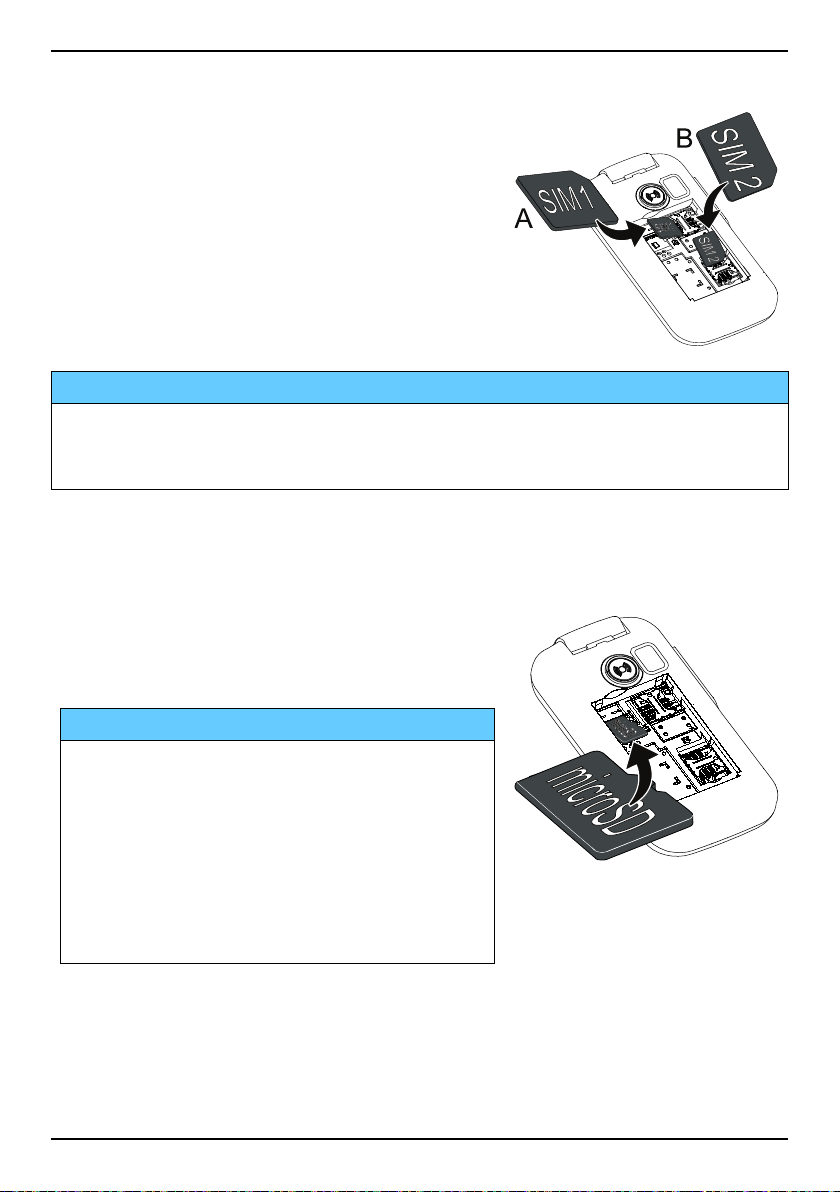
Insert the SIM cards (required)
Remove the battery if it is already installed.
Locate the SIM card holder and gently slide
the card in the holder. See the label right next
to the holder for guidance on how to insert
the card.
A. Insert the first SIM card by gently sliding
it into the SIM1 card slot.
B. Insert the second SIM card by gently slid-
ing it into the SIM2 card slot.
B
A
IMPORTANT!
This device accepts micro SIM or 3FF SIM card. Use of incompatible SIM
cards may damage the card or the device, and may corrupt data stored
on the card.
Note! If you are using only one SIM card, we recommend using SIM1.
Insert the memory card (optional)
Locate the SD card holder and follow the in-
structions for the SIM card. The device works
with or without a SD card installed.
IMPORTANT!
Use only compatible memory cards with
this device. Compatible card type:
microSD, microSDHC.
Incompatible cards may damage the card
itself, the device and corrupt any data
stored on the card. Depending on the
market some phones may have a pre-
installed memory card.
Note! Since the SIM card holder and the memory card holder are located
beneath the battery you need to turn off the phone to insert or remove
the cards.
2

English
Tip: Take care not to scratch or bend the contacts on the memory or on
the SIM card when inserting them into the card holders.
Insert the battery and replace the battery cover
Insert the battery by sliding it into the battery
compartment with the contacts facing down-
wards to the right. Replace the battery cover.
Tip: It is recommended to remove the protective plastic film from the
display to enhance the visibility.
Charge the phone
CAUTION
Only use batteries, chargers and accessories that have been approved for
use with this particular model. Connecting other accessories may be
dangerous and may invalidate the phone's type approval and warranty.
3

English
AB
When the battery is running low, is displayed and a warning signal is
heard.
1. Connect the mains adapter to a wall socket and to the charging socket
y.
The battery charge indicator is animated while charging. It takes ap-
proximately 3 hours to fully charge the battery. When the charger is
connected to the phone, is displayed briefly, and when it is
disconnected.
2. When charging is completed, is displayed on the screen.
If the phone is turned off when the charger is connected to the phone
only the battery charge indicator will be shown on the display.
Note! To save power the LCD backlight goes off after a while. Press any
button to illuminate the display. Full battery capacity will not be reached
until the battery has been charged 3–4 times. Batteries degrade over time,
which means that call time and standby time will normally decrease with
regular use.
4
This manual suits for next models
1
Table of contents
Other Doro Cell Phone manuals

Doro
Doro PhoneEasy 345gsm User manual

Doro
Doro Liberto 810 User manual

Doro
Doro 7031 User manual

Doro
Doro PHONEEASY 410GSM User manual

Doro
Doro PHONEEASY 715 User manual

Doro
Doro 1360 User manual

Doro
Doro 6051 User manual

Doro
Doro PhoneEasy 530X User manual

Doro
Doro 6050 User manual

Doro
Doro PhoneEasy 623 User manual