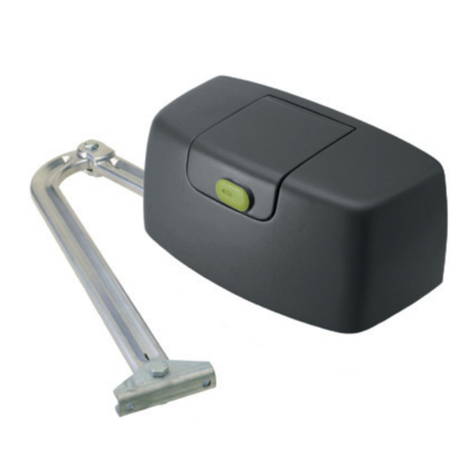
DoorHan SECTIONAL-800PRO-CE User manual

© DoorHan, 03.2019
Installation and Operation Manual
SECTIONAL-800PRO-CE
SECTIONAL-1000PRO-CE
Operator
Actual versions::
Soft — v 1.7; PCB — v 1.3
General Information 2
Safety Instructions 3
Operator Unit 5
Operator Installation 6
Electrical Connections 9
Operator Programming 10
Manual Opening 17
Maintenance 17
Troubleshooting 18
Appendix 19
2
GENERAL INFORMATION
WARNING!
If there is a wicket, glass or any non-standard section in the door it is recommended to choose an operator as if the
door area is about 20% larger.
* may increase with the installation of extremal radio receiver
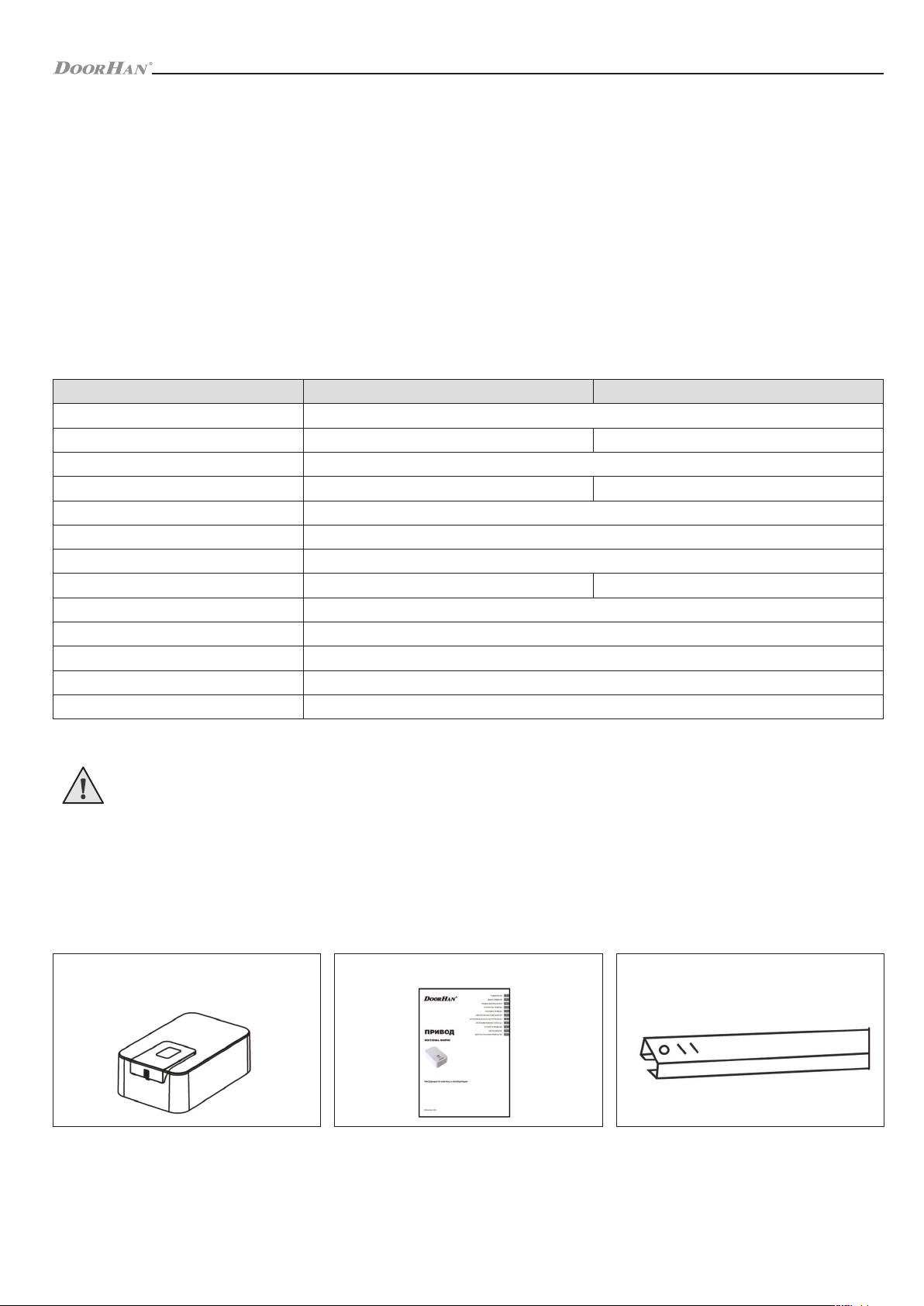
Parameters SECTIONAL-800PRO-CE SECTIONAL-1000PRO-CE
Power supply 220–240 V
Consumed power 150 W 250 W
Waiting mode max 6 W
Force 800 N 1 000 N
Control Stepped (pulse) mode
Motor 24 В DC
Opening speed 0,1 m/sec
Door area up to 11 sqm up to 13,5 sqm
Operating temperature range -20…+55 °С
Fuses power supply — 2,5 A
Radio control 433,92 MHz (max 60 remote controls)*
Transmission chain / belt
Protection class IP 20
1.2. OPERATOR PACKAGE
When you receive your Sectional-800PRO-CE / 1000PRO-CE operator, unpack it and check that the operator is not damaged.
If any damages are found, contact the operator supplier.
The operator components included in the standard package are showed below.
1. GENERAL INFORMATION
Electromechanical chain operator Sectional-800PRO-CE / 1000PRO-CE is designed for automation of balanced sectional doors.
It consists of a mechanical gear and an electric engine with a built-in control unit. The gear and the electric engine are
incorporated into one housing.
It consists of an electromechanical motor reducer, an electronic control unit and a lamp, incorporated into one housing.
The electric operator is easily secured on a track and mounted to the ceiling; opening of the door is carried out by means of a
chain / belt gear. The self-locking operator gear ensures mechanical interlocking of the door, if the engine is not running. In case
of power outage the manual emergency release allows you to operate the door manually.
For maximum safety, the control unit has force protection.
Besides, optionally, the operator can be equipped with electronic protective sensors, which stop the door movement, if there
is an obstacle or a man within the operating range of the automatic system.
1.1. SPECIFICATIONS
Operating manual, 1 pcElectric operator, 1 pc Guide, 1 pc *
3
SAFETY INSTRUCTIONS
1.3. TRACK
Guide Model Guide Length, L Travel Opening Height
SK-3000 (chain) / PK-3000 (belt) 3 000 mm 2 800 mm ≤ 2 300 mm
SK-3300 (chain) / PK-3300 (belt) 3 300 mm 3 100 mm ≤ 2 600 mm
PK-3300-3P (belt)* 3 300 mm 3 100 mm ≤ 2 600 mm
SK-3600 (chain) / PK-3600 (belt) 3 600 mm 3 400 mm ≤ 2 800 mm
SK-4200 (chain) 4 200 mm 4 000 mm ≤ 3 400 mm
SK-4600 (chain) / PK-4600 (belt) 4 600 mm 4 400 mm ≤ 3 800 mm
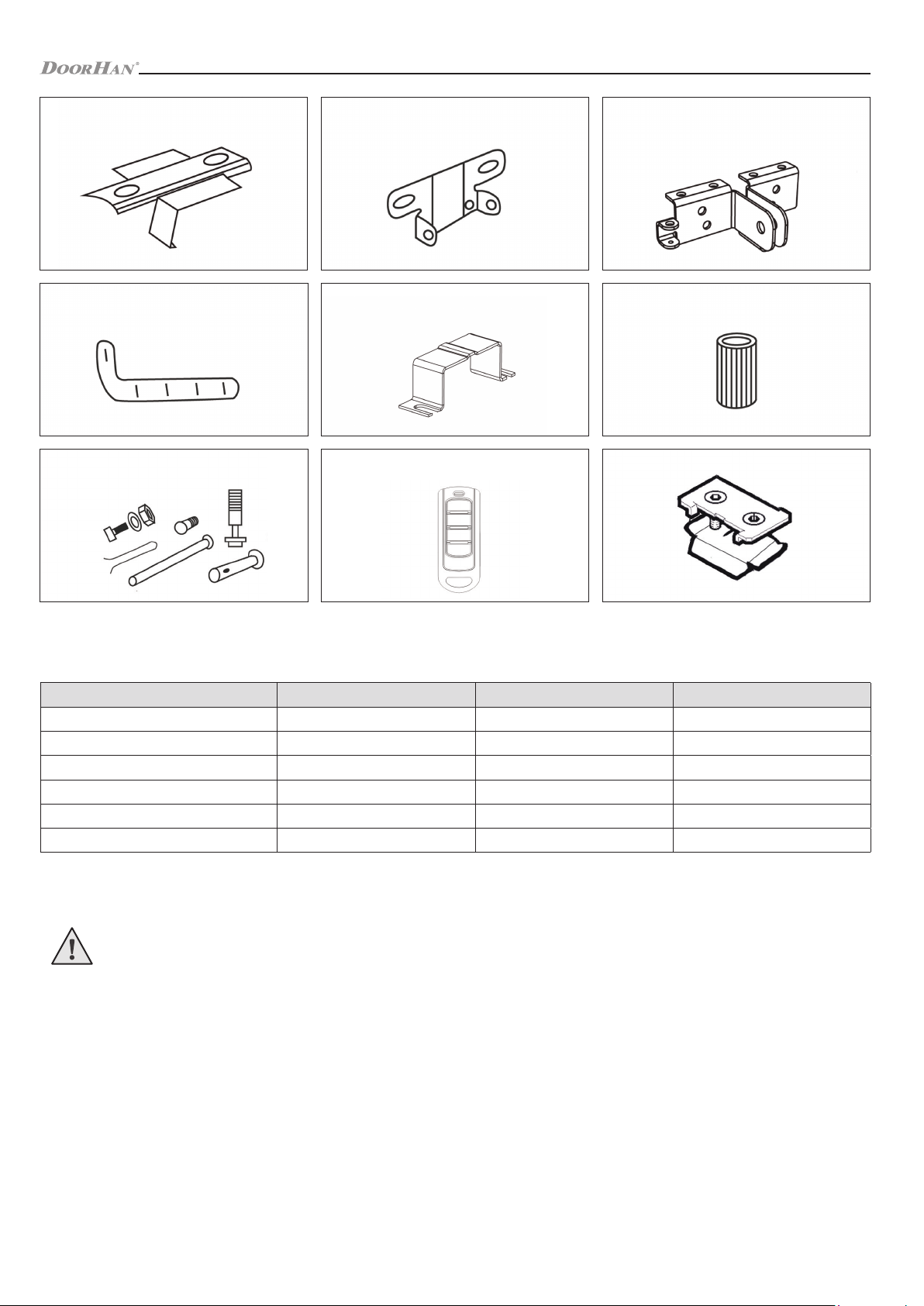
Guide fastening bracket, 1 pc Headroom bracket, 1 pc Straight arm fastening bracket, 1 pc
Curved arm, 1 pc U-shaped bracket, 2 pcs Slotted bushing, 1 pc
Fastening set, 1 pc Remote control, 2 pcs Mechanical stopper, 1 pc
* optional for operators of Sectional series
IMPORTANT!
You should observe the safety regulations to preserve people’s health. You must keep the present manual.
• You should follow all the recommendations of the given manual, as incorrect equipment installation can lead to serious
damages.
• The Sectional-800PRO-CE / 1000PRO-CE operator is designed for automation of residential sectional doors. It should be
used only for the purpose intended; any other use is prohibited.
• DoorHan is not liable for personal injuries, if the product was used for purposes other than intended.
• Make sure that the door is balanced and functions smoothly before installing the operator.
• The installation is to be carried out according to the standards EN 12453 and EN 12445. For providing the required safety
level, these requirements should be observed in non-EU countries.
• You should check if the door conforms to the standards EN 12604 and EN 12605 (see documentation on the doors). For
2. SAFETY INSTRUCTIONS
* for DIY 800 PRO-CE operator

4
SAFETY INSTRUCTIONS
non-EU countries these measures are to be observed for ensuring the normal safety level.
• The mechanical door assembly units must conform to the provisions of the standards EN 12604 and EN 12605.
• Before installing the operator, make sure the mounting location corresponds to the operator’s specifications by its climatic
conditions.
• You should not install the equipment in rooms with highly flammable substances or other hazardous media, as this can
result in explosion or fire.
• You should use tools indicated in Section «Tools» of the given manual during assembly, installation and adjustment of the
operator.
• You should use a stable support when working at height.
• You should use hand and face protection when drilling holes.
• You should use fasteners from the operator package or other suitable fasteners to securely mount the operator.
• You should power off when performing installation, cleaning or maintenance of the operator.
• When mounting the operator on a door with a pass door, it is necessary to install an additional safety device, which
prevents the operator activation, when the door is open.
• Make sure, that there will not be trapping of articles between movable and fixed elements of the operator when the door
moves.
• You should use additional DoorHan accessories, since the accessories of third party manufacturers can damage the
automatic system.
• DoorHan is not liable for unstable work of the automatic system, if you use safety devices and accessories, produced by
other manufacturers without securing approval of DoorHan.
• You should not leave the electric motor released. This can lead to uncontrolled movement of the door and, as a result, to
its damage.
• You should not use the operator, if it is necessary to repair or to adjust the equipment, since defects during the assembly
of the operator or incorrectly installed door can result in injury.
• DoorHan is not liable, if the product is not correctly installed or is damaged during operation.
• Make sure, that there are no foreign objects within the operating range of the electric operator before its start.
• You should not introduce changes, not stated in the given Manual, into the automatic system.
• You should remove the product package and dispose of it. You should not leave the packaging materials within the reach
of children.
• You should not allow children to play in the door movement area during the operator operation. All remote control panels
and stationary control buttons must be absolutely inaccessible for possible use by children.
• When installing the operator on the door facing public areas, it is required to install safety devices (photocells).
• Repair of the operator can only be carried out by specialized organizations certified by the manufacturer.
• Do not repair the operator by yourself.
• Every six months it is necessary to check the safety of the operator and the balance of the door in accordance with the
standards EN 12604 and EN 12605 in the current version. In the event of a malfunction, stop using the door and call the
service engineer immediately.
• Record the results of the operator safety test and door balance test in the check log.
• It is allowed to drive in and to pass only when the door does not move and the operator is switched off.
• The contents of the Manual could not serve as a basis for laying claims of any kind.
• The manufacturer reserves the right to introduce modifications into the structure and to improve it without prior notice.
5
WARNING! RISK OF INJURY!
Have a qualified technician lay the cables 230 V AC. The cables must be laid in protective corrugated tubes. In case of
supply cable damage, use the suitable type of the cable.
Cables needed for installation of Sectional-800PRO-CE / 1000PRO-CE operator and accessories (if available):
• Cable 2 × 0,5 mm2 (photocell transmitter);
• Cabel 4 × 0,5 mm2 (photocell receiver);
• Cable 3 × 2,5 mm2 (power supply);
• The cables should be appropriately insulated.
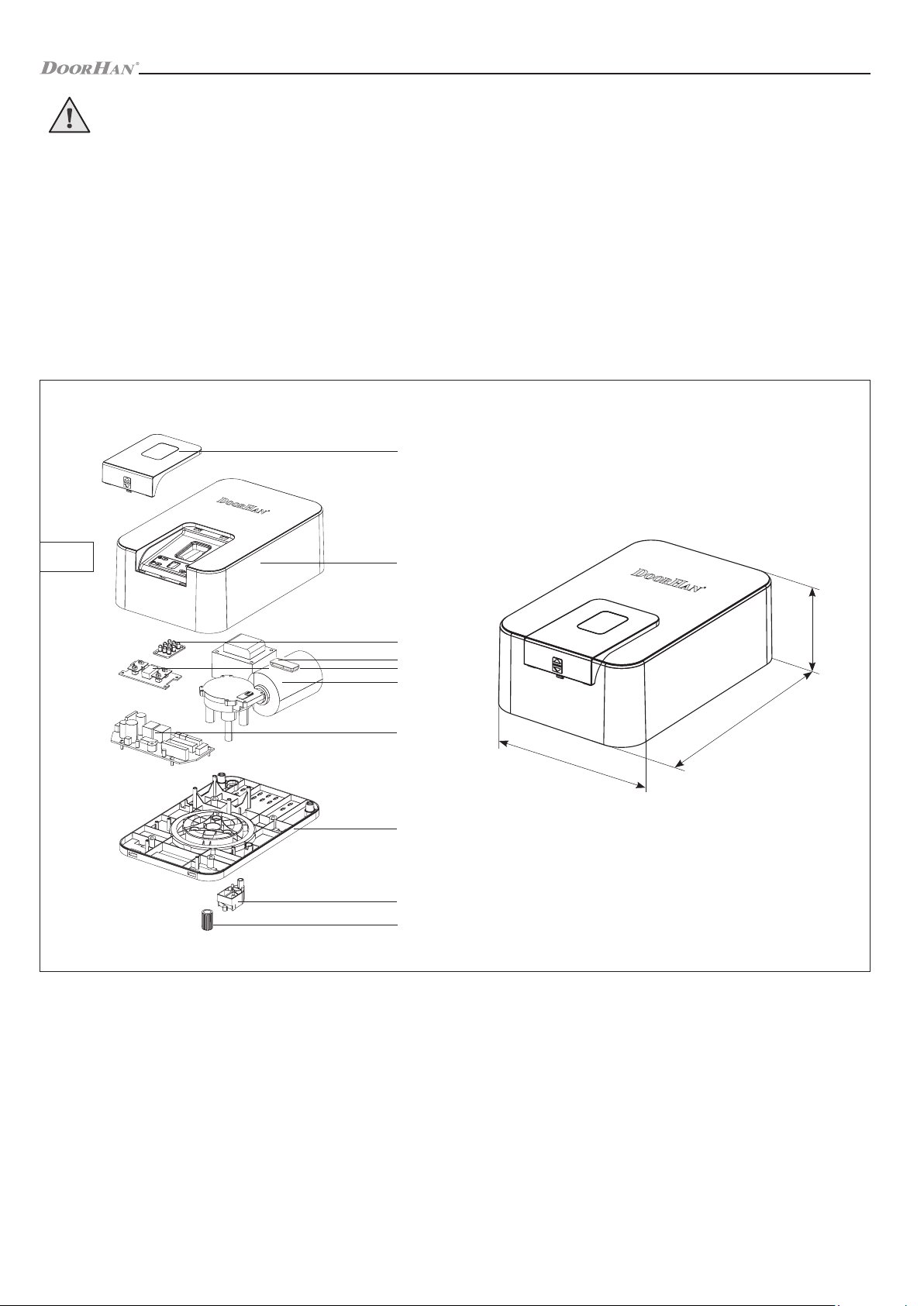
OPERATOR UNIT
1. Display cover
2. Housing cover
3. LED lamp
4. Display
5. Motor reducer
6. Control board
7. Housing
8. Plug terminals for connection of accessories
9. Reference point micriswitch
10. Splined bushing
3. OPERATOR UNIT
267
92
170
1
2
3
4
5
6
7
8
9
10
FIG. 1

6
OPERATOR INSTALLATION
1. Set of spanners
2. Set of slotted and cross screwdrivers
3. Set of drills for metal
4. Set of drills for concrete
5. Pliers
6. Hacksaw for metal
7. Electric drill
8. Tape measure (folding rule)
4. OPERATOR INSTALLATION
4.1. TOOLS
4.2. REQUIRMENTS TO DOOR INSTALLATION
1. Prior to installation check if the door is properly balanced and moves smoothly when automatically operated.
2. Make sure, that minimum clearance between the ceiling and the top point, when the door is moving, is not less than
45 mm (fig. 1).
3. Check, that the door leaf top roller is in the horizontal part of the guide rail, when the door is completely closed (fig. 2).
45 mm
FIG. 1 FIG. 2
4.3. CONNECTION OF OPERATOR AND GUIDE
1. Put the operator bushing (3) on the shaft (6).
2. Loosely tighten the drive mounting screws (7).
3. Insert the operator unit into the hole on the guide (2).
4. Fasten the operator with U-brackets (1) and tapping screws (7).
1. U-Bracket
2. Guide
3. Bushing
4. Plug terminals for connection of accessories
5. Micro-switch reference point
6. Motor shaft
7. The drive mounting screws
1
2
3
4
5
6
7
FIG. 1
7
OPERATOR INSTALLATION
4.4. TRACK INSTALLATION
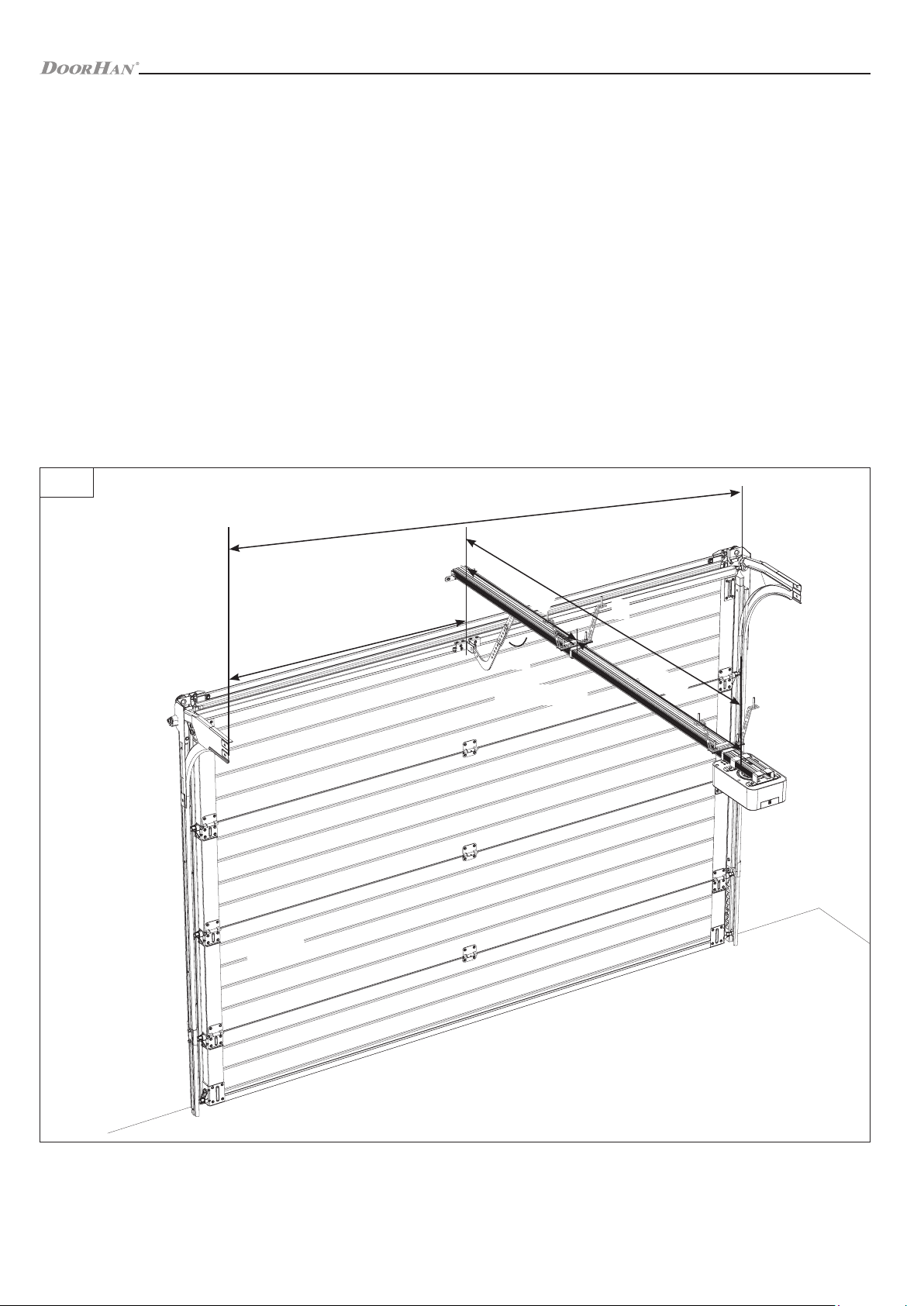
The height of operator installation depends on maximum lift of upper edge of the door leaf. After preliminary assembly
(see p. 4.3) you can start to install the track:
1. If it is necesssary to shorten the track, do it as described in the Appendix.
2. Mark a vertical line on the headroom corresponding to the horizontal door centre (fig. 1).
3. Place the lintel mounting bracket (1) in such a way that the distance from upper edge of the open door leaf to lower edge
of the track equals 10 mm min (fig. 3) and fix it to the lintel using self-tapping screws (2) (fig. 2).
4. Fasten the track (3) and the lintel mounting bracket by means of a track fixation bolt (4) (fig. 4).
5. Install a U-shaped bracket (5) on the track approximately at a distance of 2/3 L and attach it to the ceiling (fig. 5).
6. Install the track mounting brackets (6) on the track approximately at a distance of 1/3 L and attach them to the ceiling
(fig. 6).
7. Install a rod-to-leaf mounting bracket (7) in the middle of the upper aluminium profile of the door leaf and fix it using self-
tapping screws (8) (fig. 7).
8. Attach a curved arm (9) to the rod mounting bracket and fix it by means of a pin axle (10) (fig. 8). You can choose not to
install the curved arm, if 30° < α < 60°.
1. Lintel mounting bracket
2. Anchor bolt
3. Track
4. Track fixation bolt
5. U-shaped bracket
6. Track mounting bracket
7. Rod-to-leaf mounting bracket
8. Screw 6 × 15
9. Cranked rod
10. Pin axle
DOOR
WALL
B/2
B
30° < α < 60°
α
L
∼1/3L ∼2/3L
FIG. 1

8
OPERATOR INSTALLATION
10
3
4
1
2
5
7
10
9
8
6α
FIG. 2 FIG. 3
FIG. 5 FIG. 6 FIG. 7 FIG. 8
FIG. 4
4.5. MECHANICAL STOPPER INSTALATION
FIG. 1 FIG. 2
FIG. 3 FIG. 4

9
ELECTRICAL CONNECTIONS
30° < α < 60°
FIG. 5 FIG. 6
Parameters Value
Power supply 180-240 V, 50 Hz
Power supply of accessories 24 V DC
Maximum current of accessories 200 mA
Operating temperature range -20…+55°C
Radio control frequency 433.92 MHz
Operating logics Automatic / semi-automatic
Connectors Open button / Safety devices / Control light
Lamp turn-on-time 3 min (depending on the setting)
Fuse type Quick cutoff fuse, 230 V, 2,5 А
External lamp power supply 1 A
5. ELECTRICAL CONNECTIONS
5.1. CONTROL BLOCK SPECIFICATIONS
5.2. CONTROL BLOCK WIRING DIAGRAM
WARNING!
The cable wires must be protected from contact with any rough or sharp parts. All connections shall be made only when
power is off.
SBS
GND
Stop
PH CL
GND
+24V
Ext.Lamp
LAMP-LED
FRONT SIDE CONTROL BOARD
LAMP
MOTOR
Photo cells
Extremal control key External antenna Control board
energy-saving
Wicket
opening
sensor
Reference
point
microwitch
Encoder Display
FIG. 1
10
OPERATOR PROGRAMMING
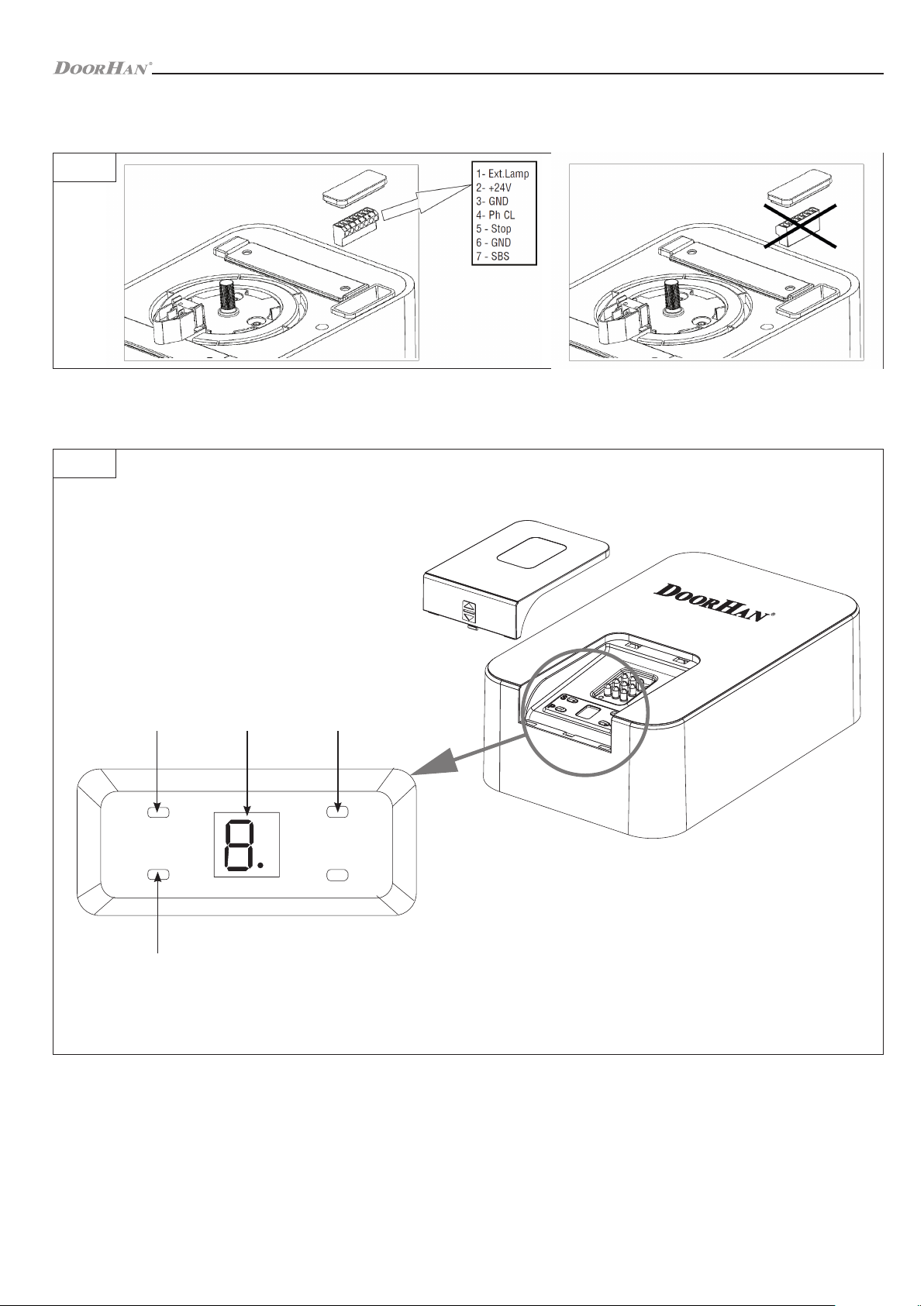
For easy connection of accessories, the operator is equipped with a removable terminal located under the plug (see fig. 2), it
allows you to make all the necessary connections without disassembling the operator housing.
6.2. PREPARATION
Block the carriage.
Turn on power, the indicator of the operator will light, sound signal will be heard.
If programming has not been completed, the settings will not be stored.
If there is a mistake in one of the settings, you can turn off power and reprogram.
+
-
P
R
1 2 3
4
6. OPERATOR PROGRAMMING
1. Radio code record button — «R»
2. Display
3. Setting selection buttons — «+», «–»
4. Programming button — «P»
FIG. 2
FIG. 1
6.1. OPERATOR CONTROL BUTTONS
This manual suits for next models
1
Table of contents
Other DoorHan Gate Opener manuals

DoorHan
DoorHan SHAFT-20 User manual

DoorHan
DoorHan SWING-3000 User manual

DoorHan
DoorHan SHAFT-30 User manual

DoorHan
DoorHan Sectional-1000 User manual

DoorHan
DoorHan Sectional-500 User manual

DoorHan
DoorHan SECTIONAL-500PRO User manual

DoorHan
DoorHan PCB-SH Installation manual

DoorHan
DoorHan SWING-3000PRO User manual

DoorHan
DoorHan SLIDING-1300 User manual

DoorHan
DoorHan Sectional-750 User manual