Dolphin Neurostim OTC User manual

Rev. E, Mar. 3, 2015
All Natural, Drug-Free Pain Relief
User Manual Table of Contents
Table of Contents...................................................................................................1
Contraindications, Warnings, and Precautions ........................................2-4
Introduction - The Dolphin Neurostim™ OTC................................................5
Product Contents ...................................................................................................6
Sterilization and Shelf Life..................................................................................6
User Support ...........................................................................................................6
Device Features and Controls.............................................................................7
Instructions for Use ..............................................................................................8
Turning Unit On....................................................................................................8
Testing and Replacing the Battery....................................................................9
Adjusting the Polarity and Sensitivity...........................................................10
Holding the Unit ............................................................................................11-12
Locating Treatment Points ...............................................................................13
Using the Extension Probe ................................................................................14
Instructions for Care...........................................................................................15
Troubleshooting ..................................................................................................16
Warranty ...............................................................................................................16
Service.....................................................................................................................16
Operating Instructions - Quick Start .............................................................17
Description of Electrical Performance ..................................................18 - 19
Technical Specifications....................................................................................20
Index .......................................................................................................................21

2 Rev. E, Mar. 3, 2015
Warnings and Precautions
Contraindications
Do not use this device if you have a cardiac pacemaker, implanted•
defibrillator, or other implanted metallic or electronic device. Such use
could cause electric shock, burns, electrical interference, or death
Warnings
If you are in the care of a physician, consult with your physician before•
using this device;
If you have had medical or physical treatment for your pain, consult with•
your physician before using this device;
If your pain does not improve, becomes more than mild, or continues•
for more than five days, stop using the device and consult with your
physician;
Do not apply stimulation over your neck because this could cause severe•
muscle spasms resulting in closure of your airway, difficulty in breathing,
or adverse effects on heart rhythm or blood pressure;
Do not apply stimulation across your chest because the introduction of•
electrical current into the chest may cause rhythm disturbances to your
heart, which could be lethal;
Do not apply stimulation over open wounds or rashes, or over swollen,•
red, infected, or inflamed areas or skin eruptions (e.g., phlebitis,
thrombophlebitis, varicose veins);
Do not apply stimulation over, or in proximity to, cancerous lesions;•
Do not apply stimulation in the presence of electronic monitoring•
equipment (e.g., cardiac monitors, ECG alarms), which may not operate
properly when the electrical stimulation device is in use;
Do not apply stimulation when in the bath or shower;•
Do not apply stimulation while sleeping;•
Do not apply stimulation while driving, operating machinery, or during•

3Rev. E, Mar. 3, 2015
any activity in which electrical stimulation can put you at risk of injury;
and
Do not use the device on children, if it has not been evaluated for pediatric•
use.
Consult with your physician before using this device, because the•
device may cause lethal rhythm disturbances to the heart in susceptible
individuals; and
Apply stimulation only to normal, intact, clean, healthy skin.•
Precautions
TENS is not effective for pain of central origin, including headache;•
TENS is not a substitute for pain medications and other pain management•
therapies;
TENS devices have no curative value;•
TENS is a symptomatic treatment and, as such, suppresses the sensation of•
pain that would otherwise serve as a protective mechanism;
Effectiveness is highly dependent upon patient selection by a practitioner•
qualified in the management of pain patients;
The long-term effects of electrical stimulation are unknown;•
Since the effects of stimulation of the brain are unknown, stimulation•
should not be applied across your head, and electrodes should not be
placed on opposite sides of your head;
The safety of electrical stimulation during pregnancy has not been•
established;
You may experience skin irritation or hypersensitivity due to the electrical•
stimulation;
If you have suspected or diagnosed heart disease, you should follow•
precautions recommended by your physician;
If you have suspected or diagnosed epilepsy, you should follow precautions•
recommended by your physician.

4 Rev. E, Mar. 3, 2015
Precautions (Continued)
Use caution if you have a tendency to bleed internally, such as following•
an injury or fracture;
Consult with your physician prior to using the device after a recent•
surgical procedure, because stimulation may disrupt the healing process;
Use caution if stimulation is applied over the menstruating or pregnant•
uterus; and
Use caution if stimulation is applied over areas of skin that lack normal•
sensation.
Adverse Reactions
You may experience skin irritation and burns beneath the stimulation•
electrodes applied to your skin;
You may experience headache and other painful sensations during or•
following the application of electrical stimulation near your eyes and to
your head and face; and
You should stop using the device and should consult with your physician if•
you experience adverse reactions from the device.
5Rev. E, Mar. 3, 2015
Introduction: The Dolphin Neurostim™ OTC
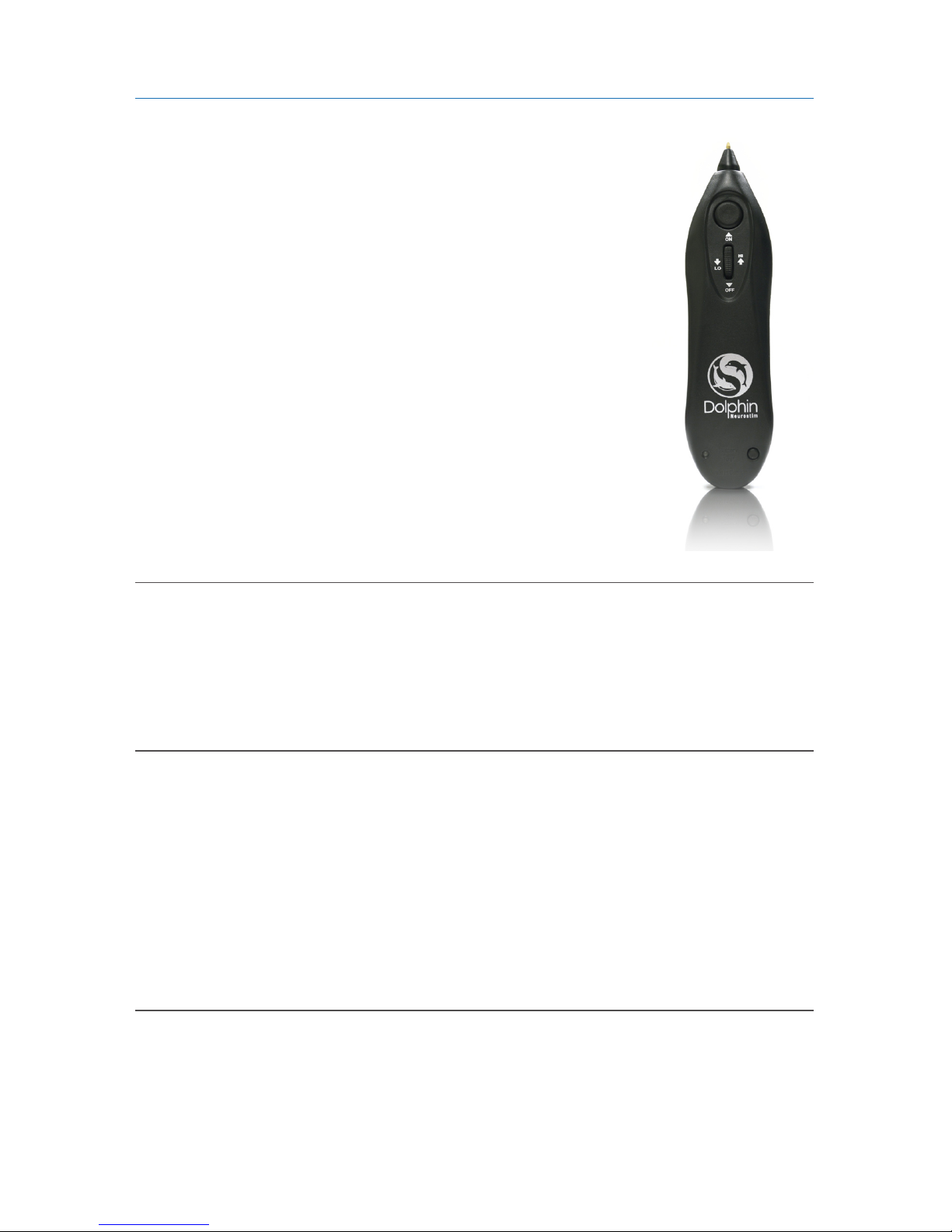
Dolphin Neurostim™OTC (DNS OTC) is a hand-held
micro current Transcutaneous Electrical Nerve Stimulator
(TENS) device, specifically designed for the temporary relief
of muscular pain.
The DNS OTC is engineered to detect and stimulate
areas of low impedance. This unique approach for the
temporary relief of pain associated with sore and aching
muscles in the back, arms, and legs due to strain from
exercise or normal household and work activities has been
developed with input from healthcare professionals and
has been thoroughly tested for over 30 years.
Caution
Warning
Indications for Use
It is strongly advised all DNS OTC users read this entire user manual before
operating this device. If you have any questions, please call our toll-free number:
1 (800) 565-7246.
The DNS should never be directly applied to the eyes, ears (canals), or genitals. Metal
tip may cause tissue damage resulting in permanent impairment in these areas
Keep this device out of the reach of children; and
Use this device only with the leads, electrodes, and accessories recommended
by the manufacturer. Adverse Reactions
The Dolphin Neurostim™ OTC is indicated for temporary relief of pain
associated with sore and aching muscles in the back, arms, and legs due to
strain from exercise or normal household and work activities.

6 Rev. E, Mar. 3, 2015
Product Contents
The shipping box should contain the following device compotents:
Dolphin Neurostim1. ™OTC Treatment Device
Black Carrying Case2.
Wrist Strap3.
User Manual4.
Warranty Card5.
Please inspect contents to ensure that there is no damange to the DNS OTC
treatment device or wrist strap before use.
Sterilization and Shelf Life
No elements of the Dolphin Neurostim OTC require sterilization. The Dolphin
Neurostim OTC has an indefinite shelf life when stored in normal room
conditions (at a temperature of 60-90 degrees Fahrenheit at relative humidity
levels of 15% to 90%).
User Support
For additional support, as well as additional resources (including books,
videos, and posters) please call or email Acumed Medical Supplies Ltd. at our
visit our website at www.dolphinotc.com for more information.
Please use the following forms to document your important medical phone
numbers for your reference when you use this device.
Home Medical Equipment Supplier: _________________________________
Home Healthcare Agency: __________________________________________
Doctor: ___________________________________________________________
7Rev. E, Mar. 3, 2015
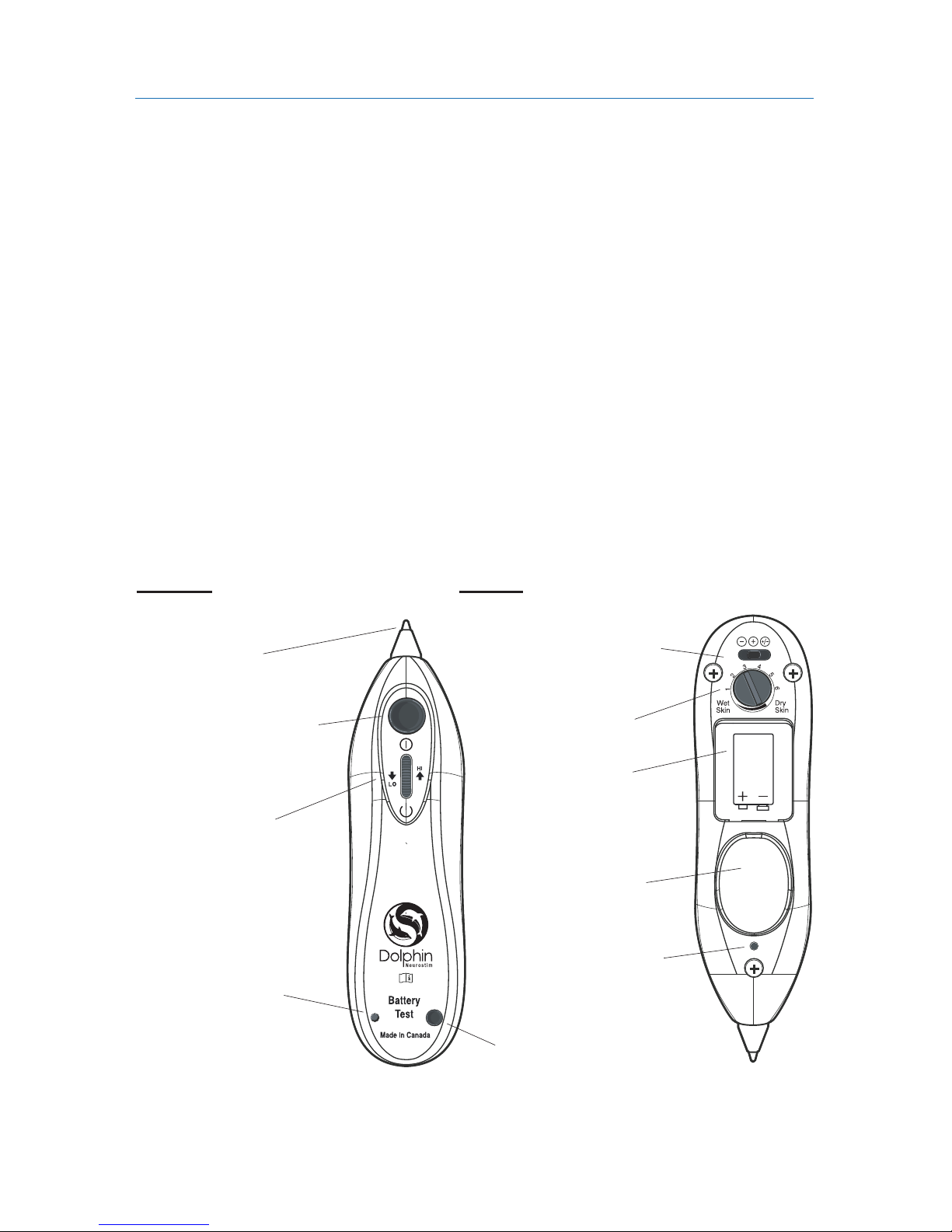
Probe1. (tip)
Simulation Button:2. Press to activate stimulation.
On/Off Switch and Intensity Control:3.
Battery Test Button:4. With unit on, pressing this button indicates battery
strength. If light does not illuminate brightly, replace battery.
Green Indicator Light:5. This light is activated when the Dolphin Neurostim™
OTC unit is switched on. Light flickers off when point has been located.
Ground Plate:6. Thumb or finger must be in contact with the plate when
locating or stimulating points.
Sensitivit7. y Adjustment: Increases point location.
Polarity Switch:8. Tonify (+), Disperse (-).
Battery Compartment:9. The Dolphin Neurostim™OTC is optimally
powered by Duracell 9V.
10. Sensitivity Adjustment
Turn to adjust skin sensitivity
12. Battery Compartment
8. Point Indicator Light
Is green when on, turns o
when point is located
9. Ground Plate
Thumb is firmly held on plate
to locate/stimulate points
5. Battery Test Light
Turns green (on) if battery
strength suicient
Device Features and Controls
1.Probe (Tip)
Point Locator/
Stimulator
2.Treatment Button
Aer locating point, press
and hold for 20 - 30 seconds/
beeps
FRONT BACK
9V
6. Battery Test Button
With unit on, press to
test battery strength
11. Polarity Switch
3. On/O Intensity Dial
Roll forward turn on, back
turn o; continue to roll
forward increases strength
8 Rev. E, Mar. 3, 2015
Instructions for Use
Read All Instructions:
Read the entire user manual, front to back, before attempting to use the DNS
OTC.
Turning on Unit
How to Turn on Unit:
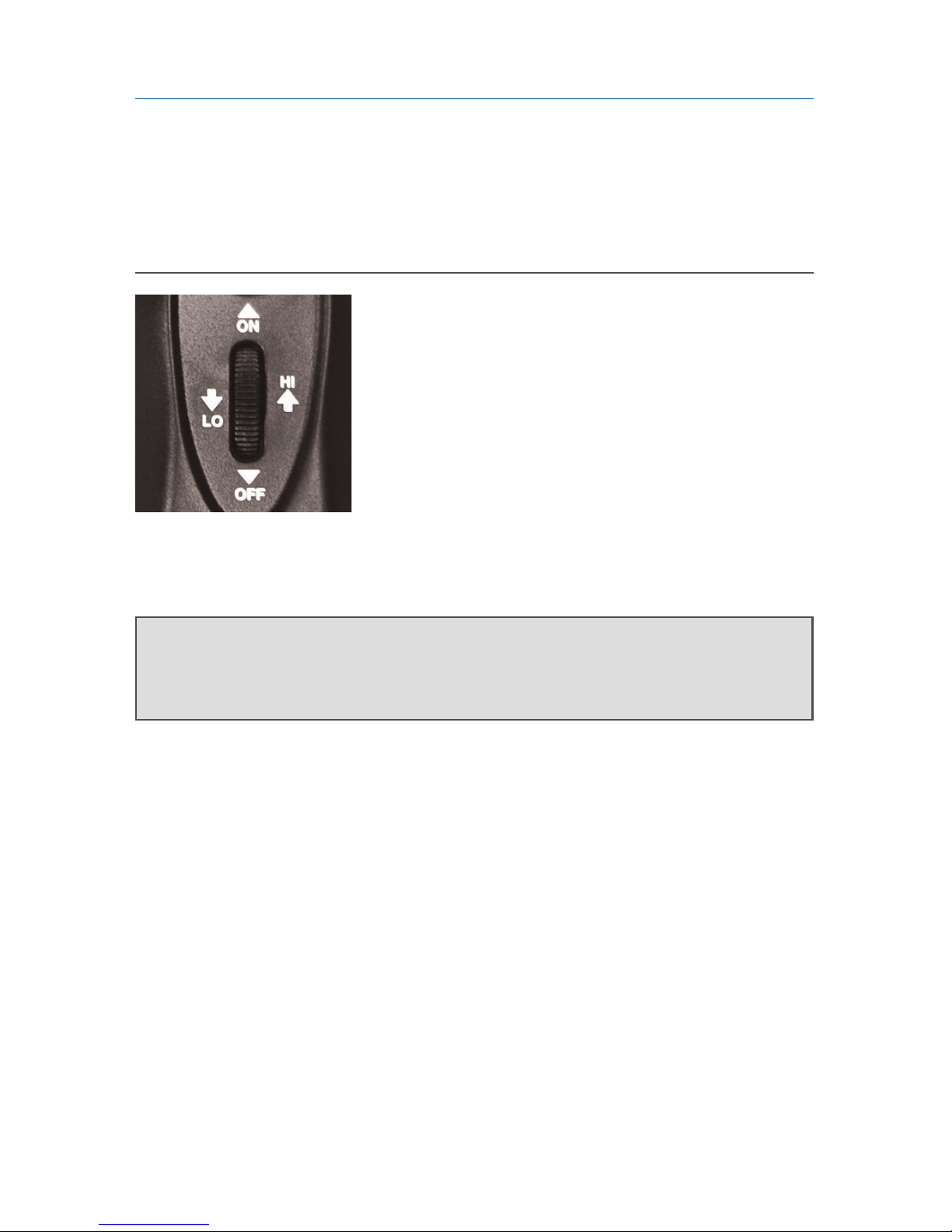
The on/off intensity wheel is located at top/front
of unit. The wheel has two functions:
a) First, rolling wheel forward (with finger tip) will
turn unit on. The wheel will click, the DNS OTC
will emit an audible tone, and indicator light will
turn on, bright green.
b) Secondly, it increases or decreases current strength during application (rolling
wheel forward increases strength, rolling backward decreases strength).
KEY TIP: Most patients start treating on lowest level, and then gradually increase
current strength over treatment.

9Rev. E, Mar. 3, 2015
Testing and Replacing the Battery
To Test Battery Strength:
With the unit on, press the battery test button (see
diagram on page 3), located at bottm of the front of
the unit - this will indicate the battery strength and
determine if it needs replacement. When the button
is pressed (with unit on) and light does not glow, it
is time to change the battery. Test the battery light
every few weeks.
To Replace the Battery:
The battery door can be removed by twisting a coin or similar object in the slot
provided. Check and replace the battery first if you experience any problems in
the operation of the DNS OTC. Use only Alkaline or Heavy Duty batteries.
Rechargeable batteries should not be used. Remove the battery if not
using the device for some time. Battery must be disposed of in line with the
local Environmental Protection Agency for requirements.

10 Rev. E, Mar. 3, 2015
Adjusting the Polarity and Sensitivity
Select Polarity:
The Polarity Setting is found at the bottom/back of
unit. Negative (-) is similar to applying an ice pack,
positive (+) is like applying a heat pack. The default
setting is negative.
It is recommended that when selecting polarity, you begin with negative;
if pain worsens after 2 to 3 treatments, switch the polarity to positive and
re-treat the area.
Adjust Sensitivity Dial:
The Sensitivity Dial assists in accurate point
location. The DNS OTC locates areas of low
impedance by measuring changes in skin resistance,
which is influenced by moisture. Normal skin
should have dial pointing upwards to 3 (11 o’clock).
KEY TIP: Once the sensitivity dial is “set” to a patient’s skin type, further
adjustment is rarely necessary. Circumstances where adjustments may
be required include, weather (ie. humidity), and individual’s hydration.
Table of contents