
Depaepe Telecom HD 2000 series User manual

HD2000 IP Phone
User Manual
http://www.diamondtelecom.eu

Table of Content
1. WELCOME........................................................................................................................ 4
2. WHAT IS IN THE PACKAGE............................................................................................. 4
3. Key Features..................................................................................................................... 5
4. Hardware specification.................................................................................................... 6
5. INSTALLATIONS............................................................................................................... 6
5.1. Power and LAN connection ................................................................................ 6
5.2. Walls mount installation: ..................................................................................... 8
6. Get Familiar with the buttons ....................................................................................... 10
7. BASIC OPERATIONS ..................................................................................................... 12
7.1. Get Familiar with Voice ..................................................................................... 12
7.2. Make a Phone call ............................................................................................ 13
7.2.1. Completing Calls............................................................................... 13
7.2.2. Quick IP Call Mode ........................................................................... 14
7.3. ANSWERING PHONE CALLS ............................................................................14
7.3.1. Receiving Calls ...................................................................................14
7.4. PHONE FUNCTIONS DURING A PHONE CALL................................................15
7.4.1. Call Hold ..............................................................................................15
7.4.2. Call Waiting and Call Flashing .............................................................15
7.4.3. Call Transfer.........................................................................................15
7.4.3.1 Blind Transfer........................................................................15
7.4.3.2 Attended Transfer .................................................................15
7.4.4. Conference Call ...................................................................................15
7.4.5. Mute incoming calls ..............................................................................16
7.4.6. Voice Messages (Message Waiting Indicator)......................................16
7.5. CALL FEATURES.................................................................................................17
7.5.1. Call Features Tables ............................................................................17
8. CONFIGURATION GUIDE...................................................................................................18
8.1. Configuring HD2000IP using Web Browser..........................................................18
8.1.1. Accessing the Web Configuration.........................................................18
8.1.2. User Programming and Configuration .................................................19
8.1.3. Passwords ...........................................................................................19
8.1.4. Configuration Options and Explanations .............................................20
8.1.4.1 Device Status.........................................................................20
8.1.4.2 Basic Options.........................................................................21
2

8.1.4.3 Account Options ....................................................................25
8.1.4.4 Super Options........................................................................34
8.1.5. Saving the Configuration Changes.......................................................38
8.1.6. Rebooting the HD2000IP......................................................................38
8.1.7. Configuration through a Central Server................................................38
9. SOFTWARE UPGRADE......................................................................................................41
10. RESTORE TO FACTORY DEFAULT SETTINGS ............................................................42
3
1. WELCOME
The IP PHONE HD2000IP is an internet telephone set that features superb audio quality, rich
functionalities, high level of integration, and compactness. By converting analog voice for
transmission over the internet, the IP Phone HD2000IP allows users with broadband internet
connections to make calls to and from anywhere in the world. The IP PHONE HD2000IP is fully
compatible with SIP industry standard and can interoperate with many other SIP compliant
devices and software on the market.
2. WHAT IS IN THE PACKAGE
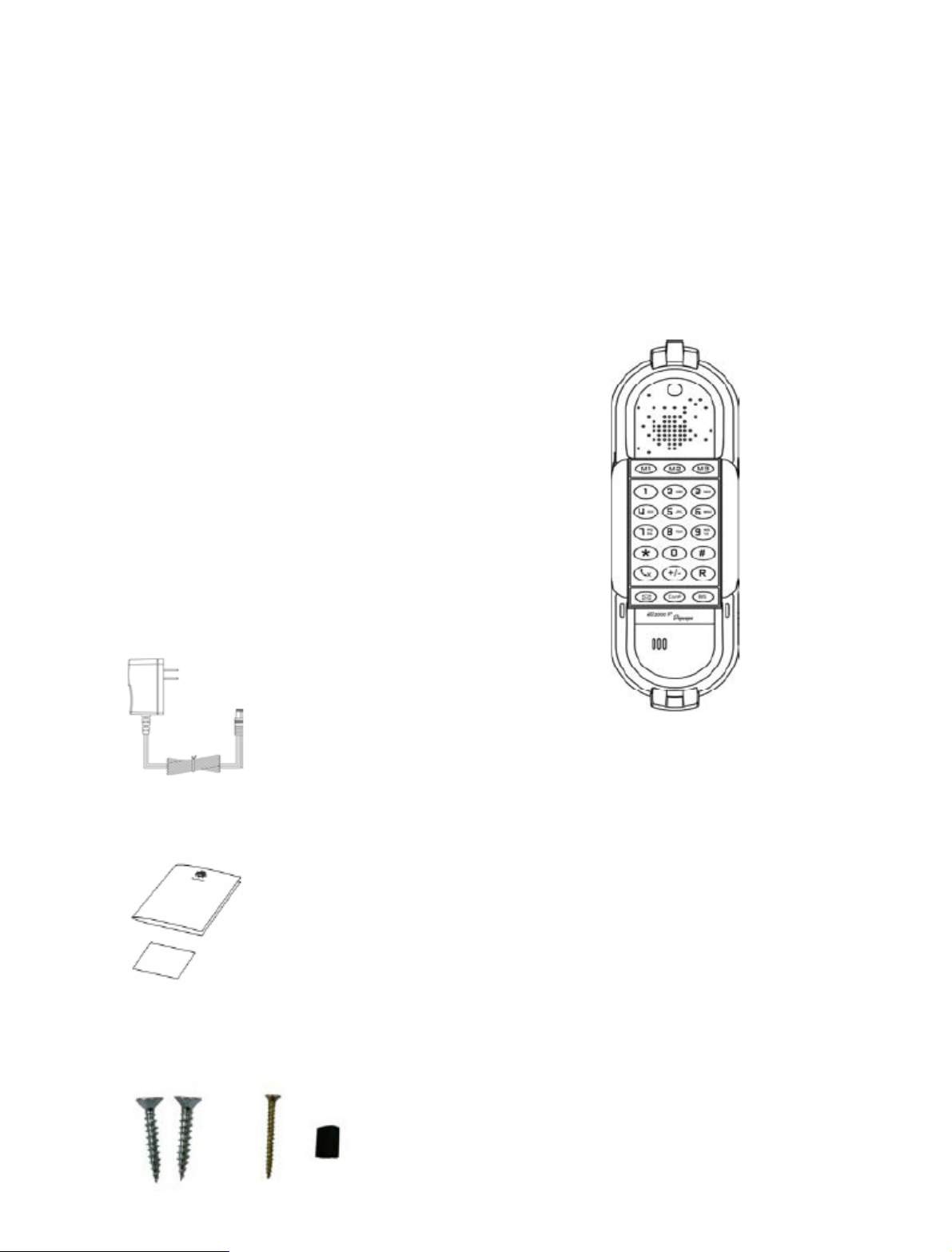
The HD2000IP package contains:
One HD2000IP VoIP Phone
One power supply (option)
User manual
1 thin screw, 2 bigger screws, 1 foam.
4

3. Key Features
- Support SIP 2.0 (RFC 3261), TCP/UDP/IP, RTP/RTCP, HTTP, ICMP, ARP/RARP, DNS,
DHCP, NTP, PPPoE, STUN, UPNP,TFTP, etc.
- Powerful Digital Signal Processing (DSP) technology to ensure superior audio quality
- Support various codecs including G.711 (PCM a-law and u-law), G.723.1 , G.729A, G.726.
- Support standard encryption and authentication (DIGEST using MD5, MD5-sess)
- Support for Layer 2 (802.1Q VLAN, 802.1p) and Layer 3 QoS (ToS, DiffServ, MPLS)
- Support Silence Suppression, VAD (Voice Activity Detection), CNG (Comfort
Noise Generation), Acoustic Echo Cancellation (AEC) with Acoustic Gain Control(AGC) for
speakerphone mode.
- Support automated provisioning for mass deployment ,RTP and TLS (pending)for security
protection
- Support automated NAT traversal without manual manipulation of firewall/NAT
- Support Hold, Transfer, Forward, 3-way Conference, in-band and out-of-band DTMF, Call
Waiting, Call Log, Off-hook Auto Dial, Auto Answer, Downloadable Ringtones, SMS,Direct IP
Call, Intercom, Paging, Pick up.
- Support syslog, full duplex hands-free speakerphone with advanced acoustic echo cancellation,
redial, volume control, voice mail with indicator, downloadable ring tones.
- Provide easy configuration through manual operation (phone keypad), Web
interface or automated centralized configuration file via TFTP or HTTP
- Support 6 dedicated function keys: Mute, 3 level volume key, Flash (Hold), Message,
Conference, Redial.
- Support 3 levels ringer volume ( high/middle/off for HD2000IP with keypad, high/middle/low
for HD2000IP urgence)
5
4. Hardware specification
Model HD2000IP
LAN interface
1x RJ45 100Base-T(POE supported)
Power supply (optional)
Input: 100-240VAC 50-60 Hz
Output: +5VDC, 1200mA
CE/FCC/UL certification
Dimension
215 x 165 x 70 mm (L x W x H)
Weight
0.9kg
Temperature
40 – 130 F
5 – 45 C
Humidity
10 - 90%
5. INSTALLATION
5.1.
Power and LAN connection
Following are the steps to install a HD2000IP:
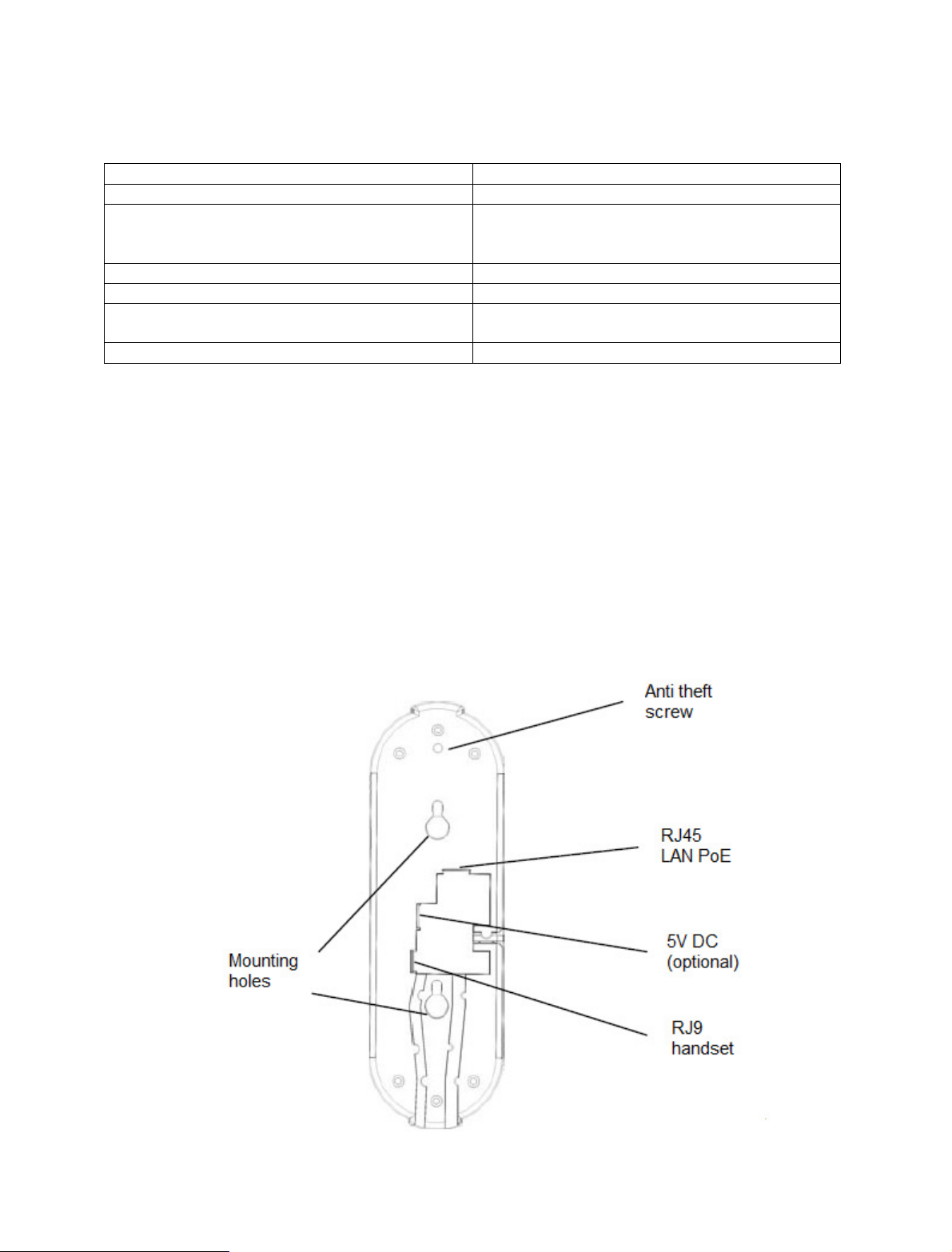
- Connect Ethernet cable from back of the phone (LAN Port) to a PoE port of switch or router.
- If you don’t have PoE switch or router, please use power adapter (optional) into back of the
phone and connect it to a power outlet.
6

Power Jack 5V DC power port
LAN 10/100Mbps RJ45 port for LAN
Handset Jack RJ9 port connect to handset
SAFETY COMPLIANCES
The HD2000IP phone complies with FCC/CE and various safety standards. The HD2000IP
power adaptor (optional) is compliant with these standards. Only use the HD2000IP power
adaptor provided by Depaepe. The manufacturer’s warranty does not cover damages to the
phone caused by unsupported power adaptors.
WARRANTY
If you purchased your HD2000IP from a reseller, please contact the company where you
purchased your phone for replacement, repair or refund. If you purchased the product
directly from Diamond Telecom Products, contact your Sales and Service Representative for
a RMA (Return Materials Authorization) number before you return the product. Diamond
Telecom Products reserves the right to remedy warranty policy without prior notification.
7
5.2.
Walls mount installation:
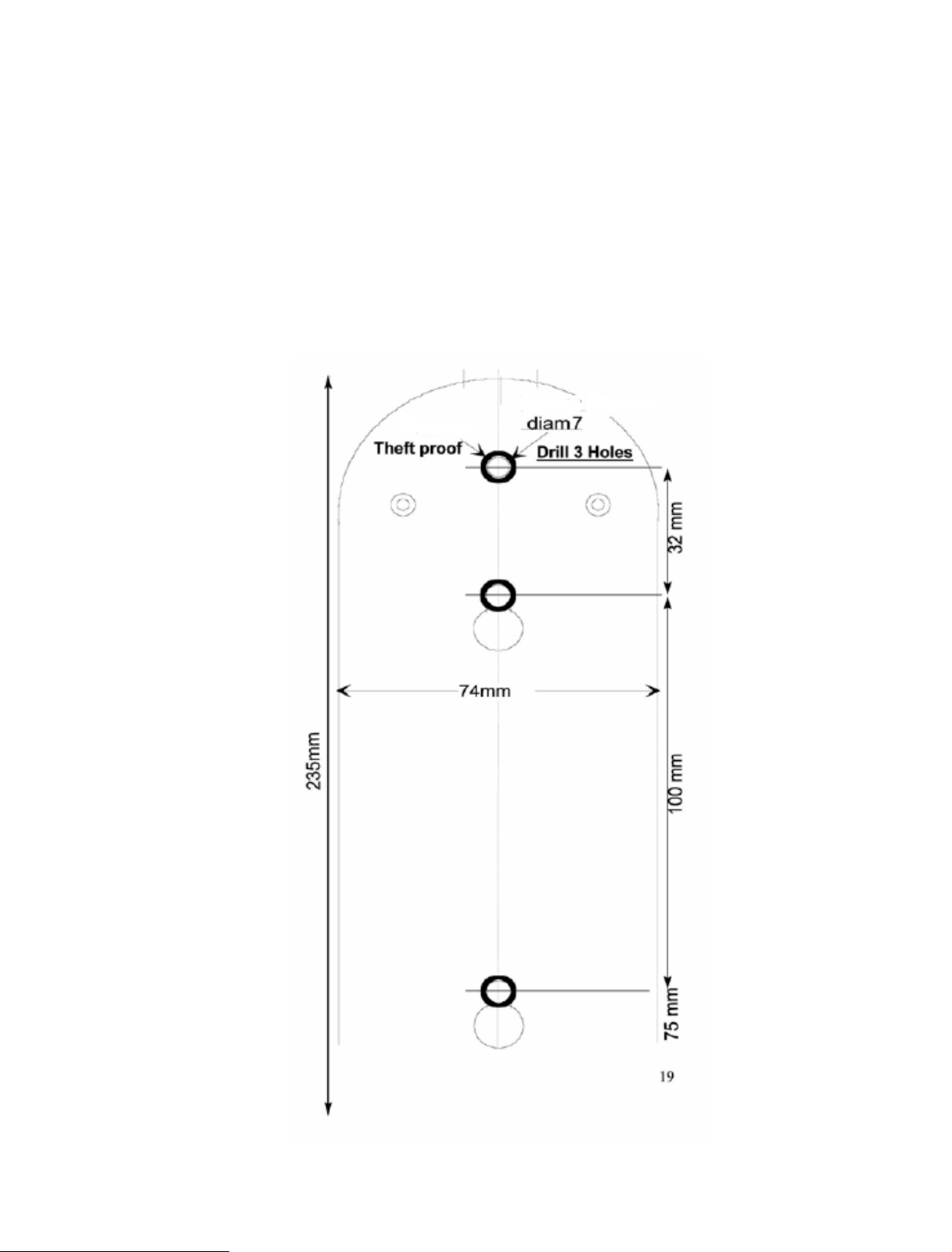
The HD2000 IP comes with a small plastic bag containing 1 thins screw and a foam plug to be
used for preventing theft or unauthorized removal, 2 bigger screws for wall mount fixing.
1) Drill 2 holes as shown on the wall mounting layout (see the next drawing). Install the 2
bigger screws in those holes on the wall.
8

2) If the telephone must be secured against thefts or unauthorized removal, drill a third hole
as shown on the wall mounting layout.
3) Check the LAN or/and Power connection.
4) Align the 2 slots at the base of the HD2000IP in front of the 2 screws and pull down.
5) If needed, install the third screw though the hole located above the telephone (see the
page
6) and hide it with the foam plug.
9
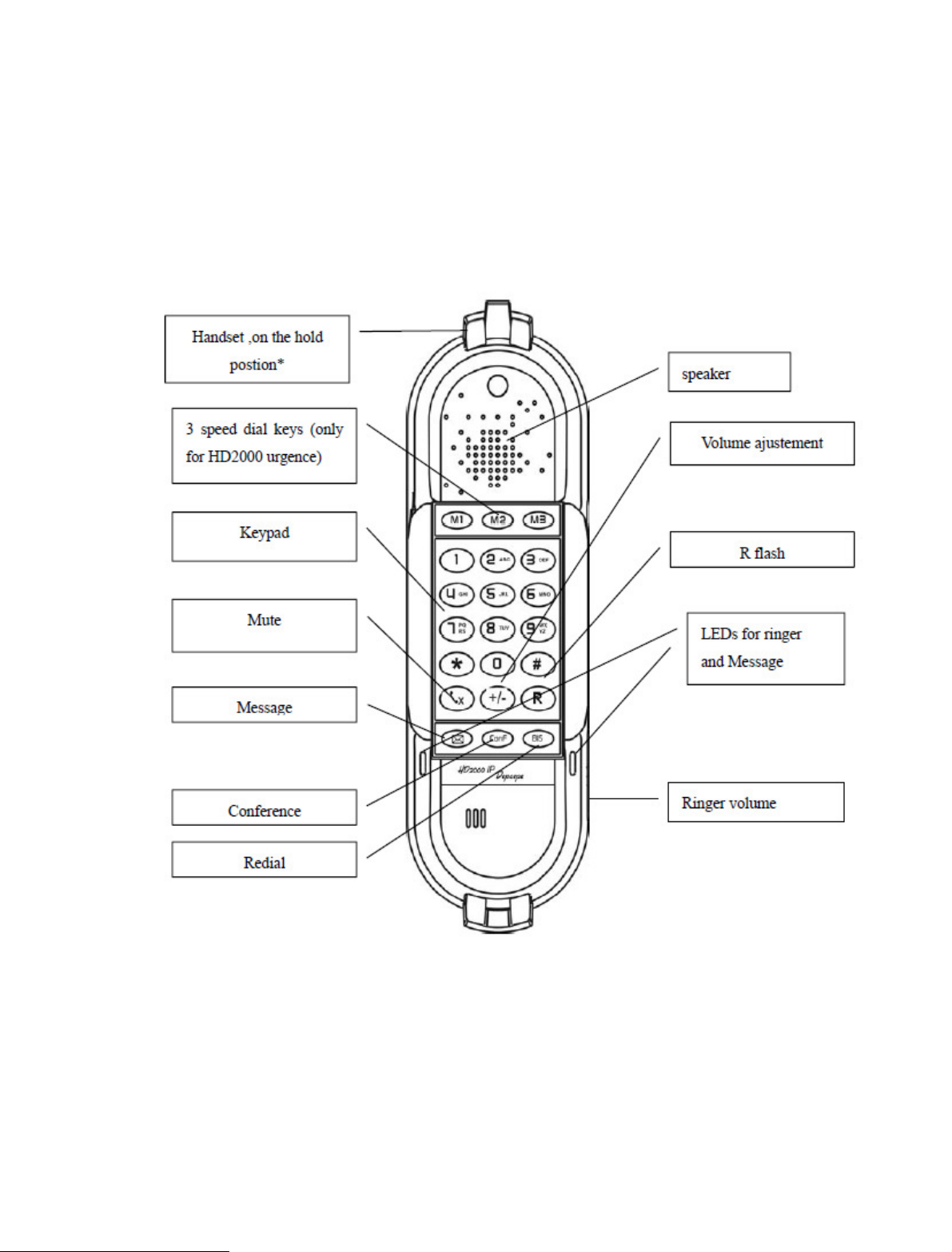
6. Get Familiar with the telephone
*Handset on hold position: This feature can be used to secure the handset while waiting for
someone to ‘come to the phone” without going back to on-hook condition.
10
Other manuals for HD 2000 series
2
Table of contents
Other Depaepe Telecom IP Phone manuals

Depaepe Telecom
Depaepe Telecom HD 2000 series User manual

Depaepe Telecom
Depaepe Telecom UC802P User manual

Depaepe Telecom
Depaepe Telecom Securphone User manual

Depaepe Telecom
Depaepe Telecom UC862 User manual

Depaepe Telecom
Depaepe Telecom Premium 300 User manual

Depaepe Telecom
Depaepe Telecom UC806 User manual

Depaepe Telecom
Depaepe Telecom progress User manual


