DeLOCK 90096 User manual

SuperSpeed USB 5 Gbps
PCI Express x1 Card
Product-No:90096
User manual no:90096-a
www.delock.com
User manual
Mode d’emploi
Uživatelská příručka
Manuale utente
Manual de utilizare
Korisnički priručnik
Bedienungsanleitung
Manual del usuario
Instrukcja obsługi
Bruksanvisning
Használati utasítás
Εγχειρίδιο χρήστη

-2-
English
Description
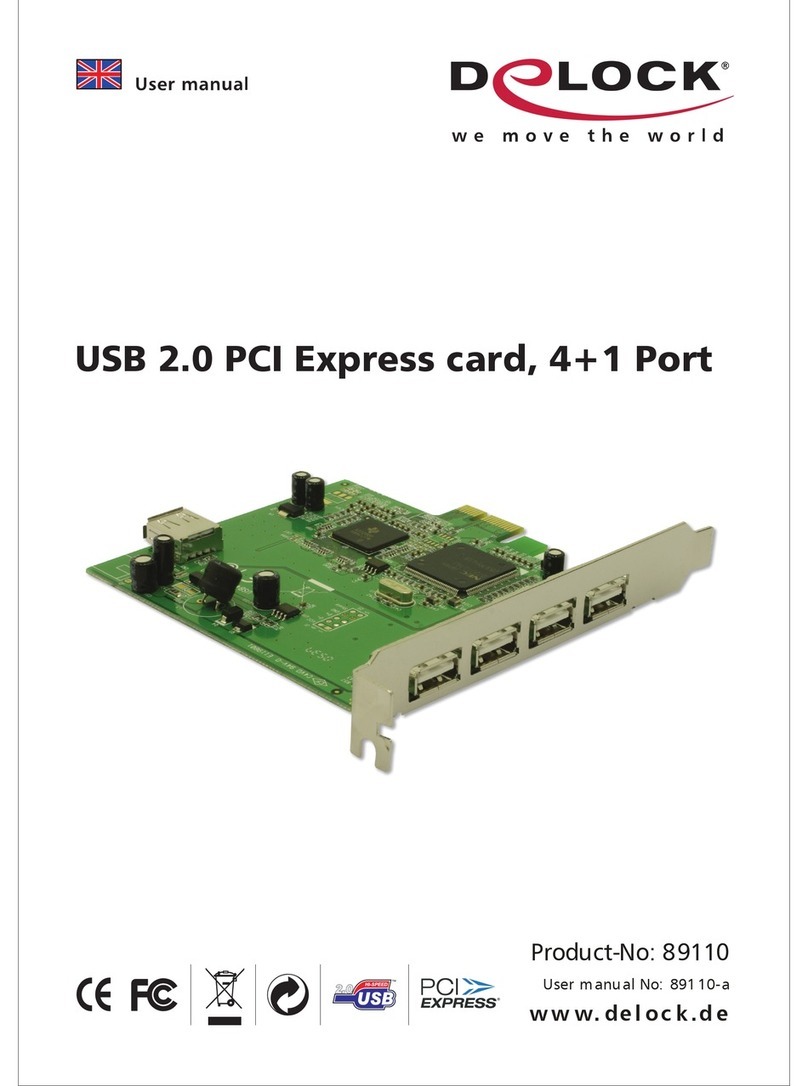
This PCI Express card by Delock expands the PC by two external USB 3.2
ports as well as one internal 19 pin USB pin header male port. Dierent USB
devices, such as docking stations, card readers, external enclosures etc., can be
connected to the card.
Specication
• Connectors:
external:
2 x SuperSpeed USB 5 Gbps (USB 3.2 Gen 1) Type-A female
internal:
1 x 19 pin USB pin header male
1 x SATA power connector
1 x PCI Express x1, V2.0
• Chipset: VIA VL805
• Data transfer rate up to:
SuperSpeed USB 5 Gbps,
Hi-Speed 480 Mbps,
Full-Speed 12 Mbps,
Low-Speed 1.5 Mbps
• Supports UASP
• Supports eXtensible Host Controller Interface (xHCI) specication 1.0
• Bootable
System requirements
• Linux Kernel 5.13 or above
• Windows 8.1/8.1-64/10/10-64/11
• PC with one free PCI Express slot
• Power supply with a free SATA power connector
Package content
• PCI Express card USB 3.0
• Low prole bracket
• User manual
Safety instructions
• Protect the product against moisture
• Avoid anti-static electricity when installing the card

-3-
English
Hardware Installation
1. Turn o your PC and unplug the power cord.
2. Open the housing.
3. Remove the slot holder from the available PCI Express slot.
4. Insert the card straight and carefully into the free PCI Express slot, until it is
well seated.
5. Use a screw to attach the card to the housing.
6. Connect a SATA power cable of your power supply to the PCI Express card.
7. Reattach the housing and connect the power cord to the AC adapter.
8. Switch on your computer.
Driver Installation
1. When the installation of the device is nished, the driver will be automatically
installed after you restart the computer.
2. You can now start to use the device.
Support Delock
If you have further questions, please contact our customer support
Final clause
Information and data contained in this manual are subject to change without
notice in advance. Errors and misprints excepted.
Copyright
No part of this user manual may be reproduced, or transmitted for any purpose,
regardless in which way or by any means, electronically or mechanically, without
explicit written approval of Delock.
Edition: 10/2022

-4-
Deutsch
Kurzbeschreibung
Die PCI Express Karte von Delock erweitert den PC um zwei externe USB 3.2
Ports sowie um einen internen 19 Pin USB Pfostenstecker. An die Karte können
verschiedene USB Geräte, wie z. B. Docking Stationen, Card Reader, externe
Gehäuse etc., angeschlossen werden.
Spezikation
• Anschlüsse:
extern:
2 x SuperSpeed USB 5 Gbps (USB 3.2 Gen 1) Typ-A Buchse
intern:
1 x 19 Pin USB Pfostenstecker
1 x SATA Stromanschluss
1 x PCI Express x1, V2.0
• Chipsatz: VIA VL805
• Datentransferraten bis zu:
SuperSpeed USB 5 Gbps,
Hi-Speed 480 Mbps,
Full-Speed 12 Mbps,
Low-Speed 1,5 Mbps
• Unterstützt UASP
• Unterstützt eXtensible Host Controller Interface (xHCI) Spezikation 1.0
• Bootfähig
Systemvoraussetzungen
• Linux Kernel 5.13 oder höher
• Windows 8.1/8.1-64/10/10-64/11
• PC mit einem freien PCI Express Steckplatz
• Netzteil mit einem freien SATA Stromanschluss
Packungsinhalt
• PCI Express Karte USB 3.0
• Low Prole Blende
• Bedienungsanleitung
Sicherheitshinweise
• Produkt vor Feuchtigkeit schützen
• Vermeiden Sie antistatische Auadung beim Einbau der Karte

-5-
Deutsch
Hardwareinstallation
1. Schalten Sie Ihren PC aus, ziehen Sie das Netzkabel.
2. Önen Sie das Gehäuse.
3. Entfernen Sie das Slotblech vom gewünschten freien PCI Express
Steckplatz.
4. Stecken Sie die Karte gerade und vorsichtig in den freien PCI Express Slot,
bis sie fest sitzt.
5. Befestigen Sie die Karte mit einer Schraube am Gehäuse.
6. Verbinden Sie ein SATA Stromkabel Ihres Netzteils mit der PCI Express
Karte.
7. Schließen Sie das Gehäuse wieder und verbinden Sie das Netzkabel mit
dem Netzteil.
8. Schalten Sie den Computer ein.
Treiberinstallation
1. Nach dem Einbau des Gerätes wird nach dem Neustart der Treiber
automatisch installiert.
2. Sie können nun das Gerät verwenden.
Support Delock
Bei weitergehenden Supportanfragen wenden Sie sich bitte an
Schlussbestimmung
Die in diesem Handbuch enthaltenen Angaben und Daten können ohne vorherige
Ankündigung geändert werden. Irrtümer und Druckfehler vorbehalten.
Copyright
Ohne ausdrückliche schriftliche Erlaubnis von Delock darf kein Teil dieser
Bedienungsanleitung für irgendwelche Zwecke vervielfältigt oder übertragen
werden, unabhängig davon, auf welche Art und Weise oder mit welchen Mitteln,
elektronisch oder mechanisch, dies geschieht.
Stand: 10/2022

-6-
Français
Conguration système requise
• Linux Kernel 5.13 ou version ultérieure
• Windows 8.1/8.1-64/10/10-64/11
• PC avec un slot PCI Express libre
• Alimentation via connecteur SATA libre
Contenu de l’emballage
• PCI Express Carte USB 3.0
• Low prole slot arrière
• Mode d’emploi
Instructions de sécurité
• Protéger le produit contre l’humidité
• Éviter l’électricité statique lors de l’installation de la carte
Installation matérielle
1. Eteignez votre PC et débranchez le cordon d'alimentation.
2. Ouvrez le boîtier.
3. Enlevez le cache du slot PCI Express disponible.
4. Insérez la carte tout droit et avec précaution dans le slot PCI Express libre
jusqu'à ce qu'elle soit bien en place.
5. Utilisez une vis pour attacher la carte au boîtier.
6. Connectez un câble d'alimentation SATA de votre bloc d'alimentation sur le
carte PCI Express.
7. Remontez le boîtier et branchez le cordon d'alimentation et l'adaptateur AC.
8. Allumez votre ordinateur.
Installation du pilote
1. Lorsque l'installation du périphérique est terminée, le pilote est installé
automatiquement après redémarrage de l'ordinateur.
2. Vous pouvez à présent commencer à utiliser le périphérique.

-7-
Español
Requisitos del sistema
• Linux Kernel 5.13 o superior
• Windows 8.1/8.1-64/10/10-64/11
• PC con una ranura PCI Express libre
• Fuente de alimentación con un conector de alimentación SATA disponible
Contenido del paquete
• Tarjeta PCI Express USB 3.0
• Low prole soporte posterior
• Manual del usuario
Instrucciones de seguridad
• Proteja el producto contra el polvo
• Evite la electricidad estática cuando instale la tarjeta
Hardware Instalación
1. Apague su equipo y desconecte el cable de alimentación.
2. Abra la carcasa.
3. Retire el soporte de la ranura de la ranura PCI Express disponible.
4. Inserte la tarjeta en posición recta y con cuidado en la ranura PCI Express
libre hasta que quede correctamente asentada.
5. Utilice un tornillo para jar la tarjeta a la carcasa.
6. Conecte un cable de alimentación SATA desde la fuente de alimentación a la
tarjeta PCI Express.
7. Vuelva a colocar la carcasa y conecte el adaptador de CA del cable de
alimentación.
8. Encienda su PC.
Instalación del controlador
1. Cuando la instalación del dispositivo haya terminado, el controlador se
instalará automáticamente después de reiniciar el equipo.
2. Ahora ya puede utilizar el dispositivo.

-8-
České
Systémové požadavky
• Linux Kernel 5.13 nebo vyšší
• Windows 8.1/8.1-64/10/10-64/11
• PC s volným PCI Express slotem
• Napájecí zdroj s volným SATA napájecím konektorem
Obsah balení
• Karta PCI Express s USB 3.0
• Záslepka do slotu
• Uživatelská příručka
Bezpečnostní pokyny
• Chraňte produkt před vlhkostí
• Při instalaci karty se vyvarujte působení antistatické elektřiny
Instalace hardware
1. Vypněte PC a odpojte přívodní šňůru napájení.
2. Otevřte kryt PC.
3. Vyndejte záslepku z volného PCI Express slotu.
4. Vložte kartu opatrně do volného PCI Express slotu až zcela dosedne.
5. Přišroubujte pomocí šroubováku kartu ke skříni.
6. Připojte SATA napájecí kabel ze zdroje počítače k PCI Express kartě.
7. Nasaďte zpět kryt a připojte napájecí šňůru.
8. Zapněte počítač.
Instalace ovladače
1. Po dokončení instalace hardwaru se driver nainstaluje automaticky. Poté
restartujte počítač.
2. Zařízení můžete začít používat.

-9-
Polsku
Wymagania systemowe
• Linux Kernel 5.13 lub nowszy
• Windows 8.1/8.1-64/10/10-64/11
• PC z wolnym slotem PCI Express
• Zasilacz z wolnym złączem zasilania typu SATA
Zawartość opakowania
• Karta PCI Express USB 3.0
• Low Prole śledz
• Instrukcja obsługi
Instrukcje bezpieczeństwa
• Produkt należy zabezpieczyć przed wilgocią
• Podczas instalacji karty należy się zabezpieczyć przed elektrycznością
statyczną
Instalacja sprzętu
1. Wyłącz komputer i odłącz kabel zasilania.
2. Otwórz obudowę.
3. Usuń blokadę z wolnego slotu PCI Express.
4. Wsuwaj kartę prosto i ostrożnie do wolnego slotu PCI Express, aż zostanie
dobrze umocowana.
5. Przykręć śrubką kartę do obudowy.
6. Podłącz kabel zasilania SATA zasilacza do karty PCI Express.
7. Zamknij z powrotem obudowę i podłącz kabel do zasilacza.
8. Włącz komputer.
Instalacja sterownika
1. Po zainstalowaniu urządzenia, sterownik zainstaluje się automatycznie po
restarcie komputera.
2. Teraz można już korzystać z urządzenia.

-10-
Italiano
Requisiti di sistema
• Linux Kernel 5.13 o superiore
• Windows 8.1/8.1-64/10/10-64/11
• PC con uno slot PCI Express libero
• Alimentatore con connettore di alimentazione SATA libero
Contenuto della confezione
• Scheda PCI Express USB 3.0
• Staa a basso prolo
• Manuale utente
Istruzioni per la sicurezza
• Proteggere il prodotto dall'umidità
• Evitare l'elettricità antistatica durante l'installazione della scheda
Installazione dell'hardware
1. Spegnere il PC e scollegare il cavo di alimentazione.
2. Aprire l'alloggiamento.
3. Rimuovere il supporto dallo slot PCI Express disponibile.
4. Inserire la scheda in linea retta e con cura nello slot PCI Express libero
nché non si trova in sede.
5. Utilizzare una vite per ssare la scheda nell'alloggiamento.
6. Collegare un proprio cavo SATA di alimentazione alla scheda PCI Express.
7. Reinserire l'alloggiamento e collegare il cavo di alimentazione all'adattatore
CA.
8. Accendere il computer.
Installazione del driver
1. Al termine dell'installazione del dispositivo, il driver viene automaticamente
installato al riavvio del computer.
2. Ora è possibile iniziare a utilizzare il dispositivo.
Table of contents
Languages:
Other DeLOCK Computer Hardware manuals

DeLOCK
DeLOCK 47209 User manual

DeLOCK
DeLOCK 63962 User manual

DeLOCK
DeLOCK 62853 User manual

DeLOCK
DeLOCK 61386 User manual

DeLOCK
DeLOCK 90300 User manual

DeLOCK
DeLOCK 89836 User manual

DeLOCK
DeLOCK 89377 User manual

DeLOCK
DeLOCK 88027 User manual

DeLOCK
DeLOCK 62866 User manual

DeLOCK
DeLOCK 88023 User manual
Popular Computer Hardware manuals by other brands

EMC2
EMC2 VNX Series Hardware Information Guide

Panasonic
Panasonic DV0PM20105 Operation manual

Mitsubishi Electric
Mitsubishi Electric Q81BD-J61BT11 user manual

Gigabyte
Gigabyte B660M DS3H AX DDR4 user manual

Raidon
Raidon iT2300 Quick installation guide

National Instruments
National Instruments PXI-8186 user manual