
Cuckoo CAC-AB0610FI User manual
AIR PURIFIER
USER MANUAL
CAC-AB0610FI
2
Dear customers,
Please keep this User Manual for your reference.
This manual will guide you if you have any questions or troubleshooting
problems.
This product filters out fine dust, allergens, and other airborne particles using a True HEPA 3-Stage Filter mounted
in the base of the product.
4-Color LED Air Quality Display
The detected air quality is shown on the display screen with 4 different colors of LED lights.
Each color represents the pollution degree of solid contaminants found in the surrounding air.
Please read the instructions carefully before using the product and keep them properly.
Filter Replacement Indicator
Features a built-in replacement indicator that reminds the user when the filter is in need of replacement.
Compact Size
With a light and portable design, this product is the perfect size for use in small rooms, offices, and apartments.
H13 True HEPA 3-Stage Filter
Collects pet dander, ultra-fine dust, harmful gases, and other airborne particles with the 3-in-1 H13 True HEPA Filter.
Automatic Operation through Dust Sensor
This product detects the pollution status of the surrounding indoor air in real time through the dust sensor.
When the automatic operation setting is selected, the product automatically adjust the fan speed according
to the surrounding pollution degree to make the indoor environment pleasant.
Features of CUCKOO Air Purifier

●
Parts & Accessories
●
Replacing the Filter
Controls/Display Panel
About the Filter
Safeguards
●
Troubleshooting
●
Before Use
During Use
Before Asking for
Support
Service Information
2
4
5 - 6
7
8 - 9
10 -11
12-13
CONTENTS
Features of CUCKOO Air Purifier
Unboxing
To unbox the air purifier, remove the foam lining, the accessories, and user manual.
Pull the air purifier out of the box and remove the plastic covering.
We recommend keeping the product box in a safe, dry location for future use.
After clearing the inner packaging, open the base of the air purifier,
take out the True HEPA filter and remove plastic packaging.
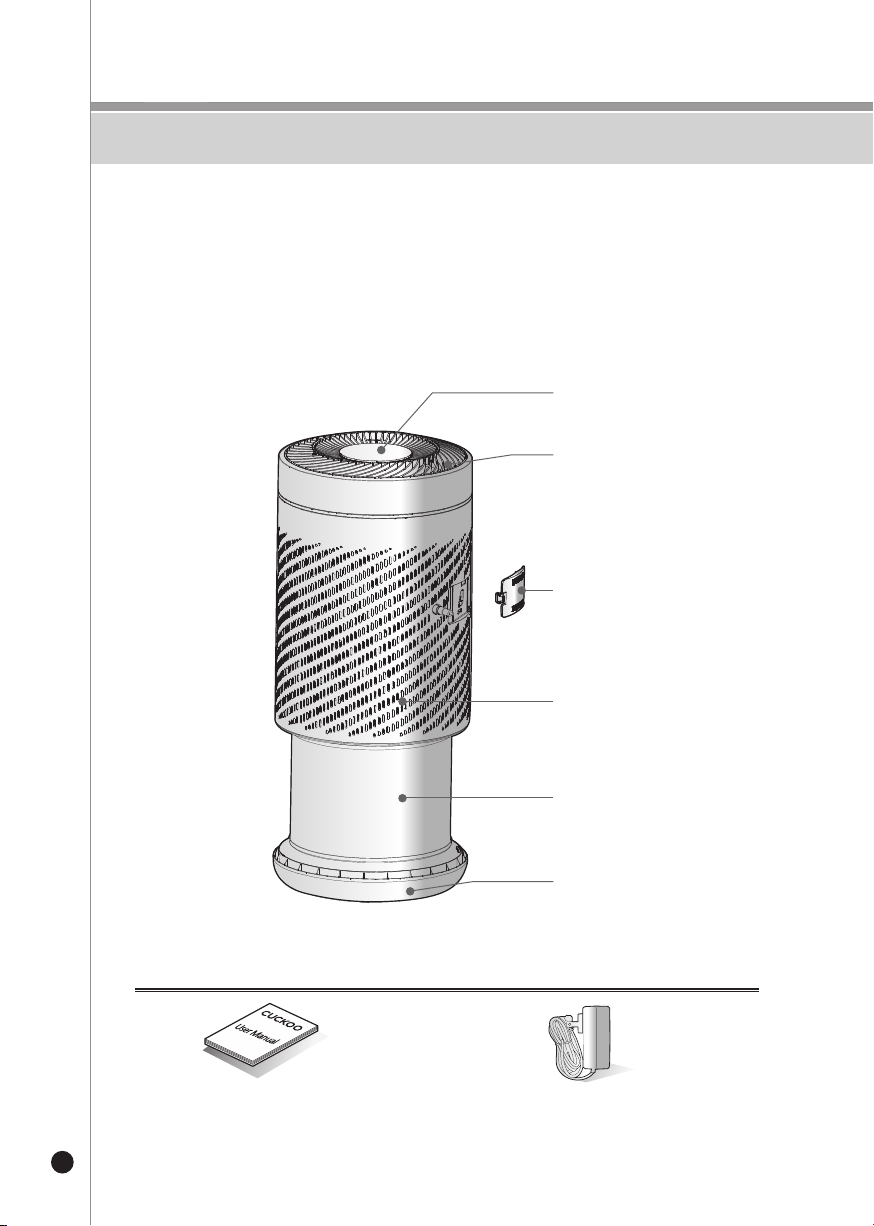
Parts
Parts & Accessories
4
Accessories
User Manual
※The picture may differ from the actual product.
DC Adapter
Control Panel
Air Vent
Filter
Intake
Base
Dust Sensor Cover
5
Replacing the Filter
* Note :
• Remove the plastic packaging from the purifier and all accessories before attempting to use.
• Ensure the purifier is unplugged before removing or installing the filter.
• Regularly wipe any dust found on the filter—do not wash or reuse a used filter.
• Do not use filters or any other accessories not designed for compatibility with this purifier.
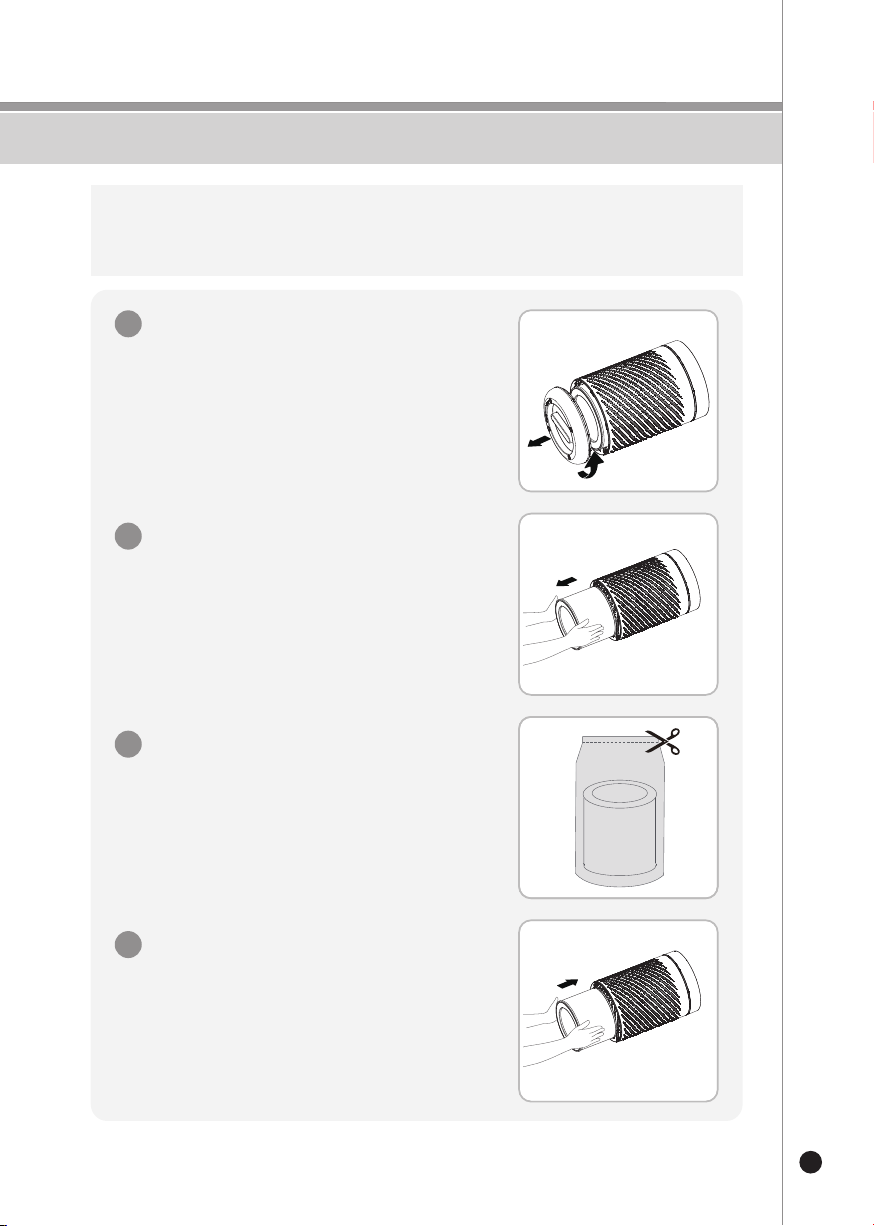
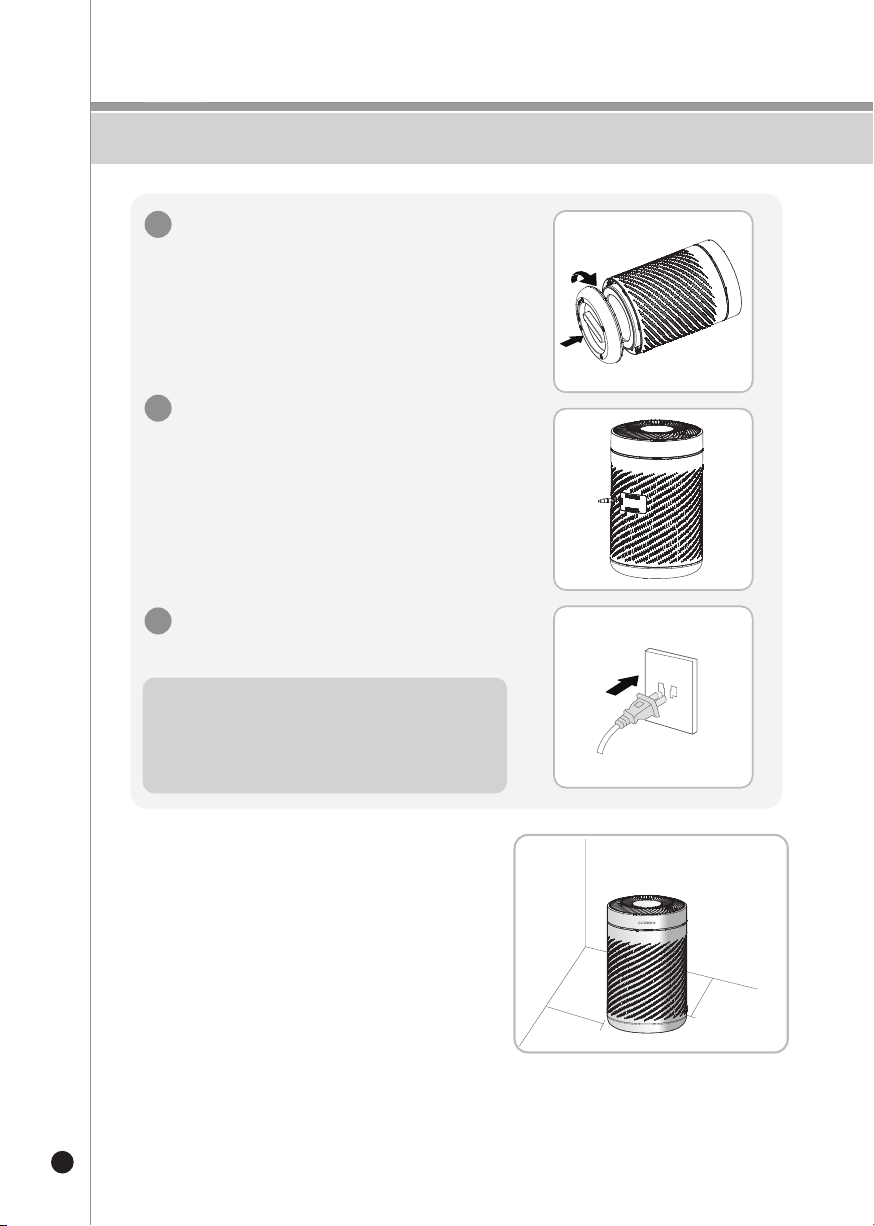
Remove the base plate by turning it
counterclockwise.
1
Remove the True HEPA filter by pulling it
out toward you.
2
Remove any protective film or plastic packaging
from the replacement filter.
3
Install the filter by securely and carefully inserting
it into the cavity of the purifier.
4
1
3
2
3
4
To ensure the purifier's longevity and the efficiency of its purification,
Resetting the Filter Replacement Indicator
Replace the base plate by turning it clockwise
until securely tightened.
Plug the power cord into an available wall outlet.
5
7
Plug in the adapter cable.
6
Press the Filter Replacement button for 3 seconds
after installing a new filter.
If it is the first time using the product, do not
reset the the filter replacement indicator.
Proper Placement
Replacing the Filter
6
1 ft (30cm)
1 ft (30cm)
6
7
5
* Note
Always ensure the base plate is securely tightened
before using the purifier. The purifier will operate
if the base is not tightened, however this may cause
irreversible damage to the filter or purifier.
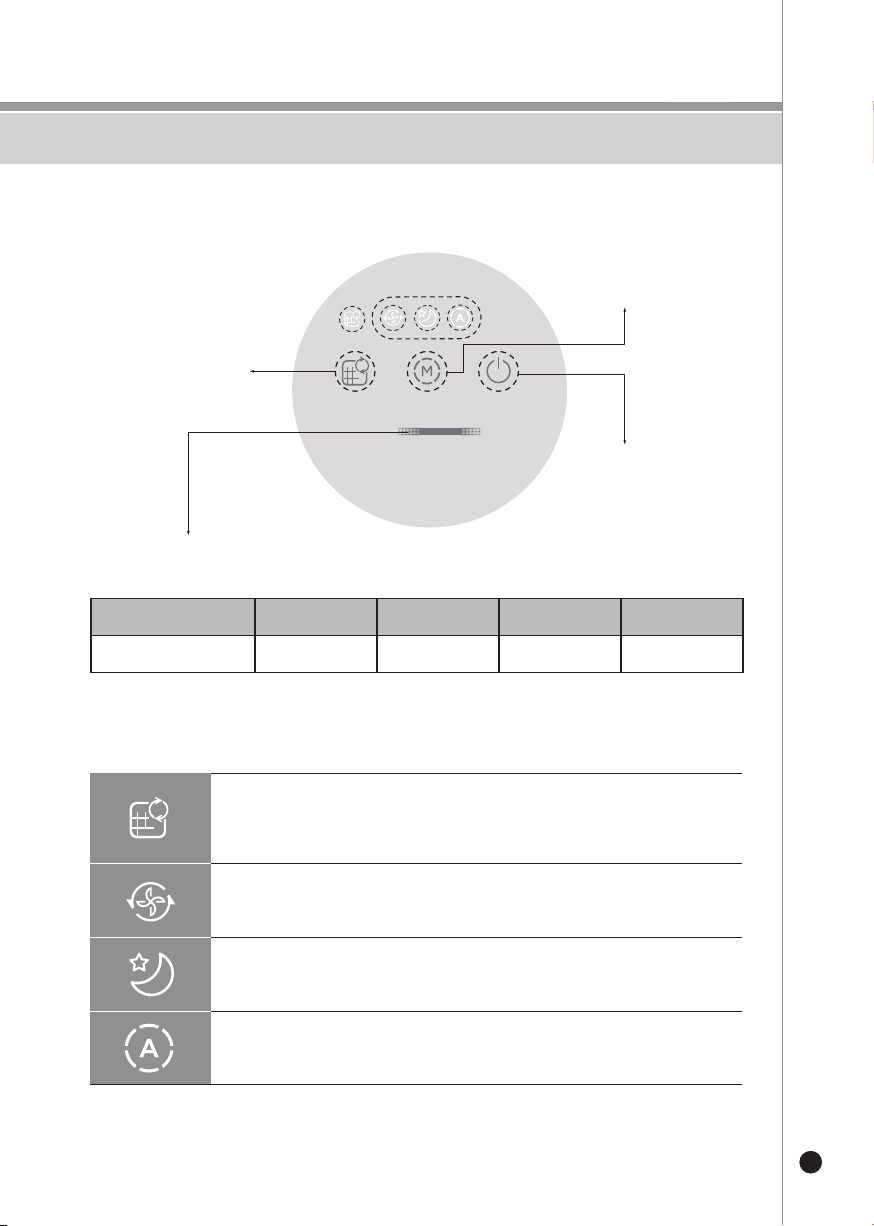
Filter Replacement Indicator
When illuminated, the True HEPA filter needs to be replaced.
For instructions on replacing the filter, see pages 5-6.
Button Descriptions
Turbo Mode
The purifier's fan will run at maximum speed for quick and efficient
purification.
Sleep Mode
The purifier's fan will run softly and at a slower speed to quietly purify the
air without disturbing your sleep.
Automatic Mode
The fan and wind speed will automatically adjust according to the surrounding
air quality.
7
Controls/Display Panel
Reset Filter Replacement
Button.
Press the button for
3 seconds to reset.
Mode Button
Cycles through Automatic
Mode, Sleep Mode, and
Turbo Mode with each press
Power Button
The digital air quality display screen shows the concentration of PM2.5 numerically.
It also represents the pollution level of solid contaminants in the air by displaying colors.
Air Pollution Level
Color
Bad
Red
Moderate
Orange
Good
Green
Excellent
Blue
Display and & Quality Indicator
About the Filter
8
About the Filter
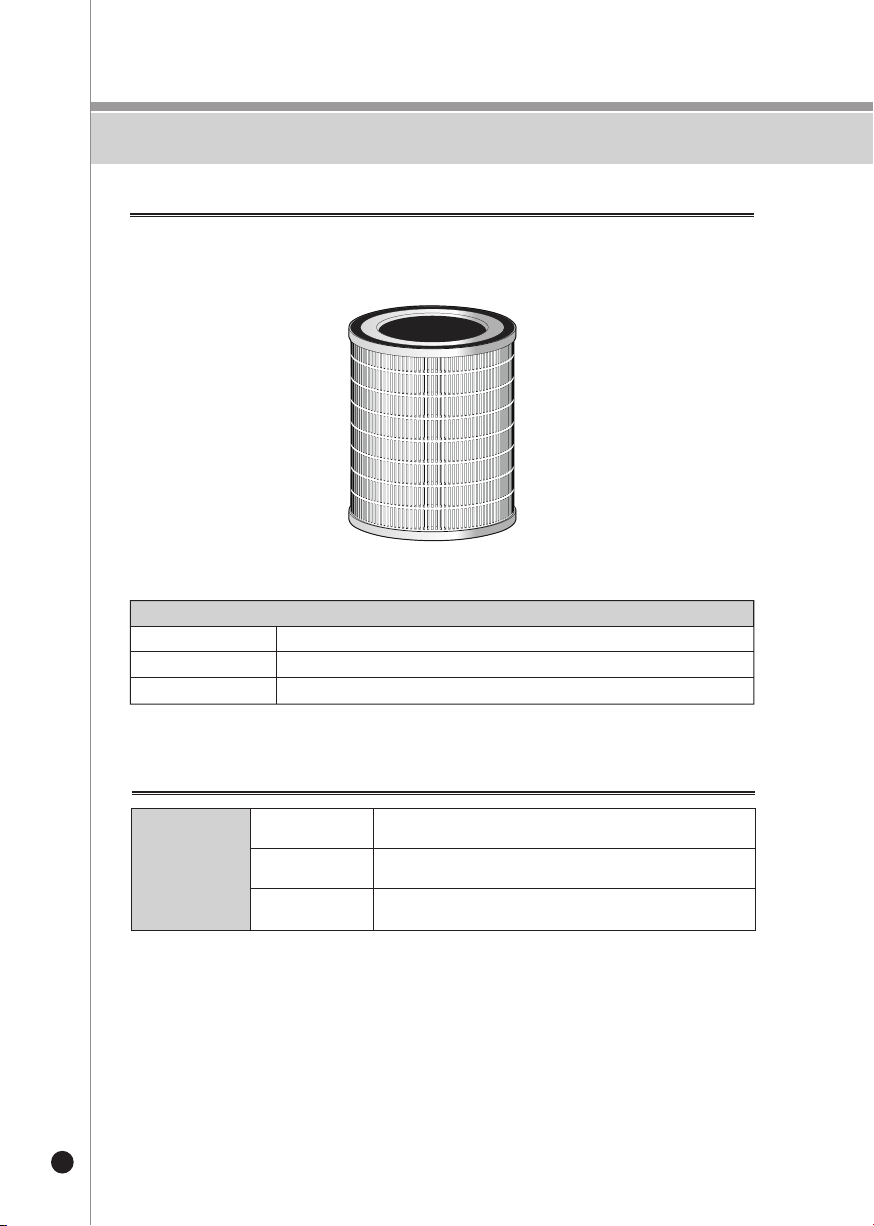
Pre-Filter
Optimally removes large dust, hair, and fur and maximizes the filter's life.
H13 True HEPA Filter
Removes at least 99.97% of air particles such as smoke, dust
pollen, dander, and mites.
Active Carbon Filter Absorbs unpleasant odors, harmful gases, food odors, cigarette
smoke, fur, and volatile organic compounds.
※
The picture may differ from the actual product.
True HEPA 3-Stage Filter
Stage 1 Pre-Filter
Stage 2 H13 True HEPA
Stage 3 Activated Carbon Filter
Air Purification
True HEPA
3-Stage Filter
Maintenance
• Ensure the product is unplugged before maintenance.
• Do not immerse the air purifier into water or any liquid.
• Do not use abrasive, corrosive or flammable cleansers (such as bleach or alcohol) to
clean any part of the unit.
• Do not wash the filter.
• Do not use a vacuum cleaner to clean the filter.
• Ensure the product is powered off and unplugged.
• Use a soft cloth with neutral cleanser to clean away any dust or debris from the surface
of the product and air intake/vent.
• If the purifier sits idle and remains unused for an extended period of time, turn the purifier
on occasionally to ensure the purifier's longevity.
• Take care to not drop any water or liquid into the purifier while cleaning.
Cleaning & Storage
1. Filter model :
CACF-AB
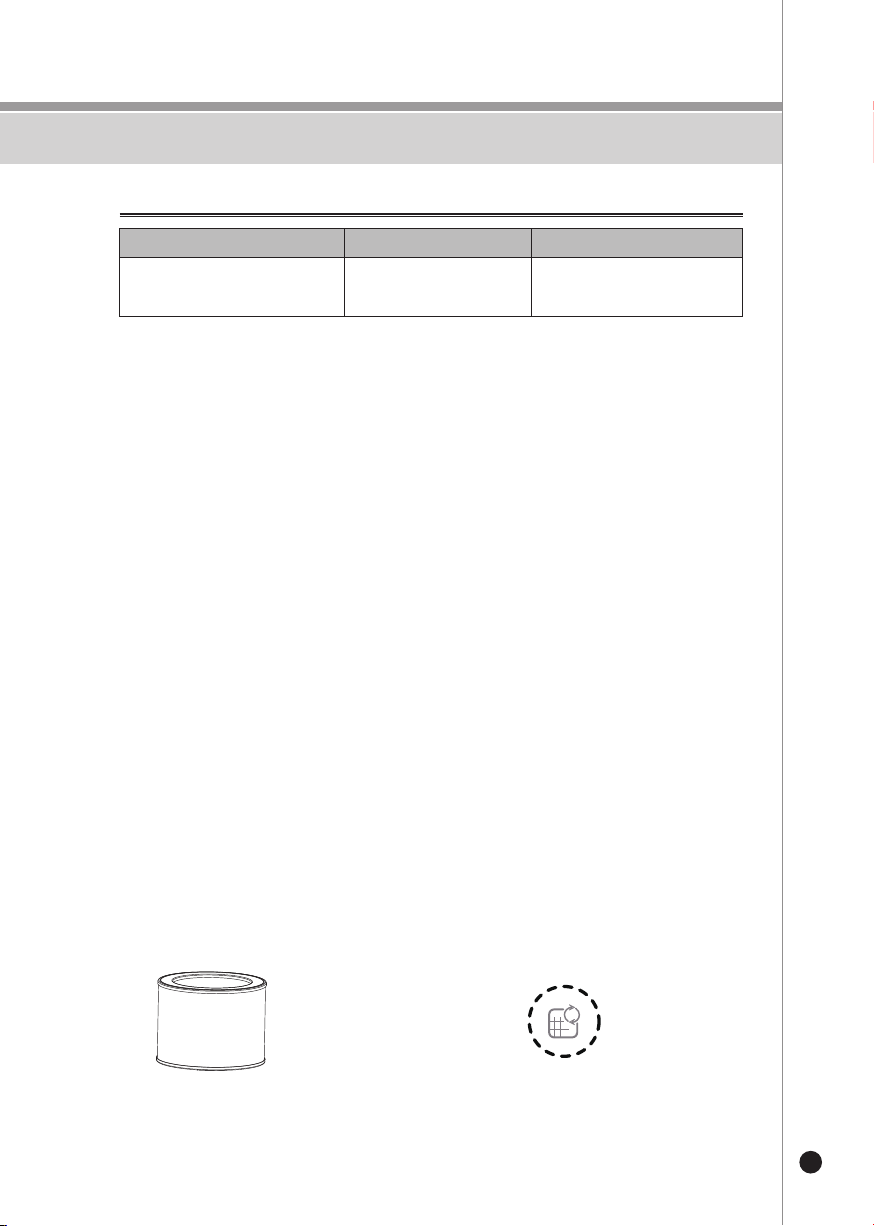
2. When the filter replacement light is on,
it reminds that the HEPA filter should be
replaced.
If it is not replaced in time, the Prompt will
appear every startup.
Replacement of the filter components
9
About the Filter
Filter Replacement Cycle
Filter Room size When to Replace
AHAM Verified Room Size
231 sqft On average, every 6 months*
* The expected filter replacement cycle is estimated by a close review of the filters to display its proper
performance. This is determined based on the product usage time (12 hours) per day and indoor pollution
index of 150㎍/㎥. Thus the cycle may shorten as the usage time or indoor pollution index goes up.
(Based on GB/T 18801-2015 standard)
H13 True HEPA
3-Stage Filter
Safeguards
10
Safety Instructions
Intended Use
•
The device is used exclusively for monitoring and cleaning air quality
indoors.
• Read all important instructions and safeguards before using
the purifier.
Safety instructions
•
Keep packaging material such as plastic wrapping, away from children
as they can pose a risk of suffocation.
•
Please follow the safety instructions to prevent fire or electrical shock.
• Only use the device indoors.
• Use only with appropriate wall outlets with the correct voltage output.
(see rating plate).
• Do not attempt to modify or repair the device.
• Do not use the device if the power cable or mains plug is
damaged or if the connection at the outlet is not stable.
• Make sure that the power cable does not get crushed while you
are using the device and that it cannot be damaged in any other
way. Place the cable so that no one will trip over it.
Do not pull the power cable tight.
• Disconnect the plug from the outlet for cleaning purposes and
whenever the device is not in use for a significant period of time.
• Do not touch the plug or the device if you have wet hands.
• Do not spray any insect repellent on or around the purifier.
• Do not use in rooms where the device may come into contact
with fuel vapor, oil vapor or metal dust.
• Do not use any volatile liquids, petroleum, kerosene, paint
thinner or polishing paste to clean the device. Such liquids may
damage the surface of the device.
• Do not expose the device to rain, water, moisture or high
humidity, and do not set it up in a bathroom or kitchen next to a sink.
• Make sure that no foreign objects get into the outlet grilles.
• Do not use near a naked flame or sparks.
• The device is not suitable for removing harmful gases (carbon
monoxide, e.g. from heating appliances).
• Unless they are supervised, the device must not be used by
those(including children) with reduced, physical, sensory and
mental abilities or who do not have the required experience
and knowledge.
Table of contents
Other Cuckoo Air Cleaner manuals

Cuckoo
Cuckoo CAC-F3010FW User manual

Cuckoo
Cuckoo CAC-I0510FW User manual

Cuckoo
Cuckoo AC-12ZH10F User manual

Cuckoo
Cuckoo CAC-D2020FW User manual

Cuckoo
Cuckoo CAC-G0910FW User manual

Cuckoo
Cuckoo CAC-J1510FW User manual

Cuckoo
Cuckoo CAC-AF1110FW User manual

Cuckoo
Cuckoo CAC-C1010FW User manual

Cuckoo
Cuckoo CAC-K1910FW User manual


