CSS Laboratories SBP-205 User manual

CSS Laboratories
Single Board Computer
SBP-205
User Guide

Copyright © 2002 CSS Laboratories, Inc. All rights reserved.
ProRack™, MaxPro™ and SBP-205™ are trademarks of CSS Laboratories, Inc.
All other trademarks are owned by their respective companies.
Published by CSS Laboratories, Inc.
1641 McGaw Avenue
Irvine, California 92614
http://www.csslabs.com/

•
•CSS Laboratories Contents •i
Contents
Section 1 – SBP-205 Features 1
Overview of the SBP-205..........................................................................................................1
Processor and Memory ................................................................................................ 1
Bus Architecture..........................................................................................................1
Peripheral Support....................................................................................................... 1
Operating System Compatibility .................................................................................1
System Integration.......................................................................................................1
Board Features........................................................................................................................... 2
Cache Memory ............................................................................................................2
Voltage Regulators ......................................................................................................2
Microprocessor ..........................................................................................................................3
Section 2 – Using the SBP-205 4
Connectors .................................................................................................................................4
Keyboard and Mouse................................................................................................... 5
IDE, Primary and Secondary....................................................................................... 6
Parallel Port .................................................................................................................7
Serial Ports (COM1, COM2).......................................................................................7
Diskette Drive (FDD) .................................................................................................. 8
Universal Serial Bus (USB).........................................................................................8
Processor Cooling Fan (CPU Fan) ..............................................................................9
Memory .....................................................................................................................................9
Memory Guidelines.....................................................................................................9
Installing and Removing Memory............................................................................. 10
Processor..................................................................................................................................11
Processor Overview................................................................................................... 11
Installing and Removing a Processor ........................................................................11
SBP-205 Installation................................................................................................................12
Overview ...................................................................................................................12
Installing the SBP-205 to a Passive Backplane .........................................................12
Jumper Switches ......................................................................................................................14
Jumper Switches Overview .......................................................................................14
Setting Jumper Switches............................................................................................16
BIOS Configuration.................................................................................................................17
BIOS Configuration Overview.................................................................................. 17
Setting Up CMOS—Standard Setup .........................................................................18
Setting Up CMOS—Advanced Setup .......................................................................19
Setting Up CMOS—Advanced Chipset Setup ..........................................................20
Configuring Power Management...............................................................................20
Configuring PCI/Plug and Play .................................................................................21
Setting Up Peripherals...............................................................................................22

•
•CSS Laboratories Contents •ii
Section 3 – Maintenance and Troubleshooting 23
Routine Maintenance ...............................................................................................................23
Troubleshooting....................................................................................................................... 23
Troubleshooting Tools...............................................................................................23
Troubleshooting by Direct Inspection .......................................................................24
Troubleshooting Using System Utilities....................................................................24
Troubleshooting Tables ............................................................................................. 25
Section 4 – Technical References 32
SBP-205 General Specifications..............................................................................................32
Memory Configuration ............................................................................................................34
System Interrupt Chart.............................................................................................................34
Notices and FCC Information 36
FCC Standards.........................................................................................................................36
Notice.......................................................................................................................................36
Glossary of Terms 37
Index 43

•
•CSS Laboratories Section 1 – SBP-205 Features •1
Section 1 – SBP-205 Features
Overview of the SBP-205
Processor and Memory
The SBP-205 is a single board computer (SBC) designed to support a single
Pentium®III processor with the following features:
Operating speeds up to 1GHz
Integrated 256 KB cache.
On-board 64-bit path memory supports up to 512MB of total memory
in two 168-pin DIMM sockets.
Bus Architecture
The SBP-205 is fully ISA and PCI Local Bus compatible. The PCI Local Bus is fully
compliant with the PCI Local Bus 2.1 specifications.
Peripheral Support
The SBP-205 supports a full complement of peripherals including:
Diskette/EIDE (up to four EIDE drives and two diskette drives)
Two serial ports
One parallel port
One PS/2 keyboard
One PS/2 mouse
Two USB ports
Operating System Compatibility
The SBP-205 is fully compatible with numerous operating systems including:
MS-DOS™ , Windows 98™ and Windows NT/2000™
OS/2
SCO UNIX™ , Interactive UNIX™ , QNX™
Linux
System Integration
The SBP-205 smoothly integrates with a CSS Laboratories passive backplane and
with the MaxPro tower servers and a number of ProRack rackmount systems.

•
•CSS Laboratories Section 1 – SBP-205 Features •2
Board Features
Specific features are discussed in the following sections. Important features include:
Cache Memory
Voltage regulators
DIMMs
Processor(s)
Connectors
Jumper switches
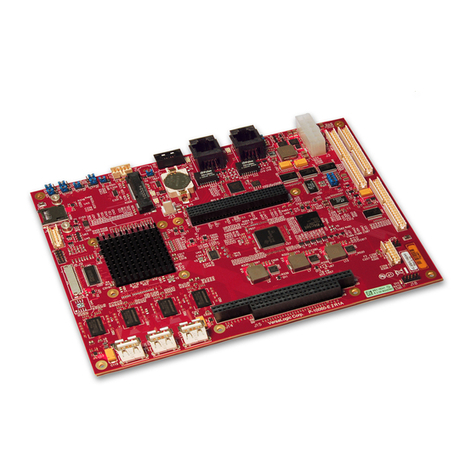
Figure 1 – SBP-205
Cache Memory
The SBP-205 provides an internal 64-bit wide, non-blocking, second level (L2)
cache supporting 256KB running at full CPU speed. The cache modules are inside
the CPUs, and provide 32KB of first level (L1) cache.
Voltage Regulators
The nine voltage regulators mounted on the SBP-205 provide compatibility with a
full line of processors.

•
•CSS Laboratories Section 1 – SBP-205 Features •3
Microprocessor
The SBP-205 supports a single Pentium III® processor operating at speeds up to
1GHz. The processor features include:
Dynamic Execution performance with Multiple Branch Prediction,
Data Flow Analysis and Speculative Execution.
Multi-transaction system bus.
Dual Independent Bus Architecture, which allows data access from
either bus simultaneously or in parallel.
Intel™ MMX multimedia technology.
32KB (16KB/16KB) non-blocking, L1 cache.
66/100/133 MHz bus speed.
Error correction, fault analysis, recovery and functional redundancy
checking for both system and L2 cache busses.

•
•CSS Laboratories Section 2 – Using the SBP-205 •4
Section 2 – Using the SBP-205
Connectors
Connector designations are stamped in white on the SBP-205 board.
SBP-205 Board Connector Descriptions
Connector Description
IDE1 Primary IDE connector
IDE2 Secondary IDE connector
USB1 USB0 (Universal Serial Bus 1)
USB2 USB1 (Universal Serial Bus 2)
FDD Diskette drive connector
LPT1 Parallel port
Mouse PS/2 mouse connector
Keyboard PS/2 keyboard connector
Chassis Fan Spare fan connector
VGA Video connector
COM1 Serial port 1 connector (COM 1)
COM2 Serial port 2 connector (COM 2)
Battery Battery
Power ATX power supply unit connector
CPU Fan Processor fan connectors

•
•CSS Laboratories Section 2 – Using the SBP-205 •5
The following illustration,
Figure 2 – SBP-205 Connectors, shows the on-board location of the connectors
detailed in the above descriptions chart.
Figure 2 – SBP-205 Connectors
Keyboard and Mouse
The 6-pin PS/2 keyboard and mouse connectors are keyed for proper installation.
PS/2 Keyboard Connector Pin Assignments
Pin Assignment Pin Assignment
1 Keyboard Data 4 +5 Vdc
2 Not Used 5 Clock
3 Ground 6 Not Used
PS/2 Mouse Connector Pin Assignments
Pin Assignment Pin Assignment
1 Mouse Data 4 +5 Vdc
2 Not Used 5 Clock
3 Ground 6 Not Used
IDE2
IDE1
USB2
USB1 FDD
LPT1
Keyboard
Mouse
COM2
COM1
Chassis
Fan
VGA
PowerCPU Fan Battery

•
•CSS Laboratories Section 2 – Using the SBP-205 •6
IDE, Primary and Secondary
The primary PCI IDE connector is designated IDE1. The secondary PCI IDE
connector is designated IDE2. Both are 40-pin connectors.
IDE Connectors (IDE1, IDE2) Pin Assignments
Pin Assignment Pin Assignment
1 Reset IDE 2 Ground
3 Host Data 7 4 Host Data 8
5 Host Data 6 6 Host Data 9
7 Host Data 5 8 Host Data 10
9 Host Data 4 10 Host Data 11
11 Host Data 3 12 Host Data 12
13 Host Data 2 14 Host Data 13
15 Host Data 1 16 Host Data 14
17 Host Data 0 18 Host Data 15
19 Ground 20 Key
21 DDRQ (DDRQ1) 22 Ground
23 I/O Write # 24 Ground
25 I/O Read # 26 Ground
27 IOCHRD 28 470Ω(ohm) pull down
29 DDACK0 (DDACK1) # 30 Ground
31 IRQ14 (IRQ15) 32 Reserved
33 Addr1 34 Reserved
35 Addr0 36 Addr2
37 Chip Select 1P (1S) # 38 Chip select (3P 3S)
39 Activity # 40 Ground
Table of contents
Other CSS Laboratories Single Board Computer manuals