
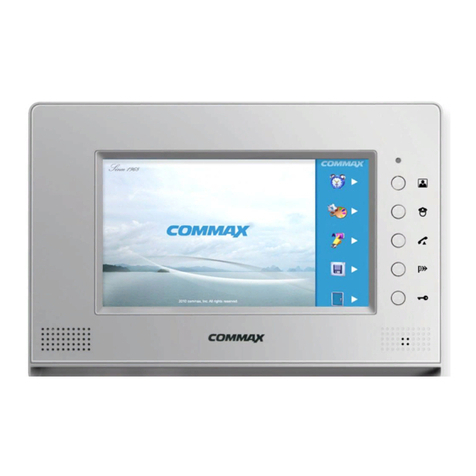
Commax CAV-705U User manual

•Thank you for purchasing COMMAX products.
•Please carefully read this User’s Guide (in particular, precautions for safety) before using a product and follow
instructions to use a product exactly.
•The company is not responsible for any safety accidents caused by abnormal operation of the product.
513-11, Sangdaewon-dong, Jungwon-gu, Seongnam-si, Gyeonggi-do, Korea
Int’l Business Dept. Tel. : +82-31-7393-540~550 Fax. : +82-31-745-2133
Web site : www.commax.com
•Thank you for purchasing COMMAX products.
•Please carefully read this User’s Guide (in particular, precautions for safety) before using a product and follow
instructions to use a product exactly.
•The company is not responsible for any safety accidents caused by abnormal operation of the product.
Home Automation CAV-705U
User Manual
www.safemag.ru
www.safemag.ru

1
Table of Contents
1. Greeting..............................................................................................................1
2. Warnings and caution.........................................................................................2
3. Parts and functions ............................................................................................4
4. Compositions .....................................................................................................5
5. Main menu..........................................................................................................6
6. Household setting (household No./ PIN / extension)..........................................7
7. Away mode setting ............................................................................................8
8. Individual door talk ...........................................................................................9
9. Guard station talk .............................................................................................11
10. Emergency function........................................................................................12
11. Telephone function(Telephone/Extension/Neighbor talk) ..............................13
12. Volume control(Receiving / calling / button tone)...........................................14
13. EMS function (Device control) ......................................................................15
14. Detoured call ..................................................................................................19
15. Delivery notice................................................................................................19
16. Guard security function .................................................................................19
17. Wiring ............................................................................................................21
18. Operation tips ................................................................................................23
19. Attention when in use.....................................................................................24
20. Miscellaneous.................................................................................................24
21. Specifications .................................................................................................25
1. Greeting
●Thank you for purchasing a COMMAX product
●Please, use the product after carefully reading this Manual
●This type of videophone can be used in apartments, villas and other buildings as a
multifunctional device with door opening, telephone conversation and guard station
control function
www.safemag.ru
www.safemag.ru

2
Please follow the things described below in order to prevent any
danger or property damage.
Warning
Caution
Prohibition.
No disassembly
No touch
Must follow strictly.
Shows plugging out the power cord
without an exception
Shows the warning and caution for an electric shock.
Shows the warning and caution for a fire.
It may cause a minor damage or injury if violated.
It may cause a serious damage or injury if
violated.
Power & Installation
Warning
Please don’t use several
products at the same time on
one power socket.
·It may cause a fire due to an
abnormal overheating.
Please don’tbend the power
cable excessively or it may
cause an electric shock.
·fire when using a damaged
power cable.
Please don’t handle the power
cable with a wet hand.
·It may cause an electric
shock.
Please plug out the power
cable from the socket when
not using it for a long period
of time.
·It may shorten the product
lifespan or cause a fire.
Please don’t install the
product in the place where
there is much oil, smoke or
humidity.
·It may cause an electric
shock or fire.
Please don’t install the
product with the lightening
and thunder.
·It may cause an electric
shock or fire.
Please don’tuse and connect
this product with other
products with different rated
voltage
·It may cause a disorder or
fire.
When installing the product
that generates heat, please
install the product away from
the wall (10cm) for the
ventilation.
·It may cause a fire due to
the increased internal
temperature.
2. Warnings and caution
www.safemag.ru
www.safemag.ru

3
Cleaning & Use
Please don’tdisassemble,
repair or rebuild this product
arbitrarily (please contact the
service center if a repair is
needed.
·It may cause an electric
shock or fire.
Please plug the power cable
firmly into the inner end
·It may cause a fire.
Please hold the plug tightly
when unplugging the power
cable (a part of the copper
wire may be disconnected if
the grabbing is only made on
the cord when pulling out the
cable).
·It may cause an electric
shock or fire
When connecting the power
cables after cutting the cable,
please install the product with
power off
·It may cause an electric
shock or fire
When installing the product,
please fix it firmly while using
the wall-mounting unit and
screws.
·It may cause an injury from
the falling object.
Please be careful when using
an AC circuit breaker since
there is a possibility of an
electric shock.
When cleaning the product,
please rub it with a soft and
dry cloth after plugging out
the power cable. (Please don’t
use any chemical products
such as wax, benzene, alcohol
or cleanser.)
Please don’t drop the product
on the ground and don’tapply
a shock .
·It may cause a failure.
Please use the designated
connection cable within the
maximum calling distance
designated for the product
·It may reduce the product
performance.
Please check the use voltage
and current for the DC-only
products and use the
appropriate rectifier.
·It may cause a fire.
Please avoid direct rays of the
sun or heating devices at a
time of installation.
·It may cause a fire.
Please don’t install the
product on an unstable place
or small support board.
·It may cause an injury if it
falls down while in use.
If an abnormal sound, burning
smell or smoke is coming out
of the product, please plug out
the power cable and contact a
service center.
·It may cause an electric
shock or fire.
Please don’t insert any
metallic or burnable materials
into the ventilation hole.
·It may cause an electric
shock or fire.
Please use only the designated
batteries for the products of
using DC power.
·It may cause an electric
shock or fire.
Cleaning & UsePower & Installation
Warning
Caution
www.safemag.ru
www.safemag.ru

4
No.
1
2
3
4
5
6
No.
7
8
9
10
11
PartPart
LCD & TOUCH SCREEN
Speaker
Power LED
MIC
Emergency button
Monitoring button
Guard button
Door release button
Talk button
Power switch
Wiring connector
3. Parts and functions
①
② ③ ④
⑤
⑥
⑦
⑧
⑩
⑪
⑨
CAV-705U
The product has hands-free conversation function : Please, press conversation
button to initiate or end a call
(Remark : When in stand by mode, only power button is on.)
▶The product is designated as Master and can be connected to multiple Slave units.
(Cannot be used as Slave terminal)
▶In case if multiple video-phone terminals are installed and the line of one terminal is busy, other
terminal can overtake the call.
▶In case if the line is busy and the call comes to the busy line, call notification only comes to the
terminal where call is directed
▶In case of emergency, notification is directed to all installed devices. Setting and resetting the
emergency situation are only available on terminals where 'Setting and resetting' button is
installed
In case if alarm is emitted, conversation through video phone terminal will be forcibly terminated.
(Alarm : emergency, Notification 1(Fire), Notification 2(Gas), Burglar 1, Burglar 2)
www.safemag.ru
www.safemag.ru

5
벽걸이 브라켓
본체 설치 스크류벽걸이 설치 스크류
본체( CAV-705U)
PHM 3 X 6 ZnYGH1T 4X50 ZnY
연결 컨넥터
2P(3EA)
POWER CORD 480 장원원형 단짹
연결 컨넥터
3P(1EA)
연결 컨넥터
4P(1EA)
MANUAL
사용설명서
연결 컨넥터
6P(2EA)
연결 컨넥터
8P(1EA)
연결 컨넥터
12P(1EA)
4. Compositions
▲Monitor
GH1T 4X18 ZNW
Screws for mounting Screws for main body Connectors Connectors Connectors
ConnectorsConnectorsConnectors
▲Wall bracket ▲User manual
www.safemag.ru
www.safemag.ru

6
①Door : Door camera monitoring and talk
②Guard : Guard station call and talk
③Telephone : Telephone and extension/neighbor talk
④EMS(Energy Management System) : Remote control(Secumax - remote metering and control)
Device control(Lighting / Gas valve / Boiler)
⑤Security1(Burglar1) : For setting Security1(Magnetic sensor)
⑥Security2(Burglar2) : For setting Security2(PIR sensor)
⑦Delivery : For checking delivery notice
⑧Away : For setting or releasing away mode
⑨Setting : For setting household Info, volume control, away mode details
5. Main menu
www.safemag.ru
www.safemag.ru

7
1. Household No. setting
It shows setting menu of building and room No. after pressing
「House Num」
icon
①Enter your preferable number and press 'Bldg' then number and press 'Rm' for room number.
Press for confirmation
(You can cancel the numbers you entered by pressing icon)
2. Household PIN setting
①It shows setting menu of PIN after pressing
「House PIN」
icon
②Enter your preferable 4 digits and press for confirmation
3. Extension No. setting
①It shows setting menu of extension No. after pressing
「extension」
icon
②Call guard station through sub phones. You can hear melody sound if installation is fine.
③Enter ID from 2 ~ 9 through 10-key button and press for confirmation
※
It shows the following screen after pressing
「「Setting 」」icon and
「「Household」」in order.
6. Household setting (household No./ PIN / extension)
www.safemag.ru
www.safemag.ru

8
①You can activate each icon to be operating in away mode.
(Devices and sensors should be installed before activating)
- Security1(Burglar1) : Activating security 1 sensor in away mode
- Security2(Burglar2): Activating security 2 sensor in away mode
- All lights off : Activating all lights Off in away mode
- Gas valve closed : Activating gas valve closed in away mode
- Standby power block : Activating standby power block device in away mode
●
●Time setting for security sensor in away mode (Value : 0 ~ 90 sec available)
①Setting delay time(Sec) - You can choose delay time after activating away mode.
(Security sensors get activated after delay time ends. - Default 60 sec
②Releasing delay time(Sec) - You can choose releasing time of reactivating sensors when you
come back home.
(It generates alarm signal after time set [Default 0 sec]
※
Factory default is 0 sec, so you should set the releasing time from 0 to 90 sec
※
It shows the following screen after pressing
「「Setting」」icon and
「「Setting
away mode」」in order.
7. Away mode setting
www.safemag.ru
www.safemag.ru

9
●
●How to use door monitoring/talk and basic function
1. Individual door monitoring and talk
①When you press
「Door」
icon, it shows door monitoring
②When you press
「Talk」
icon, it enables to talk
③When you press
「Door Release」
icon, it makes door open
2. When you get a call from entrance(Individual/Lobby)
①It shows visitor image when you get call sound(Call indication appears on the upper left of
screen)
②Press
「Talk」
icon(or button) to communicate.
③Press
「Talk end」
icon to end communication
※
You can make door open by pressing
「
「Door Release」
」
button while talking with visitor
●
●Volume control function
①You can control receiving sound volume through +, - of volume control while talking
②You can control call sound volume through +, - of volume control while monitoring
(You can make factory default by pressing
「Initial」
)
8.Individualdoor talk
www.safemag.ru
www.safemag.ru
Table of contents
Other Commax Intercom System manuals

Commax
Commax DR-2GN User manual

Commax
Commax DP-2S User manual

Commax
Commax DR-3PK User manual

Commax
Commax CM-810 User manual

Commax
Commax T45-K User manual

Commax
Commax CAV-43MG User manual

Commax
Commax DP-4VHP User manual

Commax
Commax APV-4RH User manual

Commax
Commax DRC-4DB User manual

Commax
Commax DRC-MSB User manual

Commax
Commax DRC-UC/RF1 Series User manual
Commax
Commax CDV-71AM User manual

Commax
Commax CDV-35N User manual

Commax
Commax CDV-50N Installation instructions

Commax
Commax CAV-71BQ User manual

Commax
Commax DRC-4BH User manual

Commax
Commax DRC-40KA User manual

Commax
Commax CIOT-1000Y User manual

Commax
Commax CIOT-G700M User manual

Commax
Commax DP-20H User manual





