ICS-1008/1016 INTERCOM STATION
1-2
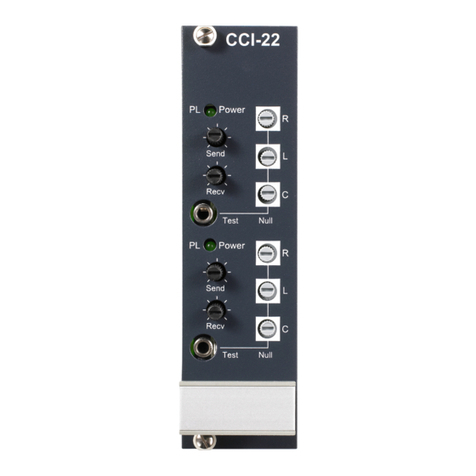
LEVEL CONTROLS
The Send level controls affect the level of the audio signals from the matrix to the
external party-line, and the Recv ("receive") control affects the level of the audio
from the party-line into the matrix.
The Send and Receive controls have a range of ± 13 dB. They are normally set at
the center position when used with Clear-Com party-line equipment.
POWER LED
The green Power LED lights when DC power is supplied to the interface. The
interface is powered by the party-line it is connected to.
Sidetone Null Adjustment
Normally this adjustment is made once during installation. If additional
adjustment is required use the following procedure.
"Sidetone" is the sound of the operator's own voice in his or her headset. In
interfaces, it is necessary to "null" (minimize) the sidetone when an external
party-line is placed in the matrix environment. Ideally, there should be no
portion of the Talk signal in the Listen signal. The side-tone nulling procedure
for each channel of the CCI-22 is described here.
The CCI-22 includes built-in nulling circuitry, including a test tone generator
and an accessory earphone. The earphone plugs into a 1/8-inch phone jack on
the front panel. When the earphone is plugged in, it automatically switches on a
test tone, and monitors the output of the null circuit.
Separate "R" (Resistance), "L" (Inductance), and "C" (Capacitance) controls
compensate for each component of the line's impedance, providing the best null
possible.
The null circuit is effective on line lengths between zero and 4000 feet with
impedances in the range of 120 to 350 ohms, and can reduce local audio in the
received signal by more than 30 dB over the frequency range of 200 Hz to 8 kHz.
To null one channel of the CCI-22:
1. Connect the external party-line devices to the CCI-22 channel.
2. Plug the accessory earphone into the front panel jack labeled "Test". This will
disconnect the interface from the matrix and enable the test oscillator. The
oscillator produces a square wave with both low and high harmonics, allowing
you to test all frequencies. The test tone pulses approximately every
half-second.
3. While listening to the test tone in the earphone, adjust the "R" control until
the tone is at a minimum.
4. Repeat Step 3 with the "L" and "C" controls. Because these controls interact
with each other, you will need to repeat steps 3 and 4 several times before you
will have minimized the test tone. Continue adjustment until the tone is
virtually inaudible. If an almost complete null cannot be obtained, it is likely
that something is wrong either with the wiring in the external party-line, or
with one of the other devices attached to the external party-line. Steps 5
through 9 are troubleshooting hints.