BT BT7660 Specification sheet

Quick Set-up and User Guide
You’ll need a Caller Display service from your network provider to use Call Blocking and other
Caller Display enabled features, including accessing your Calls list. Charges may apply.

If you need some help, call us on 0800 145 6789* or go to bt.com/producthelp
Important2
Your Answer Machine
Answer + Rec
Where to put your phone

0800 145 6789*bt.com/producthelp
If you bought more than one handset you’ll also get
Important
Only use the mains power adaptors, cables and rechargeable batteries supplied in this box or this
product might not work. Any replacement rechargeable batteries must be of the same type. BT
accepts no responsibility for damage caused to your BT7660 if you use any other type of batteries.

0800 145 6789*bt.com/producthelp
Where to put your phone
Important
1 Plug in
1 2 3

5
0800 145 6789*bt.com/producthelp
Talk/Standby time
Battery low warning
5
Rechargeable batteries
already fitted
Remove this tab
and charge batteries
for 16 hours before use.
2 Charge
16 hours
Important
Charge the handset batteries for 16 hours or your
phone might not work.

If you need some help, call us on 0800 145 6789* or go to bt.com/producthelp
Battery performance
Tip
If you need to take the batteries out, place your nger
in the groove at the bottom of the handset and lift
the cover up to release it. Then gently take the
batteries out.
If you need some help, call us on 0800 145 6789* or go to bt.com/producthelp
3 Go!
bt.com/producthelp
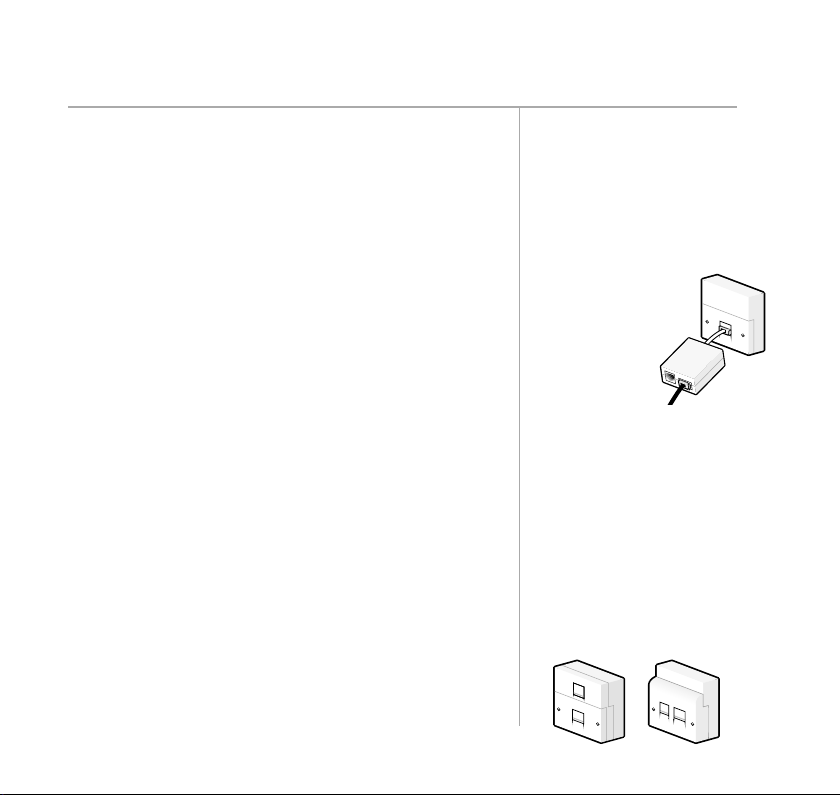
Using your BT7660 on a line
with broadband?
single
do
don’t
two
separate

If you need some help, call us on 0800 145 6789* or go to bt.com/producthelp
Quick set up guide
Getting to know your phone
Using the phone
22
22
22
22
22
Block nuisance calls25
25
25

If you need some help, call us on 0800 145 6789* or go to bt.com/producthelp
Phonebook
Caller display and the Calls List
Answer machine

If you need some help, call us on 0800 145 6789* or go to bt.com/producthelp
Settings
52
52
Base settings
Clock/Alarm55
55
55
55
Using additional handsets
Help
Table of contents
Other BT Cordless Telephone manuals

BT
BT Converse 1200 User manual

BT
BT Quartet Diverse 2015 User manual

BT
BT QUARTET 3100 User manual

BT
BT FREESTYLE 4500 User manual

BT
BT Freelance XT 3500 User manual

BT
BT Freelance XC 100 User manual

BT
BT BT6590 Instruction manual

BT
BT Synergy 3200 SMS User manual

BT
BT Diverse 4016 Micro User manual

BT
BT DIVERSE SOLO User manual

BT
BT BT3920 Specification sheet

BT
BT SYNERGY 4500 User manual

BT
BT ESPRIT 1200 User manual

BT
BT BT DIVERSE 5100 User manual

BT
BT ESPRIT 1250 User manual

BT
BT BT2100 Specification sheet

BT
BT FREESTYLE 3500 User manual

BT
BT Diverse 3010 User manual

BT
BT DIVERSE SOLO User manual

BT
BT ON-AIR 2300 SMS User manual