Braun 790CC-4 User manual
www.braun.com/register
Series 7
trimmer
trimmer
trimmer
Series 7
Series 7
Series 7
Type 5693
Modèle 5693
Modelo 5693
760 cc-4
99479749_760cc_NA_S1.indd 199479749_760cc_NA_S1.indd 1 26.02.2010 8:32:57 Uhr26.02.2010 8:32:57 Uhr
Stapled booklet, 110x200 mm, 42 p (incl. 6 p cover), 2/2c = black + HKS43N

Thank you for purchasing a Braun product.
We hope you are completely satisfied with
your new Braun shaver.
If you have any questions, please call:
US residents 1-800-BRAUN-11
1-800-272-8611
Canadian residents 1-800-387-6657
Merci d’avoir fait l’achat d’un produit Braun.
Nous espérons que vous serez entièrement
satisfait de votre nouveau rasoir Braun.
Si vous avez des questions, veuillez appeler
Braun Canada au : 1-800-387-6657
Gracias por haber comprado un producto
Braun.
Esperamos que quede completamente
satisfecho con su nueva afeitadora Braun.
Si tiene alguna duda, por favor llame al:
01(800) 508-5800
English 4
Français 18
Español 30
99479749/II-10
USA/CDN/MEX
99479749_760cc_NA_S2.indd 199479749_760cc_NA_S2.indd 1 10.02.2010 15:21:27 Uhr10.02.2010 15:21:27 Uhr
trimmer
trimmer
trimmer
on
off
on
off
trimmer
trimmer
trimmer
Series 7
Series 7
Series 7
34
6
5
1
2
9
8
10
11
12
15
14
17
18
19
7
20
16
13
trimmer
trimmer
trimmer
Series7
Series7
Series 7
99479749_760cc_NA_S3.indd 199479749_760cc_NA_S3.indd 1 10.02.2010 15:22:01 Uhr10.02.2010 15:22:01 Uhr

4
English
IMPORTANT SAFETY
INSTRUCTIONS
When using an electrical appliance, basic precautions should
always be followed, including the following:
Read all instructions before using this appliance.
When disconnected, the hand-held part of this shaving
appliance may be cleaned under water.
DANGER
To reduce the risk of electric shock:
1. Use only in dry conditions.
2. Do not submerge in water.
3. Do not reach for an appliance that has fallen into water. Unplug
immediately.
4. Do not use while bathing or in a shower.
5. Do not place, store or charge the appliance where it can fall or
be pulled into a tub or sink. Do not place in or drop into water or
other liquid.
6. Except when charging, always unplug this appliance from the
electrical outlet immediately after using.
7. Unplug this appliance before cleaning.
8. This appliance is provided with a special cord set with
integrated Safety Extra Low Voltage power supply. Do not
exchange or manipulate any part of it.
9. Do not use an extension cord with this appliance.
FOR HOUSEHOLD USE ONLY
99479749_760cc_NA_S4-42.indd 499479749_760cc_NA_S4-42.indd 4 17.02.2010 14:13:46 Uhr17.02.2010 14:13:46 Uhr

5
WARNING
To reduce the risk of burns, fire, electric shock, or injury to
persons:
1. Close supervision is necessary when this appliance is used by,
on, or near children or invalids.
2. Use this appliance only for its intended use as described in
this manual. Do not use attachments not recommended by the
manufacturer.
3. Never operate this appliance if it has a damaged cord or plug,
if it is not working properly, if it has been dropped or damaged,
or if the power supply has been dropped into water. Return the
appliance to a service center for examination and repair.
4. Keep the cord away from heated surfaces.
5. Never drop or insert any object into any opening.
6. Do not use outdoors or operate where aerosol (spray)
products are being used or where oxygen is being
administered.
7. Do not use this appliance with a damaged or broken foil, as
serious skin injuries may occur.
8. Always attach plug to appliance first, then to outlet.
To disconnect, turn all controls to «off», then remove plug from
outlet.
9. When plugging to an electrical outlet outside the USA, use a
plug adapter to match the outlet’s pin configuration.
10. Caution: The battery used in this device may present a fire or
chemical burn hazard if mistreated. Do not disassemble heat
above 100 °C (212 °F) or incinerate.
SAVE THESE INSTRUCTIONS
99479749_760cc_NA_S4-42.indd 599479749_760cc_NA_S4-42.indd 5 17.02.2010 14:13:47 Uhr17.02.2010 14:13:47 Uhr
6
Warning
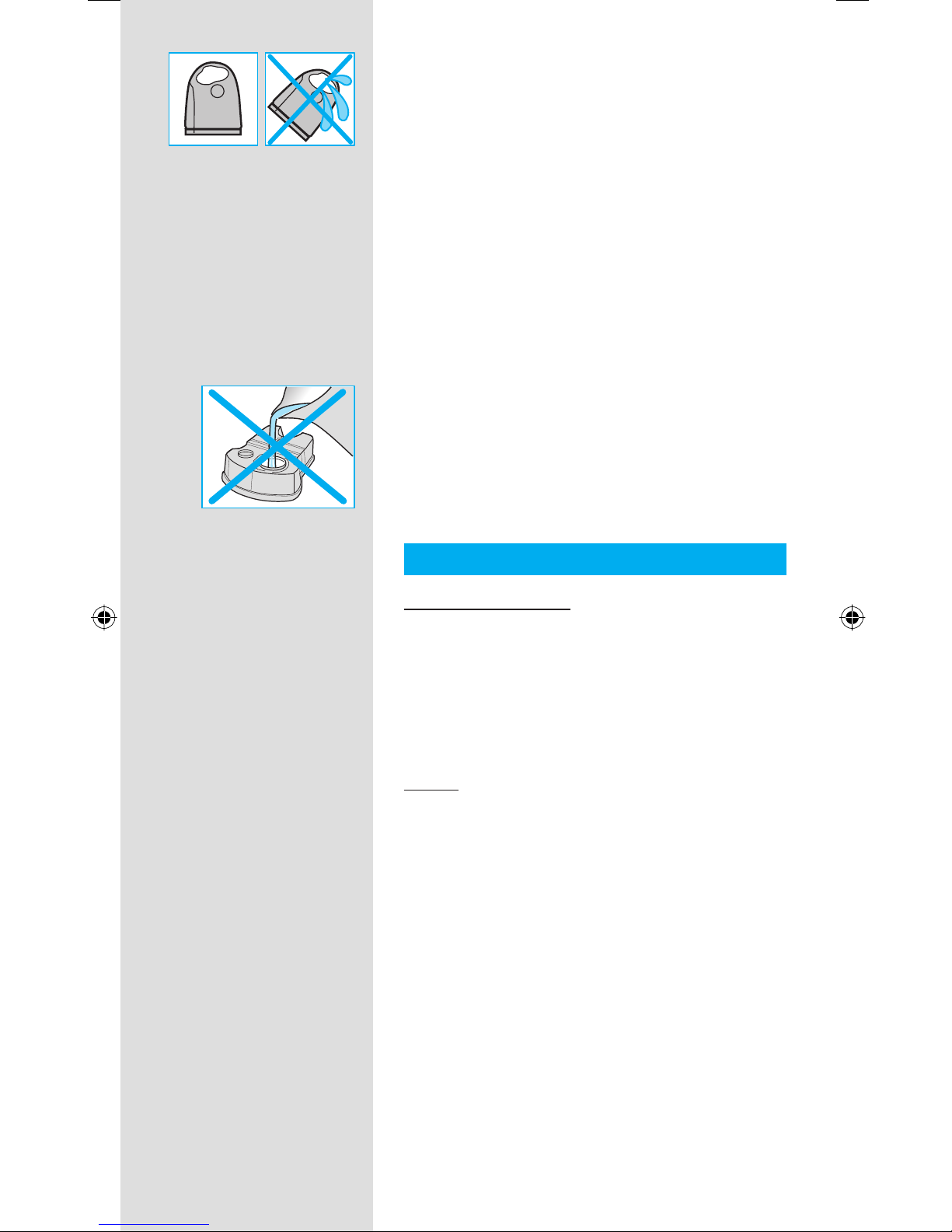
To prevent the cleaning fluid from leaking, ensure
that the Clean&Renew station is placed on a flat
surface. When a cleaning cartridge is installed,
do not tip, move suddenly or transport the
station in any way as cleaning fluid might spill
out of the cartridge. Do not place the station
inside a mirror cabinet, nor over a radiator, nor
place it on a polished or lacquered surface.
The cleaning cartridge contains a highly
flammable liquid so keep it away from sources
of ignition. Do not expose to direct sunlight and
cigarette smoking nor store it over a radiator.
Keep it out of reach of children.
Do not refill the cartridge and use only original
Braun refill cartridges.
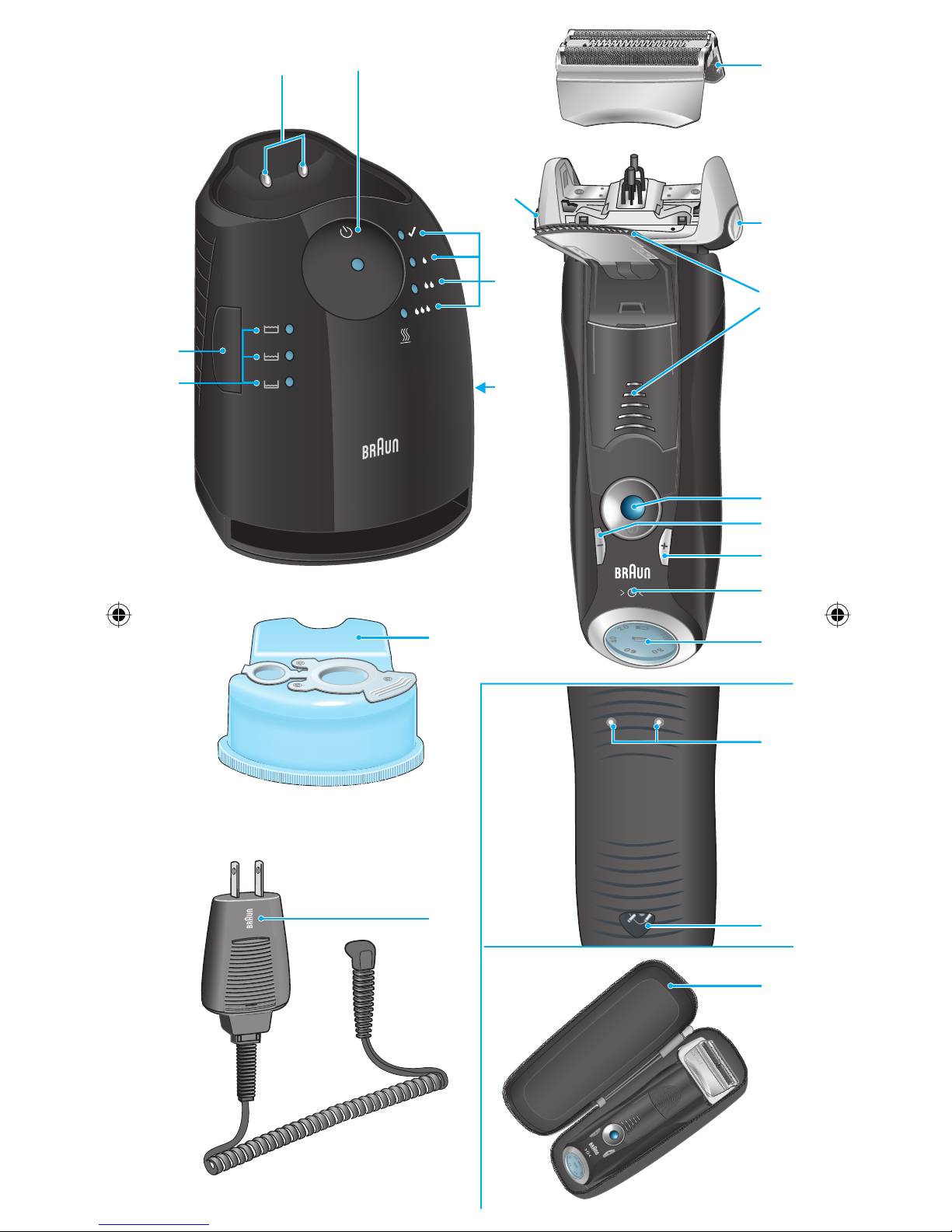
Description
Clean&Renew station
1Cleaning fluid display
2Lift button for cartridge exchange
3Station-to-shaver contacts
4Start button
5Cleaning program indicators
6Station power socket
7Cleaning cartridge
Shaver
8Foil & Cutter cassette
9Cassette release button
0Shaver head «lock» switch
qPop-out long hair trimmer
wOn/off switch
e(–) setting button (sensitive)
r(+) setting button (intensive)
tReset button
zShaver display
uShaver-to-station contacts
iShaver power socket
oTravel case
pSpecial cord set
99479749_760cc_NA_S4-42.indd 699479749_760cc_NA_S4-42.indd 6 17.02.2010 14:13:47 Uhr17.02.2010 14:13:47 Uhr
7
Before shaving
Prior to first use you must connect the shaver to
an electrical outlet using the special cord set p
or alternatively proceed as below.
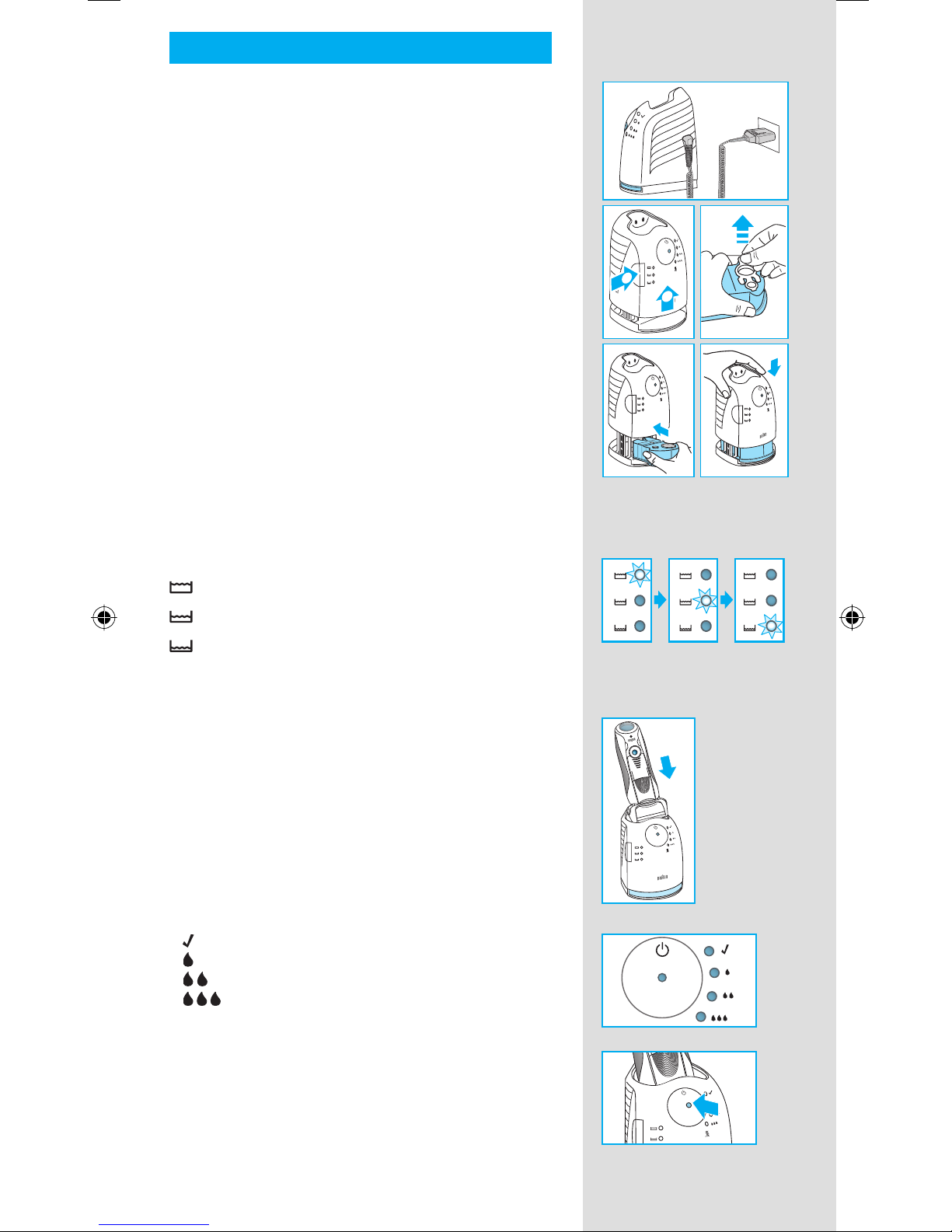
Installing the Clean&Renew station
• Using the special cord set p, connect the
station power socket 6to an electrical outlet.
• Press the lift button 2to open the housing.
• Hold the cleaning cartridge 7down on a flat,
stable surface (e.g. table).
• Carefully remove the lid from the cartridge.
• Slide the cartridge into the base of the station
as far as it will go.
• Slowly close the housing by pushing it down
until it locks.
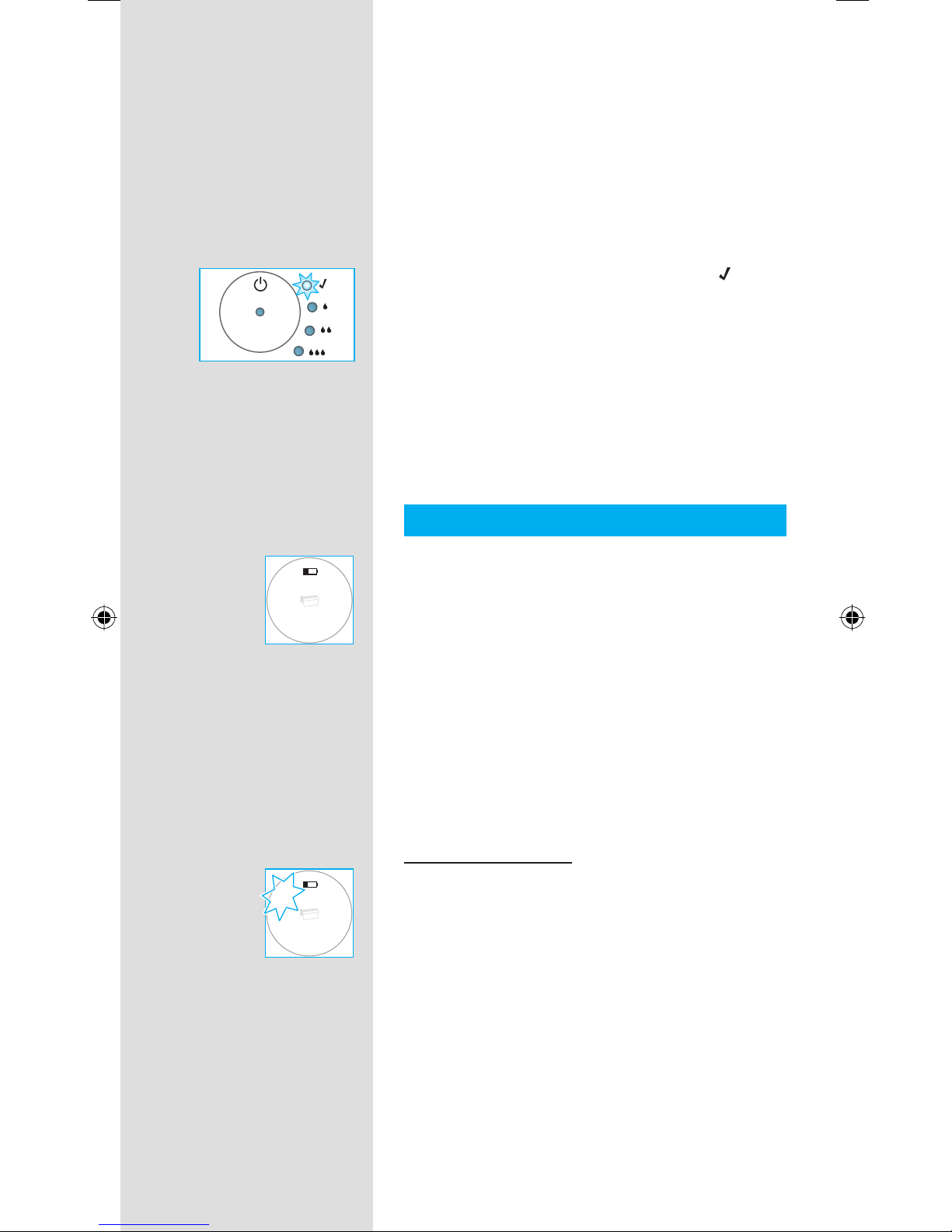
The cleaning fluid display 1will show how much
fluid is in the cartridge:
up to 30 cleaning cycles available
up to 7 cleaning cycles remaining
new cartridge required
Charging and cleaning the shaver
Insert the shaver head down into the cleaning
station. (The contacts uon the back of the
shaver will align with the contacts 3in the
cleaning station).
If required, the Clean&Renew station will auto-
matically charge the shaver. The hygiene status
of the shaver will also be analyzed and one of
the following cleaning program indicators 5will
light up:
« » shaver is clean
« » short economical cleaning required
« » normal level of cleaning required
« » high intensive cleaning required
If the station selects one of the required cleaning
programs, it will not start unless you press the
start button 4.For best shaving results, we
recommend cleaning after each shave.
new
f
a
s
t
c
l
e
a
n
f
a
s
t
c
l
e
a
n
f
a
s
t
c
l
e
a
n
2
1
new
f
a
s
t
c
l
e
a
n
f
a
s
t
c
l
e
a
n
f
a
s
t
c
l
e
a
n
2
1
trimmer
Series 7
trimmer
Series 7
99479749_760cc_NA_S4-42.indd 799479749_760cc_NA_S4-42.indd 7 17.02.2010 14:13:47 Uhr17.02.2010 14:13:47 Uhr
8
While cleaning is in progress, the respective
cleaning program indicator will blink. Each
cleaning program consists of several cycles,
where cleaning fluid is flushed through the
shaver head and a heat drying process dries
the shaver. Depending on the program selected
the total cleaning time will range from 32 to 43
minutes.
The cleaning programs should not be inter-
rupted. Please note that while the shaver is
drying, the shaving head may be hot and wet.
When the program is finished, the blue « »
indicator will light up. Your shaver is now clean
and ready for use.
Stand-by mode
10 minutes after completing the charging or
cleaning session, the Clean&Renew station
switches to the stand-by mode: The indicators
of the Clean&Renew station turn off.
Shaver display
The shaver display zshows the charge status
of the battery. During charging or when using the
shaver, the respective green charge status will
blink. When the battery is fully charged the green
charge status will light up continously, provided
the shaver is switched on or connected to an
electrical outlet.
Stand-by mode
(Shaver is switched off but connected to the
power grid)
Some minutes after completing the charging,
the shaver switches to the stand-by-mode:
The display turns off.
Low charge indicator:
The red «low» charge indicator blinks to
indicate that the charge has dropped below
20%, provided the shaver is switched on.
The remaining battery capacity is sufficient
for 2 to 3 shaves.
Charging information
• A full charge provides up to 50 minutes
of cordless shaving time. This may vary
according to your beard growth.
• The best environmental temperature for
charging is between 41 °F to 95 °F / 5 °C to
35 °C. Do not expose the shaver to
temperatures higher than 122 °F / 50 °C for
extended periods of time.
1
0
0
8
0
6
0
4
0
2
0
1
0
0
8
0
6
0
4
0
2
0
1
0
0
8
0
6
0
4
0
2
0
1
0
0
8
0
6
0
4
0
2
0
99479749_760cc_NA_S4-42.indd 899479749_760cc_NA_S4-42.indd 8 17.02.2010 14:13:48 Uhr17.02.2010 14:13:48 Uhr
9
Personalizing your shaver
Personalizing your shaver
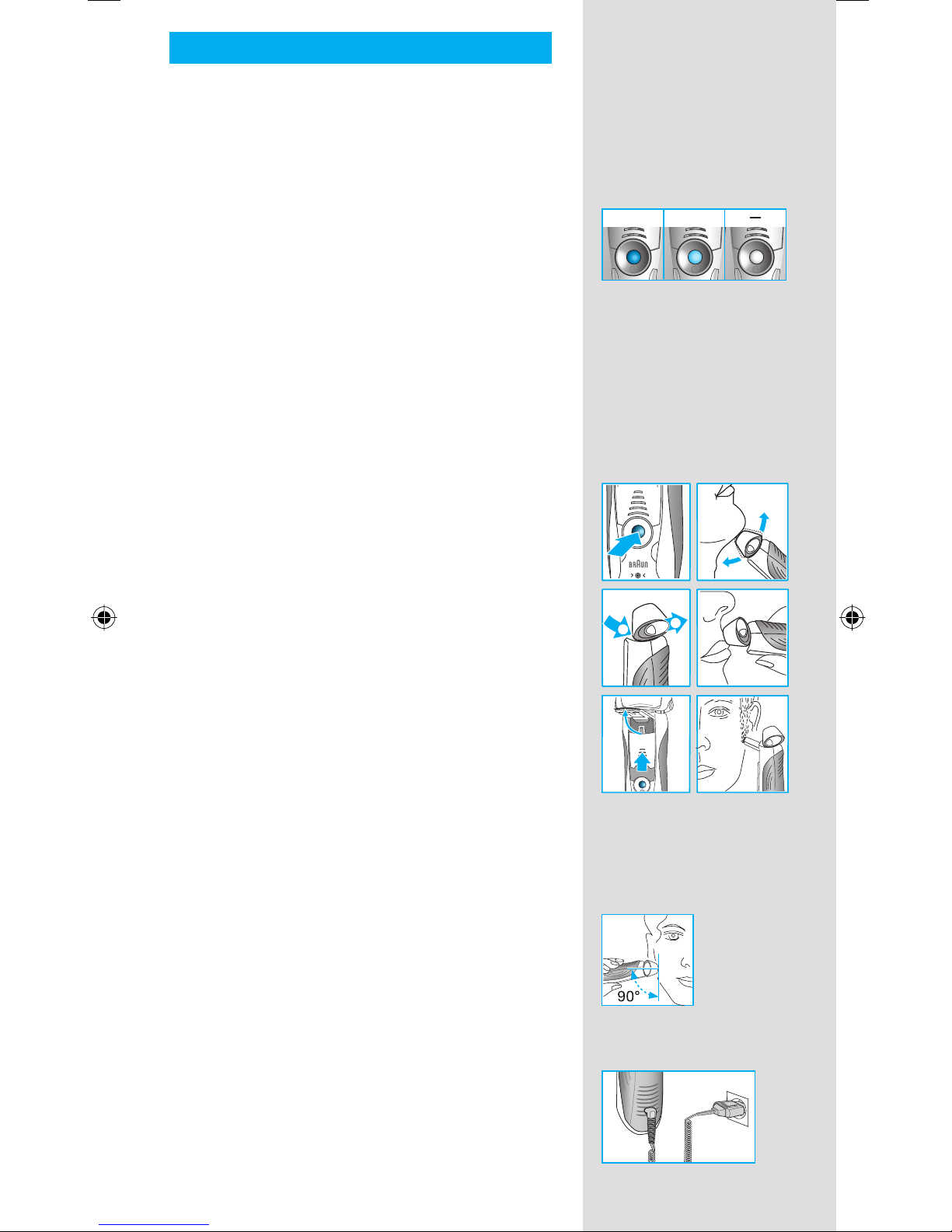
With the (–) eand (+) rbuttons you can choose
the best setting for shaving different areas of
your face and as per your specific needs.
The different settings are indicated by the pilot
light incorporated in the on/off switch w:
• dark blue (powerful shave)
• light blue (normal)
• white (for a thorough comfortable shave in
sensitive areas of your face such as neck)
For a thorough and fast shave we recommend
the (+) setting.
When switching on next time, the last used
setting will be activated.
How to use
Press the on/off switch wto operate the shaver:
• The pivoting shaver head and floating foils
automatically adjust to every contour of your
face.
• To shave hard to reach areas (e.g. under the
nose) slide the shaver head «lock» switch 0to
the back position to lock the pivoting head at
an angle.
• To trim sideburns, mustache or beard, slide the
pop-out long hair trimmer qupwards.
Tips for the perfect shave
For best shaving results, Braun recommends you
follow 3 simple steps:
1. Always shave before washing your face.
2. At all times, hold the shaver at right angles
(90°) to your skin.
3. Stretch your skin and shave against the
direction of your beard growth.
Shaving with the cord
If the shaver has run out of power (discharged),
and you do not have the time to recharge it in the
Clean&Renew station, you may also shave with
the shaver connected to an electrical outlet via
the special cord set p.
+normal
+normal
t
r
lock
12
trimmer
lock
lock
lock
+
t
r
lock
12
trimmer
lock
lock
lock
+
releaserelease
99479749_760cc_NA_S4-42.indd 999479749_760cc_NA_S4-42.indd 9 17.02.2010 14:13:48 Uhr17.02.2010 14:13:48 Uhr
10
Cleaning
Automatic cleaning
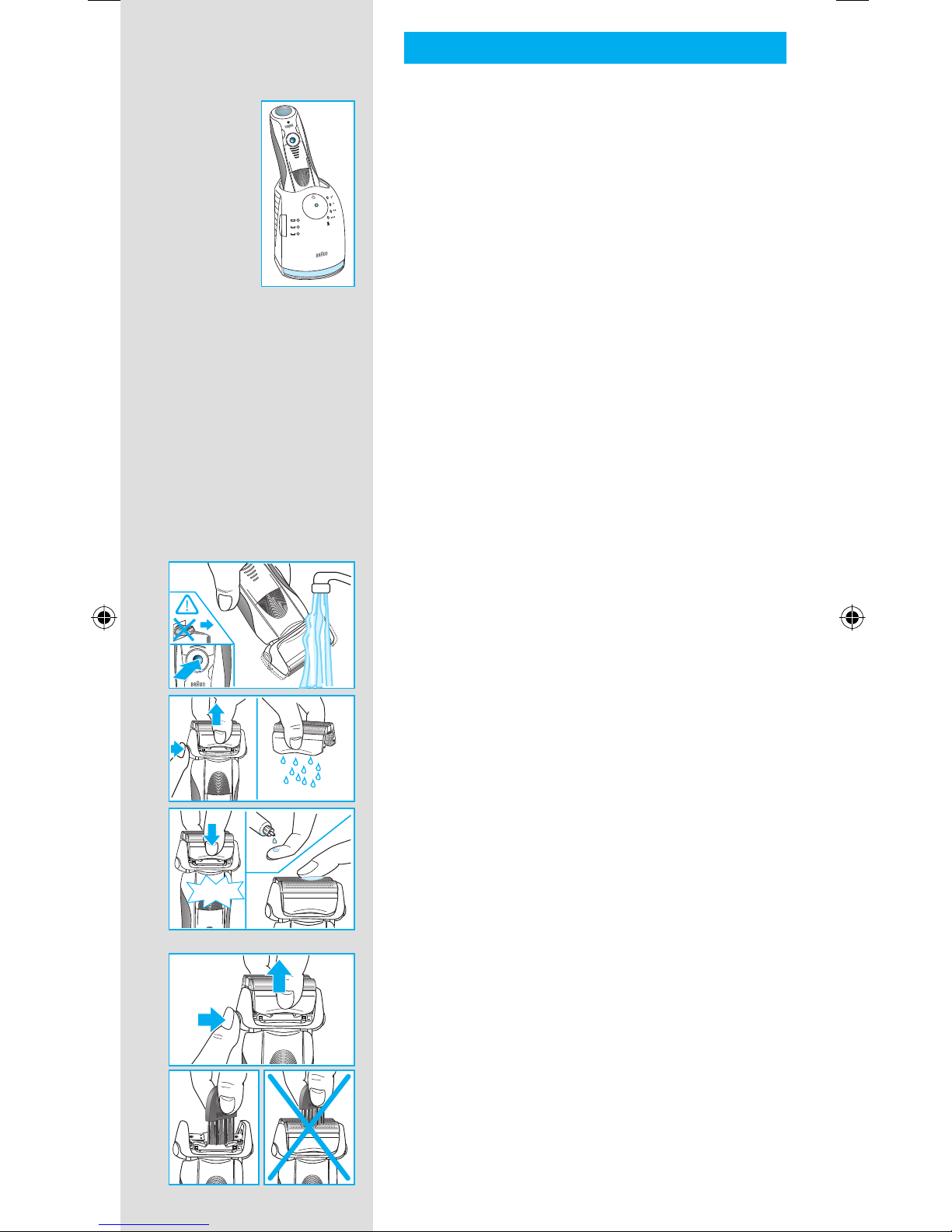
After each shave, return the shaver to the
Clean&Renew station and proceed as described
above in the section «Before shaving».
All charging and cleaning needs are then
automatically taken care of. With daily use, a
cleaning cartridge should be sufficient for about
30 cleaning cycles.
The hygienic cleaning cartridge contains alcohol,
which once opened will naturally evaporate
slowly into the surrounding air. Each cartridge,
if not used daily, should be replaced after
approximately 8 weeks.
The cleaning cartridge also contains lubricants,
which may leave residual marks on the outer foil
frame after cleaning. However, these marks can
be removed easily by wiping gently with a cloth
or soft tissue paper.
Manual cleaning
The hand-held unit shall be detached from the
power supply cord before cleaning. The shaver
shall not be used until it has dried.
Rinsing the shaving head under running water
is an alternative way to keep the shaver clean,
especially when travelling:
• Switch the shaver on (cordless) and rinse the
shaving head under hot running water.
You may use liquid soap without abrasive
substances. Rinse off all foam and let the
shaver run for a few more seconds.
• Next, switch off the shaver, press the release
button 9to remove the Foil & Cutter cassette
8and let it dry.
• If you regularly clean the shaver under
water, then once a week apply a drop of
light machine oil on top of the Foil & Cutter
cassette.
Alternatively, you may clean the shaver using the
brush provided:
• Switch off the shaver. Remove the Foil & Cutter
cassette 8and tap it out on a flat surface.
Using the brush, clean the inner area of the
pivoting head. However, do not clean the
cassette with the brush as this may damage it.
trimmertrimmer
oil
trimmer
er
re
le
a
s
e
trimmer
re
le
a
s
e
re
le
a
s
e
click! Series 7
Series 7
Series
Series
oil
trimmer
er
re
le
a
s
e
trimmer
re
le
a
s
e
re
le
a
s
e
click! Series 7
Series 7
Series
Series
re
le
a
s
e
re
le
a
s
e
re
le
a
s
e
Series 7
Series 7
re
le
a
s
e
re
le
a
s
e
re
le
a
s
e
Series 7
Series 7
99479749_760cc_NA_S4-42.indd 1099479749_760cc_NA_S4-42.indd 10 17.02.2010 14:13:49 Uhr17.02.2010 14:13:49 Uhr
Other manuals for 790CC-4
4
This manual suits for next models
1
Table of contents
Languages:
Other Braun Electric Shaver manuals


Braun
Braun Gillette Venus Bikini Precision User manual

Braun
Braun BT7330 User manual

Braun
Braun Pro Wet&Dry 9470cc User manual

Braun
Braun Contour Pro Special Edition Series User manual

Braun
Braun SERIES3 350CC User manual

Braun
Braun Silkpil Xpressive 7281 WD User manual

Braun
Braun Pro Wet&Dry 9419s User manual

Braun
Braun SensoFlex 6 Series User manual

Braun
Braun 9394cc User manual

Braun
Braun 5 Series User manual