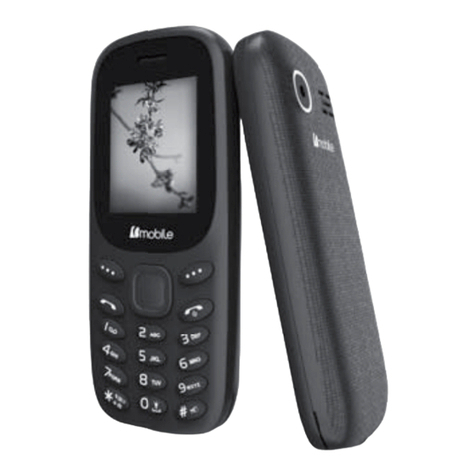
Bmobile W170 User manual

User
User Manual
Manual
GSM/WCDMA Digital mobile phone
Content
1.1 File manager............................................................... 5
1.2 Phonebook.................................................................. 6
1.3 Fun & Games..............................................................6
1.3.1 Java............................................................................. 6
1.3.2 Java settings................................................................ 6
1.3.3 Java default security....................................................6
1.4 Call center...................................................................6
1.4.1 Call history..................................................................6
1.4.2 Call settings.................................................................7
1.5 Messaging...................................................................8
1.5.1 Email...........................................................................8
1.6 Multimedia..................................................................8
1.6.1 Camcorder...................................................................8
1.6.2 Image viewer...............................................................9
1.6.3 Media player............................................................... 9
1.6.4 Photo editor.................................................................9
1.6.5 Sound recorder............................................................9
1.6.6 FM radio..................................................................... 9
1.7 Settings..................................................................... 10
1.7.1 Phone settings........................................................... 10

1.7.2 Network settings....................................................... 10
1.7.3 Security settings........................................................ 11
1.7.4 Connectivity..............................................................11
1.7.5 Restore factory settings.............................................12
1.7.6 Sound effects.............................................................12
1.8 User profiles............................................................. 12
1.9 Extra......................................................................... 13
1.9.1 Calculator..................................................................13
1.9.2 Unit converter........................................................... 13
1.9.3 Currency converter................................................... 13
1.9.4 Stopwatch..................................................................13
1.9.5 E-book reader............................................................13
1.9.6 Answer machine....................................................... 14
1.9.7 Organizer.................................................................. 14
1.10 Services.................................................................... 15
1.10.1 Internet services........................................................ 15
1.11 STK.......................................................................... 15

Technical reference
Phone
Model
Bmobile W170
Dimension(L×W×H)
121.6mm×51mm×12.6mm
Weight
86g
Li-ion battery
Model
Bmobile W170
Standard voltage
3.7V
Max. charge voltage
4.25V
Rated capacity
1000mAh
Portable battery charger
Model
Bmobile W170
Input
100-240V 0.15A
Output
5V 500mA
USB cable
Specification
Micro 5pin
Earpiece
Specification
3.5 interface

Appearance
Keys and functions
Name
Function in standby screen
Left soft key
Message
Right soft key
Menu
Dial key
- Answer incoming calls
- Dial numbers by SIM card in dial
screen
-Go to the call log list
End key
Short press:
- End the call or reject incoming call

- return to standby screen in any mode
Long press:
-Switch on/off phone
Direction
keys
UP key
STK
Down key
Contacts
Left key
Gallery
Right key
New message
OK key
Enter the dial-pad
Numeric
keys
1
Short press: go to dial screen and input
number 1
0, 2~9
Short press: go to dial screen, and input
numbers 0,2~9.
*
go to dial screen and input *.
#
go to dial screen and input #.
Note:
1. Keypad Lock: When keypad is locked, the phone is in
power-saving mode and user cannot operate phone functions
except answering incoming calls or charging;
2. Lock/unlock keypad: press Left soft key + * key
3. In this manual, “short press” a key means press a key then
immediately release it.
Functional Menus
1.1 File manager
Use File manager to organize your files in folders.
If a memory card is inserted, the files stored on it are organized
separately.
Select Phone or Memory card and select Options to browse, copy,

delete, and move the files in folders.
Open: Select to open the Received files, Images, Audio,
E-book, my music, and Photos.
Format: Format the phone or memory card.
1.2 Phonebook
You can store the name and telephone number in the phone
memory or the SIM card.
Up to 500 pairs of numbers and names can be stored in the phone
memory.
The storage capacity of the SIM card is determined by the
type of the card.
1.3 Fun & Games
1.3.1 Java
Java is a folder where downloaded games and applications are
stored.
1.3.2 Java settings
You can set the java audio(1-7 or off), Java backlight(on/off), Java
vibration(on/off), Select SIM and Heap size.
1.3.3 Java default security
Set Java default security related parameters as needed.
1.4 Call center
1.4.1 Call history
You can view Missed calls, Dialed calls, Received calls through
this function, as well as delete all log etc.

1.4.2 Call settings
Call waiting: After you choose Activate, the mobile phone
will contact the network. A moment later, the network will
make a response and send a message to acknowledge your
operation. If the call waiting function is activated, the
network will alert you and the mobile phone screen will
display the incoming call number if others are calling you
while you are already in a conversation.
Call divert: this network function enables you to forward
incoming calls to another number you have previously
specified.
Call barring: The call barring function enables you to bar
calls as needed. When setting this function, you need to use a
network barring code, which can be obtained from the
network operator. If the code is wrong, an error message will
be prompted on the screen. After selecting a call barring
option, continue to select Activate or Deactivate. The mobile
phone will prompt you to input the call barring code and then
contact the network. A moment later, the network will make
a response and send the operation results to the mobile
phone.
Advanced settings
Black list: you can set many numbers. When this Black list
is enabled, you won’t receive the calls from the numbers
entered in the Black list.
Auto redial: Set it to On or Off to enable or disable auto
redial. If you set Auto redial to On, the mobile phone will
automatically redial the number a moment later if the called
party does not reply. The number of auto redial times can be
set to a maximum of 10. In the auto redial period, you cannot
dial other numbers. To end the auto redial process, press the

End key.
Note: This function requires support from the network
operator to which the SIM card is registered.
Background sound: To set playback settings and effect list.
Call time reminder: To set single or circle tone in a call to
make you know the time.
Auto quick end: You can select to turn on/off this function.
Reject by SMS:You can select to turn on/off this function.
Answer mode: Select an answer mode as per your need.
1.5 Messaging
The phone supports Short Messaging Service (SMS) and
Multimedia Message Service (MMS). You can send text messages
and manage the messages that you sent and received.
In the standby mode, go to the main menu by pressing the left soft
key, and then select message center to enter into the message
interface.
In the message, select the options to see operate the other new
menu.
1.5.1 Email
You can create an account to send / receive E-mail.
1.6 Multimedia
1.6.1 Camcorder
This function enables you to take picture or record dynamic
pictures. you can press left or right direction key to zoom in or
zoom out; OK key to take picture or capture videos clip; left soft

key to access camcorder settings; right soft key to exit capture
interface.
1.6.2 Image viewer
You can view the pictures or images through this function.
1.6.3 Media player
Use this function to play audio and video files. By pressing the
direction key can you control the playing process of video player:
play/pause(up direction key), fast forward (press and hold right
direction key) and rewind (press and hold left direction key). In
video player interface, press number key * to switch to full screen
play; you can press 2 or 8 key to tune volume.
1.6.4 Photo editor
Photo artist: into the memory card in the select photos, can
be automatically change the size, the main screen size of the
cutting operation.
1.6.5 Sound recorder
Access this option, you can make a recording.
Start to record: Press the up direction key to begin and
press the right soft key to stop. The file will be manually
saved. Press the end key to quit without the recording file
saved.
Note: The recording time depends on the memory capacity of the
mobile phone.
1.6.6 FM radio
Your phone is equipped with an FM radio. You can use the
application as a traditional FM radio with automatic tuning and

saved channels. You can listen to it while running other
applications.
1.7 Settings
1.7.1 Phone settings
Time and date: set home city, the time/date format and
update with time zone.
Schedule power on/off: The mobile phone provides 4 times
for scheduled power on and off. You can set status and time
for each scheduled time.
Language: You can select language for menu operation.
Preferred writing language:Select an input method based
on your needs
Display: You can set wallpaper, screen saver, power on/off
display, main menu style, show date and time and clock type
through this function.
Themes: Activate the theme as per your need.
Greeting text:You can choose to boot on / off greeting.
Dedicated key: You can assign the direction key as
shortcuts to important functions. Press the corresponding
direction key in standby mode to start the function.
Auto update time: Can auto update the time with network.
Flight mode: Set the Flight mode power on /off.
Misc. settings: you can set signal LED, brightness and time
of the LCD backlight.
1.7.2 Network settings
Contact the network operator to obtain the network services. Then
you can set network selection, preferred networks, service
Table of contents
Other Bmobile Cell Phone manuals

Bmobile
Bmobile QS210-LQ200 User manual

Bmobile
Bmobile BL54 User manual

Bmobile
Bmobile C450 User manual

Bmobile
Bmobile AX1010 User manual

Bmobile
Bmobile S245 User manual

Bmobile
Bmobile AX1045e User manual

Bmobile
Bmobile FUN4 User manual

Bmobile
Bmobile AX660 User manual

Bmobile
Bmobile AX Series User manual

Bmobile
Bmobile K340 User manual

Bmobile
Bmobile QS720 User manual

Bmobile
Bmobile AX922 User manual

Bmobile
Bmobile C220 User manual

Bmobile
Bmobile Z01 User manual

Bmobile
Bmobile SERIE AX User manual

Bmobile
Bmobile AX1015 User manual

Bmobile
Bmobile AX Series User manual

Bmobile
Bmobile AX1091 User manual

Bmobile
Bmobile AX620 User manual

Bmobile
Bmobile AX705 User manual