Blueview BV-3100 User manual

BV-3100 Mobile Acoustic Underwater Vision® System
!"#$%"
#&%%'(&$&"

BlueView Technologies has made every effort to ensure the accuracy and completeness of this
document; however, because ongoing development efforts are made to continually improve the
capabilities of our products, we cannot guarantee the accuracy of the contents of this document. We
disclaim liability for errors, omissions, or future changes herein. For the most up to date information
read the help.txt file in the roViewerE software.
Copyright © 2003-2009 BlueView Technologies Corp. All rights reserved. No part of this publication
may be copied, reproduced, or translated, without the prior written consent of BlueView Technologies.
No part of this publication may be stored or transmitted in any electronic form without the prior
consent of BlueView Technologies. Any unauthorized use is a violation of copyright laws.
Warning! This product contains lead, a chemical known to the state of California to
cause cancer, birth defects and other reproductive harm. Handling and/or opening this
unit may result in exposure to lead, in the form of solder.
Warning! Disassembly and repair of this electronic unit should only be performed by
authori ed service personnel. Any modification of the serial number or attempt to repair
the original equipment or accessories by unauthori ed individuals will void the
warranty.
Warning! Changes or modifications to this unit not expressly approved by the party
responsible for compliance may void the any product warranty. This includes the
installation an operation of any not approved software .
Warranty Information
The BV-3100 is backed by a standard 12-month parts and labor warranty policy.
For more information on warranty and/or maintenance issues please call BlueView Technologies at
206.545.7260.
BV-3100 User’s Handbook 15 April 2009
Page 1

IMPORTANT SAFEGUARDS
When using ele tri al produ ts, basi safety pre autions should always be followed, in luding the
following:
READ ALL INSTRUCTIONS BEFORE USING
DANGER – To reduce the risk of electrocution:
" Always unplug the BV-3100 control box immediately after using.
" Do not place or store the control box where it can easily fall or be pulled into water.
)" If the box does fall in the water, unplug before retrieving.
WARNING – To reduce the risk of burns, electrocution, fire, or injury to persons:
1. Use this sonar only for its intended use as described in this manual. Do not use attachments not recommended by BlueView
Technologies.
2. Never operate this product if it has a damaged cord or plug, if it is not working properly, if it has been dropped or damaged, or
if the control box has been dropped into water.
3. Keep cords away from heated surfaces.
4. Connect this product to a properly grounded outlet only. See grounding instructions.
SAVE THESE INSTRUCTIONS
GROUNDING INSTRUCTIONS
This product should be grounded. In the event of an electrical short circuit, grounding reduces the risk of electric shock by providing an
escape wire for the electric current. The BV-3100 control box is equipped with a cord having a grounding wire with a grounding plug. The
plug must be plugged into an outlet that is properly installed and grounded.
DANGER – Improper use of the grounding plug can result in a risk of electric shock.
If repair or replacement of the cord or plug is necessary, do not connect the grounding wire to either flat blade terminal. The wire
with insulation having an outer surface that is green with or without yellow stripes is the grounding wire.
Check with a qualified electrician or serviceman if the grounding instructions are not completely understood, or if in doubt as to
whether the product is properly grounded.
This product is factory equipped with a specific electric cord and plug to permit connection to a proper electric circuit. Make sure
that the product is connected to an outlet having the same configuration as the plug. No adapter should be used with this product. Do not
modify the plug provided—if it will not fit the outlet, have the proper outlet installed by a qualified electrician. If the product must be
reconnected for use on a different type of electric circuit, the reconnection should be made by qualified service personnel.
If it is necessary to use an extension cord, use only a three wire extension cord that has a three-blade grounding plug, and a
three-slot receptacle that will accept the plug on the product. Replace or repair a damaged cord.
BV-3100 User’s Handbook 15 April 2009
Page 2

(*
*&+ """"""""""""""""""""""""""""""""""""""""""""""""""""""""""""""""""""""""""""""" ,
-$$""""""""""""""""""""""""""""""""""""""""""""""""""""""""""""""""""""""""""""""""""""""""""""""""""""""""""""""""""""""""""""""""""""""",
.%%'*"""""""""""""""""""""""""""""""""""""""""""""""""""""""""""""""""""""""""""""""""""""""""""""""""""""""""",
*&/'.0*& """"""""""""""""""""""""""""""""""" 1
2"""""""""""""""""""""""""""""""""""""""""""""""""""""""""""""""""""""""""""""""""""""""""""""""""""""""""""""""""""""""""""""""1
.34.567"""""""""""""""""""""""""""""""""""""""""""""""""""""""""""""""""""""""""""""""""""""""""""
*&))! """""""""""""""""""""""""""""""""""""""""""""""""""""""""""""
# """""""""""""""""""""""""""""""""""""""""""""""""""""""""""""""""""""""""""""""""""""""""""""""""""""""""""""""""""""
2"""""""""""""""""""""""""""""""""""""""""""""""""""""""""""""""""""""""""""""""""""""""""""""""""""""""""""""""""""""""""""""""
!.67 """""""""""""""""""""""""""""""""""""""""""""""""""""""""""""""""""""""""""""""""""""""""""""""""
8** """"""""""""""""""""""""""""""""""""""""""""""""""""""""""""""""""""""""""""""""""""""""""""""""""""""""""""" ,
*( """""""""""""""""""""""""""""""""""""""""""""""""""""""""""""""""""""""""""""""""""""""""""""""""""""""""""" 1
39-& """""""""""""""""""""""""""""""""""""""""""""""""""""""""""""""""""""""""""""""""""""""""""""""""""""""""""
Positioning controls ............................................................................................. 1
Pre-defined position buttons ................................................................................. 1
Numeric ‘tilt’ read-out ......................................................................................... 1
Numeric ‘pan’ readout ......................................................................................... 17
Target Depth’ selector ......................................................................................... 17
.0'%"""""""""""""""""""""""""""""""""""""""""""""""""""""""""""""""""""""""""""""""""""""""""""""""""""""""""""""""""""""
Pole case ........................................................................................................... 17
*&, """"""""""""""""""""""""""""""""""""""""""""""""""""""""""""""""""""""""""""""""""""""""""""""""""""" :
#&&%7#.&( """""""""""""""""""""""""""""""""""""""""""""""""""""""""""""""""""""""""""""""""""""""
#&&%7* """""""""""""""""""""""""""""""""""""""""""""""""""""""""""""""""""""""""""""""""""""""""""""""""
BV-3100 User’s Handbook 15 April 2009
Page 3

Chapter 1 Welcome
Overview
The BlueView BV-3100 Mobile Acoustic Underwater Vision® System is an inte rated
solution for operatin a boat mountable BlueView sonar mounted on a di ital pan
and tilt unit. The pole mounted sonar and Pan & Tilt connects with a sin le cable to
the BV-3100 control box, which connects to a PC via USB and Ethernet. The BV-
3100 system is airline checkable lu a e.
Standard Package Contents
Please note that special orders may include variations to this list. If you are not
sure or feel your packa e may be missin items, please contact BlueView at
206.545.7260.
Component
Sonar Module
Hard Shell Transport Case
Sonar, Pan & Tilt (SPT) Junction Box
Pan and Tilt Pole with 50 ft Cable Assembly
Transom Mount Assembly
7 ft. Ethernet Cable
Ru ed USB Cable
Power Cable
BV-3100 Quickstart Guide
BV-3100 Installation and Operation Manual
ProViewer Software CD
Sonar User’s Handbook
Hex Driver
Screw Kit
BV-3100 User’s Handbook 15 April 2009
Page 4

Chapter 2 Get to know the System Components
To familiarize yourself with the BV-3100 system, please review the identifications
charts below.
Mounting Pole
Sonar Mounting Pole Connectors
BV-3100 User’s Handbook 15 April 2009
Page 5
Main Pole Connector: This connector provides power
and data from the Sonar Pan & Tilt Junction Box (SPT) to
both the sonar and pan/tilt
Sonar Cable: This connector provides power and data
from the SPT to the sonar
Pan and Tilt connector: This connector provides
power and control from the SPT to the pan/tilt unit

Sonar Pan & Tilt (SPT) Junction Box
The SPT junction box contains a power supply, a USB to RS-485 Converter and a
flash memory drive. The power supply provides power to both the pan and tilt unit
and sonar. The converter adds a COM port to the PC so the PC can communicate
with the pan and tilt via a USB port The flash memory contains the necessary
drivers for the USB to COM port converter. The Ethernet port on the control box
provides communication with the sonar. The SPT box can handle input AC power
between 110 and 240 volts.
BV-3100 User’s Handbook 15 April 2009
Page 6
;*
.*
#*!
,#*
.%
39
9.*;%%%9.
<$%39
*
SPT Bo Connectors

Chapter 3 BV-3100 Installation
After verifyin that all necessary components are present, you are ready to be in
inte ration of the BV-3100.
Assem ling the Pole
The followin instructions will walk you throu h all steps necessary to assemble the
pole, mount the sonar, and connect all required cablin .
1. Remove the pole unit from shippin case.
2. Place the top and bottom pole pieces end to end and pull the excess cable
throu h the top of the pole.
3. Rotate one of the pole se ments till the ali nment notches are adjacent to
each other.
4. Attach the lower section to the upper usin the provided cap screws. Insert
the bolt first throu h the unthreaded upper flan e and screw into the
threaded lower flan e.
BV-3100 User’s Handbook 15 April 2009
Page 7

5. Attach the sonar into the sonar clamp by loosenin the four cap screws,
slidin in the sonar and reti htenin the four cap screws.
BV-3100 User’s Handbook 15 April 2009
Page 8
NOTE: The sonar is inserted into the clamp such that its connector is on the same side
as the Pan & Tilt connector.
NOTE: Use the stickers and connector placement on the rear end cap of the
sonar to determine the up-down orientation of the sonar. If the sonar is
inverted, be sure to select the “inverted” option in ProViewer’s settin s.
!$%=%
#

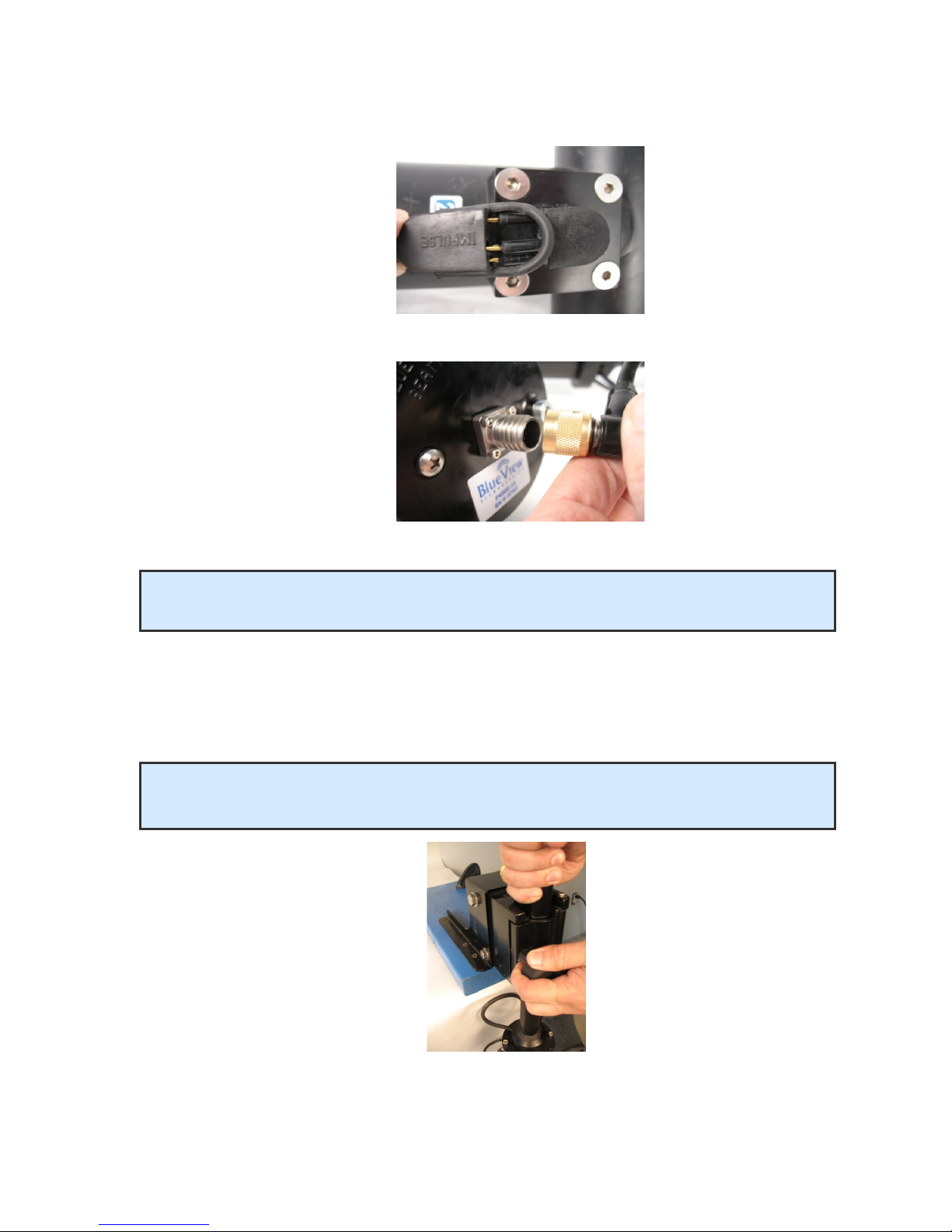
6. Connect the pan/tilt cable to the pan/tilt connector.
7. Connect the sonar cable to the sonar connector.
Pole Mounting
1. Securely attach the transom mount assembly to a fixed structure. The mountin
holes are sized for .25” bolts.
2. Place the pole into the clamp and close the clamp by ti htenin the threaded
knob.
3. Rotate the pole in the mount so that the sonar, when set to the ‘home position,’
points in the desired direction.
BV-3100 User’s Handbook 15 April 2009
Page 9
NOTE: It is the user’s responsibility to insure the pole mount is secured in a way that
will support the pole assembly.
NOTE: Do not let go of the pole assembly until the clamp is closed and the threads
have fully engaged.
Table of contents