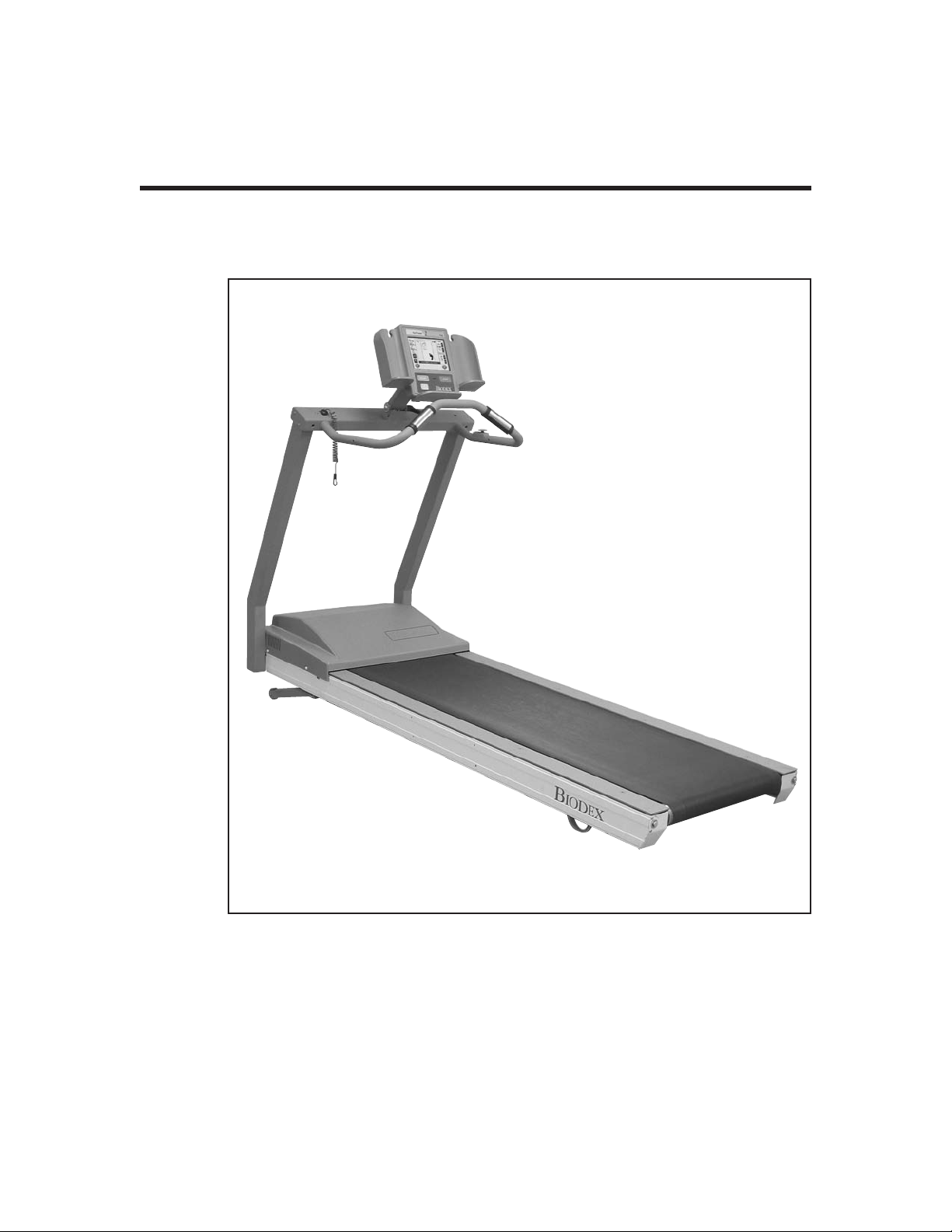
biodex 950-387 User manual

GAIT TRAINER 2
APPLICATION/OPERATION MANUAL
950-385
950-386
950-387
950-395
950-396
950-397
950-398
BIODEX
Biodex Medical Systems, Inc.
20 Ramsay Road, Shirley, New York, 11967-4704, Tel: 800-224-6339 (In NY and Int’l, call 631-924-9000), Fax: 631-924-9338, Email: [email protected], www.biodex.com
FN: 05-159 5/05

—II —
This manual covers installation and operation procedures
for the following products:
#950-385 Gait Trainer 2, 115 VAC
#950-386 Gait Trainer 2, 230 VAC
#950-387 Gait Trainer 2, 100 VAC (Japan)
#950-395 Gait Trainer 2, 230 VAC (German)
#950-396 Gait Trainer 2, 230 VAC (Italian)
#950-397 Gait Trainer 2, 230 VAC (French)
#950-398 Gait Trainer 2, 230 VAC (Spanish)
GAIT TRAINER 2
98-131
0413
NOTE: All or some of the following symbols, cautions, warnings and notes may apply to your Gait Trainer 2 and
correspond to this operation manual:
Symbol Meaning
Attention, consult accompanying documents.
Symbol signification: Attention, se référer à la notice.
CAUTION: Federal law restricts this device to sale by or on the order of a medical practitioner. When pre-
scribed for therapeutic purpose, a physician should clearly define the parameters of use (i.e., total work, maxi-
mum heart rate, etc.) to reduce the risk of patient injury.
!
!

1. INTRODUCTION ..........................................................................................................................1-1
2. CLINICAL CONSIDERATIONS FOR GENERAL USE ..........................................................2-1
3. SETUP ................................................................................................................................................3-1
•Connecting the Printer ................................................................................................................3-1
•Connecting the Safety Lanyard ..................................................................................................3-2
•Handrail Installation (Optional) ................................................................................................3-2
4. GAIT TRAINING MODE..............................................................................................................4-1
•The Gait Training Mode ..............................................................................................................4-1
•Power Up........................................................................................................................................4-1
•The Gait Trainer User Set-up Information Screen....................................................................4-2
•The Audio/Visual Biofeedback Screen......................................................................................4-3
•The Footfalls/Histogram Screen ................................................................................................4-4
5. NORMATIVE DATA ......................................................................................................................5-1
6. GAIT TRAINING OPERATION ..................................................................................................6-1
•Gait Trainer 2 Theory of Operation ............................................................................................6-1
•Gait Trainer 2 Operation ..............................................................................................................6-1
7. EXERCISE RESULTS ......................................................................................................................7-1
•Exercise Results Parameters ........................................................................................................7-1
•Exercise Results Screen Functions ..............................................................................................7-2
8. TREADMILL OPERATION ..........................................................................................................8-1
•Quick Start Operation ..................................................................................................................8-1
•Quick Start Track/Numeric Display Parameters ....................................................................8-2
•Manual Treadmill Operation ......................................................................................................8-3
•Manual Mode Exercise Track and Numeric Display Parameters..........................................8-4
9. TREADMILL PROFILES................................................................................................................9-1
•Choosing a Pre-defined Exercise Profile....................................................................................9-1
•Designing a Custon Exercise Profile ..........................................................................................9-3
10. GAIT TRAINER 2 UTILITIES ....................................................................................................10-1
•Configuration ..............................................................................................................................10-1
•Patient Management ..................................................................................................................10-3
•System Maintenance ..................................................................................................................10-5
11. MAINTENANCE ..........................................................................................................................11-1
•Daily Maintenance ......................................................................................................................11-1
•Quarterly Maintenance ..............................................................................................................11-1
•Annually or Every 1,000 Hours ................................................................................................11-1
•Maintenance Procedures ............................................................................................................11-2
12. TROUBLE-SHOOTING ................................................................................................................12-1
13. OPTIONAL ......................................................................................................................................13-1
•Installing the Elevation Rockers ..............................................................................................13-1
14. ELECTROMAGNETIC COMPATIBILITY ................................................................................14-1
15. SPECIFICATIONS ..........................................................................................................................15-1
16. REFERENCES AND BIBLIOGRAPHY ......................................................................................16-1
17. ASSEMBLY DRAWINGS AND SCHEMATICS ......................................................................17-1
TABLE OF CONTENTS
—III — CONTENTS

Designed specifically for rehabilitation and retraining of gait for patients with neurologic and
orthopedic gait dysfunctions, the Biodex Gait Trainer 2 provides both the audio and visual feed-
back needed to progress patients quickly and safely to normal ambulation.
The Gait Trainer 2 is easy to use. The clinician need only select the patient’s age and height for the
treadmill to automatically calculate the exact speed needed to achieve desired step cycle. The
rhythmic movement and the audio feedback provide patients with added stimulus for retraining
of neural pathways to improve gait pattern.
The Gait Trainer 2 promotes correct stride length for early phase patients. By starting out slowly
(with the zero starting speed and small .1 step cycle speed increments) it is possible to manually
position the patient’s lower extremities in the desired patterns for gait, thus reinforcing the prop-
er techniques early in the rehabilitation process. As the patient progresses, correct stride length is
coupled to the correct step cycle. When belt speed is increased, the patient must either take longer
strides or more strides to stay on target. Normative data allows clinicians to compare patient
progress to baseline norms.
Of course, the Gait Trainer 2 can also be used for many other rehabilitation treadmill applications.
In treadmill mode, its unparalleled speed control, durability, incline and decline in both forward
and reverse directions, digital feedback, low profile, and choice of handrail configurations make
it the ideal choice for virtually any patient young or old.
The Biodex Gait Trainer 2 comes with a printer which is easy to install and resides on the printer
stand. Options include -3 to 12% incline/decline (ideal for work with back, posture, lumbar spine
and patella patients,) and a choice of handrails.
1. INTRODUCTION
—1-1 — INTRODUCTION

!
The following clinical considerations should be observed for all patients who exercise on the
Biodex Gait Trainer 2. Additional clinical considerations, specific to gait training, are provided in
the chapter titled: Clinical Applications and References.
1. All patients should consult a physician before beginning any rehabilitation program.
2. Instruct patient on proper use and all Gait Trainer 2 safety features before beginning exercise.
3. Always attach the Safety Lanyard to the patient’s clothing or wrist before allowing exercise to begin.
4. Ensure patient has stretched and warmed-up prior to starting exercise.
5. Do not allow any patient to exercise unattended on the Gait Trainer 2. Never leave the Gait Trainer 2
running unattended.
6. Periodically monitor the heart rate of patients exercising on the Gait Trainer 2.
7. Begin all exercise at a slow pace, increasing speed gradually to patient tolerance and progressing toward
exercise goals. Always inform the patient immediately prior to increasing or decreasing speed or eleva-
tion.
8. If reversing belt direction, bring the Gait Trainer 2 to a complete stop and inform patient that the belt
will begin moving in the opposite direction.
9. Immediately discontinue exercise if patient feels faint, dizzy or short of breath.
10. Never allow anyone to step onto the Gait Trainer 2 while the treadbelt is in motion. Always stop the
Gait Trainer 2 prior to allowing the patient to step up onto the treadbelt.
11. Instruct patients to use the handrails when first learning to walk on the Gait Trainer 2.
1. Tous les patients doivent voir leur médecin responsable avant d’entreprendre la séance de rééducation.
2. Expliquer au patient la bonne utilisation des systémes de sécurité du tapis avant de démarrer la séance.
3. Connector toujours la sangle de sécurité aux vêtements du patient ou poignet avant que le patient ne
commence à travailler.
4. Vérifier que la patient s’est échauffé et a fait des étirements avant de commencer l’entraînement sur le
tapis.
5. Ne pas laisser le patient seul sur le tapis pendant la séance. Ne jamais laisser le tapis tourner sans
patient et sans surveillance.
6. Surveiller de temps à autrela fréquence cardiaque du patient pendant la séance.
7. Démarrer les protocloes à une vitesse lente et augmenter progressivement la vitesse en fonction de la
tolérance du patient et progres uers les objectifs de la séance. Signaler avant de l’appliquer tonte aug-
mentation ou diminution de vitesse ou d’inclinaison.
8. Avant de changer la direction de déplacement du tapis, arrêter le tapis complétement et expliquer au
patient que le tapis va démarrer dans le sens opposé.
9. Arrêter la séance immédiatement en cas de dyspnée, d’étourdissements ou d’autres signes de malaise.
10. Ne jamais faire monter personne sur le tapis pendant que le tapis est en marche. Arrêter toujours le
tapis avant que le patient ne s’y positionne.
11. Donner la consigne au patient d’utiliser les barres horizontales lors de sa premiére séance sur le tapis.
2. CLINICAL CONSIDERATIONS FOR GENERAL USE
—2-1 — CLINICAL CONSIDERATIONS FOR GENERAL USE

Figure 3.1. Attaching the Safety Lanyard, printer cable and printer.
Included with the Gait Trainer 2 are a printer, printer stand and Safety Lanyard. These should all
be attached/installed prior to operation of the Gait Trainer 2.
CONNECTING THE PRINTER
(See Figure3.1.)
The printer cable should be connected to the printer receptacle at the back of the display with the
USB cable end. Attach the opposite end of the cable to the back of the printer.The cordshould run
down the back of the display and over the motor cover so as not to be in contact with the moving
belt. Place the printer on the printer stand. Ensurethat the printer stand is positioned next to the Gait
Trainer 2 but far enough away so as not to come in contact with the Gait Trainer 2’s moving parts.
Note: The printer receptacle is for the printer only. Do not plug anything else in this receptacle.
Nota: La prose pour imprimante est destinée à la seule imprimante. Ne brancher rien d’autre dans cette prise.
CONNECTING THE SAFETY LANYARD
(See Figure 3.1.)
A Safety Lanyard is provided. The Gait Trainer 2 will not operate unless the lanyard is attached.
Attach the Safety Lanyard at the left corner of the top cross bar supporting the Display panel. The
round end of the Safety Lanyard attaches to the unit via a Velcro® brand hook and loop fastener.
The clip end of the lanyard should be attached to the patient’s clothing or wrist in a way that does
not interfere with the patient’s exercise.
NOTE: Disconnecting the Safety Lanyard (left side of Display/Control Panel) or pressing the red Safety
Stop (atop the right side of the Support Bar) at any time will cause the treadbelt to immediately ramp down
to a full stop and reset to 0.0 mph. The Display will read <Safety Lanyard Removed> and the treadbelt will
not restart until the Safety Lanyard is once again in position and/or <Start> is pressed following use of the
Safety Stop. Display data is not lost in either case. Data accumulation will resume once the lanyard is recon-
nected and <Start> has been pressed.
Attach Safety Lanyard
Attach Printer Cable
(behind display)
3. SET-UP
—3-1 — SET-UP

HANDRAIL INSTALLATION (OPTIONAL)
(See Figures 3.2 – 3.4.)
Figure 3.2.
Figure 3.3.
Figure 3.4. The Biodex Gait Trainer 2 comes with a sturdy support bar installed (Figure 3.2).
Optional Standard (Figure 3.3) and Geriatric/Pediatric handrails (Figure 3.4) are also available.
CONTENTS
SET-UP — 3-2 —

The Biodex Gait Trainer 2 comes with a sturdy support bar, but optional Standard Rehab and
Geriatric/Pediatric handrails are also available. Both optional handrails are installed as follows:
NOTE: Do not fully tighten any screws until all the screws and hardware have been positioned and par-
tially secured.
1. Using a Phillips screwdriver, remove the two screws that attach the cover plate to side of the
display support bar. Set the screws and mounting plates aside.
2. Using a 9/16-inch box wrench, attach the optional handrail to the display support bar with a
3/8-inch lock washer and hex head bolt.
3. Slide the handrail mounting bar into the bottom of the optional handrail so that the screw
holes align.
4. Attach the bottom of the handrail to the platform deck frame using two 1/4 - 20 x 1.75-inch
socket-head screws.
5. Using one 1/4 - 20 x 1.75-inch button-head screw, secure the optional handrail to the support
bar. Pass the screw, threads to the outside of the deck, through the support bar first and into
the optional handrail.
6. Tighten all screws.
7. Using a Phillips screwdriver, replace the cover plate on the display support bar with the two
screws set aside in step #1.
8. Repeat the procedure to attach the opposite optional handrail.
NOTE: Assembly drawings for the procedure, if needed, are provided on pg. 17-2.
CONTENTS
—3-3 — SET-UP

The Biodex Gait Trainer 2 can be used for gait training applications, or as a rehabilitation tread-
mill. The following section describes use in the Gait Training Mode. Rehabilitation treadmill oper-
ation is described later in this manual.
THE GAIT TRAINING MODE
The Gait Training Mode is useful for the rehabilitation and retraining of gait for patients with neu-
ralgic and orthopedic gait dysfunctions. It provides both audio and visual feedback for patient
compliance. The rhythmic movement of the treadbelt along with the audio and visual biofeed-
back, provides the necessary stimulus for retraining neural pathways, thus improving the gait pat-
tern of the patient.
NOTE: It is recommended that the Biodex Unweighing System be used in conjunction with the Gait Trainer
2to provide a safe environment for the patient and clinician, and also to allow for proper patient position-
ing for weight distribution and coordination of balance.
POWER-UP
(See Figure 4.1)
To provide power to the Gait Trainer 2, ensure the power plug is connected to an appropriate sock-
et. Press the ON/OFF switch, located on the base of the Gait Trainer 2 in the left corner at the front
end, to the “l” (ON) position. The orange LED on the <On/Standby> key, located at the bottom
left of the display panel, should illuminate to indicate that power to the Gait Trainer 2 is ON. You
can now press the <ON/Standby> key to activate the display panel and bring up the Opening
Menu touch screen.
Figure 4.1. The Gait Trainer 2 Opening Menu.
4. GAIT TRAINING MODE
—4-1 — GAIT TRAINING MODE

THE GAIT TRAINER USER SETUP INFORMATION SCREEN
(See Figure 4.2)
Figure 4.2. The Gait Trainer User Setup Information screen.
The Opening Menu displays three icons: Gait Trainer, Treadmill and Utilities. Touch <Gait
Trainer> to advance to the User Setup Information screen. This screen allows entry of patient
information and parameters used for gait training.
At the User Setup Information screen, simply touch the appropriate icon to begin entering informa-
tion. Apop-up keypad is used to enter some parameters such as Name and Age. Once the desired
information is entered/selected, touch <Next> to advance to the Footfalls/Historgram screen or
touch <A/V> to advance to the Biofeedback Options Screen. A brief explanation of each parameter
and function on the Gait Training User Setup Information Screen follows.
NOTE: For all screens, <Next> advances to the next screen, <Back> returns the user to the previous screen.
Gait Training User Setup Information Screen Parameters
NOTE: The first three parameters, Gender, Height and Age, are mandatory fields and must be completed
beforegait training can begin.
•Gender: Touch the appropriate icon to choose <Male> or <Female>.
• Height: This setting is used to determine leg length. Touch the appropriate <Height> icon
to select the desired range.
• Age: Range is from 10 to 80 years old. Touch the <Age> keypad and then use the pop-up
keypad to change the value. Touch <OK> to continue.
•Gait Training Time: Default value is 6:00 minutes. Use the ▲or ▼arrows to change the value.
CONTENTS
GAIT TRAINING MODE — 4-2 —
This manual suits for next models
6
Table of contents
Other biodex Treadmill manuals
Popular Treadmill manuals by other brands

Smooth Fitness
Smooth Fitness EVO 3i user manual

NordicTrack
NordicTrack NETL81810.0 user manual

Schwinn
Schwinn 830/Journey 8.0 Assembly manual / owner's manual

Keys Fitness
Keys Fitness HealthTrainer HT-740T owner's manual

Spirit
Spirit XT8 Service manual

NordicTrack
NordicTrack T 14.0 Treadmill Manuel de l'utilisateur