Axis 16852 User manual

1
User’s Manual
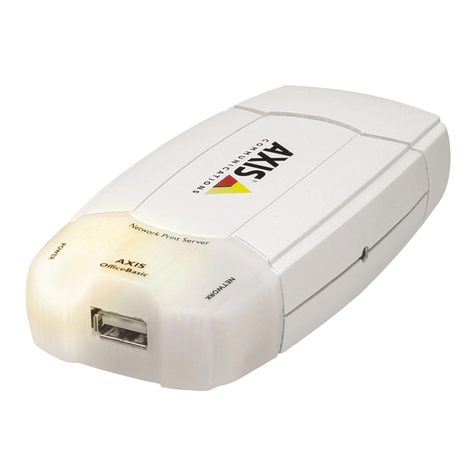
AXIS OfficeBasic
Print Server
User’s Manual

User’s Manual
2
Safety Notices
Please take some time to read through the safety notices before installing the AXIS
OfficeBasic.
Caution! - must be observed to avoid loss of data or damage to your equipment.
Important: - must be observed to avoid operational impairment.
Do not proceed beyond any of the above notices unless you have taken appropriate measures!
Electromagnetic Compatibility (EMC) notices - USA
This equipment generates and radiates radio frequency energy and if not installed and used in accordance with the instruction
manual, may cause interference to radio communications. It has been tested and found to comply with the limits for a Class A
computing device pursuant to Subpart B of Part 15 of FCC rules, which are designed to provide reasonable protection against
such interference when operated in a commercial environment. Operation of this equipment in a residential area is likely to cause
interference in which case the user at his own expense will be required to take whatever measures may be required to correct the
interference. Shielded cables should be used with this unit to ensure compliance with the Class A limits.
Electromagnetic Compatibility (EMC) notices - Europe
This digital equipment fulfils the requirements for radiated emission according to limit B of EN55022/1994, and the
requirements for immunity according to EN50082-1/1992 residential, commercial, and light industry (Compliance is not valid
for unshielded network and printer cables).
Liability
Every care has been taken in the preparation of this manual; if you detect any inaccuracies or omissions, please inform us by
contacting your local Axis office. AXIS Communications AB cannot be held responsible for any technical or typographical
errors and reserves the right to make changes to the product and manuals without prior notice. Axis Communications AB makes
no warranty of any kind with regard to the material contained within this document, including, but not limited to, the implied
warranties of merchantability and fitness for a particular purpose. Axis Communications AB shall not be liable nor responsible
for incidental or consequential damages in connection with the furnishing, performance or use of this material.
Year 2000 compliance
Axis Communications warrants that the AXIS OfficeBasic, with software versions 6.00 or later, is Year 2000 compliant.
Axis’ Trademarks
ThinServer.
Other Trademark Acknowledgments
DOS, Ethernet, Internet Explorer, LAN Manager, LAN Server, Microsoft, Netscape and Windows, are registered trademarks of
the respective holders.
AXIS OfficeBasic User’s Manual Revision 1.1
Part No: 16852 Date: July 2003
Copyright © Axis Communications AB, 2003

3
User’s Manual
Preface
Thank you for purchasing the AXIS OfficeBasic Print Server. This product has been
developed to connect your printers anywhere in your network, allowing all network users
access to the shared printer resources.
About this manual
This manual provides introductory information as well as detailed instructions on how to set
up and manage the AXIS OfficeBasic in various network environments. It is intended for
everyone involved in installing and managing the AXIS OfficeBasic. To fully benefit from
the manual, you should be familiar with basic networking principles.
This manual is applicable for the AXIS OfficeBasic, with software release 6.00 or later.
About Axis
Axis Communications is dedicated to providing innovative solutions for network-connected
computer peripherals. Since the start in 1984, it has been one of the fastest growing
companies in the market and is now a leader in its field.
ThinServer™ Technology - enables Axis’ products to act as intelligent file server
independent ThinServer devices. A ThinServer device is a network server which includes
“thin” embedded server software capable of simultaneous multiprotocol communication,
scalable RISC hardware and a built-in Web server which allows easy access and management
via any standard Web browser. The ThinServer technology makes it possible to connect any
electronic device to the network, thus providing “Access to everything”.
Today, Axis Communications is offering six major ThinServer product lines consisting of:
Network Print Servers - offer a powerful and cost-efficient method for sharing printer
resources in your network. They connect to any standard printer, featuring high performance,
simple management and easy upgrading across the network. The print servers are available in
Ethernet, Fast Ethernet and Token Ring versions.
IBM Mainframe and S/3x - AS/400 Print Servers and Protocol Converters - include a
wide range of LAN, coax and twinax attached print servers for the IBM host environment. By
emulating IBM devices, these servers provide conversion of the IPDS, SCS and 3270DS data
streams to the major ASCII printer languages.

User’s Manual
4
Network Attached Optical Media Servers - provide a flexible and cost-efficient solution
for sharing CD-ROMs, DVD-ROMs and other optical media across the network. They are
available in Ethernet, Fast Ethernet and Token Ring versions.
Network Camera Servers - provide live images using standard Internet technology, thus
enabling access to live cameras via any standard Web browser. They offer a perfect solution
for remote surveillance over the Internet; their sharp images can bring life into any web site.
These servers support Ethernet as well as PSTN and GSM phone lines.
Network Scan Servers - enable easy distribution of paper-based information across
workgroups and the enterprise. By sending scanned documents to your destination via the
Internet/intranet, you will reduce your faxing/mailing costs, as well as save time, thus
improving your organization’s efficiency.
Support services
Should you require any technical assistance, please contact your Axis dealer. If your
questions cannot be answered immediately, your Axis dealer will forward your queries
through the appropriate channels to ensure you a rapid response.
If you are connected to Internet, you can find on-line manuals, technical support, firmware
updates, application software and company information on the addresses listed below.
WWW: http://www.axis.com
FTP server: ftp://ftp.axis.com/pub/axis

5
User’s Manual
Table of Contents
Section 1 Product Overview . . . . . . . . . . . . . . . . . . . . . . . . . . . . . . . . . . . . . . . . . . . . . . 7
Package Contents . . . . . . . . . . . . . . . . . . . . . . . . . . . . . . . . . . . . . . . . . . 8
AXIS OfficeBasic Physical Description . . . . . . . . . . . . . . . . . . . . . . . . 9
The AXIS OfficeBasic CD . . . . . . . . . . . . . . . . . . . . . . . . . . . . . . . . . 10
Section 2 Hardware Installation and IP address assignment . . . . . . . . . . . . . . . . . . . . 12
Adding a Network Printer to your workstation . . . . . . . . . . . . . . . . . . 19
Section 3 Printing from Windows 95/98/NT4/2000/XP . . . . . . . . . . . . . . . . . . . . . . . 20
Adding Printers in Windows 2000 and XP over TCP/IP . . . . . . . . . . 21
Adding NetBIOS/NetBEUI Printers in Windows 2000 using AXIS Print
Monitor . . . . . . . . . . . . . . . . . . . . . . . . . . . . . . . . . . . . . . . . . . . . . . . . 22
Adding Printers in Windows NT 4 Using the Microsoft LPR Monitor 24
Adding NetBIOS/NetBEUI Printers in Windows NT 4 using AXIS Print
Monitor . . . . . . . . . . . . . . . . . . . . . . . . . . . . . . . . . . . . . . . . . . . . . . . . 25
Adding Printers in Windows 95/98 over TCP/IP using AXIS Print
Monitor . . . . . . . . . . . . . . . . . . . . . . . . . . . . . . . . . . . . . . . . . . . . . . . . 27
Adding Printers in Windows 95/98 over NetBIOS/NetBEUI using AXIS
Print Monitor . . . . . . . . . . . . . . . . . . . . . . . . . . . . . . . . . . . . . . . . . . . . 30
Section 4 Printing from Windows NT 3.5 (TCP/IP) . . . . . . . . . . . . . . . . . . . . . . . . . . 32
Installing AXIS Print Monitor . . . . . . . . . . . . . . . . . . . . . . . . . . . . . . . 33
Installing TCP/IP Printer Ports . . . . . . . . . . . . . . . . . . . . . . . . . . . . . . 35
Section 5 Printing from Windows NT 3.5 (NetBIOS/NetBEUI) . . . . . . . . . . . . . . . . . 37
Installing AXIS Print Monitor . . . . . . . . . . . . . . . . . . . . . . . . . . . . . . . 38
Installing NetBIOS/NetBEUI Printer Ports . . . . . . . . . . . . . . . . . . . . . 40
Section 6 Management & Configuration . . . . . . . . . . . . . . . . . . . . . . . . . . . . . . . . . . . 41
Using a Web browser . . . . . . . . . . . . . . . . . . . . . . . . . . . . . . . . . . . . . 41
Using the Test Button . . . . . . . . . . . . . . . . . . . . . . . . . . . . . . . . . . . . . 46
WINS, DDNS, DHCP information for System Administrators . . . . . 49
Section 7 Upgrading the Software. . . . . . . . . . . . . . . . . . . . . . . . . . . . . . . . . . . . . . . . 52
Appendix A Technical Specifications. . . . . . . . . . . . . . . . . . . . . . . . . . . . . . . . . . . . . . . . 54

User’s Manual
6
Appendix B The Parameter List . . . . . . . . . . . . . . . . . . . . . . . . . . . . . . . . . . . . . . . . . . . . . 1
Appendix C Glossary . . . . . . . . . . . . . . . . . . . . . . . . . . . . . . . . . . . . . . . . . . . . . . . . . . . . . 3
Index . . . . . . . . . . . . . . . . . . . . . . . . . . . . . . . . . . . . . . . . . . . . . . . . . . . . . . . . 5

User’s Manual Section 1: Product Overview 7
Section 1 Product Overview
Based on the ThinServer technology, the AXIS OfficeBasic allows
you to share your available printer resources on your network. You
can connect your AXIS OfficeBasic directly to any standard printer
without the need of additional cabling.
The AXIS OfficeBasic supports printing using the TCP/IP and
NetBIOS/NetBEUI protocols from the following clients:
• Windows XP (requires firmware version 6.15 and up in your
print server)
• Windows 2000
• Windows NT 3.5x and up
•Windows95
•Windows98

Section 1: Product Overview User’s Manual
8
Package Contents
Verify that nothing is missing from the print server package by
using the check list below. Please contact your dealer if anything
should be missing or damaged. All packing materials are
recyclable.
From your local dealer you can order optional accessories. The
following items are available for the AXIS OfficeBasic:
Hardware Model Part Numbers
Print Server AXIS OfficeBasic 0107-001-01
Power Supply
(PS-B)
Europe 13267
UK 13268
Australia 13269
USA 13270
Japan 13936
Media Title Part Numbers
CD AXIS OfficeBasic CD revision 1.0
Printed Materials AXIS OfficeBasic User’s Guide 16853
Optional Accessories Title Part Numbers
Cables
Printer Cable extensions 13522
Centronics to mini-Centronics
cable 16453
Ribbons Self-adhesive velcro ribbons 13282 & 13283

User’s Manual Section 1: Product Overview 9
AXIS OfficeBasic Physical Description
Plan view of the AXIS OfficeBasic
Network Connectors The AXIS OfficeBasic is designed for 10 Mbps Ethernet and 100
Mbps Fast Ethernet networks and connects to the network via a
twisted pair category 5 cable (10baseT and 100baseTX) or better.
The AXIS OfficeBasic is equipped with an autosensing function
that detects the speed of the local network segment and varies the
speed of its data communication accordingly, between 10 Mbps and
100 Mbps.
Printer Port The AXIS OfficeBasic print server is provided with a single high-
speed IEEE 1284 compatible parallel port, that connects directly to
any standard printer.

Section 1: Product Overview User’s Manual
10
Centronics-to-Centronics and Centronics-to-mini Centronics
extension cables may be obtained from your local distributor for use
with printers physically unable to accommodate the AXIS
OfficeBasic.
Test Button The test button is used for:
• Printing a test page to check the connection to the printer.
• Printing the parameter list showing all the AXIS OfficeBasic
settings.
• Resetting the AXIS OfficeBasic parameters to the factory
default settings.
Refer to Using the Test Button, on page 46, for more information
about the test button.
Network Indicator The network indicator flashes to indicate network activity.
Power Indicator The power indicator is lit while power is applied. If it is not lit, or it
flashes, there is a problem with the AXIS OfficeBasic or its power
supply.
The AXIS OfficeBasic CD
The AXIS OfficeBasic CD comprises all necessary AXIS
OfficeBasic documentation and software. It is compatible for use
within all of the supported Windows environments.
The CD interface is available in HTML format, but the
documentation is in pdf format.
Start-up procedures The AXIS OfficeBasic CD starts automatically from a local CD
drive on Windows 95/98, NT and 2000 platforms.
This manual suits for next models
1
Table of contents
Other Axis Print Server manuals