
AUDIOBYTE Hydra VOX User manual

Hydra VOX DAC
Owner’s Manual - English

AUDIOBYTE Hydra VOX DAC Owner’s Manual
1
Table of Contents
About this document.............................................................................................................2
Package content ....................................................................................................................3
Safety Precautions.................................................................................................................3
Functional Description ..........................................................................................................4
Detailed Specifications .......................................................................................................10
USB Configuration ...............................................................................................................11
Recommended software players: ................................................................................11
USB Driver Installation ....................................................................................................11
Audiobyte Limited Warranty .............................................................................................15
Document version and modifications description ........................................................18

AUDIOBYTE Hydra VOX DAC Owner’s Manual
2
About this document
This document is the user manual for the Audiobyte Hydra VOX digital –to
analog converter, headphone amplifier and preamplifier unit.
It contains a basic overview of the device’s internal architecture, specific
handling details, functional description, safety precautions and product warranty
details. This document is not meant for service or repair operations, as these must
be carried out only by qualified personnel.
Audiobyte is a subsidiary of Rockna Electronics S.R.L., and is a registered
trademark. More information regarding Rockna Audio and Audiobyte products can
be found on-line at the websites owned and operated by the company:
https://www.rockna-audio.com
https://audiobyte.net
Rockna Electronics S.R.L.
Address: Strada Plopului, nr. 5, Suceava
ZIP Code: 720145, Romania
Phone:
+40 770 125 694 –General inquires
Email:

AUDIOBYTE Hydra VOX DAC Owner’s Manual
3
Package content
The package you received should contain the following:
•One Hydra Vox DAC Unit (identifiable by the 7-digit serial number on the
back);
•DAC velvet cover.
Safety Precautions
1) This device is meant for indoor use only.
2) Protect device from excessive heat, humidity and liquid filled objects, such
as vases.
3) Clean only with dry cloth.
4) Use Audiobyte Hydra ZAP as power source.
5) Use Audiobyte branded or Audiobyte approved supply cables to connect
Hydra VOX to Hydra ZAP;
6) Before plugging any supply cables in the device, make sure the Hydra ZAP
is in standby.
7) Do not move the device while operational.
8) Do not disconnect cables while device is powered on.
AUDIOBYTE Hydra VOX DAC Owner’s Manual
4
Functional Description
The Hydra VOX DAC requires multiple supply voltages in order to be
completely functional.
Also, the DAC is controlled by the supply unit via CAN interface, using an
Audiobyte proprietary protocol, thus it is mandatory to use the Audiobyte Hydra
ZAP as a power source. Please make sure that the Hydra ZAP is in stand-by mode
before attaching the VOX supply cables.
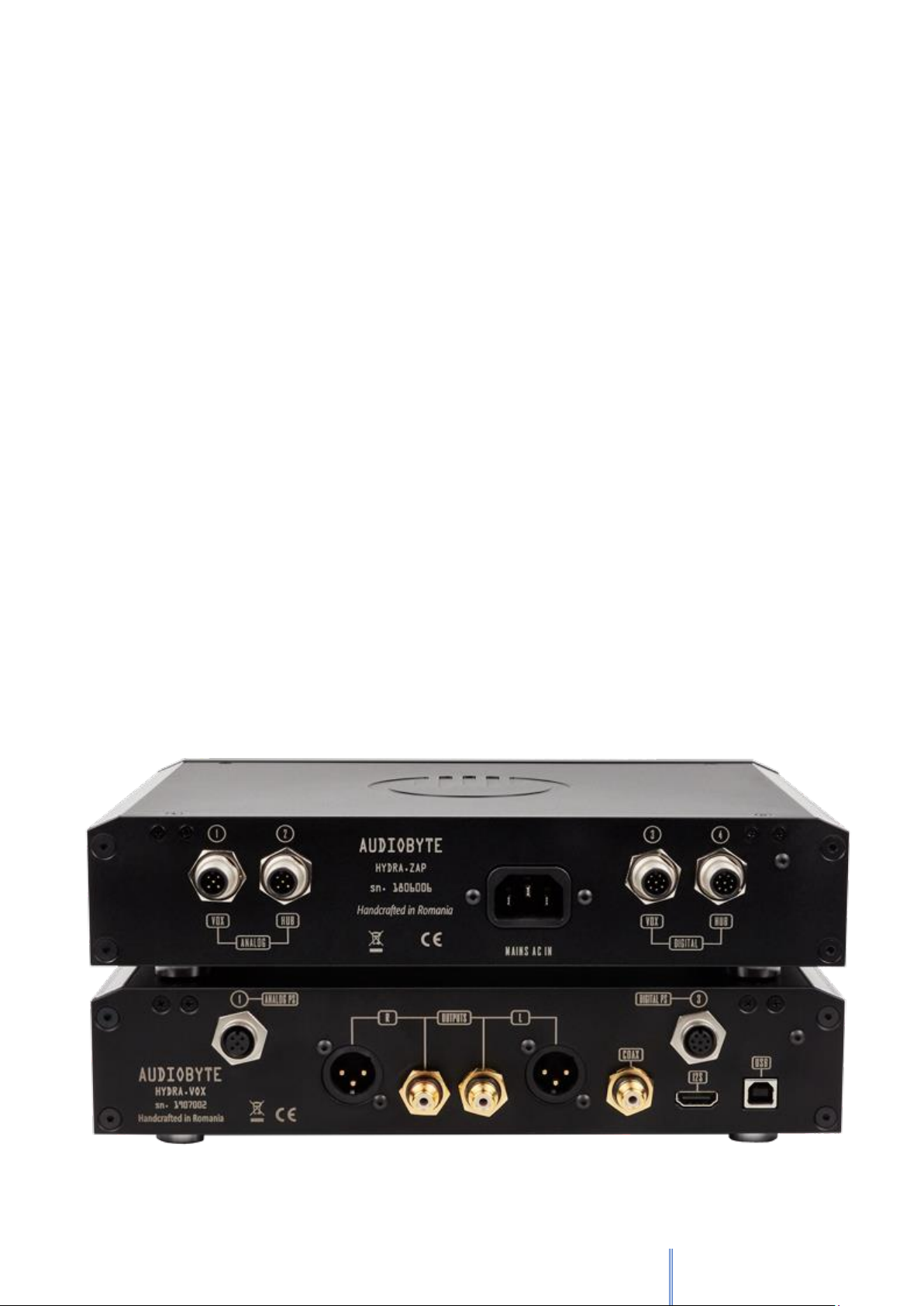
To connect the Hydra VOX DAC to the Hydra ZAP Supply, two cables must
be used, the 5-way analog + reference cable and 8-way digital the cable.
Connect the 5-way cable between the ZAP male header marked with (1)
(VOX ANALOG) and the VOX female header marked with (1) (ANALOG PS). Use the
guides located on both the plug and the header in order to determine the proper
rotation upon insertion. Make sure that both ends are completely fastened.
Connect the 8-way cable between the ZAP male header marked with (3)
(VOX DIGITAL) and the VOX female header marked with (3) (DIGITAL PS). Use the
guides located on both the plug and the header in order to determine the proper
rotation upon insertion. Make sure that both ends are completely fastened.

AUDIOBYTE Hydra VOX DAC Owner’s Manual
5
If both supply cables are correctly attached, the Audiobyte Hydra VOX is
automatically powered-up when the Hydra ZAP is powered on (use Hydra ZAP
touch-screen). If proper communication between the two devices has been
established, a green dot will be visible near the VOX text on the Hydra ZAP main
screen.
At power-up, the Hydra VOX will briefly display the Audiobyte logo screen
and then enter the default screen.
To shut down the Hydra VOX, the user must press the stand-by button on
the Hydra ZAP main screen.
Upon shut-down the DAC saves its current settings, which are resumed at
the next start-up: current selected input, PCM and DSD filters, DSD direct state,
phase mode, headphone detect state, I2S mode and attenuation level.
If stored attenuation level is lower than -20dB (volume is too loud), the
attenuation is limited to -20dB at next start-up. Also, if mute is enabled at shut-
down, it is automatically disabled at start-up.
Use the Hydra VOX touch-screen to adjust its settings. The VOX main screen
has the following controls:
•the top-right button is used to select between the DACs three inputs
(circular selection):
oUSB;
oI2S;
oS/Pdif.
•the bottom left and right buttons are used to adjust the volume level.
Pressing once on these buttons will show the current volume level without
AUDIOBYTE Hydra VOX DAC Owner’s Manual
6
changing it. Multiple press or long-press on these buttons will adjust the
volume level until the end of scale:
-127.5dB (min volume) →0dB (max volume);
•the bottom-middle button is used to set Mute ON or OFF;
•the top-left Audiobyte logo button is used to go to the menu screen;
•the center line is used by default to display the current input sample rate. If
no lock detected on current input, the “--.--" text is shown. When volume
level is adjusted, the current attenuation is displayed.
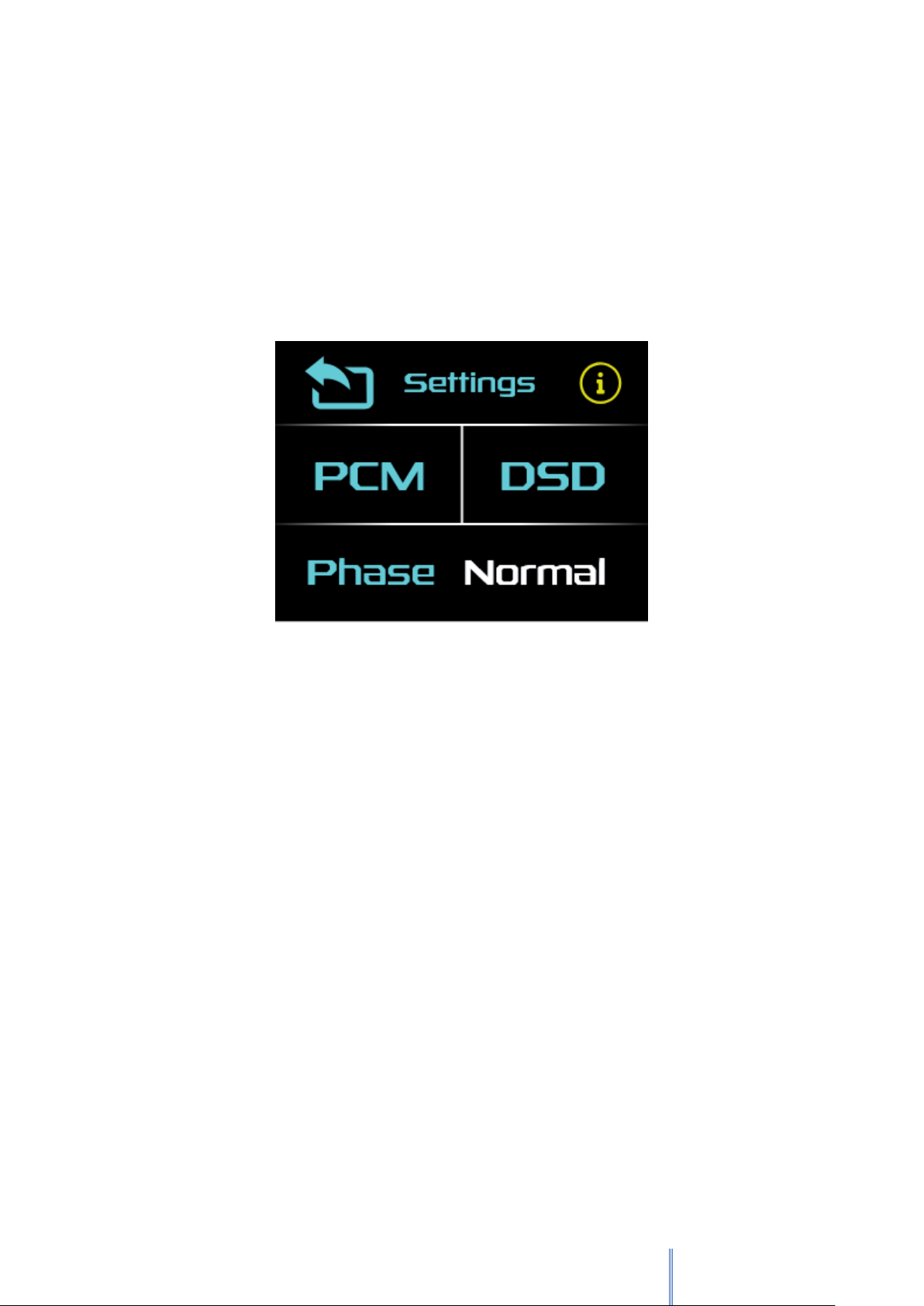
The menu screen has the following controls:
•Pressing on the lower side of the screen will cycle the output signal phase
state between Normal and Inverted;
•PCM button enters the PCM audio settings screen;
•DSD button enters the DSD audio settings screen;
•Pressing on the top-middle Settings button enters the general audio
settings screen;
•The top-right button opens the device information screen;
•The top-left button returns to the main screen;

AUDIOBYTE Hydra VOX DAC Owner’s Manual
7
Use the three check-buttons on the PCM audio settings screen to select the
Phase Response:
▪Linear;
▪Minimum;
▪Hybrid;
In the DSD settings screen, when the DSD Direct button is pressed:
▪if DSD direct is activated, the volume level will be set to max and the
headphone amplifier disabled, only after OK is pressed in the
confirmation screen;
▪If DSD direct is deactivated, volume level will be applied and headphone
amplifier will be enabled.
Note: DSD phase response is currently not implemented and selection is
disabled on display.

AUDIOBYTE Hydra VOX DAC Owner’s Manual
8
In the general audio settings screen the user can select if line outputs (RCA
and XLR) are to be disabled if headphones are inserted. Thus, if HP Detect is:
▪ON –line out signals are disabled when headphones are detected;
▪OFF –line out signals are enabled at all times.
I2S Mode allows the user to select between various HDMI I2S input
configurations, depending on the I2S signal source type.
The Info Screen shows device-related information as follows:
▪Hydra VOX firmware pack pseudo-name (ex: ROCKET);
▪FPGA (audio) firmware version;
▪Micro-controller (system control) firmware version;
▪User interface (touchscreen display) firmware version;
▪ZAP-VOX CAN Interface status (OK/NOT OK).
The Hydra VOX can be remotely controlled using the Hydra ZAP
Android/iOS app.
Please search for the Audiobyte Hydra Remote app on Google Play or Apple
App Store.

AUDIOBYTE Hydra VOX DAC Owner’s Manual
9
Firmware Update
Each Hydra VOX firmware update wave file contains update data for all three
firmware types that the unit comprises (FPGA, Controller, Display).
In order for the update to start (the wave file is validated as update file), the
current FPGA firmware version and the update file FPGA firmware version must
be different. The other two versions can be any version.
Update and downgrade are both possible on all three firmware types. Each
wave update file is released with the FPGA, Controller, Display versions in its name,
in that order. For example, the file HVOX_111_267_118.wav has FPGA v1.11,
Controller v2.67, Display v1.18.
Follow the steps below to update your unit:
1. Download and unpack the appropriate zip file;
2. Set the DAC input on USB;
3. Make sure that on the PC side the playback is bit-perfect (attenuation is set
to 0dB, channels are not inverted, no DSP effects are added etc.);
4. Select the DAC as output device and play the .wav update track;
5. During the update process, you will see the update file play progress on
display. Let the wave file play until the end without changing the volume
level or other player parameters;
6. When update wave playback is completed successfully, you will see “Done”
on display;
7. The DAC checks received images for validity and installs them one after
another;
8. After all check are done, the Hydra VOX main menu is resumed and you can
check the new firmware versions in the info screen.
Table of contents
Other AUDIOBYTE Media Converter manuals


