ATEN ALTUSEN SN0108 User manual

Serial over the NETTM
SN0108 / SN0116
User Manual
Enterprise KVM Solutions by ATEN
2004-12-15

FCC Information
This is an FCC Class A product. In a domestic environment this product may cause
radiointerferenceinwhichcasetheusermayberequiredtotakeadequatemeasures.
This equipment has been tested and found to comply with the limits for a Class
Adigital device,pursuant toPart 15of theFCC Rules.Theselimitsaredesigned
to provide reasonable protection against harmful interference when the equip-
ment is operated in a commercial environment. This equipment generates, uses
and can radiate radio frequency energy and, if not installed and used in
accordancewiththeinstructionmanual,maycauseharmfulinterferencetoradio
communications. Operation of this equipment in a residential area is likely to
cause harmful interference in which case the user will be required to correct the
interference at his own expense.
© Copyright 2004 ALTUSEN®PAPE-0241-1AX
All brand names and trademarks are the registered property of their respective owners.
2004-12-15

Package Contents
The complete SN0108 / SN0116 package consists of:
M1 SN0108 or SN0116
M1 RJ-45 (F) to DB-9 (M) Adapter
M8 RJ-45 (F) to DB-9 (F) Adapters (SN0108); or
16 RJ-45 (F) to DB-9 (F) Adapters (SN0116)
M1PowerCord
M1SoftwareCD
M1 Rack Mount Kit (Brackets and Phillips head hex M3 x 8 screws)
M4 Foot Pads
M1 User Manual*
M1 Quick start guide
M1 Warranty Registration card
Check to make sure that all of the components are present and in good order.
If anything is missing, or was damaged in shipping, contact your dealer.
Read this manual thoroughly and follow the installation and operation
procedures carefully to prevent any damage to the switch or to any other
devices on the SN0108 / SN0116 installation.
*Features may have been added to the SN0108 / SN0116 since this manual
was written. Please visit our website to download the latest version of this
manual.
2004-12-15
iii

Contents
Chapter 1
Introduction
Overview . . . . . . . . . . . . . . . . . . . . . . . . . . . . . . . . . 1
Requirements . . . . . . . . . . . . . . . . . . . . . . . . . . . . . . . 2
Features . . . . . . . . . . . . . . . . . . . . . . . . . . . . . . . . . . 3
Chapter 2
Hardware Setup
SN0108 / SN0116 Front Panel . . . . . . . . . . . . . . . . . . . . . . 5
SN0108 / SN0116 Rear Panel . . . . . . . . . . . . . . . . . . . . . . . 6
Installation . . . . . . . . . . . . . . . . . . . . . . . . . . . . . . . . . 7
Before you Begin . . . . . . . . . . . . . . . . . . . . . . . . . . . 7
PC Installation . . . . . . . . . . . . . . . . . . . . . . . . . . . . 7
Sun Fire V100 Server Installation . . . . . . . . . . . . . . . . . . 9
Chapter 3
Browser Operation
Logging In . . . . . . . . . . . . . . . . . . . . . . . . . . . . . . . . 11
The SN0108 / SN0116 Main Screen . . . . . . . . . . . . . . . . 12
Configuration and Control . . . . . . . . . . . . . . . . . . . . . . . 14
Telnet . . . . . . . . . . . . . . . . . . . . . . . . . . . . . . . . 14
Chapter 4
Administration
Working Environment Configuration . . . . . . . . . . . . . . . . . . 21
General . . . . . . . . . . . . . . . . . . . . . . . . . . . . . . . 21
Network . . . . . . . . . . . . . . . . . . . . . . . . . . . . . . . 23
RADIUS . . . . . . . . . . . . . . . . . . . . . . . . . . . . . . 25
OOBC . . . . . . . . . . . . . . . . . . . . . . . . . . . . . . . . 26
Date / Time . . . . . . . . . . . . . . . . . . . . . . . . . . . . . 27
Firmware . . . . . . . . . . . . . . . . . . . . . . . . . . . . . . 28
Logout . . . . . . . . . . . . . . . . . . . . . . . . . . . . . . . . 29
Device Management Configuration . . . . . . . . . . . . . . . . . . . 30
Port Config . . . . . . . . . . . . . . . . . . . . . . . . . . . . . 30
User Management . . . . . . . . . . . . . . . . . . . . . . . . . . 33
Session Info . . . . . . . . . . . . . . . . . . . . . . . . . . . . . 36
Sys Info . . . . . . . . . . . . . . . . . . . . . . . . . . . . . . . 36
Log . . . . . . . . . . . . . . . . . . . . . . . . . . . . . . . . . 37
2004-12-15
iv

Chapter 5
Out of Band Operation
Direct Terminal Connection (HyperTerminal) . . . . . . . . . . . . . 39
HyperTerminal Setup . . . . . . . . . . . . . . . . . . . . . . . . 39
Logging In . . . . . . . . . . . . . . . . . . . . . . . . . . . . . . 42
Indirect Terminal Connection (HyperTerminal) . . . . . . . . . . . . 43
Connection Setup . . . . . . . . . . . . . . . . . . . . . . . . . . 43
Final Check . . . . . . . . . . . . . . . . . . . . . . . . . . . . . 44
Logging In . . . . . . . . . . . . . . . . . . . . . . . . . . . . . . 45
Direct Dial In Connection (PPP) . . . . . . . . . . . . . . . . . . . . 46
Connection Setup . . . . . . . . . . . . . . . . . . . . . . . . . . 46
Finishing Up . . . . . . . . . . . . . . . . . . . . . . . . . . . . 49
Logging In . . . . . . . . . . . . . . . . . . . . . . . . . . . . . . 49
Indirect Dial In Connection (PPP) . . . . . . . . . . . . . . . . . . . 50
Connection Setup . . . . . . . . . . . . . . . . . . . . . . . . . . 50
Final Check . . . . . . . . . . . . . . . . . . . . . . . . . . . . . 51
Logging In . . . . . . . . . . . . . . . . . . . . . . . . . . . . . . 51
Telnet Access . . . . . . . . . . . . . . . . . . . . . . . . . . . . . . 52
Logging In . . . . . . . . . . . . . . . . . . . . . . . . . . . . . . 52
SSH Access . . . . . . . . . . . . . . . . . . . . . . . . . . . . . . . 53
With a Terminal Session (Linux): . . . . . . . . . . . . . . . . . 53
With a Third Party Utility (Windows): . . . . . . . . . . . . . . . 54
Appendix
Specifications . . . . . . . . . . . . . . . . . . . . . . . . . . . . . . 55
Administrator Login Failure . . . . . . . . . . . . . . . . . . . . . . . 56
IP Address Determination . . . . . . . . . . . . . . . . . . . . . . . . 57
Stacking and Mounting . . . . . . . . . . . . . . . . . . . . . . . . . 60
Stacking . . . . . . . . . . . . . . . . . . . . . . . . . . . . . . . 60
Rack Mounting . . . . . . . . . . . . . . . . . . . . . . . . . . . 60
RJ45 to DB9 Pin Assignments . . . . . . . . . . . . . . . . . . . . . 61
DCE Connection . . . . . . . . . . . . . . . . . . . . . . . . . . 61
DTE Connection . . . . . . . . . . . . . . . . . . . . . . . . . . 61
Troubleshooting . . . . . . . . . . . . . . . . . . . . . . . . . . . . . 62
Limited Warranty . . . . . . . . . . . . . . . . . . . . . . . . . . . . 62
2004-12-15
v

About This Manual
This User Manual is provided to help you get the most from your SN0108 /
SN0116 system. It covers all aspects of installation, configuration and
operation. An overview of the information found in the manual is provided
below.
Overview
Chapter 1, Introduction, introduces you to the SN0108 / SN0116 System.
Its purpose, features and benefits are described.
Chapter 2, Hardware Setup, shows the SN0108 / SN0116’s front and rear
components, and provides step-by-step instructions for setting up your
installation.
Chapter 3, Browser Operation, details all of the concepts and procedures
involved in the day-to-day browser operation of your SN0108 / SN0116
installation.
Chapter 4, Administration, explains the administrative procedures that are
employed to configure the SN0108 / SN0116’s working environment.
Chapter 5, Out of Band Operation, describes how to set up the various
serial port methods that can be used to access the SN0108 / SN0116 when the
network is unavailable.
An Appendix at the end of the manual providestechnical and other important
information regarding the SN0108 / SN0116.
2004-12-15
vi

Conventions
This manual uses the following conventions:
Courier Indicates text that you should key in.
[ ] Indicates keys you should press. For example, [Enter] means
to press the Enter key. If keys need to be chorded, they
appear together in the same bracket with a plus sign between
them: [Ctrl+Alt].
1. Numbered lists represent procedures with sequential steps.
MBullet lists provide information
>Indicates selecting an option on a menu. For example, Start >
Run means to open the Start menu, and then select Run.
Indicates critical information.
Getting Help
For additional help, advice, and information, ALTUSEN provides several
support options. If you need to contact ALTUSEN technical support with a
problem, please have the following information ready beforehand:
MProduct model number, serial number, and date of purchase.
MYour computer configuration, including operating system, revision level,
expansion cards, and software.
MAny error messages displayed at the time the error occurred.
MThe sequence of operations that led up to the error.
MAny other information you feel may be of help.
2004-12-15
vii

ALTUSEN Technical Support
North America Technical
Phone Support Registered ALTUSEN product owners are entitled
to telephone technical support. Call the ALTUSEN
Technical Support Center: 949-453-8885.
International Technical
Phone Support 1. Contact your local dealer.
2. Call the ALTUSEN Technical Support Center:
(886-2) 8692-6959.
Email Support Email your questions and concerns to:
Online Troubleshooting The ALTUSEN support website:
http://www.altusen.com/support
provides online troubleshooting that describes the
most commonly encountered problems and offers
possible solutions to them.
Online Documentation User Manuals are available electronically at the
ALTUSEN support website:
http://www.altusen.com/support
Software Updates Download the latest drivers and firmware for your
product from the ALTUSEN support website:
http://www.altusen.com/support
Product Information
For information about all of ALTUSEN’s products and how they can help
you connect without limits, visit ALTUSEN on the web.
ALTUSEN Authorized Resellers
ALTUSEN provides the following ways to find an authorized reseller in your
area:
MIn the United States of America, call: 866-ALTUSEN (258-8736)
MIn Canada and South America, call: 949-453-8885
MIn all other locations, call: 886-2-8692-6789
MVisit ALTUSEN on the web at http://www.altusen.com for a list of
locations and telephone numbers
2004-12-15
viii

Chapter 1.
Introduction
Overview
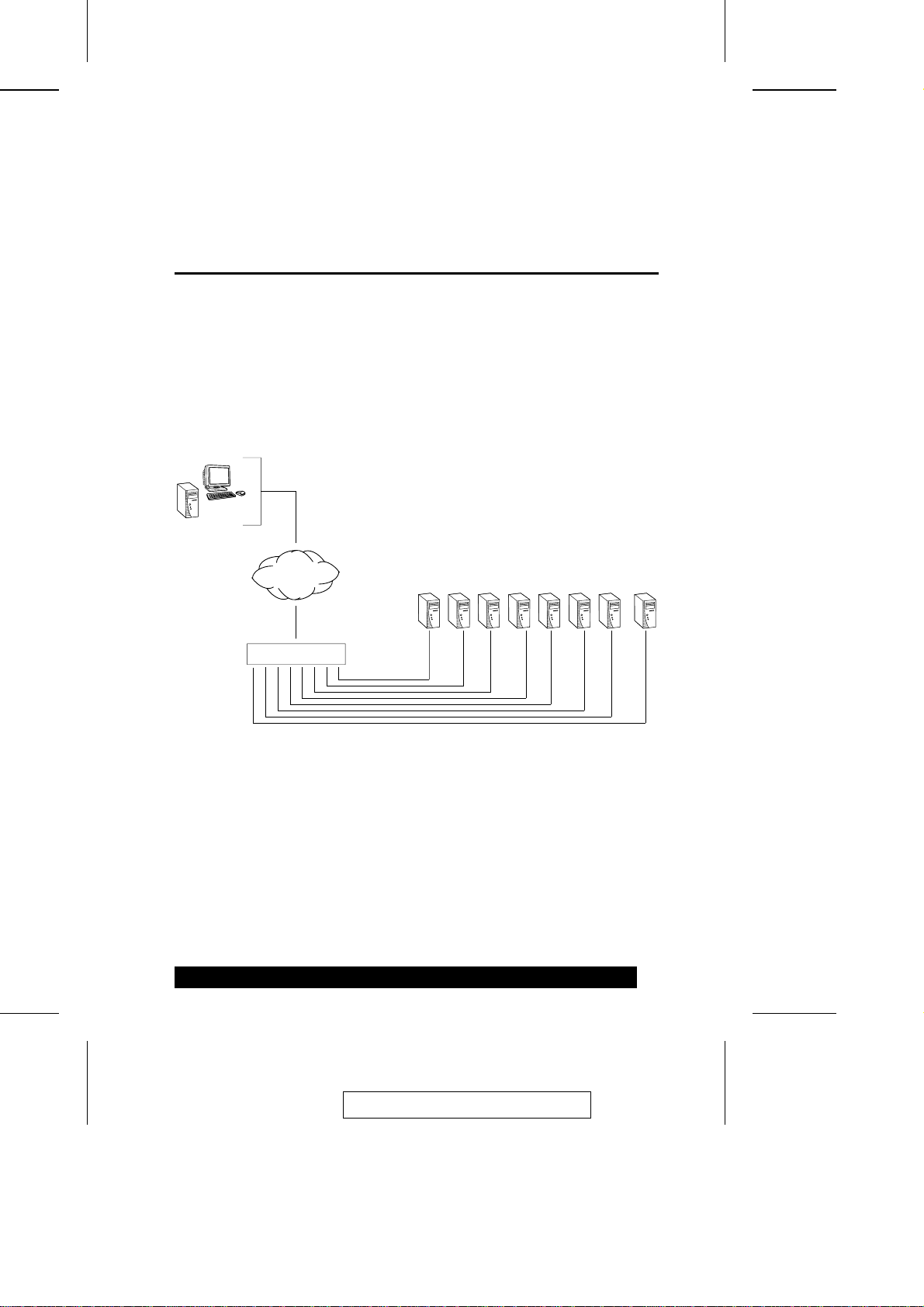
The SN0108 / SN0116 Serial over the NET™is a control unit that provides
remote serial access to up to eight (SN0108) or 16 (SN0116) servers or other
serial IT devices (hubs, routers, power management devices, etc.), via a
TCP/IP connection. Up to eight (SN0108) or 16 (SN0116) Users can log in at
the same time from any computer connected to the Internet, whether down
the hall, or half way around the world. Each is able to control a separate port
so that eight attached devices can be accessed at the same time.
The SN0108 / SN0116 can work in tandem with other remote management
products - such as the Altusen PN9108 Power over the NET™remote power
management system to provide convenient, reliable, and effective, remote
data center device management.
Installation is fast and easy: plugging cables into their appropriate ports is all
that is entailed. A choice of browser based GUI, Telnet (SSH), and VT-100
console terminal sessions make configuration and operation smooth and
convenient.
Remote
SN0108
TCP/IP
2004-12-15
1

The SN0108 / SN0116’s firmware is upgradeable over the Net, so you can
stay current with the latest improvements simply by downloading updates
from our website. With its advanced features and ease of operation, the
SN0108 / SN0116 is the most convenient, most reliable, and most cost
effective way to obtain access to your remote, serially connected, IT products.
Requirements
MSun’s Java 2 JRE 1.4 or higher must be installed on your computer. Java is
available for free download from the Sun Java website: http://java.sun.com
MThe devices that connect to the SN0108 / SN0116 must support RS-232
terminal operations.
2004-12-15
2
Other manuals for ALTUSEN SN0108
3
This manual suits for next models
1
Table of contents
Other ATEN Switch manuals

ATEN
ATEN VS-0404 User manual

ATEN
ATEN CS1953 User manual

ATEN
ATEN VS-201 User manual

ATEN
ATEN Master View CS-1762 User manual

ATEN
ATEN Slideaway CL5708 User manual

ATEN
ATEN CS1942DP User manual

ATEN
ATEN KN-9116 User manual

ATEN
ATEN CS533 Tap User manual

ATEN
ATEN VM0202H User manual

ATEN
ATEN ALTUSEN KL1508A User manual

ATEN
ATEN Master View CS-72A User manual

ATEN
ATEN CS-62 User manual

ATEN
ATEN Altusen KN9016 User manual

ATEN
ATEN KN2100VA User manual

ATEN
ATEN CS428 User manual

ATEN
ATEN KM0216 / KM0432 User manual

ATEN
ATEN Master View CS-9134 User manual

ATEN
ATEN MASTER VIEW CS-124U User manual

ATEN
ATEN KN1000A User manual

ATEN
ATEN AS-401PII User manual