
AT&T TL7710 User manual

User’s manual
TL7710
DECT 6.0 cordless headset

Congratulations
on your purchase of this AT&T product. Before using this AT&T
product, please read the Important safety information section
on pages 50-53 of this manual. Please thoroughly read this
user’s manual for all the feature operations and troubleshooting
information necessary to install and operate your new AT&T
product. You can also visit our website at
www.telephones.att.com or call 1 (800) 222-3111.
In Canada, dial 1 (866) 288-4268.
Model number: TL7710 (Headset and headset base)
Type: DECT 6.0 cordless headset
Serial number:
Purchase date:
Place of purchase:
Both the model and serial numbers of your AT&T product can be
found on the bottom of the headset base.
Save your sales receipt and original packaging in case it is
necessary to return your telephone for warranty service.
© 2010 Advanced American Telephones. All Rights Reserved. AT&T and
the AT&T logo are trademarks of AT&T Intellectual Property licensed to
Advanced American Telephones, San Antonio, TX 78219. Printed in China.
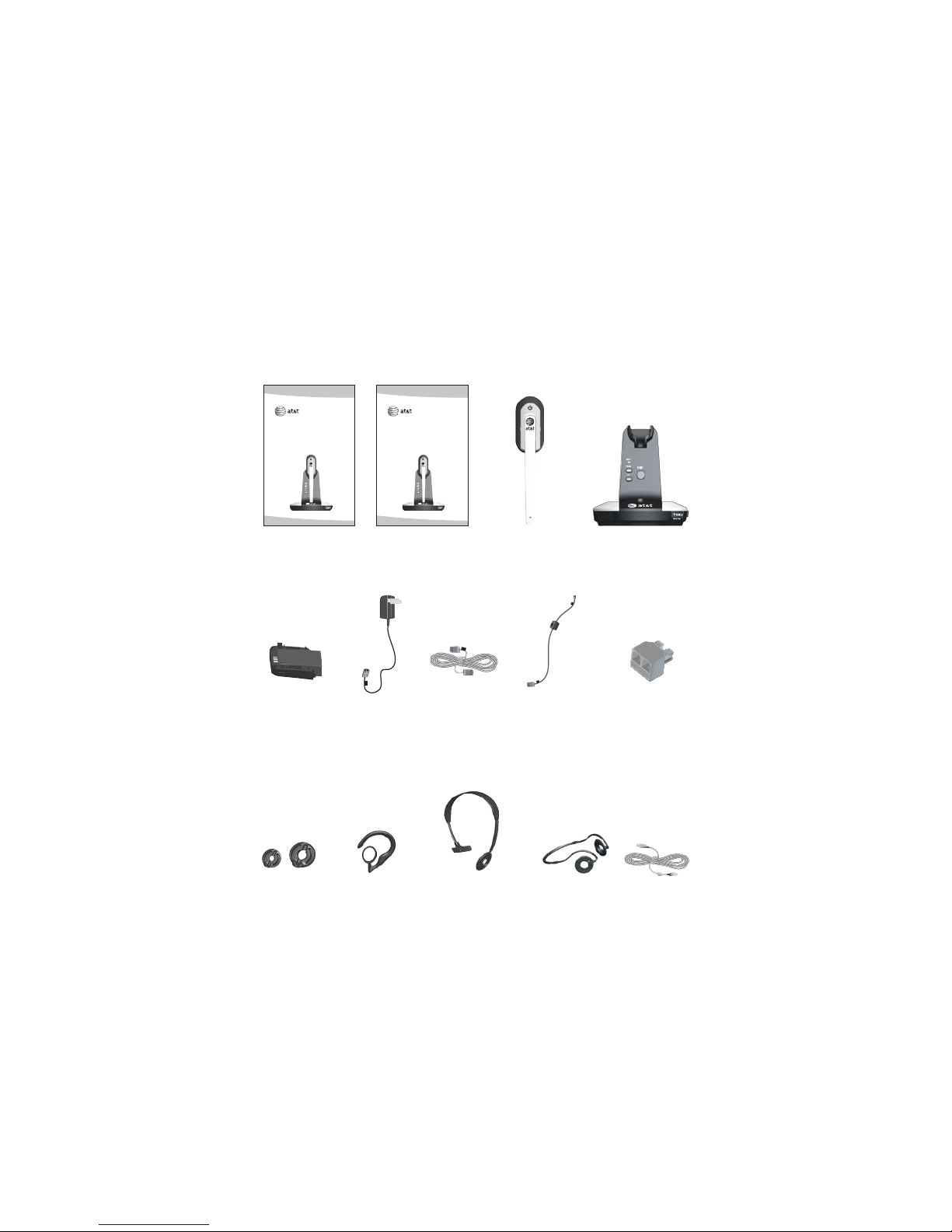
Headset baseCordless headset
with medium-sized
earbud attached
Telephone
line cord
User's manual Quick start guide
Headset base
power adapter
Over-the-ear hook Behind-the-neck
band
Over-the-head band
Parts checklist
Check to make sure the headset package includes the following
items. Save your sales receipt and original packaging in the
event warranty service is necessary.
Line splitterBattery pack
(battery
with battery
compartment
cover attached)
User’s manual
TL7710
DECT 6.0 cordless headset
Quick start guide
TL7710
DECT 6.0 cordless headset
USB cable2 earbuds
Corded phone
interface cable

Optional accessories
In this manual, there are references to TL7100 and TL7700.
The TL7100 is a lifter and TL7700 is an expansion headset with
charger, purchased separately. For more information about these
products, see the user’s manuals. You may also download the
manuals at www.telephones.att.com.
TL7100 TL7700

User’s manual
TL7710
DECT 6.0 cordless headset
Table of contents
Getting started
Quick reference guide -
headset......................................... 1
Quick reference guide -
headset base............................. 2
Installation...................................... 4
Headset base installation........ 5
For calls using the phone
line.................................................. 5
For calls using your
computer ..................................... 7
Connect your headset to
your computer .......................... 7
Headset base settings .............. 8
Corded handset connection
switch............................................ 8
Battery installation..................... 9
Battery charging ......................... 10
Add and register headsets ....11
For Synapse users.................. 12
For SynJ users..........................12
To register a headset to the
headset base............................13
To register a headset to
an AT&T DECT cordless
telephone base .......................14
Replace a headset ....................15
To deregister all headsets
from the headset base........ 15
To deregister the headset(s)
from an AT&T DECT cordless
telephone base .......................16
Headset attachments ...............17
Earbud..........................................17
Over-the-ear hook.................18
Over-the-head band .............21
Behind-the-neck band ......... 23
Operation
Headset operation .....................25
Power on/off the
headset........................................ 25
Phone mode and PC
mode ............................................25
Make a call.................................26
Answer a call............................ 27
End a call....................................27
Headset ringer .........................28
Temporary ringer
silencing......................................28
Options while on calls.............29
Volume control ........................ 29
Call waiting................................ 29
Mute ..............................................30
Switch a call between the
handset and headset ..........30

Multiple headsets/handsets
use.................................................31
Intercom..........................................32
Answer an intercom call.....32
Answer an incoming call
during an intercom call....... 32
End an intercom call.............32
PC mode.........................................33
Turn on PC mode ...................33
Configure your audio
settings........................................33
Make or answer a call in
PC mode..................................... 33
Switch between PC mode
and PHONE mode.................. 34
Conference PHONE and PC
calls............................................... 35
Appendix
Alert tones and lights .............. 36
Headset alert tones............... 36
Headset lights .......................... 37
Headset base lights...............38
Troubleshooting .......................... 39
Important safety
information................................50
Safety information.................. 50
Especially about cordless
headsets .....................................51
Precautions for users
of implanted cardiac
pacemakers............................... 53
Pacemaker patients...............53
Maintenance..................................54
FCC Part 68 and ACTA.............55
FCC Part 15................................... 58
Limited warranty......................... 60
Technical specifications ..........64
DECT 6.0 digital
technology.................................64
Operating range......................64
Extended range and
clarity ...........................................64
Index
Index.................................................65

Quick reference guide - headset
VOL+/VOL-
Push the volume switch on the top
of the headset to the right or left
to adjust the headset ringer volume
while in idle mode (page 28) or the
listening volume while on a call
(page 29).
(On/off button and light)
Press to make, answer and end a call (pages 26-27).
On when the headset is charging in the headset base.
Flashes once every 10 seconds in red light when the headset is
in low battery mode.
Flashes twice every three seconds in blue light when the
headset is in use.
Flashes four times every three seconds in blue light when there
is an incoming call.
Flashes quickly and alternately in red and blue when the
headset is being registered.
Flashes slowly and alternately in red and blue when the
headset is being deregistered.
Earpiece
Battery pack
Open to replace the battery pack.
Microphone
MUTE/FLASH
Press to mute the microphone
during a call (page 30).
Press and hold for two seconds to
answer an incoming call when you
receive a call waiting alert during a
call (page 29).
Press to mute the ringer in the
earpiece when there is an incoming
call (page 30).
Getting started
1

Quick reference guide - headset base
Corded handset audio adjust switch
This switch is only used with the corded
telephone handset connected to the
corded phone interface cable (page 6).
Charging cradle
Place the headset here for charging.
MUTE (light)
On when the mute function is on.
PAIR
Use to initiate headset registration
or deregistration.
PHONE (mode button and light)
On when the home or office phone
line is chosen for calls.
Flashes twice every three seconds
when the headset is in use.
Flashes four times every three seconds
when there is an incoming call.
PC (mode button and light)
On when the PC is chosen for calls.
Flashes twice every three seconds
when the headset is in use.
Getting started
2

MICROPHONE/ VOLUME
Press the volume keys on the side
of the headset base to adjust the
speaking volume when on a call
(page 29).
Quick reference guide - headset base
CORDED HANDSET CONNECTED/
YES/NO
Choose the setting based on whether
you are using a corded handset
(page 8).
TEL WALL JACK (red dot)
POWER jack
(green dot)
CORDED PHONE CONNECTION
This jack (orange dot) is only used
with corded phone interface cable
connecting to the corded telephone.
Getting started
3
LIFTER
This jack is only used with an AT&T
handset lifter (model TL7100 or
TL7711, purchased separately).
(USB port)
Open the port cover to plug in the USB
cable when in PC mode (page 33).

Installation
See pages 9-10
for easy instructions.
You must install and
charge the battery before
using the headset. STOP!
If you subscribe to high-speed Internet service (DSL - digital
subscriber line) through your telephone line, you must install a
DSL filter between the telephone line cord and telephone wall
jack (see pages 5-6). The filter prevents noise and caller ID
problems caused by DSL interference. Please contact your DSL
service provider for more information about DSL filters.
For customer service or product information, visit our website at
www.telephones.att.com or call 1 (800) 222-3111.
In Canada, dial 1 (866) 288-4268.
Avoid placing the headset base too close to:
• Communication devices such as television sets, VCRs or other
cordless telephones.
• Excessive heat sources.
• Noise sources such as a window with traffic outside, motors,
microwave ovens, refrigerators or fluorescent lighting.
• Excessive dust sources such as a workshop or garage.
• Excessive moisture.
• Extremely low temperature.
• Mechanical vibration or shock such as on top of the washing
machine or work bench.
Getting started
4
Table of contents
Other AT&T Headset manuals








