
AT&T Z331 User manual
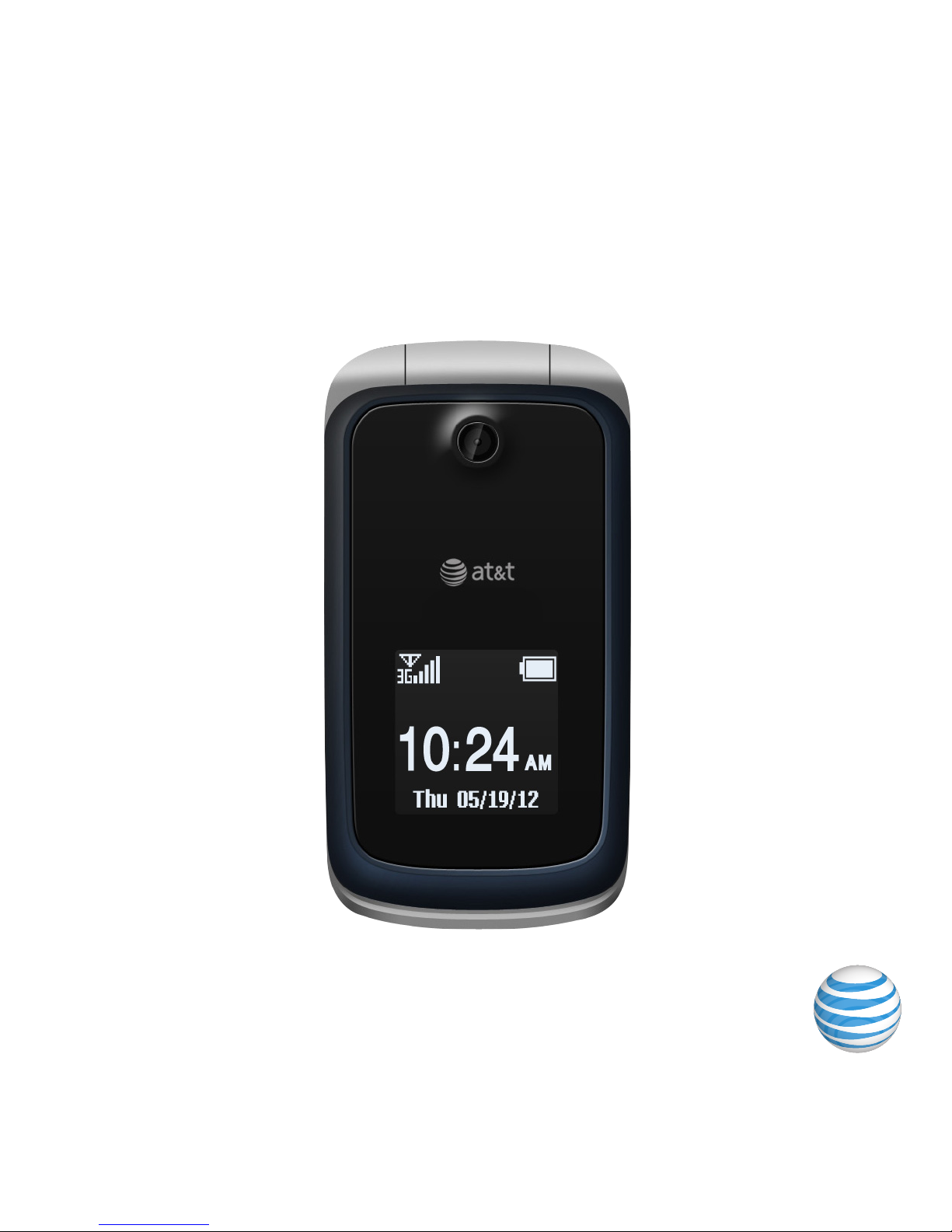
User Guide
Z331

Some of the contents in this manual may differ from your phone depending on the software
of the phone. Actual color may vary.
Your phone is designed to make it easy for you to access a wide variety of content. For your
protection, we want you to be aware that some applications that you enable may involve
the location of your phone being shared. For applications available through AT&T, we
offer privacy controls that let you decide how an application may use the location of your
phone and other phones on your account. However, the AT&T privacy tools do not apply
to applications available outside of AT&T. Please review the terms and conditions and the
associated privacy policy for each location-based service to learn how location information
will be used and protected. In addition, your AT&T phone may be used to access the internet
and to download, and/or purchase goods, applications, and services from AT&T or elsewhere
from third parties. AT&T provides tools for you to control access to the Internet and certain
Internet content. These controls may not be available for certain devices which bypass
AT&T controls.
Service provided by AT&T Mobility. Portions © 2011 AT&T Intellectual Property. All rights
reserved. AT&T, the AT&T logo and all other AT&T marks contained herein are trademarks
of AT&T Intellectual Property and/or AT&T affiliated companies. All other marks contained
herein are the property of their respective owners.
Copyright © 2011 ZTE CORPORATION.
All rights reserved.
No part of this publication may be excerpted, reproduced, translated or utilized in any form
or by any means, electronic or mechanical, including photocopying and microfilm, without
the prior written permission of ZTE Corporation.
The manual is published by ZTE Corporation. We reserve the right to make modifications on
print errors or update specifications without prior notice.
Version No. : V1.0
Edition Time: July, 2011
Manual No. : 079584502967

Getting Started ............................................................................................................................................1
Removing the Back Cover ..................................................................................................................1
Battery .........................................................................................................................................................1
SIM and Memory Cards ......................................................................................................................3
Charging Your Phone ...........................................................................................................................5
Powering Phone On/Off .....................................................................................................................7
Getting to Know Your Phone ............................................................................................................8
Key Functions ..........................................................................................................................................9
Idle Mode ..................................................................................................................................................11
Indicators and Icons ...........................................................................................................................11
Main Menu ...............................................................................................................................................13
Entering Text ..............................................................................................................................................15
Changing Input Mode ........................................................................................................................15
Entering Letters ....................................................................................................................................16
Entering Numbers...............................................................................................................................16
Entering Symbols ................................................................................................................................16
Calls.................................................................................................................................................................. 17
Making a Voice Call ............................................................................................................................. 17
Using the Address Book ................................................................................................................... 17
Using Call Options ............................................................................................................................... 17
Receiving Calls ......................................................................................................................................18
Adjusting the Volume ........................................................................................................................18
Using Call History .................................................................................................................................18
Contents
iContents

Messages ......................................................................................................................................................19
Type of Messages ................................................................................................................................19
SMS and MMS ........................................................................................................................................19
Instant Messaging ................................................................................................................................ 21
Voice Mail ...............................................................................................................................................24
Message Folders .................................................................................................................................24
Using Message Options ...................................................................................................................25
Message Settings ................................................................................................................................ 25
Using Message Templates .............................................................................................................26
Mobile Email ............................................................................................................................................... 27
Address Book ............................................................................................................................................29
AT&T Address Book ..........................................................................................................................29
Adding Contact ...................................................................................................................................29
Searching Contact .............................................................................................................................30
Setting Speed Dial ..............................................................................................................................30
Making a Speed Dial ..........................................................................................................................30
Using Address Book Entry Options ............................................................................................31
Bluetooth .....................................................................................................................................................32
Enabling Bluetooth ............................................................................................................................ 32
My Devices ............................................................................................................................................. 32
Sending Data ........................................................................................................................................ 33
Receiving Data ..................................................................................................................................... 33
Mobile Web .................................................................................................................................................34
Using the att.net Homepage.........................................................................................................34
Visiting a Website ...............................................................................................................................34
ii Contents

Tools ...............................................................................................................................................................36
Alarm ........................................................................................................................................................36
Calendar .................................................................................................................................................36
Calculator ............................................................................................................................................... 37
Tip Calculator .......................................................................................................................................38
Stopwatch..............................................................................................................................................38
World Time ............................................................................................................................................38
Currency Conversion .......................................................................................................................39
Recent Calls ..........................................................................................................................................39
Entertainment ......................................................................................................................................... 40
Pictures ....................................................................................................................................................41
Video .........................................................................................................................................................41
Music ........................................................................................................................................................42
Voice Recorder ....................................................................................................................................44
Social Networking - AT&T Social Net ...........................................................................................45
Yellow Pages - YPmobile® ...................................................................................................................48
AT&T GPS.....................................................................................................................................................50
Settings .........................................................................................................................................................54
Sound Profile Settings......................................................................................................................54
Phone Settings ....................................................................................................................................54
Display Settings ...................................................................................................................................55
Connection Settings .........................................................................................................................56
Call Settings...........................................................................................................................................56
Security Settings ................................................................................................................................. 57
Flight Mode ............................................................................................................................................59
iiiContents

Accessibility .............................................................................................................................................. 60
TTY Mode .............................................................................................................................................. 60
HAC (Hearing Aid Compatibility) Mode ................................................................................. 60
Care and Maintenance .........................................................................................................................61
General Care .........................................................................................................................................61
General Guidelines ............................................................................................................................63
CTIA Requirements...........................................................................................................................64
Aircraft Safety ......................................................................................................................................65
Hospital Safety ....................................................................................................................................65
Road Safety ...........................................................................................................................................66
Vehicles Equipped with an Airbag..............................................................................................66
Third Party Equipment ....................................................................................................................67
Declaration of Conformity ............................................................................................................67
Disposing of Your Phone ................................................................................................................67
Emergency Service ...........................................................................................................................68
Privacy Information ...........................................................................................................................69
Turn on the HAC Setting .................................................................................................................69
Copyright Notice ................................................................................................................................69
Troubleshooting and FAQs ...............................................................................................................70
Specifications ........................................................................................................................................... 74
FCC Compliance ..................................................................................................................................... 75
Radio Frequency (RF) Energy ..........................................................................................................76
Notes ..............................................................................................................................................................78
iv Contents
Notes: In this User Manual, “press a key” means to press the key and release it,
while “hold a key” means to press the key for at least two seconds and then
release it.
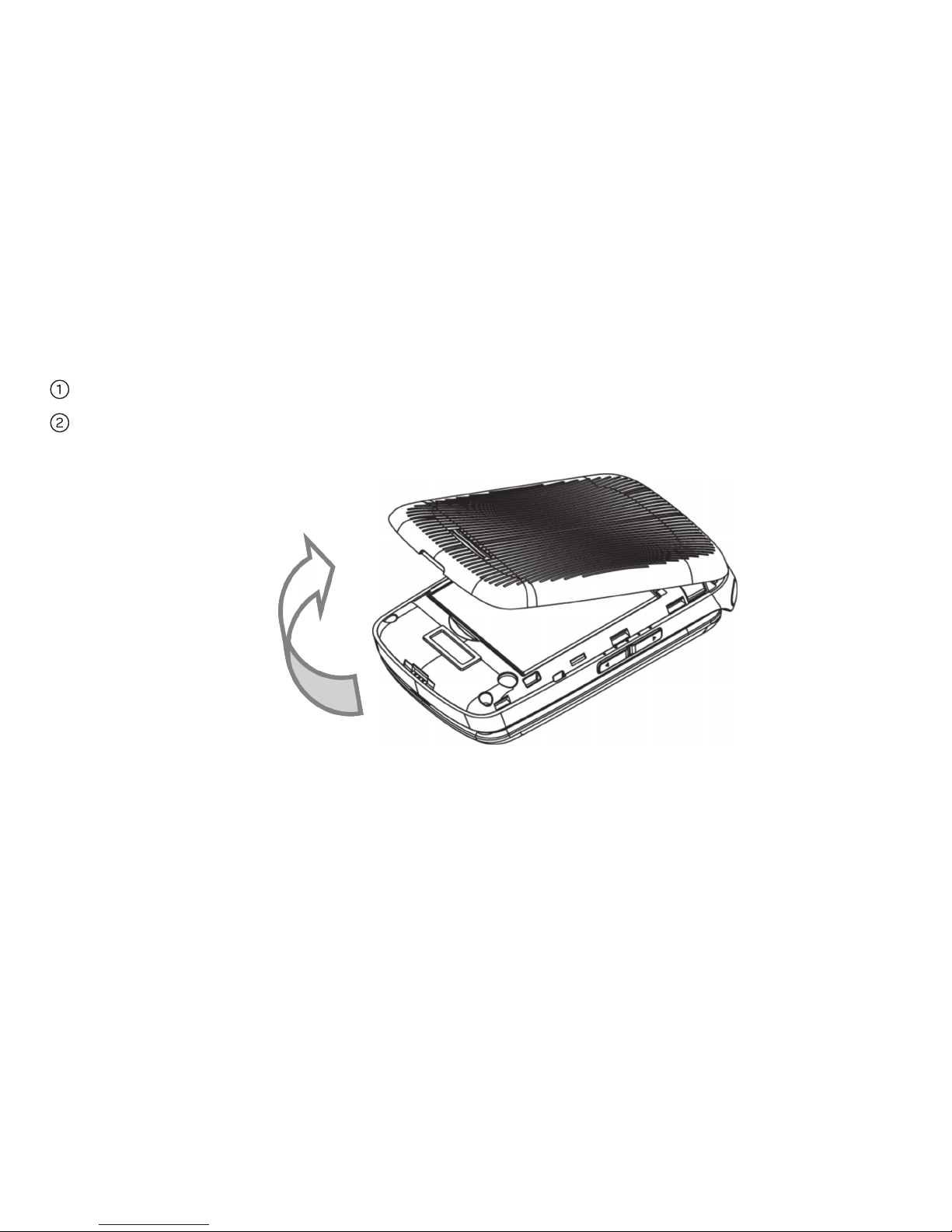
Removing the Back Cover
Hold the Power/End Key to turn off the phone.
Lift the bottom of the back cover from the notch and remove the back cover as
shown below.
Battery
Installing the Battery
Notes:
• The phone automatically turns off if the battery power is too low.
• If you are not going to use the battery for a long time, remove it from the phone
and store it in a cool dry place.
Getting Started
1Getting Started
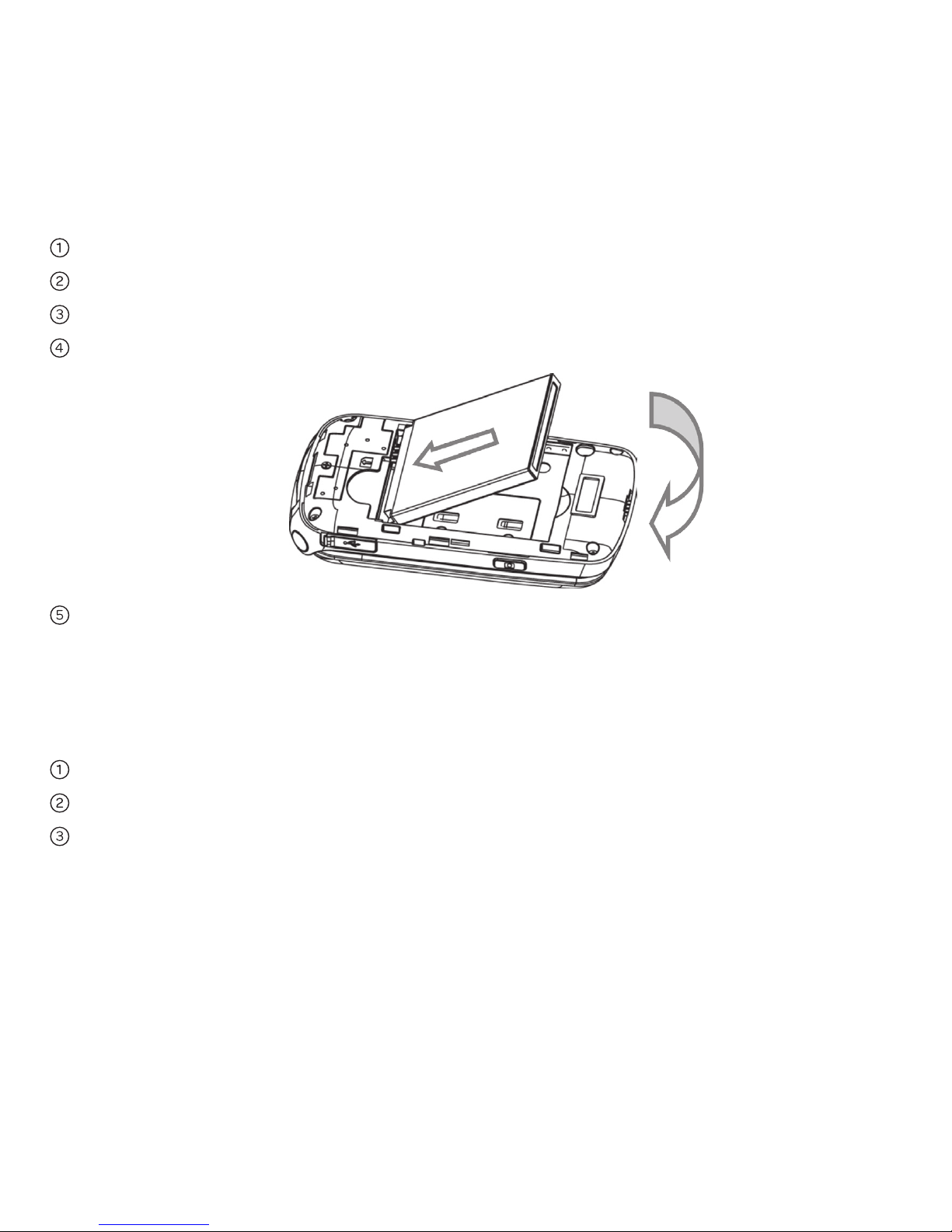
Hold the Power/End Key to turn off the phone.
Remove the back cover of your phone.
Carefully insert the battery with the contacts located against the metal springs.
Push down the battery until it clicks into place.
Replace the cover on the back of the phone.
Caution: Make sure the cover is lined up before pressing it into place. Do not force
it. Doing so will damage the back cover.
Removing the Battery
Hold the Power/End Key to turn off the phone.
Remove the back cover of your phone.
Lift the end of the battery near the bottom of the phone to remove it.
2 Getting Started
SIM and Memory Cards
Inserting the SIM (Subscriber Identification Module) Card
You can obtain a SIM card from your service provider when you sign on as
a subscriber.
Caution:
• Do not bend or scratch your SIM card. Keep the card away from electricity
and magnetism.
• Don’t touch the metal surface of the SIM card. Doing so could cause
information on the card to be lost or destroyed.
• Disconnect the charger and other accessories from your phone and remove
the battery before inserting and removing your SIM card.
Hold the Power/End Key to turn off the phone.
Remove the back cover of your phone.
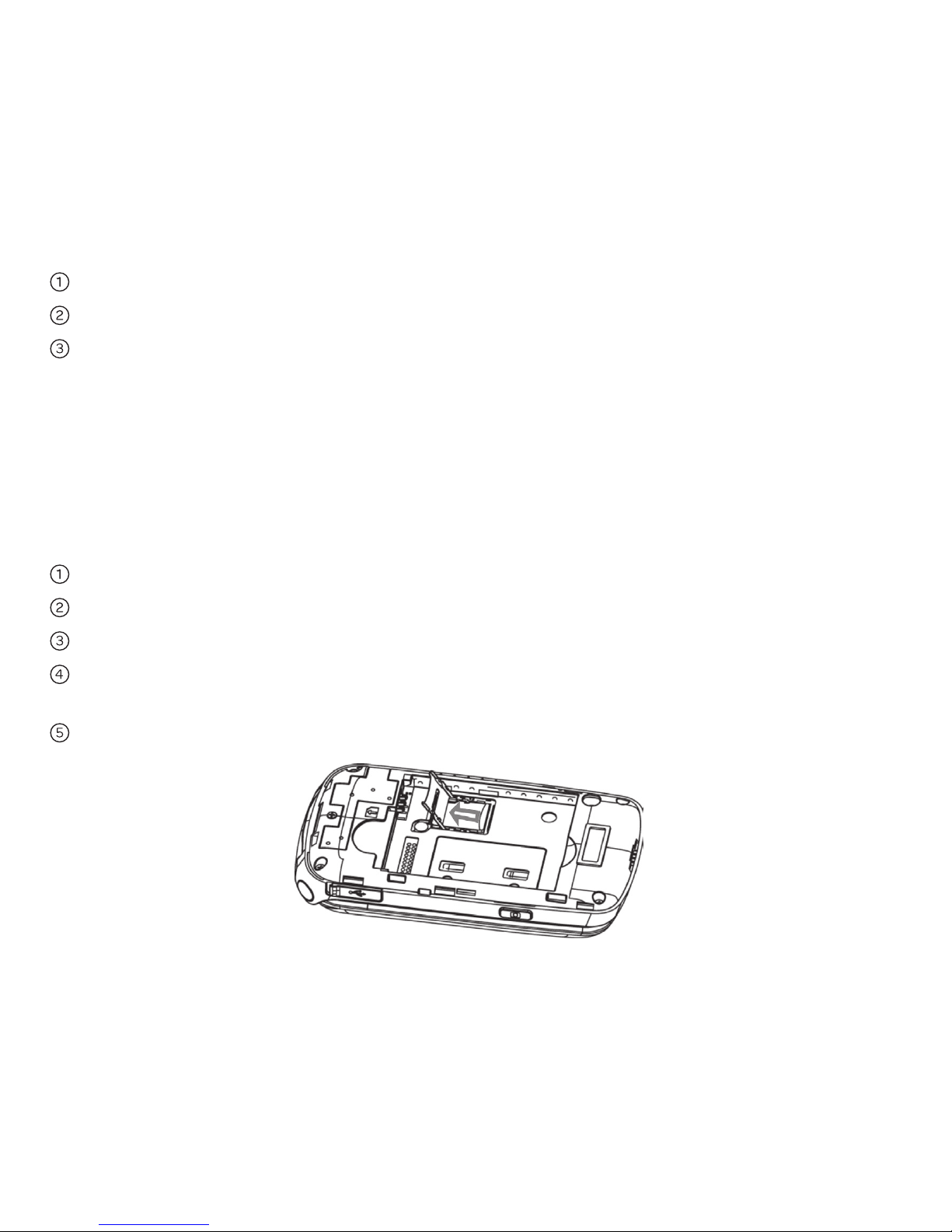
Hold the SIM card with the metal contacts facing downward and the cut corner
at the upper right. Insert the card into the card holder and push it until it clicks
into position.
Replace the cover on the back of your phone.
3Getting Started
Removing the SIM Card
Hold the Power/End Key to turn off the phone.
Remove the back cover of your phone.
Gently remove the SIM card from the card holder.
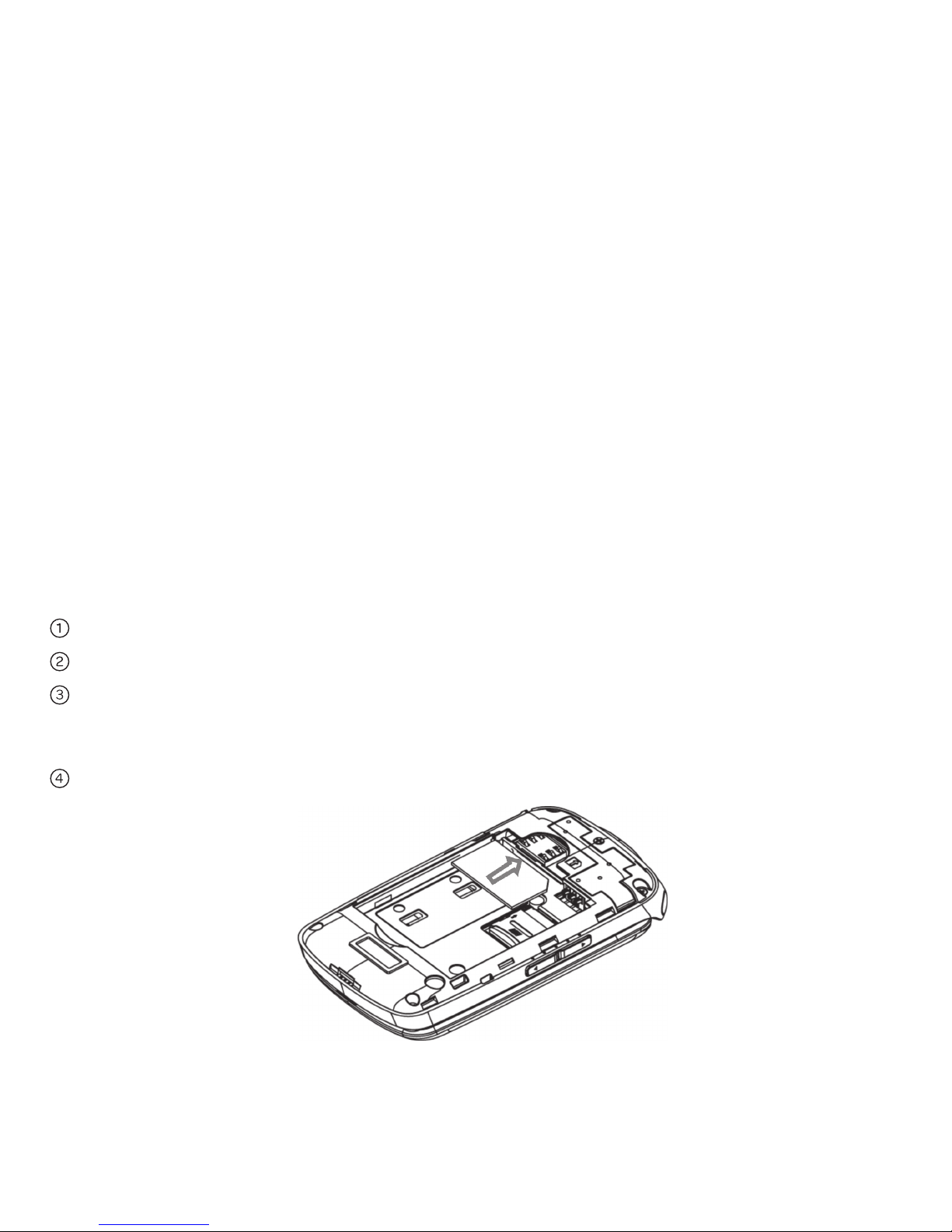
Inserting the Memory Card
The memory card gives your phone a very large memory capacity. This allows you
to save multimedia data, including images, photos, MP3 audio files, and ringtones.
You can also use this memory card to store other files.
Tip: Your phone can support a memory card with the capacity up to 8 GB.
Hold the Power/End Key to power off the phone.
Remove the back cover and battery.
Push the cover of the memory card slot in designated direction and lift it up.
Carefully place the memory card into the memory card slot and lock the cover
as shown below.
Reinsert the battery, replace the back cover, and turn the phone on.
4 Getting Started
Other manuals for Z331
1
Table of contents
Other AT&T Cell Phone manuals


