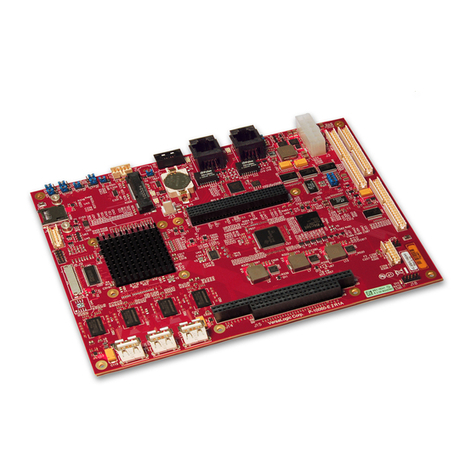
Arbor Technology EmETXe-a58M0 User manual

EmETXe-
a58M0
COM Express®Compact
Type 6 CPU Module
User’s Manual
Version 1.0
2016.02

Revision History
Version Date Description
1.0 FEB, 2016 Initial release

- i -
Preface iii
Copyright Notice................................................................iii
Declaration of Conformity ................................................iii
CE..........................................................................................iii
FCC Class A .........................................................................iii
RoHS.....................................................................................iv
SVHC / REACH.....................................................................iv
Warning ...............................................................................v
Replacing the Lithium Battery...........................................v
Technical Support ..............................................................v
Warranty .............................................................................vi
Chapter 1 - Introduction 1
1.1 The Product..................................................................2
1.2 About This Manual.......................................................2
1.3 Specifications ..............................................................3
1.4 Inside the Package ......................................................4
1.5 Ordering Information...................................................4
1.5.1 Optional Accessories.................................................4
1.6 The Installation Paths of CD Driver ...........................5
Chapter 2 - Board Overview 7
2.1 What Is “COM Express®”? ..........................................8
2.2 Board Dimensions.......................................................9
2.3 Block Diagram ...........................................................10
2.4 Connector Pin Denition ..........................................11
2.5 Jumper Setting ...........................................................14
Chapter 3 - Installation & Maintenance 15
3.1 Installing the CPU Module on Carrier Board...........16
3.2 Installing the Heatsink ..............................................17
Contents

- ii -
Chapter 4 - BIOS 19
4.1 Main ............................................................................20
4.2 Advanced....................................................................22
4.2.1 ACPI Settings............................................................23
4.2.2 CPU Conguration ...................................................24
4.2.3 IDE Conguration.....................................................25
4.2.4 SDIO Conguration ..................................................26
4.2.5 USB Conguration ...................................................27
4.2.6 Super IO Conguration............................................29
4.2.7 H/W Monitor ..............................................................30
4.2.8 Network Stack Conguration ..................................31
4.3 Chipset .......................................................................32
4.3.1 South Bridge.............................................................33
4.3.2 North Bridge..............................................................38
4.4 Boot ............................................................................40
4.4.1 CSM16 Parameters ...........................................41
4.4.2 CSM Parameters ................................................41
4.5 Security ......................................................................43
4.6 Save & Exit .................................................................44
Appendix 47
Appendix A: I/O Port Address Map ................................48
Appendix B: BIOS Memory Mapping .............................51
Appendix C: Interrupt Request Lines (IRQ) ..................54
Appendix D: Watchdog Timer (WDT) Setting................55
Content

- iii -
Copyright Notice
All Rights Reserved.
The information in this document is subject to change without prior notice in
order to improve the reliability, design and function. It does not represent a
commitment on the part of the manufacturer.
Under no circumstances will the manufacturer be liable for any direct, indirect,
special, incidental, or consequential damages arising from the use or inability
to use the product or documentation, even if advised of the possibility of such
damages.
This document contains proprietary information protected by copyright.
All rights are reserved. No part of this manual may be reproduced by any
mechanical, electronic, or other means in any form without prior written
permission of the manufacturer.
Declaration of Conformity
CE
The CE symbol on your product indicates that it is in compliance with the
directives of the Union European (EU). A Certicate of Compliance is available
by contacting Technical Support.
This product has passed the CE test for environmental specications when
shielded cables are used for external wiring. We recommend the use of
shielded cables. This kind of cable is available from ARBOR. Please contact
your local supplier for ordering information.
This product has passed the CE test for environmental specications. Test
conditions for passing included the equipment being operated within an
industrial enclosure. In order to protect the product from being damaged by
ESD (Electrostatic Discharge) and EMI leakage, we strongly recommend the
use of CE-compliant industrial enclosure products.
Warning
This is a class A product. In a domestic environment this product may cause
radio interference in which case the user may be required to take adequate
measures.
FCC Class A
This device complies with Part 15 of the FCC Rules. Operation is subject to
the following two conditions:
Preface

- iv -
(1)This device may not cause harmful interference, and
(2)This device must accept any interference received, including interference
that may cause undesired operation.
NOTE:
This equipment has been tested and found to comply with the limits for a
Class A digital device, pursuant to Part 15 of the FCC Rules. These limits are
designed to provide reasonable protection against harmful interference when
the equipment is operated in a commercial environment. This equipment
generates, uses, and can radiate radio frequency energy and, if not installed
and used in accordance with the instruction manual, may cause harmful
interference to radio communications. Operation of this equipment in a
residential area is likely to cause harmful interference in which case the user
will be required to correct the interference at his own expense.
RoHS
ARBOR Technology Corp. certies that all components in its products are in
compliance and conform to the European Union’s Restriction of Use of Haz-
ardous Substances in Electrical and Electronic Equipment (RoHS) Directive
2002/95/EC.
The above mentioned directive was published on 2/13/2003. The main pur-
pose of the directive is to prohibit the use of lead, mercury, cadmium, hexava-
lent chromium, polybrominated biphenyls (PBB), and polybrominated diphenyl
ethers (PBDE) in electrical and electronic products. Member states of the EU
are to enforce by 7/1/2006.
ARBOR Technology Corp. hereby states that the listed products do not contain
unintentional additions of lead, mercury, hex chrome, PBB or PBDB that ex-
ceed a maximum concentration value of 0.1% by weight or for cadmium exceed
0.01% by weight, per homogenous material. Homogenous material is dened
as a substance or mixture of substances with uniform composition (such as sol-
ders, resins, plating, etc.). Lead-free solder is used for all terminations (Sn(96-
96.5%), Ag(3.0-3.5%) and Cu(0.5%)).
SVHC / REACH
To minimize the environmental impact and take more responsibility to the
earth we live, Arbor hereby conrms all products comply with the restriction
of SVHC (Substances of Very High Concern) in (EC) 1907/2006 (REACH
--Registration, Evaluation, Authorization, and Restriction of Chemicals)
regulated by the European Union.
All substances listed in SVHC < 0.1 % by weight (1000 ppm)
Preface

- v -
Warning
Single Board Computers and their components contain very delicate
Integrated Circuits (IC). To protect the Single Board Computer and its
components against damage from static electricity, you should always follow
the following precautions when handling it :
1. Disconnect your Single Board Computer from the power source when you
want to work on the inside.
2. Hold the board by the edges and try not to touch the IC chips, leads or cir-
cuitry.
3. Use a grounded wrist strap when handling computer components.
4. Place components on a grounded antistatic pad or on the bag that comes
with the Single Board Computer, whenever components are separated from
the system.
Replacing the Lithium Battery
Incorrect replacement of the lithium battery may lead to a risk of explosion.
The lithium battery must be replaced with an identical battery or a battery type
recommended by the manufacturer.
Do not throw lithium batteries into the trash-can. It must be disposed of in
accordance with local regulations concerning special waste.
Technical Support
If you have any technical difculties, please consult the user’s manual rst at:
http://www.arbor.com.tw
Please do not hesitate to call or e-mail our customer service when you still can-
not nd out the answer.
http://www.arbor.com.tw
E-mail:info@arbor.com.tw
Preface

- vi -
Warranty
This product is warranted to be in good working order for a period of two years
from the date of purchase. Should this product fail to be in good working order
at any time during this period, we will, at our option, replace or repair it at no
additional charge except as set forth in the following terms. This warranty does
not apply to products damaged by misuse, modications, accident or disaster.
Vendor assumes no liability for any damages, lost prots, lost savings or any
other incidental or consequential damage resulting from the use, misuse of,
or inability to use this product. Vendor will not be liable for any claim made by
any other related party.
Vendors disclaim all other warranties, either expressed or implied, including
but not limited to implied warranties of merchantability and tness for a
particular purpose, with respect to the hardware, the accompanying product’s
manual(s) and
written materials, and any accompanying hardware. This limited
warranty gives you specic legal rights.
Return authorization must be obtained from the vendor before returned
merchandise will be accepted.
Authorization can be obtained by calling or
faxing
the vendor and
requesting a Return Merchandise Authorization (RMA)
number.
Returned
goods should always be accompanied by a clear problem
description.
Preface

- 1 -
Introduction
1Chapter 1
Introduction

- 2 -
Introduction
1.2 About This Manual
This user’s manual provides general information and installation instructions
about the product. This user’s manual is intended for experienced users and
integrators with hardware knowledge of personal computers. If you are not
sure about any description in this booklet. Please consult your vendor before
further handling.
1.1 The Product
The EmETXe-a58M0 is a space-conscious CPU board of 95 mm x 95 mm to
take up only small footprint in your system. By the architecture of Type 6, the
board has two high-performance connectors to promise stable data passing rate.
The soldered onboard AMD APU G-series SoC, along with integrated Graphics
chipset, bring LVDS, and DDI solution for most monitors or LCD video panels.
For system conguration, the board is supported by AMI UEFI BIOS. EmETXe-
a58M0 is an ideal choice for some demanding industrial control and data com-
munications by its signicant processing performance, low power consumption
and these features:
• Fanless Design
• Soldered onboard AMD APU G-series SoC GX-412HC processor
• Analog RGB and DDI Port
• Integrated Gigabit Ethernet
Table of contents
Other Arbor Technology Single Board Computer manuals

Arbor Technology
Arbor Technology EmETXe-i88U4-D1539 User manual

Arbor Technology
Arbor Technology Em104P-i6023 User manual

Arbor Technology
Arbor Technology EmCORE-i90U2 User manual

Arbor Technology
Arbor Technology EmCORE-i65M3 User manual

Arbor Technology
Arbor Technology EmCORE-i2703 User manual

Arbor Technology
Arbor Technology EmCORE-v7002 User manual

Arbor Technology
Arbor Technology HiCORE-i89Q1 User manual

Arbor Technology
Arbor Technology HiCORE-i6320 User manual

Arbor Technology
Arbor Technology HiCORE-i35Q User manual

Arbor Technology
Arbor Technology EmETXe-i92U0 User manual