Amiro LX PB21 User manual

ORIGINAL INSTRUCTIONS
FOR AMIRO 21W Sloar Power Bank
Please read this user manual carefully before using AMIRO and then keep it properly.
amiro.io

EN

Key Specifications
Thank you for purchasing our 21W Solar Powerbank. For
best performance and safety purchase, please read this
manual carefully before using the product.
Please keep this manual for future reference.
• Battery Type:Lithium-ion polymer battery
• Capacity: 3.7V 13000mah 48.1wh
• Solar Panle: 21W max
• USB-C input: 5V / 3A, 9V / 2A, 12V / 1.5A
• USB-A output: QC3.0 5V / 3A, 9V / 2A, 12 / 1.5A
• USB-C output: QC3.0, PD3.0 5V / 3A, 9V / 2A, 12V / 1.5A
• Size: 330 x 187 * 56mm (L x W x H)
• N.W.:980g
• Working temperature: 0~40°C
Note: the test condition of solar panel is 1000W / m ², 25 ° C, measured
under AM1.5 (atmospheric quality) standard light intensity.
When in use, the actual output power will be affected by the use area,
weather and air pollution index .

EN Special Tips
• Do not swing the cable of charger ( adapter)back and
forth, pull or squeeze.
• Please unplug the charger (adapter) from the power socket
when the battery is completely charged.
• If the charger (adapter) has a strong operating noise,over-
heat, smoke or abnormal smell, immediately unplug it from
the power socket to avoid fire, and hand it over to the
dealer.
• Protect the charging cable PVC housing from scratching or
puncturing by sharp items.
• Please keep the charger ( adapter) heat dissipation well
and away from combustible and explosive stuff.
• Protect the charger (adapter) dropping from high place,
crashing or throwing into water.
• Do not connect the charger (adapter) to other digital
devices. Charger (adapter) for indoor use only, and do not
use in high temperature or humid environment.
For making full use of power bank and guaranteeing your
safety while using it, please pay attention to the following
items:
• Do not strike, damage, beat, pierce, or throw the battery.
• Do not expose battery to water, chemical solvent or fire to
avoid the danger of combustion or explosion.
• Do not place the battery interface next to any metal items
to prevent short circuit.
• Do not disassemble or modify the battery for any other
purpose.
• Use the specified charger (adapter) to charge the battery to
avoid battery damage.
• Keep heat dissipation well while using the battery.
• Stop using the battery if it smells of smoke, swells, leaks or
distorts. Contact the dealer immediately .
• Do not put power bank next to scraps of paper or metal
items during transportation.
• Keep the battery away from children.
• To protect the environment, please dispose the used
battery according to local environmental regulations, or
propose to sent to the designated recycling centers, should
not discard with household waste.

Special Tips
• Do not swing the cable of charger ( adapter)back and
forth, pull or squeeze.
• Please unplug the charger (adapter) from the power socket
when the battery is completely charged.
• If the charger (adapter) has a strong operating noise,over-
heat, smoke or abnormal smell, immediately unplug it from
the power socket to avoid fire, and hand it over to the
dealer.
• Protect the charging cable PVC housing from scratching or
puncturing by sharp items.
• Please keep the charger ( adapter) heat dissipation well
and away from combustible and explosive stuff.
• Protect the charger (adapter) dropping from high place,
crashing or throwing into water.
• Do not connect the charger (adapter) to other digital
devices. Charger (adapter) for indoor use only, and do not
use in high temperature or humid environment.
• Do not strike, damage, beat, pierce, or throw the battery.
• Do not expose battery to water, chemical solvent or fire to
avoid the danger of combustion or explosion.
• Do not place the battery interface next to any metal items
to prevent short circuit.
• Do not disassemble or modify the battery for any other
purpose.
• Use the specified charger (adapter) to charge the battery to
avoid battery damage.
• Keep heat dissipation well while using the battery.
• Stop using the battery if it smells of smoke, swells, leaks or
distorts. Contact the dealer immediately .
• Do not put power bank next to scraps of paper or metal
items during transportation.
• Keep the battery away from children.
• To protect the environment, please dispose the used
battery according to local environmental regulations, or
propose to sent to the designated recycling centers, should
not discard with household waste.
EN Caution
1) Use the specified output cable and connector for charging
mobile phone or other digital devices.
2) Ensure the device input voltage matches to the power
bank output voltage, then connect it to the device.
3) The input voltage is 5V not over 5.5V, input current is 3A
and not over 3.5A.
Instructions
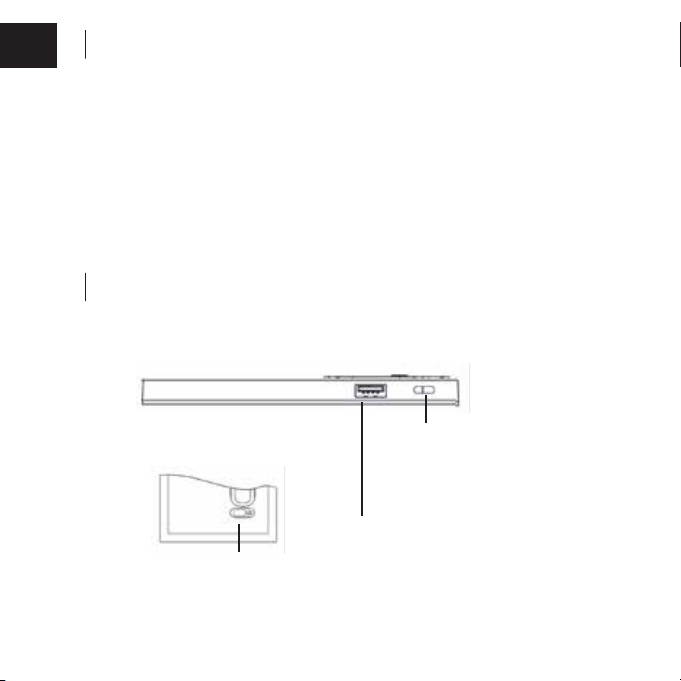
I. Functional Parts Figure
Input
5V/3A,9V/2A,12V/1.5A
Output
QC3.0 PD3.0
5V/3A,9V/2A,12V/1.5A
Output QC3.0,5V 3A,9V 2A,12 1.5A
Power display screen

II. Turn On & Turn Off
Plug and play,that is when the digital device (like a phone)connects to
the power bank,it will turn on immediately and charge the device, if the
connection unplugs,it will turn off automatically in 35 seconds.
III. Charge Power Bank
When charging, the single nixie tube on the display will flash. When the
display percentage is 100, it means that it is full.
1) Charging with AC
Charge power bank by connecting the charger to its input connector
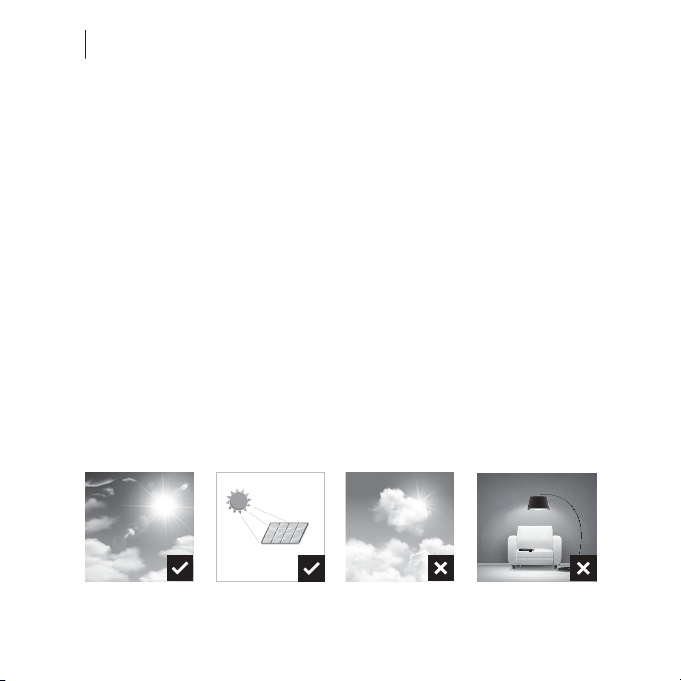
2) Charging in the sun
When charging, make sure that the power is in the closed state, so as
not to charge slowly, expand the solar panels in the sunlight, and
open the solar panels.
Note: please turn off the solar panel when charging the
mobile phone device.
Instructions
Sunshine
Perfect time for soloar
charging! Avoid from
placing the panel
under shade area.
Cloudy
Not a perfect
condition but you can
still perform charging
on some devices.
Home Lighting
Home lighting is too
weak to power solar
panel.
Best Condition
Place the panel 45°
facing towards the
sunlight to maximse
the charging rate.
45°

IV. Power Indication
When the charger charges the mobile power supply, or the mobile power
supply charges digital products such as mobile phones, the power will
be displayed, and the nixie tube displays the percentage.
V. Applications
Suitable for most mobile phones, tablets, PC's, cameras, videocameras,
bluetooth and other digital devices with or similar with 5V input.
Connect the device to the power bank by using the charging cable and
turn it on.
List of packaging:
21W Solar Powerbank x 1
Manual x 1
Specified output cable x 1
Instructions
For the difference of connector data and technology, some digital devices
may not compatible with the battery, not for the quality of the battery.
Warm Prompts
EN

CE Certification
Declaration of Conformity
We,
MEROTEC GmbH
Otto-Brenner-Straße 8
47877 Willich / Germany
declare that the product
Machine Description: Solar Power Bank
Machine Type: LX PB21
Function: Charge Mobile Devices
Conforms to the following directives and standards
Battery Directive 2006/66/EC
RoHS Directive 2011/65/EU
WEEE Directive 2012/19/EU
Authorized Signatory
Signature:_______________________
Place: Willich
Name: Roland Menken
General Manager
Date: 01.11.2021
MEROTEC GmbH
Otto-Brenner-Straße 8
47877 Willich / Germany
+49(0)2154 8253 251002

BEDIENUNGSANLEITUNG
FÜR DEN AMIRO Solar Powerbank 21 Watt
amiro.io
Bitte lesen Sie diese Bedienungsanleitung sorgfältig vor dem Gebrauch
des AMIRO durch und bewahren Sie sie an einem sicheren Ort auf.
Table of contents
Languages: