Akaso V50X User manual

V2.0
ACTION CAMERA
V50 X
01 02 03 04 05
06 07 08 09 10 11 12 13
14 15 16 17 18 19 20
21 22 23 24 25 26 27
28 29 30 31 32 33 34 35
36 37 38 39 40

Contents
Camera Specification ------------------------------------------------------------------------ 03
Critical Notes ----------------------------------------------------------------------------------- 04
What’s in the Box ----------------------------------------------------------------------------- 05
Your V50 X --------------------------------------------------------------------------------------- 06
Getting Started--------------------------------------------------------------------------------- 08
Installing&Formatting Memory Card-------------------------------------------------- 08
Removing&Installing Waterproof Case ---------------------------------------------- 10
Charging&Installing Battery-------------------------------------------------------------- 12
Button Operation Instructions ----------------------------------------------------------- 13
Camera Modes -------------------------------------------------------------------------------- 15
Photo Mode ---------------------------------------------------------------------------------- 15
Video Mode----------------------------------------------------------------------------------- 17
Wifi Mode ------------------------------------------------------------------------------------- 20
Customizing Your V50 X -------------------------------------------------------------------- 21
Photo Settings ------------------------------------------------------------------------------- 21
Video Settings ------------------------------------------------------------------------------- 22
System Settings ----------------------------------------------------------------------------- 24
Connecting to the AKASO GO App ------------------------------------------------------ 28
Playing Back Your Content ---------------------------------------------------------------- 30
Playing Back or Deleting Files on V50 X ---------------------------------------------- 30
Playing Back or Deleting Files on AKASO GO App -------------------------------- 31
Downloading Your Content --------------------------------------------------------------- 32
Offloading Your Content to Computer ----------------------------------------------- 32
Downloading Your Content to Smartphone ---------------------------------------- 32
EN
01 02 03 04 05
06 07 08 09 10 11 12 13
14 15 16 17 18 19 20
21 22 23 24 25 26 27
28 29 30 31 32 33 34 35
36 37 38 39 40

Remote Control-------------------------------------------------------------------------------- 33
Video-------------------------------------------------------------------------------------------- 34
Photo ------------------------------------------------------------------------------------------- 34
CR2032 Battery Replacement for Remote ------------------------------------------ 34
Maintaining Your Camera------------------------------------------------------------------ 36
Maximizing Battery Life--------------------------------------------------------------------- 36
Battery Storage and Operation ---------------------------------------------------------- 36
Mounting Your Camera--------------------------------------------------------------------- 37
Q&A------------------------------------------------------------------------------------------------ 39
Contact Us--------------------------------------------------------------------------------------- 40
EN
01 02 03 04 05
06 07 08 09 10 11 12 13
14 15 16 17 18 19 20
21 22 23 24 25 26 27
28 29 30 31 32 33 34 35
36 37 38 39 40

Camera Specification
Specifications
Model V50 X
Master Icatch
LCD 2.0-inch touchscreen
Port Micro USB 2.0, Micro HDMI
External Mic Support(Exclusive to AKASO Cameras Only)
Battery 4.2V 1350mAh
Battery life Around 120mins when fully charged
Lens 6G
Aperture 2.6
Remote control Support
Video/Photo format MOV/JPG
Gyroscope 6-axis gyroscope
EN
01 02 03 04 05
06 07 08 09 10 11 12 13
14 15 16 17 18 19 20
21 22 23 24 25 26 27
28 29 30 31 32 33 34 35
36 37 38 39 40

Critical Notes
Congratulations on your new AKASO Action Camera V50 X!
You must be excited to use your AKASO V50 X. However, please spend time
reading this manual before using it. You need to get to know all the features now so
as to get the most out of it.
CAUTION!
1. This is a high-precision product. Do not drop.
2. Do not expose the item to strong magnetic fields, such as electric motors, magnets
and machinery rife with strong radio waves.
3. Never leave the item in high-temperature areas. Electronics and optics can be
damaged under prolonged exposure to heat.
4. Although this model is waterproof without needing an additional housing. it is
important to check that all seals are intact and all doors are properly closed
before submerging the camera in water.
5. Always store extra batteries in a compartment away from any sharp metals and
moisture.
6. Avoid extended periods of battery charging. Keep it away from children and pets
while charging to avoid accidents.
7. If your camera does not work normally or encounters any photo or video quality
issues, please feel free to refer to FAQs in this manual or contact our support for
help by sending emails to our official email address [email protected].
EN
01 02 03 04 05
06 07 08 09 10 11 12 13
14 15 16 17 18 19 20
21 22 23 24 25 26 27
28 29 30 31 32 33 34 35
36 37 38 39 40

What’s in the Box
AKASO V50 X
x 1
Waterproof
Housing x 1
Battery Charger
x 1
Battery
x 2
USB Cable
x 1
Remote Control
x 1
Remote Control
Strap x 1
Clip
x 1
Protective
Backdoor x 1
Clip 2
x 1
Mount 4
x 1
Mount 1
x 1
Mount 2
x 1
Mount 3
x 1
Mount 5
x 1
Spanner
x 1
Mount 7
x 1
Handle Bar /
Pole Mount x 1
Helmet Mounts
x 2
Mount 6
x 1
Bandages
x 4
Tethers
x 5
Lens Cloth
x 1
Double Sided
Tape x 2
Quick Start
Guide x 1
EN
01 02 03 04 05
06 07 08 09 10 11 12 13
14 15 16 17 18 19 20
21 22 23 24 25 26 27
28 29 30 31 32 33 34 35
36 37 38 39 40

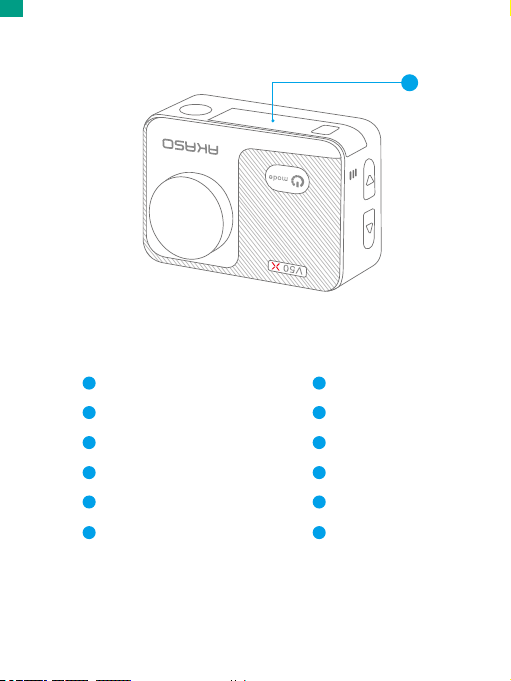
12
Shutter Button
Indicator Light
Power/Mode Button
Memory Card Slot
Micro USB Port
Micro HDMI Port
1
3
4
5
6
2
Lens
Screen
Up Button
Speaker
Down Button
Battery Door
7
9
10
11
12
8
Note: The camera does not record sounds when it’s in the waterproof case.
EN
01 02 03 04 05
06 07 08 09 10 11 12 13
14 15 16 17 18 19 20
21 22 23 24 25 26 27
28 29 30 31 32 33 34 35
36 37 38 39 40

Welcome to your AKASO V50 X. To capture videos and photos, you need a memory
card (sold separately) to start recording.
Memory Cards
Please use brand name memory cards that meet these requirements:
• U3 rating
• Capacity up to 64GB
Note:
1. Please format the memory card first in this camera before using. To keep your
memory card in good condition, reformat it on a regular basis. Formatting erases
all your content, so please make sure to offload your photos and videos before
formatting.
2. Files are saved each time the file size reaches 4G and starts recording again on a
new file till the memory card is full. The free space of 4G is actually 3.6G+.
Installing&Formatting Memory Card
The memory card is a precision electronic device. To get the most out of it, please
mind the following tips.
• Please format the memory card before using it for the first time or if there is any
data or other files that are not recognized by the camera in the memory card.
• Please turn off the camera before inserting or removing the memory card.
Note: Reformatting the memory card will degrade its performance. If the memory
card performance degrades, please purchase a new memory card.
• Please turn off the camera before inserting or removing the memory card.
• Please do not bend the memory card and avoid falling or being squeezed.
• Please do not place this memory card in a strong electric or magnetic environment,
such as near a speaker or a television receiver.
• Please do not use or leave the memory card in an overheating or under-cooled environment.
• Keep the memory card clean and avoid touching any liquid. If the memory card is
touching the liquid, wipe it dry with a soft cloth.
• Please place the memory card in the car holder while not using.
Getting Started
EN
01 02 03 04 05
06 07 08 09 10 11 12 13
14 15 16 17 18 19 20
21 22 23 24 25 26 27
28 29 30 31 32 33 34 35
36 37 38 39 40

• Please do not insert the memory card into other digital cameras. If you want to
insert different memory cards into this action camera, please format them first.
• Please do not insert the memory card formatted in a digital camera or a card
reader into the action camera.
• Data stored in the memory card may be damaged if the memory card is not
used properly.
• Data stored in the memory card may be damaged if the camera is turned off or
the memory card is removed amid data storage or deletion.
Note: It’s normal that the memory card will heat up after being used for a long
time. Please insert it back into the camera when it cools off.
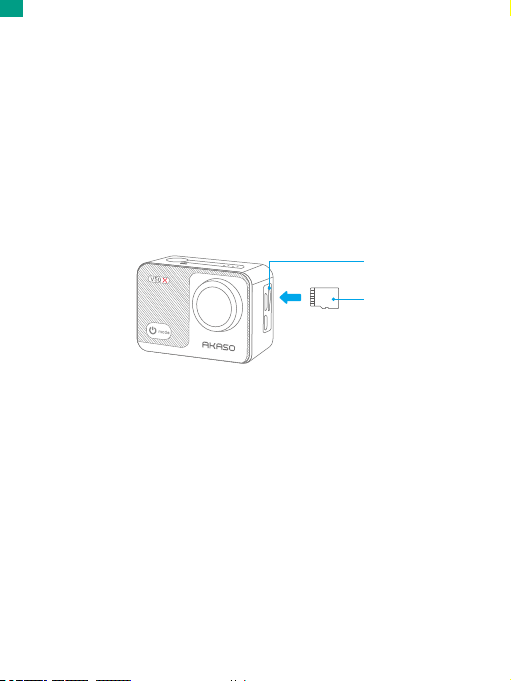
Memory Card Installation
Locate the memory card slot in the dash cam, then insert the memory card after
confirming the correct direction, and then press down on it till it's in place. Please
do not insert the memory card rudely.
To remove the memory card, please press down on it till you hear a sound indicating
it’s inserted, the memory will then pop out and make another sound. Please do not
remove the memory card when the camera turns on in case files in the card are
damaged.
Format
1.Please insert the memory card when the camera turns off. Turn on the camera
when the card is inserted.
2.Click the Setting icon to enter camera settings, locate the option Format Memory
Card, then click Confirm to complete the process.
Memory Card Slot
Memory Card
EN
01 02 03 04 05
06 07 08 09 10 11 12 13
14 15 16 17 18 19 20
21 22 23 24 25 26 27
28 29 30 31 32 33 34 35
36 37 38 39 40
Other manuals for V50X
7
Table of contents
Other Akaso Action Camera manuals

Akaso
Akaso V50X User manual

Akaso
Akaso Brave 4 User manual

Akaso
Akaso EK7000 User manual

Akaso
Akaso V50 Pro SE User manual

Akaso
Akaso Brave 6 Plus User manual

Akaso
Akaso V50 Elite User manual

Akaso
Akaso V50X User manual

Akaso
Akaso EK7000 User manual

Akaso
Akaso Keychain User manual

Akaso
Akaso Brave 8 User manual

Akaso
Akaso EK7000 User manual

Akaso
Akaso BRAVE 4 PRO User manual

Akaso
Akaso EK7000 User manual

Akaso
Akaso Brave 8 User manual

Akaso
Akaso EK7000 User manual

Akaso
Akaso EK7000 User manual

Akaso
Akaso Brave 4 User manual

Akaso
Akaso Brave 7 User manual

Akaso
Akaso V50 Pro SE User manual

Akaso
Akaso Brave 8 User manual