Akaso V50X User manual

V2.2
ACTION CAMERA
V50 X
01 02 03 04
05 06 07 08 09 10
11 12 13 14 15 16
17 18 19 20 21 22 23
24 25 26 27 28 29 30
31 32 33 34 35

Contents
Camera Specification --------------------------------------------------------------------- 01
Important Notes --------------------------------------------------------------------------- 02
What’s in the Box -------------------------------------------------------------------------- 03
Your V50 X------------------------------------------------------------------------------------ 04
Getting Started ----------------------------------------------------------------------------- 06
Using Memory Cards ------------------------------------------------------------------ 06
Charging the Camera------------------------------------------------------------------ 07
Button Operation & Indicators ----------------------------------------------------- 08
Operation Instructions---------------------------------------------------------------- 09
Overview of Modes------------------------------------------------------------------------ 11
Photo Modes----------------------------------------------------------------------------- 11
Video Modes ----------------------------------------------------------------------------- 13
Wifi Mode --------------------------------------------------------------------------------- 16
Customizing Your V50 X ----------------------------------------------------------------- 17
Photo Settings --------------------------------------------------------------------------- 17
Video Settings --------------------------------------------------------------------------- 19
System Settings ------------------------------------------------------------------------- 21
Connecting to AKASO GO App -------------------------------------------------------- 24
Playing Back Your Content ------------------------------------------------------------- 26
Offloading Your Content ---------------------------------------------------------------- 28
Remote Control----------------------------------------------------------------------------- 29
Maintaining Your Camera--------------------------------------------------------------- 32
Maximizing Battery Life------------------------------------------------------------------ 32
Battery Storage and Operation ------------------------------------------------------- 32
Mounting Your Camera------------------------------------------------------------------ 33
Contact Us------------------------------------------------------------------------------------ 35
EN
01 02 03 04
05 06 07 08 09 10
11 12 13 14 15 16
17 18 19 20 21 22 23
24 25 26 27 28 29 30
31 32 33 34 35

Camera Specification
Model V50 X
LCD 2.0-inch touchscreen
Port USB Port / Micro HDMI Port
External Mic
Supported but sold separately.
Note: Be sure to purchase external microphones compatible with
this camera.
Battery
About 120mins of recording time in 4K.
Note: The actual battery life may vary based on the environment
and usage.
Remote control Supported
Video/Photo format MOV / JPG
Gyroscope 6-axis gyroscope
EN
01 02 03 04
05 06 07 08 09 10
11 12 13 14 15 16
17 18 19 20 21 22 23
24 25 26 27 28 29 30
31 32 33 34 35

Important Notes
Congratulations on your new AKASO V50 X Action Camera! You must be excited to
use your new camera, but please spend some time familiarizing yourself with this
manual first so that you get the most out of your camera’s features.
CAUTION!
1. This camera is a precise product. Please protect it from falling or colliding in
case it’s badly damaged.
2. Please place this camera away from machines or matters rich in strong
magnetic fields or power, such as motors or magnets.
3. Please make sure the camera work at its operating temperature. Do not leave it
exposed to high or low-temperature areas for a long period of time in case its
service life is shortened.
4. Please make sure to securely attach the action camera to the waterproof case
before diving in case water leaks in, causing malfunction on it.
5. Please do not charge the battery for a long period of time. Keep it away from
kids and pets in case of any incident.
6. Please take the battery out of the camera if you do not use it for a long period
of time.
7. Please store this camera away from any sharp metals and wet compartments
Warm Tip: In case your camera does not work normally or encounters any
photo or video quality issues, please feel free contact customer support for
help by sending emails to our official email address [email protected].
EN
01 02 03 04
05 06 07 08 09 10
11 12 13 14 15 16
17 18 19 20 21 22 23
24 25 26 27 28 29 30
31 32 33 34 35

What’s in the Box
AKASO V50 X
x 1
Waterproof
Housing x 1
Battery Charger
x 1
Battery
x 2
USB Cable
x 1
Remote Control
x 1
Remote Control
Strap x 1
Clip 1
x 1
Protective
Backdoor x 1
Clip 2
x 1
C Mount
x 1
Buckle Mount
x 1
J-Hook Mount
x 1
A Mount
x 1
D Mount
x 1
Spanner
x 1
E Mount
x 1
H Mount
x 1
Helmet Mount
x 2
F Mount
x 1
Bandage
x 4
Tether
x 5
Lens Cloth
x 1
Double-Sided
Adhesive Tape x 2
Quick Start
Guide x 1
EN
01 02 03 04
05 06 07 08 09 10
11 12 13 14 15 16
17 18 19 20 21 22 23
24 25 26 27 28 29 30
31 32 33 34 35

Welcome to your AKASO V50 X action camera. To capture videos and photos, you
will need a memory card (sold separately).
Using Memory Cards
Please use brand name memory cards that meet these requirements:
• U3
• Capacity up to 64GB
Note:
1. Please format the memory card in this camera before using it for bettercompatibility.
2. Memory cards larger than the specified maximum capacity can cause issues like
non-recognition or even camera malfunctions like unresponsiveness or firmware
failure.
3. To keep your memory card in good condition, regularly reformat your memory
card for optimal performance. Remember, reformatting erases all data, so
transfer your photos and videos before reformatting. With FAT32, the card will
stop recording and create a new file if the file size of a recording reaches 4GB.
Formatting the memory card
1. Turn on the camera.
2. Tap the Settings icon in the bottom right corner to enter the camera settings
screen.
3. Scroll down to locate the "Format Card" option and tap on it.
4. Select the "Confirm" option to complete the formatting process.
Getting Started
Normal
4K30fps
00:00:00 03:21:11
Power Frequency
Format Card
Reset
Cancel
Confirm
EN
01 02 03 04
05 06 07 08 09 10
11 12 13 14 15 16
17 18 19 20 21 22 23
24 25 26 27 28 29 30
31 32 33 34 35

Installing the memory card
To install the memory card, first press the charging cover to reveal the memory
card slot, then insert the memory card in the orientation shown and close the
cover. To remove the card, press down on it till you hear a sound indicating it’s
inserted, the memory will then pop out and make another sound.
Notes:
1. Be sure to turn off the camera before installation or removal.
2. Insert the card into the card slot with the correct orientation.
3. Avoid using the card in areas with strong currents or magnetic fields.
4. Refrain from allowing the card to come into contact with metal objects, and
avoid using any metal tools that could cause it to be squeezed, bent, or fall.
5. Store the card in dry locations, away from corrosive substances.
6. Always ensure that no foreign items are inserted into the card slot.
Charging the Camera
We recommend you fully charge the camera before using it for the first time.
To charge the camera, insert the battery into the camera's battery slot, connect it
to a USB adapter or computer using the USB cable. Once fully charged,
disconnect the cable and ensure the battery cover is securely fastened.
You can also charge the battery separately. To do this, insert it into the battery
charger, then connect the charger to a USB outlet using the USB cable.
To install the battery, press the buckle of the battery cover to open it, then place
the battery into its slot and close the battery cover. If you wish to remove the
battery, simply pull the battery strip.
Memory Card Slot
Memory Card
EN
01 02 03 04
05 06 07 08 09 10
11 12 13 14 15 16
17 18 19 20 21 22 23
24 25 26 27 28 29 30
31 32 33 34 35

Note: Charging your device using a computer USB port may take longer than
using a power adapter, as the output of USB ports is usually lower. It will take
approximately three hours to fully charge the battery, so please be patient. Once
the battery is fully charged, it can last about 120 minutes of 4K video recording.
Nevertheless, it's important not to overcharge the battery, so please unplug the
device from the power source once it's fully charged.
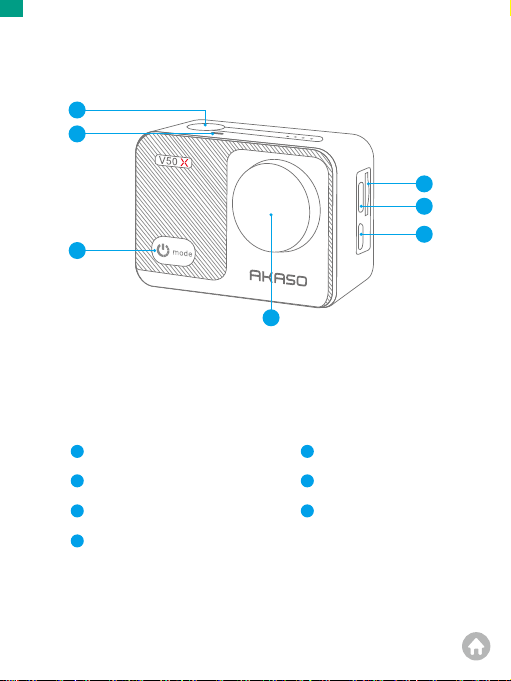
The indicator light will remain blue when powering on, and go out
when off. It will flash when capturing photos or videos.
Status indicator
Shutter button
Power button
Press the Shutter button to confirm the option.
Long press the Shutter button to access the setting menu.
Press the Power button to enter the camera mode menu.
Long press the Power button to turn on or off the camera.
Up button
Press the Up button to turn on or off Wifi.
Long press to zoom in. The camera supports up to 4X.
Down button
Press the Down button to enter the playback screen.
Long press to zoom out. The camera support up to 4X.
Buttons/
Indicator lights
Operation/Status
Button Operation & Indicators
The indicator light will remain red while charging, and go out when
fully charged.
Charging indicator
The Wifi indicator will flash red when Wifi is turned on, and will stay
on when connected. It will go out when Wifi is off.
Wifi indicator
EN
01 02 03 04
05 06 07 08 09 10
11 12 13 14 15 16
17 18 19 20 21 22 23
24 25 26 27 28 29 30
31 32 33 34 35
Other manuals for V50X
7
Table of contents
Other Akaso Action Camera manuals

Akaso
Akaso V50 Elite User manual

Akaso
Akaso Brave 4 User manual

Akaso
Akaso Brave 8 User manual

Akaso
Akaso EK7000 Pro User manual

Akaso
Akaso Keychain User manual

Akaso
Akaso EK7000 User manual

Akaso
Akaso V50 Elite User manual

Akaso
Akaso BRAVE 4 PRO User manual

Akaso
Akaso Brave 7 LE User manual

Akaso
Akaso V50 Elite User manual

Akaso
Akaso V50 Pro SE User manual

Akaso
Akaso Brave 8 User manual

Akaso
Akaso Brave 7 User manual

Akaso
Akaso Brave 6 Plus User manual

Akaso
Akaso EK7000 User manual

Akaso
Akaso EK7000 User manual

Akaso
Akaso EK7000 User manual

Akaso
Akaso V50 Pro SE User manual

Akaso
Akaso EK7000 User manual

Akaso
Akaso Brave 8 User manual