
Airdog X5 User manual

Note: Please read this manual carefully and keep for future reference.

Thank you for supporting us on Indiegogo!
Your contribution helped us to bring the Airdog green technology air purifier to market. Thank you for joining our team to reduce waste
and protect our planet.
Your new Airdog air purifier contains our advanced ionic wind technology. It includes a pre-filter, a washable electronic filtration core
and a replaceable catalytic composite filter, which removes odors, decomposes volatile organic compounds (VOC), and converts
ozone back to oxygen.
These technologies can provide broad protection against airborne particles down to 14.6nm, including many that traditional HEPA
filters leave behind: Bacteria, mold, viruses, fungi, chemical fumes and odors. It offers you a healthier, cleaner home environment.
The Airdog purifier has been thoroughly tested to meet our own exacting quality control standards for your long-term safety.
Click on our Twitter, Facebook and Official Website.
For customer support, please contact support@siliconvalleyairexperts.com
About Your Airdog X5 Air Purifier
2

Table Contents
2.General Safety Imformation / WARNING ---------------------------4
1.About Your Airdog X5 Air Purifier ---------------------------2
3.Caution / Ozone Concerns ---------------------------5
4.Packing List / Components ---------------------------6
5.Installation Guide ---------------------------7
6.Air Purifier Operation Instruction ---------------------------8
7.Display and Air Quality Indicator Instruction ---------------------------9
8.Cleaning and Maintenance ---------------------------10
9.Care of Composite Filter ---------------------------11
10.App Setting ---------------------------12-13
11.Customer Service ---------------------------14
12.Q&A ---------------------------15-16
13. Airdog X5 Manual ---------------------------17

WARNING
GENERAL SAFETY IMFORMATION
•Read this manual carefully before you operate the air purifier. Failure to do so may result in serious injury or death.
•Do not connect to a stable power supply until you have installed all components.
•Do not use the purifier when power cord or plug is damaged as it may result in electric shock, serious injury or death. Have a
qualified technician replace damaged cords or plugs.
•Do not operate air purifier with wet hands as this may result in electrical shock, serious injury or death.
•Do not modify the purifier without the help of a qualified electrician. Please contact our customer support for assistance.
•Do not use your Airdog near any open window as rain may create an electrical hazard. Do not expose your Airdog to wet or
damp conditions.
•Do not immerse the Airdog air purifier in water or any other liquid.
•Do not reach for an Airdog air purifier that has fallen into water. Unplug it immediately.
•Do not block the Airdog’s outlet/inlet when operating or put it in a soft surface where the air openings may be blocked.
•Do not insert any object into the air outlet /inlet as it may damage the device or lead to injury.
•Do not remove the collecting plate without turning off the power supply.
•Do not touch the inside parts after removing the filter. A small amount of static charge may still be present if the unit was just
turned off.
Please Read All Instructions Before Using This Product !
4

Cantion
•Remove all packing materials (bags, cardboard, foams, etc.)
•Use the correct electrical supply voltage for safety.
•Turn the Airdog off before unplugging it from the electrical outlet.
•Monitor children carefully when operating your Airdog near them, even when the purifier is in child lock mode.
•Follow our official cleaning instruction video to clean and maintain your Airdog for long-term safety.
•Make sure the filter is completely dry before placing it back into the Airdog after cleaning.
•After cleaning, always re-install the collecting plate according to the orientation on the label.
•Always put your Airdog in an open, flat, and stable area when operating to avoid any accidents.
•Airdog X5 reaches a maximum of 5ppb (0.005ppm) ozone after testing for 24 hours in an enclosed room according to EN60335
(equivalent to UL 867 standards). This is lower than the ambient ozone level in most environments.
Ozone Concerns
5
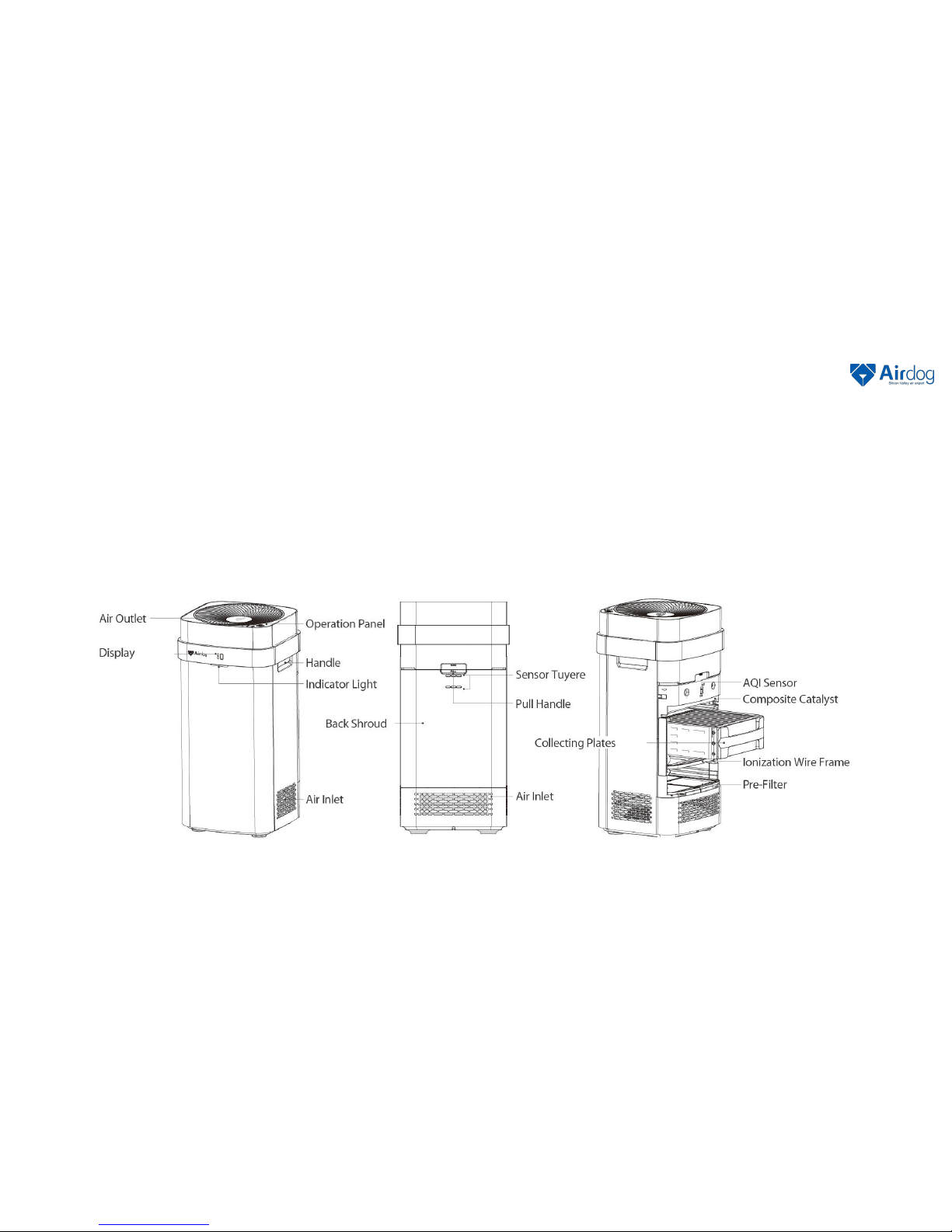
Components
Front/Side Back Internal Structure
Notes:Wording in order from left to right and from up to down in order to correspoonding to the words on graph
6
Air Purifier Main Body × 1 Collecting Plates× 1 Remote Control × 1 Cleaning Brush × 1
Packing List

Installation Instructions
1.Take the collecting plates out of the foam box;
2. Use the pull handle to open the back shroud (Pic1);
3.Insert the collecting plates in the orientation described on the label (Pic2);
4.Place the air purifier in an open location to achieve the best cleaning efficiency;
7

Air Purifier Operation Instruction
Children Lock Indicator
In this mode the operation button is locked to prevent children from playing with the purifier.
The purifier may be controlled or unlocked only with the remote control or smartphone app.
Auto mode Indicator Light
When this light on, the air purifier is running under automatic mode. It automatically senses the air
quality and adjusts its running speed according to the air quality level. This is the most energy
efficient mode and we recommend keeping the purifier in this mode most of time.
Auto Indicator Light
When this light on, the air purifier is running under automatic mode. It automatically senses the air
quality and adjusts its running speed according to the air quality level. This is the most energy
efficient mode and we recommend keeping the purifier in this mode most of time.
Wind Speed Indicator Light
A short press ( approximately 1 second) turns the power ON. A long press (over 3 seconds) turns the power
OFF.
When power is ON, each short press cycles through auto-mode ON/OFF, different fan speeds, sleep mode,
etc…Check indicator lights to understand each operation mode.
Sleep Mode Indicator
In sleep mode, your air purifier is still cleaning your air but in
quieter low-speed mode. Also to avoid light disturbance, all
display lights are OFF.
WIFI Indicator (Blue light)
When the indicator is flashing the
purifier is in pairing mode;
8

Display and Air Quality Indicator Instruction
AQI (Air Quality Index),
this is a calculated air quality index based on the particle numbers that
the sensor measures in the air. Ranges from 0-500.
Cleaning reminder
When “C” appears on the display instead of AQI numbers, it reminds
you to wash the collecting plates. Press and hold the “Reset” button for
6 seconds to cancel the reminder once the collecting plates are washed
or cleaned.
Fault Display
When the display shows “9XXX”, please contact our customer service
We will promptly respond to your request or have our local team to
contact you.
Yellow Green:
Good
35ug/m3 < PM 2.5 ≤ 75ug/m3
Green:
Excellent
PM 2.5 ≤ 35 ug/m3
Wind Speed Indicator
L1-L4, slow to fast.
Notes:
1. Results based on the real-time monitoring about particles by using build-in sensor.
2. Results affect by the position and height even it is nearby areas.
Yellow:
Moderately Polluted
75ug/m3 < PM 2.5 ≤ 150ug/m3
Red:
Hazardous
PM2.5 > 150ug/m3
9

Cleaning and Maintenance
Air quality sensor cleaning
The Airdog air purifier has an embedded air quality sensor. To keep the air
quality sensor reading correctly, please clean the sensor as illustrated every 6
months, using dry cotton swabs as illustrated.
Cleaning and Maintenance
•We recommend a complete cleaning every 6-12 months.
•First, unplug the power supply. Open the back shroud, pull out the ionization wire frame and collecting plates. Pull
out the protective rubber sleeve as illustrated in (Pic 1).
•Clean the ionization wire frame and collecting plates properly according to the previous instructions.
•Use a wet cloth to wipe down all surfaces of the protective rubber sleeve, as illustrated. Clean the sleeve
completely, including the notches
•Clean the inner walls of the air purifier with a wet cloth;
•Dry the parts completely, then put them back in order.
10
Other manuals for X5
2
Table of contents
Other Airdog Air Cleaner manuals


