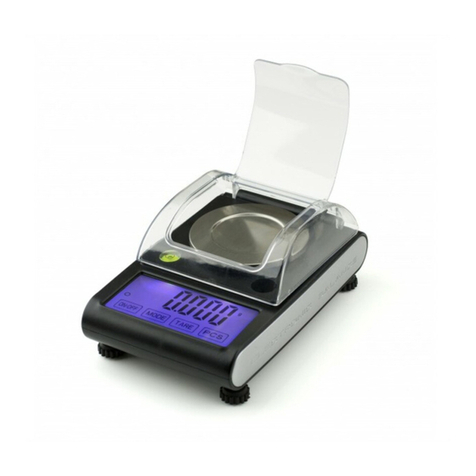
A&D GP-61KS User manual

GP SERIES
GP-12K/GP-20K /GP-30K/GP-32K
GP-40K/GP-60K/GP-61K
GP-100K/GP-102K
GP-30KS/GP-32KS
GP-60KS/ GP-61KS/GP-100KS
Precision Balance
INSTRUCTION MANUAL
WM+PD4000273D

© 2006 A&D Company Ltd. All rights reserved.
No part of this publication may be reproduced, transmitted, transcribed, or translated
into any language in any form by any means without the written permission of A&D
Company Ltd.
The contents of this manual and the specifications of the instrument covered by this
manual are subject to change for improvement without notice.

1
CONTENTS
Basic operation
1. INTRODUCTION ............................................................................................................................3
1-1 About This Manual ..............................................................................................................................3
1-2 Features..............................................................................................................................................3
1-3 Compliance.........................................................................................................................................5
2. UNPACKING THE BALANCE........................................................................................................7
2-1 Unpacking ...........................................................................................................................................7
2-2 Installing the Balance..........................................................................................................................8
3. PRECAUTIONS..............................................................................................................................9
3-1 Before Use..........................................................................................................................................9
3-2 During Use..........................................................................................................................................9
3-3 After Use............................................................................................................................................10
3-4 Power Supply....................................................................................................................................10
3-5 Display Symbols and Key Operation ................................................................................................11
3-6 Smart Range Function......................................................................................................................12
4. WEIGHING UNITS........................................................................................................................13
4-1 Units..................................................................................................................................................13
4-2 Changing the Units............................................................................................................................16
5. WEIGHING ...................................................................................................................................17
5-1 Basic Operation (Kilogram Mode).....................................................................................................17
5-2 Counting Mode (PCS).......................................................................................................................18
5-3 Percent Mode (%).............................................................................................................................20
5-4 Animal Weighing Mode (Hold Function)............................................................................................20
5-5 Accumulation Function......................................................................................................................21
Adapting to the environment
6. RESPONSE ADJUSTMENT / SELF CHECK FUNCTION ...........................................................23
6-1 Automatic Response Adjustment / Self Check Function...................................................................23
6-2 Manual Response Adjustment..........................................................................................................24
7. CALIBRATION..............................................................................................................................25
7-1 Calibration Group..............................................................................................................................25
7-2 Automatic Self Calibration (Calibrationduetochangesintemperature)..................................................26
7-3 Calibration Using the Internal mass (One-Touch Calibration)...........................................................27
7-4 Calibration Using an External Weight...............................................................................................28
7-5 Calibration Test Using an External Weight........................................................................................30
7-6 Correcting the Internal Mass Value...................................................................................................32
8. FUNCTION SWITCH AND INITIALIZATION ................................................................................ 34
8-1 Permit or Inhibit.................................................................................................................................34
8-2 Initializing the Balance ......................................................................................................................35
9. FUNCTION TABLE.......................................................................................................................36
9-1 Structure and Sequence of the Function Table.................................................................................36
9-2 Display and Keys ..............................................................................................................................36
9-3 Details of the Function Table.............................................................................................................37
9-4 Description of the Class “Environment, Display” ..............................................................................40
9-5 Description of the Item “Data output mode”......................................................................................42
9-6 Description of the Item “Data format”................................................................................................43
9-7 Description of the Data FormatAdded to the Weighing Data..................................................................45

2
9-8 Data Format Examples .....................................................................................................................46
9-9 Clock and Calendar Function............................................................................................................48
9-10 Comparator Function ......................................................................................................................50
9-11 Adding the Comparison Results......................................................................................................52
9-12 Main Display Comparison Function................................................................................................52
10. ID NUMBER AND GLP REPORT...............................................................................................54
10-1 Setting the ID Number.....................................................................................................................54
10-2 GLP Report .....................................................................................................................................55
11. DATA MEMORY..........................................................................................................................58
11-1 Notes on Using Data Memory.........................................................................................................58
11-2 Memory for Weighing Data..............................................................................................................59
11-3 Memory for Calibration and Calibration Test Data ..........................................................................62
11-4 Memory for Unit Mass in the Counting Mode..................................................................................63
11-5 Memory for Comparator Settings....................................................................................................65
11-6 Memory for Tare Value ....................................................................................................................67
11-7 Data Memory: Quick Selection Mode..............................................................................................71
11-8 Data Memory: Confirmation and Storage Mode..............................................................................72
12. PROGRAMMABLE-UNIT...........................................................................................................73
13. DENSITY MEASUREMENT .......................................................................................................74
RS-232C serial interface
14. I/O UNIT SPECIFICATIONS (Standard) ....................................................................................77
14-1RS-232C//ExternalContactInput..........................................................................................................77
15. CONNECTION TO PERIPHERAL EQUIPMENT........................................................................ 79
15-1 Connection to the AD-8121B Printer...............................................................................................79
15-2 Connection to a Computer..............................................................................................................79
15-3 Using Windows Communication Tools (WinCT) .............................................................................80
15-4 Using the WinCT software, the balance can do the following:........................................................80
16. COMMANDS ..............................................................................................................................81
16-1 Command List.................................................................................................................................81
16-2 Acknowledge Code and Error Codes..............................................................................................82
16-3 Control Using CTS and RTS...........................................................................................................82
16-4 Settings Related to RS-232C..........................................................................................................82
Maintenance
17. MAINTENANCE .........................................................................................................................83
18. TROUBLESHOOTING................................................................................................................83
18-1 Checking the Balance Performance and Environment...................................................................83
18-2 Error Codes.....................................................................................................................................84
18-3 Asking For Repair............................................................................................................................86
19. SPECIFICATIONS ......................................................................................................................87
20. EXTERNAL DIMENSIONS.........................................................................................................89
21. OPTIONS....................................................................................................................................91
22. TERMS/INDEX ...........................................................................................................................92

3
1. INTRODUCTION
This manual describes how the GP series balance works and how to get the most out of it in terms
of performance.
Read this manual thoroughly before using the balance and keep it at hand for future reference.
1-1 About This Manual
This manual consists of the following five parts:
Basic operation .............................. Describes precautions on handling the balance, balance
construction and basic balance operation.
Adapting to the environment .......... Describes response adjustment, calibration and calibration
test.
Functions ....................................... Describes various functions of the balance.
RS-232C serial interface................... Describes RS-232C serial interface output and external contact
input. The RS-232C serial interface outputs weighing data and
controls the balance. The external contact input commands the
balance re-zeroing and data output.
Maintenance................................... Describes maintenance, error codes, troubleshooting,
specifications and options.
1-2 Features
Large Vacuum Fluorescent Display, easy to read.
Dust-tight and Protected Against Water Jets (Complying with IP65), allows washing with water.
Built-in Calibration Weight (hereinafter referred to as internal mass), allows easy calibration,
adjustment and maintenance of the balance.
Automatic Self Calibration, using the internal mass, adapting to changes in temperature.
Self Check Function, provided to self-check the balance using the internal mass.
Automatic Response Adjustment, adapting to vibration and drafts in the environment.
High Response Speed, the time to read a displayed value after a sample is placed on the pan
has been shortened by using the Super Hybrid Sensor (SHS). (Approx. 1.5 seconds when
FAST is selected for the response rate.)
Data Memory Function, storing weighing data, calibration data or unit mass in the counting
mode. It can also store tare values or upper and lower limit values for the comparator function.
Interval Memory Mode is provided to store the weighing data periodically.
Good Laboratory Practice (GLP) data output using the standard RS-232C serial interface.
Clock and Calendar Function, adding the time and date to the output data.
Comparator Indicators, displaying the comparison results, H I, OK or LO.
Capacity Indicator, displaying the weight value in percentage relative to the weighing capacity.

4
Hold Function, provided for weighing a moving object such as an animal.
Multiple Weighing Units, with most of the common units used around the world.
Density Mode, for calculating the density of a solid.
Accumulation Function, adding the weight values and outputting the sum.
Adjustable Display Position, the standard type balance has a swing-arm to adjust the display
position for optimum viewing.
Separate display type balances (GP-30KS/32KS/60KS/61KS/100KS) are also available.
Windows Communication Tools (WinCT), allows easy communication with Windows.
Windows is a registered trademark of Microsoft Corporation.
Reference Card, provided for a quick reference to the balance operation.
Underhook, available as an option, for measuring density and weighing magnetic materials.
Comparator Output (OP-04) and Analog Voltage Output (OP-06) are available as options.

5
1-3 Compliance
Compliance with FCC Rules
Please note that this equipment generates, uses and can radiate radio frequency energy. This
equipment has been tested and has been found to comply with the limits of a Class A
computing device pursuant to Subpart J of Part 15 of FCC rules. These rules are designed to
provide reasonable protection against interference when equipment is operated in a
commercial environment. If this unit is operated in a residential area, it may cause some
interference and under these circumstances the user would be required to take, at his own
expense, whatever measures are necessary to eliminate the interference.
(FCC = Federal Communications Commission in the U.S.A.)
Compliance with EMC Directives
This device features radio interference suppression in compliance with valid
EC Regulation 89/336/EEC.

6

7
2. UNPACKING THE BALANCE
2-1 Unpacking
The balance is a precision instrument. Unpack the balance carefully. Keep the packing
material to be used for transporting the balance in the future.
The packing contents depend on the balance model. See the illustrations to confirm that
everything is contained.
Standard type: GP-12K/20K/30K/32K/40K/60K/61K/100K/102K
Note
Please confirm that the AC adapter type is correct
for your local voltage and receptacle type.

8
Separate display type: GP-30KS/32KS/60KS/61KS/100KS
Note
Please confirm that the AC adapter type is correct
for your local voltage and receptacle type.
2-2 Installing the Balance
Install the balance as follows:
1. Refer to “3. PRECAUTIONS” for installing the balance.
2. Adjust the leveling feet to level the balance. Confirm it using the bubble spirit level.
3. Confirm that the adapter type is correct for the local voltage and power receptacle type.
4. Connect the AC adapter to the balance. Warm up the balance for at least 30 minutes with
nothing on the weighing pan.
This manual suits for next models
14
Table of contents
Other A&D Scale manuals