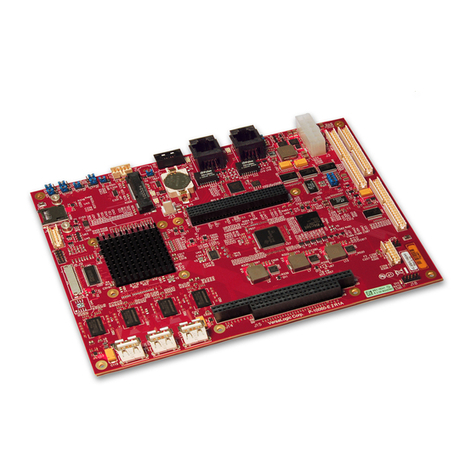
Aaeon PCM-6896 User manual

PCM-6896
Intel 815E compact boardwith PCI
slot, Audio, LAN, compact flash, 4
COM ports, PC/104 & PC/104 Plus

Copyright Notice
This document is copyrighted, 2001. All rights are reserved. The
original manufacturer reserves the right to make improvements to
the products described in this manual at any time without notice.
No part of this manual may be reproduced, copied, translated or
transmitted in any form or by any means without the prior written
permission of the original manufacturer. Information provided in
this manual is intended to be accurate and reliable. However, the
original manufacturer assumes no responsibility for its use, nor for
any infringements upon the rights of third parties which may result
from its use.
Acknowledgments
VIA is a trademark of VIA Technology, Inc.
AMD is a trademark of Advanced Micro Devices, Inc.
Award is a trademark of Award Software International, Inc.
Cyrixisatrademark ofCyrix Corporation.
IBM, PC/AT, PS/2 and VGA are trademarks of International
Business Machines Corporation.
Intel and Pentium are trademarks of Intel Corporation.
Microsoft Windows ®is a registered trademark of Microsoft Corp.
SMC is a trademark of Standard Microsystems Corporation.
RTLis a trademarkof RealtekSemi-Conductor Co.,Ltd.
C&T is a trademark of Chips and Technologies, Inc.
UMC is a trademark of United Microelectronics Corporation.
All other product names or trademarks are properties of their
respective owners.
Part No. 2087689604 5th Edition
A1.0 Printed in Taiwan March 2001

Packing List
Before you begin installing your card, please make sure that the
followingmaterials are included:
• 1PCM-6896Intel 815Eall inoneCPU Card
• 1 Quick Installation Guide
• 1 Supporting CD-ROM that contains the following:
•User’sManual (this manualin PDF file)
•VGAdrivers and utilities
•Audio drivers and utilities
•Latest BIOS (as of the CD-ROM was made)
If any of these items are missing or damaged, contact your
distributor or sales representative immediately.
FCC STATEMENT
This devise complies with part 15 FCC rules. Operation is subject
to the following two conditions:
(1) This device may not cause harmful interference.
(2) This device must accept any interference received including
interference that may cause undesired operations.
This equipment has been tested and found to comply with the
limits for a class "A" digital device, pursuant to part 15 of the FCC
rules. These limits are designed to provide reasonable protection
against harmful interference when the equipment is operated in a
commercial environment. This equipment generates, uses, and can
radiate radio frequency energy, and if not installed and used in
accordance with the instruction manual, may cause harmful
interference to radio communications. Operation of this equipment
in a residential area is likely to cause harmful interference in which
case the user will be required to correct the interference at his own
expense.

A Message to the Customer
AAEON Customer Services
Each and every AAEON product is built to the most exacting
specifications to ensure reliable performance in the harsh and
demanding conditions typical of industrial environments. Whether
your new AAEON equipment is destined for the laboratory or the
factory floor, you can be assured that your product will provide the
reliability and ease of operation for which the name AAEON has
come to be known.
Your satisfaction is our primary concern. Here is a guide to
AAEON's customer services. To ensure you get the full benefit of
our services, please follow the instructions below carefully.
TechnicalSupport
We want you to get the maximum performance from your products.
So if you run into technical difficulties, we are here to help. For the
most frequently asked questions, you can easily find answers in
your product documentation. These answers are normally more
detailed than the ones we can give over the phone.
So please consult this manual first. If you still cannot find the
answer, gather all the information or questions that apply to your
problem, and with the product close at hand, call your dealer. Our
dealers are well trained and ready to give you the support you need
to get the most from your AAEON products. In fact, most problems
reported are minor and are able to be easily solved over the phone.
In addition, free technical support is available from AAEON
engineers every business day. We are always ready to give advice
on application requirements or specific information on the installa-
tion and operation of any of our products.

Product Warranty
AAEON warrants to you, the original purchaser, that each of its
products will be free from defects in materials and workmanship for
two years from the date of shipment.
This warranty does not apply to any products which have been
repaired or altered by persons other than repair personnel autho-
rized by AAEON, or which have been subject to misuse, abuse,
accident or improper installation. AAEON assumes no liability
under the terms of this warranty as a consequence of such events.
Because of AAEON's high quality-control standards and rigorous
testing, most of our customers never need to use our repair service.
If an AAEON product is defective, it will be repaired or replaced at
no charge during the warranty period. For out-of-warranty repairs,
you will be billed according to the cost of replacement materials,
service time, and freight. Please consult your dealer for more
details.
If you think you have a defective product, follow these steps:
1. Collect all the information about the problem encountered. (For
example, CPU type and speed, AAEON products used, other
hardware and software used, etc.) Note anything abnormal and
list any on-screen messages you get when the problem occurs.
2. Call your dealer and describe the problem. Please have your
manual, product, and any helpful information readily available.
3. If your product is diagnosed as defective, obtain an RMA
(return material authorization) number from your dealer. This
allows us to process your return more quickly.
4. Carefully pack the defective product, a fully-completed Repair
and Replacement Order Card and a photocopy proof of pur-
chase date (such as your sales receipt) in a shippable container.
A product returned without proof of the purchase date is not
eligible for warranty service.
5. Write the RMA number visibly on the outside of the package
and ship it prepaid to your dealer.

Notice
DearCustomer,
Thank you for purchasing the PCM-6896 board. This user's
manual is designed to help you to get the most out of the PCM-
6896, please read it thoroughly before you install and use the
board. The product that you have purchased comes with an two-
year limited warranty, but AAEON will not be responsible for
misuse of the product. Therefore, we strongly urge you to first
read the manual before using the product.
To receive the latest version of the user manual, please visit our
Web site at:
http://www.aaeon.com

Contents
CopyrightNotice.....................................................................2
PackingList.............................................................................3
FCCSTATEMENT.................................................................3
A Message to the Customer .................................................4
AAEONCustomer Services .................................................4
TechnicalSupport....................................................................5
ProductWarranty....................................................................5
Notice.....................................................................................6
Chapter One: General Information.................10
Introduction.......................................................11
Features............................................................12
Specifications....................................................13
Board Layout....................................................17
Board Dimensions............................................18
Chapter Two: Hardware Installation..............19
Safetyprecautions .............................................................. 20
Removingthe CPU ............................................................. 20
InstallingACPU ................................................................. 21
Settingjumpers ................................................................... 22
Installing DRAM (DIMMs) .............................................. 23
Location of Jumpers and Connectors..............24
Listof Jumpers ................................................................... 25
Listof Connectors .............................................................. 26
Clear CMOS (JP1)...........................................27
COM3 &COM4 Selection (JP2 & JP3)..........................28
SpeakerOut and Line Out(JP4) ....................................... 29
FrontPanel(JP5) ................................................................ 29

PC/104 Plus Voltage Select (JP6).........................29
COM 2 Setting (JP8 &JP7)......................................30
CPU/SDRAM Setting (JP9)....................................31
Diskon Chip (JP10)............................................................ 33
CPU and System Fan Power Connector (CN1).................36
USB Connector (CN5 &CN6)...............................37
IDE Hard Drive Connector (CN7)...............................38
IR Connector (CN10)...............................................40
ATXPowerConnector (CN11) ........................................... 40
DVI Connector (CN12).....................................41
KeyboardandMouseConnector(CN13)................................42
VGA Display Connector (CN14)..............................43
Audio Connector (CN15).........................................44
Parallel Port Connector (CN16)..................................44
100-Base-Tx Ethernet Connector (CN17)...............45
Floppy Drive Connector (CN19)...............................46
DigitalI/O Connector (CN20)...............................................48
Audio Out Connector 1 Watt (CN22).......................49
AT/ATX Power Select (CN25).......................................49
WakeOnLan(CN25)...........................................................49
Compact Flash Connector.............................................50
Chapter3:AwardBIOSetup................................51
Starting setup.......................................................................52
Getting help..........................................................................53
Setup keys............................................................................54
Main Setup Menu................................................................55
StandardCOMSFeatures...................................................57
Advanced BIOS Feature.....................................................62
AdvancedChipsetFeatures.................................................67
IntegratedPeripherals.........................................................71

Chapter 4: Driver Installation ...........................89
Notice: Attention.................................................................90
ChipsetDriverWin98/2000................................................91
UltraATA Storage Driver Win98/2000..............................92
Win98Lan...........................................................................93
Win98VGA.........................................................................94
Win98Audio........................................................................95
WinNTSecurityDriver.......................................................96
WinNTUltraATA...............................................................97
WinNTVGA........................................................................98
WinNTAudio.......................................................................99
WinNTLAN......................................................................100
Win2000VGA...................................................................101
Win2000Audio..................................................................102
Win2000LAN....................................................................103
PowerManagementSetup...................................................76
PnP/PCIConfigurations.......................................................80
PC Health Status..................................................................81
Frequency/VoltageControl..................................................82
Load Fail-Safe Defaults.......................................................83
LoadOptimizedDefaults.....................................................84
Set Supervisor Password.....................................................85
Set User Password...............................................................86
Save to CMOS & Exit........................................................87
Quit without Saving.............................................................88

1
General
Information
This chapter gives background informa-
tion on the PCM-6896.
Sections include:
• Card specifications
• Card layout and dimensions
CHAPTER
Other manuals for PCM-6896
1
Table of contents
Other Aaeon Single Board Computer manuals

Aaeon
Aaeon EPIC-QM57 User manual

Aaeon
Aaeon EPIC-BT07 User manual

Aaeon
Aaeon UP-CHCR1 User manual

Aaeon
Aaeon EPIC-HD07 User manual

Aaeon
Aaeon UP User manual

Aaeon
Aaeon PICO-EHL4-A11 User manual

Aaeon
Aaeon BOXER-RK88-0001 User manual

Aaeon
Aaeon PFM-CVS User manual

Aaeon
Aaeon PCM-4890 User manual

Aaeon
Aaeon GENE-TGU6 User manual
Popular Single Board Computer manuals by other brands

CompuLab
CompuLab SB-A510 reference guide

Boser
Boser HS-7321 manual

Premier Farnell
Premier Farnell Embest SBC8530 quick start guide

MicroSys Electronics
MicroSys Electronics miriac SBC-LS1043A2 user manual

Portwell
Portwell WUX Series user guide

Lanner electronics
Lanner electronics IAC-F847 Series user manual