Zte WF721 User manual

LEGAL INFORMATION
Copyright © 2016 ZTE CORPORATION.
All rights reserved.
No part of this publication may be excerpted, reproduced, translated or utilized in
any form or by any means, electronic or mechanical, including photocopying and
microfilm, without the prior written permission of ZTE Corporation.
The manual is published by ZTE Corporation. We reserve the right to make
modifications on print errors or update specifications without prior notice.
Version: R1.0
Edition Time: April 27, 2016

Getting to Know your Device............................................................................................... 1
External View ................................................................................................................... 1
Installing Your Device...................................................................................................... 2
Interface Description......................................................................................................... 3
Indicators........................................................................................................................... 4
Getting Started with Your Device......................................................................................... 5
Device Installation ............................................................................................................ 5
Turning on Your Device ................................................................................................... 5
Checking the Wireless Signal ........................................................................................... 6
Connecting the Device to a Phone.................................................................................... 6
Place a Test Call................................................................................................................ 7
Using Your Device................................................................................................................ 7
Making calls...................................................................................................................... 7
Three-Way Calling............................................................................................................ 8
Call Waiting...................................................................................................................... 8
Call Forwarding ................................................................................................................ 9
Setting up Voice Mail ..................................................................................................... 11
Access Your Voicemail .................................................................................................. 11
Retrieving Messages ....................................................................................................... 11
Remote Retrieve.............................................................................................................. 12
Adjusting Volume........................................................................................................... 12
Troubleshooting.................................................................................................................. 13
Specification........................................................................................................................ 14
Warnings and Notices......................................................................................................... 15
Safety Precautions........................................................................................................... 15
Limited Warranty............................................................................................................ 16
Limitation of Liability..................................................................................................... 17
Radio Frequency (RF) Energy........................................................................................ 17
FCC Regulations............................................................................................................. 19
IC Notice......................................................................................................................... 20


Confidential and Proprietary Information of ZTE CORPORATION 1
Getting to Know your Device
The WF721 provides calling services through your wireless service
provider’s cellular network, and other features including Voicemail, Call
Waiting, Call Display, Call Forwarding, and Three-way Calling for your
corded or cordless home phone(s).
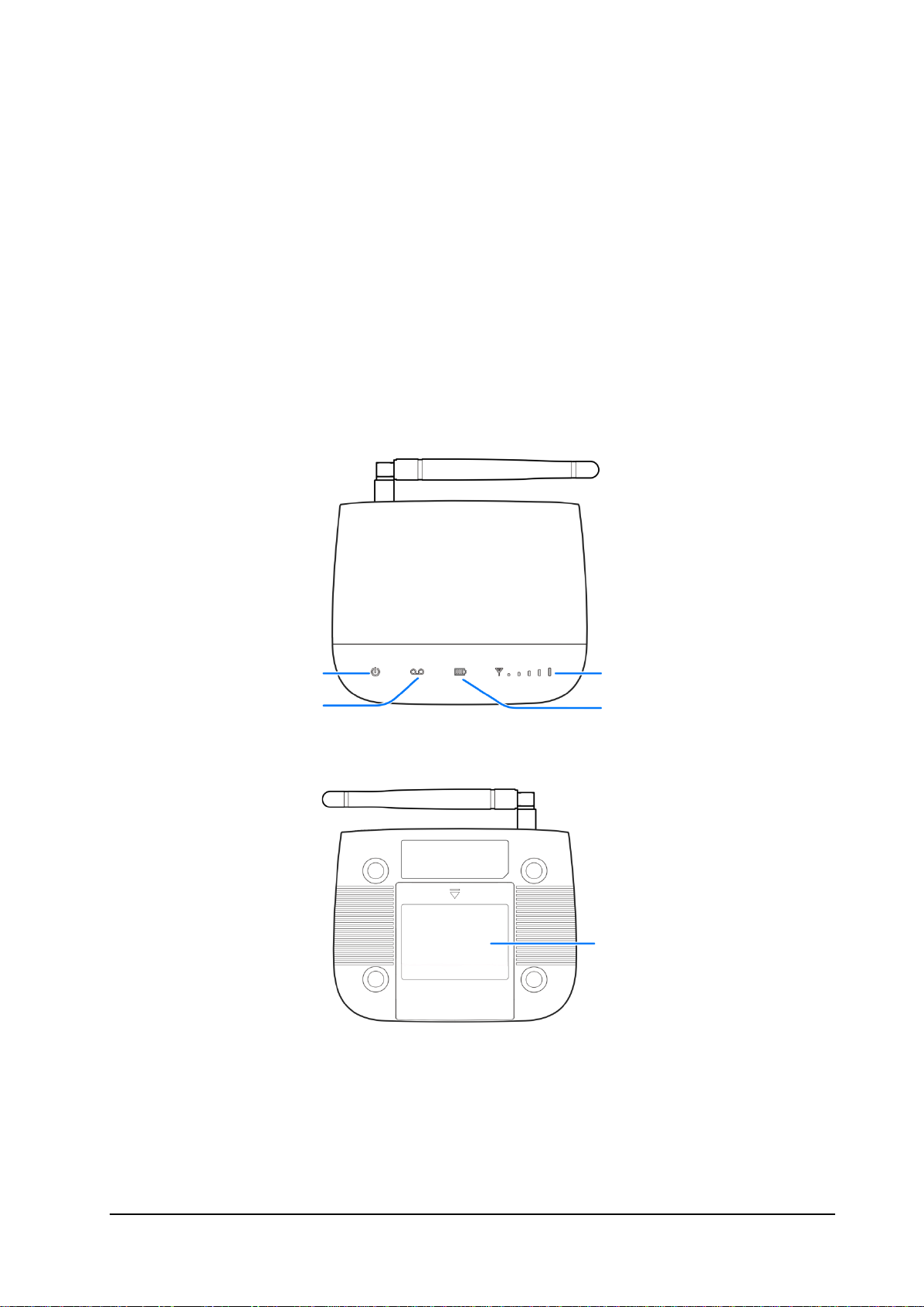
External View
Signal Strength
Battery Charge
Power
Voicemail
Battery Cover

ZTE WF721 User Guide
2 Confidential and Proprietary Information of ZTE CORPORATION
Installing Your Device
1. Slide the battery cover and remove it.
2. Install the (U)SIM card into the (U)SIM card slot.
Warning:
Your device does not support micro-SIM card, nano-SIM card, or any other
nonstandard SIM cards. To avoid device damage, please do not use any
nonstandard SIM cards in your device.
Note:
The (U)SIM card included with the device is locked to, and may only be used
with the ZTE Home Phone device.
3. Install the battery and close the battery cover.

ZTE WF721 User Guide
Confidential and Proprietary Information of ZTE CORPORATION 3
Notes:
The WF721 takes about 5 hours to charge fully. The charge time may be
impacted by environmental factors.
When fully charged, the battery will automatically stop charging.
When not using the battery for a long period, remove it from your
WF721 and store it in a cool, dry place.
Interface Description
Warning:
The Service Port is only for diagnostic purposes, not for customer use. To
avoid device damage, please do not place a USB-based device into the
USB port of the WF721.
Power Switch
Power Socket
Telephone Ports
Service Port
Antenna Port

ZTE WF721 User Guide
4 Confidential and Proprietary Information of ZTE CORPORATION
Indicators
When the WF721 is powered on, the following states may be displayed on
the LED screen. For a description of the states, refer to the following table:
Icon Indicator Status
Power Green On
Off No Power
Voicemail Green
Blinking
New voicemail waiting
Off No Message
Battery Charge Green High
Orange Medium
Red Low
Off No charge or no battery installed
Wireless Service
Green(1to
5 Bars)
Signal Strength(Low to High)
No Bar Lit No Service
Blinking
Red Bars
Check (U)SIM card
Solid Red
Bars
Software Updating

ZTE WF721 User Guide
Confidential and Proprietary Information of ZTE CORPORATION 5
Getting Started with Your Device
Device Installation
The WF721 works with your wireless service provider’s cellular network
instead of your home’s phone jacks.
Put the WF721 in a place where there is a strong signal from a signal tower,
typically near a window or outside wall.
Note:
Some electronic devices may be susceptible to electromagnetic interference.
Locate the device away from the connected phone, TV set, radio, or other
electronic equipment to avoid electromagnetic interference.
Turning on Your Device
1. Insert the small end of the power adapter into the power socket of your
WF721.
2. Plug the power adapter to a standard AC wall outlet.
3. Slide the On/Off switch to the On position.

ZTE WF721 User Guide
6 Confidential and Proprietary Information of ZTE CORPORATION
Note:
When powered off, the WF721 will no longer send or receive calls.
Checking the Wireless Signal
1. Raise antenna to an upright position.
2. Confirm signal strength light is green for optimal performance.
Note:
If you do not see a green light (signal strength), you may want to choose an
alternate installation location.
Connecting the Device to a Phone
1. Unplug your existing phone from the wall jack.
2.Plug your phone into the “Phone 1” port on the WF721, using your existing
phone cable or included phone cable.
Other manuals for WF721
2
Table of contents
Other Zte Cordless Telephone manuals