
Zhuoyi ZYT09 User manual

Shanghai Zhuoyi Electronic Co.,Ltd.
Add: 1# Building, No.118 Hangtou Rd., Pudong, Shanghai, China
Tel: 0086 21 33893666 33750266 Fax: 0086 21 33893668
Http://www.zhuo-yi.com Email: info@zhuo-yi.com
Timer Switch User Manual ZYT09
·Be sure to read the manual carefully before using.
·Please safekeeping the manual.
●Function and Application
This product designed with high-performance microcomputer chip,
can automatically switch on and switch off various kinds of electric
equipments according to the fixed time with 40 groups and automatic
calibration function. It is widely used in programmable control of
electric cooker, booster, lamp, water heater, sprayer, bottler, preheater,
agriculture facilities, and broadcasting equipment and etc.
●Technical Specifications
Voltage Range:220V 50Hz Voltage scope:85%~110%
Switch Capacitance: 20A Consumed power<3W
Programs: 40 sets Timing Control Range:1min~168h
Timingerror<±0.5s/day Battery:Rechargeable
Temperature:-10℃~+50℃RelativeHumidity:<95%
Dimension:50×100×74mm Weight:185g
●Function Key Description
6 keys: “Function key", “Select key”、“Addend key” “Subtractive key”,“Manual key”,“Reset
key”,and other functions shown as follow:
1.Function key:function selection
Click it into the setting. Push continuously and check or set the clock key, program
key, error key and so on. Press it for 3 seconds and enter the state of clock display.
2.Select key:function parameters。
In the function setting mode,clicking it you can select various parameters of a function
module or a few different parameters. And the selected parameter is blinking.
3.Addend key:parameter adjust
Select the specific parameter in positive direction.
4.Subtractive key:parameter adjust
Select the specific parameter in opposite direction.
5.Manual key:when the clock running, press the manually key to achieve the output state
transitions. Press it and the cycle order can be selected:“auto-on-auto-off”. In the
program state, press the "manual" button to cancel the current procedures for setting
parameters for :"-:-". Press it again and get the recovery the setting parameter last time.
6.Reset key:System reset, clear all the settings, the time to 00:00:00.
7.Other function:
For 30 seconds without any operation, it will back to the clock display. Without external
power supply, meanwhile the clock running, press the "addend" button and "subtractive"
button for 2 seconds, it can close the liquid crystal display into the power-saving mode.
As the clock is running, for 5 minutes without any operation, it also comes into the
power-saving mode. When it is in the power-saving mode, press any key to wake it up.
●Clock Calibration
1. Function options: press function key and select the clock function menu, "Clock"
2. Parameters: Press select key to select the time parameter (hours, minutes, seconds
Shanghai Zhuoyi Electronic Co.,Ltd.
Add: 1# Building, No.118 Hangtou Rd., Pudong, Shanghai, China
Tel: 0086 21 33893666 33750266 Fax: 0086 21 33893668
Http://www.zhuo-yi.com Email: info@zhuo-yi.com
days), the selected parameters is blinking.
3. Parameter settings adjust: Press "+" button or "-" button to adjust the selected hours,
minutes, seconds, days.
4. Setting confirm: press the "function" key and move to the next functional module,
or long press it and back to the state clock display.
●Timing Settings
1. Function options: Click "Function" button, select the settings function menu, "Program"
displays.
2. Parameters options: press the "Select" key to select the time parameter (hours, minutes),
the selected parameter is blinking.
3.Time parameter settings adjust: Press "+" button or "-" button to select the time parameter
(hours, minutes)and set 1ON program
4. Days Settings: select "Day" key, press "Subtractive" key to determine on or off state (it
displays "on" or "off"). Press "addend" button to select other days, and press
"Subtractive" key to determine on or off state again. In turn set the other days. Day
settings, set to "on" and the day displays on the monitor; set to "off" days not shown.
5. Loop setting: Press "Select" key to select circuits, then 1-circuit is flicker. Click
"subtractive" key to determine on or off state. "On" means the open time of 1-circuit, "off"
means the off time of it. Click "addend" button to select the other circuit, and press
"Subtractive" key to determine on or off state. In turn set the other circuits. Circuits
settings, set to "on" and the circuit displays on the monitor; set to "off" circuits not shown.
6. Click "select" button, select the program group number, and press addend key to set the
other programs (2ON, 2Off, 40ON, 40Off).
Notice: ■When make an error or cancel the settings, press “Addend key ”or” Subtractive
key” to select the group number, then press ”Manual key” to make it display “—
— :— —” ( it means no timing program, not "00:00").
■If you set the switch-on time, you must set the switch-off time to correspond.
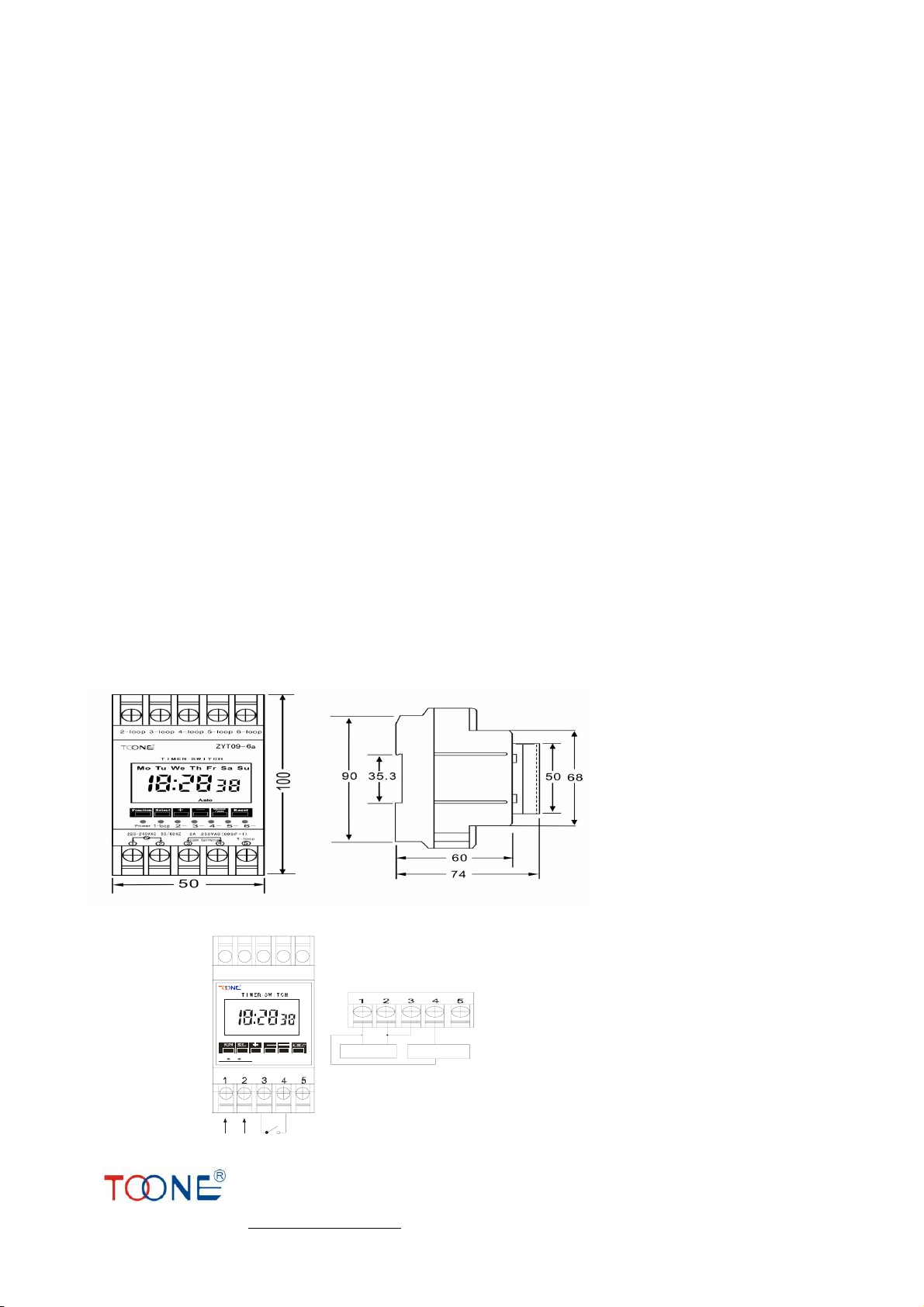
● Installation Dimensions
●Connection Method
ZYT09
Power
Wiring diagram
Power AC220V Load AC220V
Mon Tue Wen Thu Fr i Sat Sun
Auto
Table of contents
Other Zhuoyi Switch manuals


