XIEGU Bk300 User manual


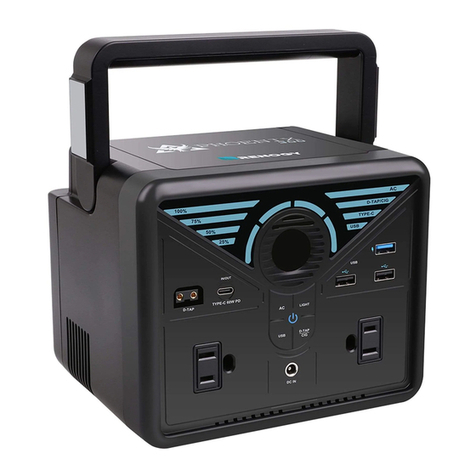
All-In-One Portable Power Station
User Manual
PJSTAR3-V1.0

EN 1
Packing List
Power Station
power cord
User Manual
DC Cigarette Lighter Adapter
AC Adapter Charger
Car Charger

EN 2
Layout
1
3
2
4
5
6
7
8
9
10
11
12
13
14
English

EN 3
Function Situation
1 Light Button
• Long press the button to turn on / off the
button to switch the light mode.
2 LED Flashlight • Normal, Strobe, SOS and OFF
3 Heat Dissipation Fan • Built-in fan ensures proper cooling for
smooth operation.
4 Power Button
• Press the button to show the remaining
battery.
• Press the button before using USB, DC,
Type-C Outputs to charge other devices.
5 LCD Display Screen • Show the working and battery status of
the power station.
6 AC Power Button • Press the AC power button before using
AC outputs.
7 AC Output 1
• Insert the AC adapter charger into the
AC output to charge your devices(110V/220V
300W).
8 AC Output 2
• Insert the AC adapter charger into the
AC output to charge your devices(110V/220V
300W).
9 QC 3.0 USB Output • Charge your phone, tablet, camera, etc.
75% faster than a standard charge.
10 DC Input • Charge the power station.
11 Type-C PD 60W Input/Output Port
• Charge the power station (Input)
• Charge your laptop, phone, tablet,
camera, etc. (Output)
12 USB Output 2 • Charge your phone, tablet, camera, etc.
13 USB Output 3 • Charge your phone, tablet, camera, etc.
14 DC Output • Charge your XIEGU radios, phone, tablet,
camera, etc.

EN 4
Capacity 80,000mAh 3.7V 296Wh (Bk300)
100,000mAh 3.7V 370Wh (Bk400)
Weight 3.33kg (Bk300)
3.50kg (Bk400)
Dimensions 255*230*136mm
DC Input 15V/2.5A
DC Output 12V-16V /10A
AC Outputs 110V 60Hz 220V 50Hz 300W (350W Surge)
USB Outputs 1 x QC3.0 5V/2.4A, 9V/2A,12V1.5A
2 x USB 5V/2.4A
Type-C PD Input/Output 5V/3A, 9V/3A, 12V/3A, 15V/3A, 20V/3A (60W Max)
Charging Time
Bk300:
8~9h (DC Input 15V/2.5A)
5~5.5h (Type-C Input 60W)
Bk400:
10~11h (DC Input 15V/2.5A)
6~6.5h (Type-C Input 60W)
Battery Lithium-ion
Operating Temperature -10đ~ 40đ
Lifecycles

EN 5
Operation Guide
Charging Your Power Station
DC Input:
• Insert the one end of the AC adapter charger into the DC outlet of the power
station, insert the other end of the AC adapter charger into the wall outlet.
Recommended using the attached AC adapter charger for charging, which is stable
and fast.
• Plug the car adapter into the car socket, then connect the DC cable into the power
station.
Type-C Input: Plug the Type-C cable into power outlets, connect the Type-C cable
into the power station.
Charging Your Smart Phones or Any Other Devices
comes with 2 AC outputs, 1 DC output, 1 Type-C output and 3 USB
outputs (one is QC 3.0, the rest are normal ports) located at the side of the unit.
AC Outputs: Plug the AC adaptor charger into AC Outputs on your Bk300/400,
and connect it to your laptop, tablet or other devices you want to charge.
Then press the AC BUTTON. You can charge two devices by using AC outputs at
the same time.
Note: AC outputs can’t charge devices more than 300W. The AC outputs will
always ON even there is no load. Please turn off the AC power button Manually
when not in use.
Type-C PD 60W Output: Plug the Type-Ccable into the Type-C Output on your
Bk300/400, and connect it to your phone, tablet or other devices you want to
charge. Then press the POWER BUTTON.
Note: Type-C PD 60W output can’t charge devices more than 60W. When using
Type-C 60W output, recommended that customers use the attached Typc-C cable
or the Type-C cable that supports 60W.
USB Outputs: Plug the USB cable into the USB outputs on your Bk300/400,
Bk 300/400,

EN 6
:KHQXVLQJ$&2XWSXWV³$&´DQG³287´ZLOODOZD\VEHRQ
:KHQXVLQJ'&2XWSXW³'&´DQG³287´ZLOODOZD\VEHRQ
:KHQXVLQJ86%2XWSXWV³86%´³$´DQG³287´ZLOO
always be on.
DQGFRQQHFWLWWR\RXUSKRQHWDEOHWRURWKHUGHYLFHV\RXZDQWWRFKDUJH7KHQ
SUHVVWKH32:(5%87721<RXFDQFKDUJHWKUHHGHYLFHVE\XVLQJ86%RXWSXWV
at the same time.
Flashlight
3OHDVHSUHVVWKHSRZHUEXWWRQWKHQORQJSUHVVWKH/LJKW%XWWRQWRWXUQRQRII
WKHÀDVKOLJKW
,QÀDVKOLJKWPRGHSUHVV/LJKW%XWWRQWRVZLWFKIURPOLJKWPRGHVQRUPDO
VWUREH626
LCD Display Screen
Battery Icon 1 grid 2 grids 3 grids 4 grids 5 grids
Battery Power 20% 40% 60% 80% 100%
:KHQWKHUHLVQRSRZHUWKHHQWLUHLFRQZLOOÀDVK
:KHQFKDUJLQJWKHWRSJULGLFRQZLOOÀDVKDFFRUGLQJWRWKH
current power consumption.
:KHQIXOO\FKDUJHGWKHHQWLUHLFRQZLOODOZD\VEHRQ
• Each grid icon represents 20% battery.

EN 7
When using QC3.0 USB Output, “USB”, “5V/9V” and “OUT”
will always be on.
When using DC Input, “IN” will always be on.
When using Type-C Input, “Type-C” and “IN” will always be
on.
When using Type-C Output, “Type-C” and “OUT” will always
be on.
When the internal temperature of the power station exceeds
70đ(158 ē), this icon will light up, all interfaces will stop
power supply. Please wait for the power station to cool
down before using.
When the power station breaks down, such as short circuit,
overload and so on, this icon will light up. Please use after
troubleshooting.
Attention:
• Always read all instructions carefully before using your power station.
• AC outputs of Bk300/400 can’t charge devices more than 300W.
• Type-C PD 60W output of Bk300/400 can’t charge devices more than 60W.
• Power supplies will get hot when in use.
• The AC power button can not turn on while the power station is recharging, the
DC output and USB outputs will work.
• Please turn off the AC power button before you start recharging the power station.
• The DC output will auto shut off when there is no load to save power, the AC
outputs will always ON even there is no load. Please turn off the AC power button
Manually when not in use.
• Be cautions of excessive drops, bumps, abrasionsor other impacts to this power
station.

EN 8
'RQ¶WVXEPHUJH\RXUSRZHUVWDWLRQLQZDWHURUH[SRVHLWWRUDLQRUPRLVWXUH
1HYHURSHQRUGLVDVVHPEOH\RXUSRZHUVWDWLRQDVLWZLOOYRLG\RXUZDUUDQW\
2QO\FKDUJHWKHSURGXFWDWWHPSHUDWXUHVEHWZHHQđ~ 40đ.
• Keep the power station away from children.
'RQ¶WLQVHUWIRUHLJQREMHFWVLQWR$1<LQSXWVRURXWSXWV
• Don’t dispose the unit together with household waste.
'RQ¶WRSHUDWHWKHXQLWDERYHWKHVSHFL¿HGLQSXWYROWDJH
)RUSURWHFWLQJWKLVXQLWPDNHVXUHWKHEDWWHU\FDSDFLW\RISRZHUVWDWLRQLV
adequate before use.
&KHFNWKHEDWWHU\RIWKHSRZHUVWDWLRQDWOHDVWHYHU\WKUHHPRQWKVDQGFKDUJH
the power station in time.
ポータブル電源
Backer300/400
This manual suits for next models
1
Table of contents