
WorldCom Group GlobalSat LT-501 Series User manual

1
GlobalSat LT-501/LT-601 Series
User Manual
Version: 1.0
GlobalSat WorldCom Corporation
16F., No. 186, Jian 1st Rd, Zhonghe Dist.,
New Taipei City 23553, Taiwan
Tel: 886.2.8226.3799/ Fax: 886.2.8226.3899
www.globalsat.com.tw
USGlobalSat Incorporated
14740 Yorba Court Chino, CA 91710
Tel: 888.323.8720 / Fax: 909.597.8532
www.usglobalsat.com

2
TABLE OF CONTENTS
1. Warning .................................................................................................................................................3
2. Welcome................................................................................................................................................4
3. Introduction and Features...................................................................................................................5
3.1 Introduction.....................................................................................................................5
3.2 LED Indicators................................................................................................................6
4. Device Operation.................................................................................................................................. 7
4.1 Device charging ..............................................................................................................7
4.2 How to Replace 19A Battery ..........................................................................................8
4.3 Power ..............................................................................................................................9
4.4 Function button.............................................................................................................10
5. Safety Information.............................................................................................................................. 11
6. Limited Warranty ................................................................................................................................ 11
7. FCC Warning.......................................................................................................................................16

3
1. Warning
USE RESPONSIBLY. READ ALL INSTRUCTIONS AND
SAFETY INFORMATION BEFORE USE.
GlobalSat WorldCom Corporation / USGlobalSat, Inc., will not accept any responsibility
whatsoever for accidents or violations of local Laws resulting from failure to observe
common sense precautions and local laws. Your personal judgment, traffic regulations,
and common sense must always take precedence over any directions produced by GPS
receiver or the mapping software.
Indemnification:
User agrees to defend, indemnify and hold harmless GlobalSat WorldCom Corp. and USGlobalSat,
Inc., its officers, directors, employees and agents against and from any third party claims, actions,
damages or demands, including but not limited to, reasonable legal and accounting fees, resulting
from user's use or misuse of this product, violation of these Terms, or any activities related to this
product, or from user's violations of the rights of any other user of this product. Use of this Product is
at user's own risk.

4
2. Welcome
Thank you for purchasing the GlobalSat LT-501/LT-601. The LT-501/LT-601 is a sleek,
compact and feature rich personal tracking device. The LT-501/LT-601 unit incorporates a
wide array of custom feature, functions and configurations for unique client requirements.
We appreciate your purchase of a GlobalSat WorldCom Product!

5
3. Introduction and Features
3.1 Introduction
LT-501/LT-601 is a LoRa®compliant RF tracker specifically designed for both indoor and
outdoor monitoring on objects. The indoor tracking is done by beacon. It is compact, light,
and easy to use. The device is also equipped with the re-chargeable battery to provide
basic power usage. The device allows monitoring center to remotely configure and track
the device immediately or periodically by sending RF commands to the device.
LT-501R/LT-601R is another SKU with 19A battery to increase battery life a lot.
Note: Please use GPS active external antenna with MMCX connector for
improving GPS receiving sensitivity.
1 BLE LED
6 Function Button
2 GPS LED
7 Lanyard Holes
3 LoRa®LED
8 Micro USB Connector
4 Power LED
9 External GPS Antenna Connector
5 Power Button

6
3. Introduction and Features (Continued)
3.2 LED Indicators
Power LED
LED
Green Constantly Lit
Green Blinking
Red
Constantly Lit
State
LT-501/LT-601 is fully
charged
LT-501/LT-601 is being
charged
Battery power
is low
LoRa®LED
LED
Blinking Quickly
State
Data transmitting
BLE LED
LED
Blinking Quickly
State
Data transmitting
Note: For beacon transmitter type, LT-501/LT-601 could receive iBeacon,
Eddystone-UID and ALTBeacon.
GPS LED
LED
Blinking Quickly
(Once per second)
Blinking Slowly
(Once every 3 seconds)
State
LT-501/LT-601 is searching for
GPS fix
LT-501/LT-601 receives GPS fix
7
4. Device Operation
4.1 Device charging
Using the device for the first time, rechargeable battery will require a complete 100%
charge before LT-501/LT-601 is operable. To maximize your device’s battery life, proceed
by performing the steps listed below.
1. Connect LT-501/LT-601 to the AC power adapter via its cable.
2. Allow at least 2.5 hours of battery charging time.
Note:
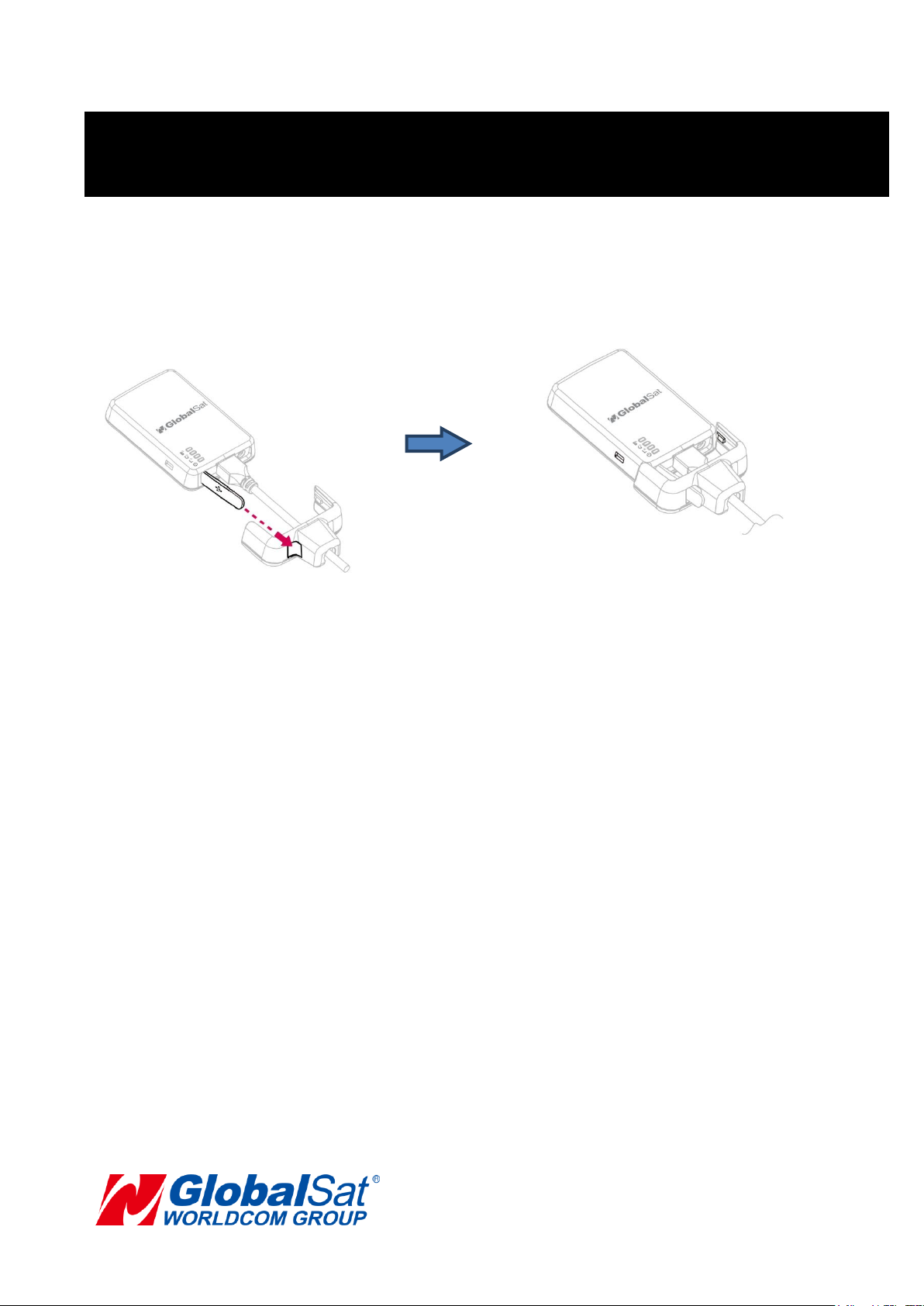
1. Refer to the illustration above to use the USB cable holder to make sure the micro USB
cable and the LT-501/LT-601 device are well connected.
2. The silicon cover for USB connector needs to be well sealed for IPX7 equivalence.
3. For LT-501R/LT-601R’s battery is one time battery, it could not be charged.

8
4.2 How to Replace 19A Battery
1. Unscrew the 4 screws on the four sides
of LT-501R/LT-601R with a proper
cross point screwdriver.
2. Remove the old battery. While pushing
the new cell into the battery holder, just
directly insert to end position.
3. Assembly LT-501R/LT-601R with the
bottom cover properly.
4. Screw the 4 screws on the four sides of
LT-501R/LT-601R.

9
4.3 Power
1. To turn the device “ON”, press and hold the power button until the device has a short
beep sound.
Note: Press the power button once, the power LED would flash for 3 times.
2. To turn the device “OFF”, press and hold the power button until the device has a
short beep sound.
3. To perform a hard reset, press and hold the power button for over 10 seconds.

10
4.4 Function button
When function button is long pressed, LT-501/LT-601 will send the first help report
immediately. Then LT-501/LT-601 would send help reports every 30 seconds (default
value) continuously to LoRaWANTM gateway till it gets server acknowledgement and GPS
fix (or beacon fix). You could also dismiss the help report by sending dismissed command
from the application server. LT-501/LT-601 could enter into USB mode by pressing
function button once when connecting to PC via its cable.
Note:
The LoRaWANTM requires a 1% transmit duty-cycle lower than the legal limit to avoid
network congestion. Abide by EU’s regulation, LT-501 should send help reports to
application server via gateway by 5-minute interval minimal.
This manual suits for next models
5
Table of contents





