Wistron Amilo Pro V2060 User manual

Amilo Pro V2060
Service Guide
PART NO.: 49.46I01.001 PRINTED IN TAIWAN

II
Revision History
Please refer to the table below for the updates made on Amilo Pro V2060 service guide.
Date Chapter Updates

III
Copyright
Copyright © 2005 by Wistron Incorporated. All rights reserved. No part of this publication may be
reproduced, transmitted, transcribed, stored in a retrieval system, or translated into any language or computer
language, in any form or by any means, electronic, mechanical, magnetic, optical, chemical, manual or
otherwise, without the prior written permission of Wistron Incorporated.
Disclaimer
The information in this guide is subject to change without notice.
Wistron Incorporated makes no representations or warranties, either expressed or implied, with respect to the
contents hereof and specifically disclaims any warranties of merchantability or fitness for any particular
purpose. Any Wistron Incorporated software described in this manual is sold or licensed "as is". Should the
programs prove defective following their purchase, the buyer (and not Wistron Incorporated, its distributor, or
its dealer) assumes the entire cost of all necessary servicing, repair, and any incidental or consequential
damages resulting from any defect in the software.
Intel is a registered trademark of Intel Corporation.
Pentium is a registered trademark of Intel Corporation.
Other brand and product names are trademarks and/or registered trademarks of their respective holders.

IV
Conventions
The following conventions are used in this manual:
Screen messages Denotes actual messages that appear
on screen.
NOTE Gives bits and pieces of additional
information related to the current
topic.
WARNING Alerts you to any damage that might
result from doing or not doing specific
actions.
CAUTION Gives precautionary measures to
avoid possible hardware or software
problems.
IMPORTANT Reminds you to do specific actions
relevant to the accomplishment of
procedures.

V
Preface
Before using this information and the product it supports, please read the following general information.
1. This Service Guide provides you with all technical information relating to the BASIC CONFIGURATION
decided for Wistron "global" product offering. To better fit local market requirements and enhance product
competitiveness, your regional office MAY have decided to extend the functionality of a machine (e.g.
add-on card, modem, or extra memory capability). These LOCALIZED FEATURES will NOT be covered
in this generic service guide. In such cases, please contact your regional offices or the responsible
personnel/channel to provide you with further technical details.
2. Please note WHEN ORDERING FRU PARTS, that you should check the most up-to-date information
available on your regional web or channel. If, for whatever reason, a part number change is made, it will
not be noted in the printed Service Guide. For Medion AUTHORIZED SERVICE PROVIDERS, your
Medion office may have a DIFFERENT part number code to those given in the FRU list of this printed
Service Guide. You MUST use the list provided by your regional Medion office to order FRU parts for
repair and service of customer machines.

VI

Chapter 1 1
This document contains step-by-step procedures on how to disassemble the notebook computer for
maintenance and troubleshooting.
To disassemble the computer, you need the following tools:
TWrist grounding strap and conductive mat for preventing electrostatic discharge
TFlat screwdriver
TPhillips screwdriver
THex screwdriver
TPlastic flat screwdriver
NOTE: The screws for the different components vary in size. During the disassembly process, group the
screws with the corresponding components to avoid mismatch when putting back the components.
Chapter 1
Machine Disassembly and Replacement

2Amilo Pro V2060
General Information
Before You Begin
Before proceeding with the disassembly procedure, make sure that you do the following:
1. Turn off the power to the system and all peripherals.
2. Unplug the AC adapter and all power and signal cables from the system.
3. Remove the battery pack.

3
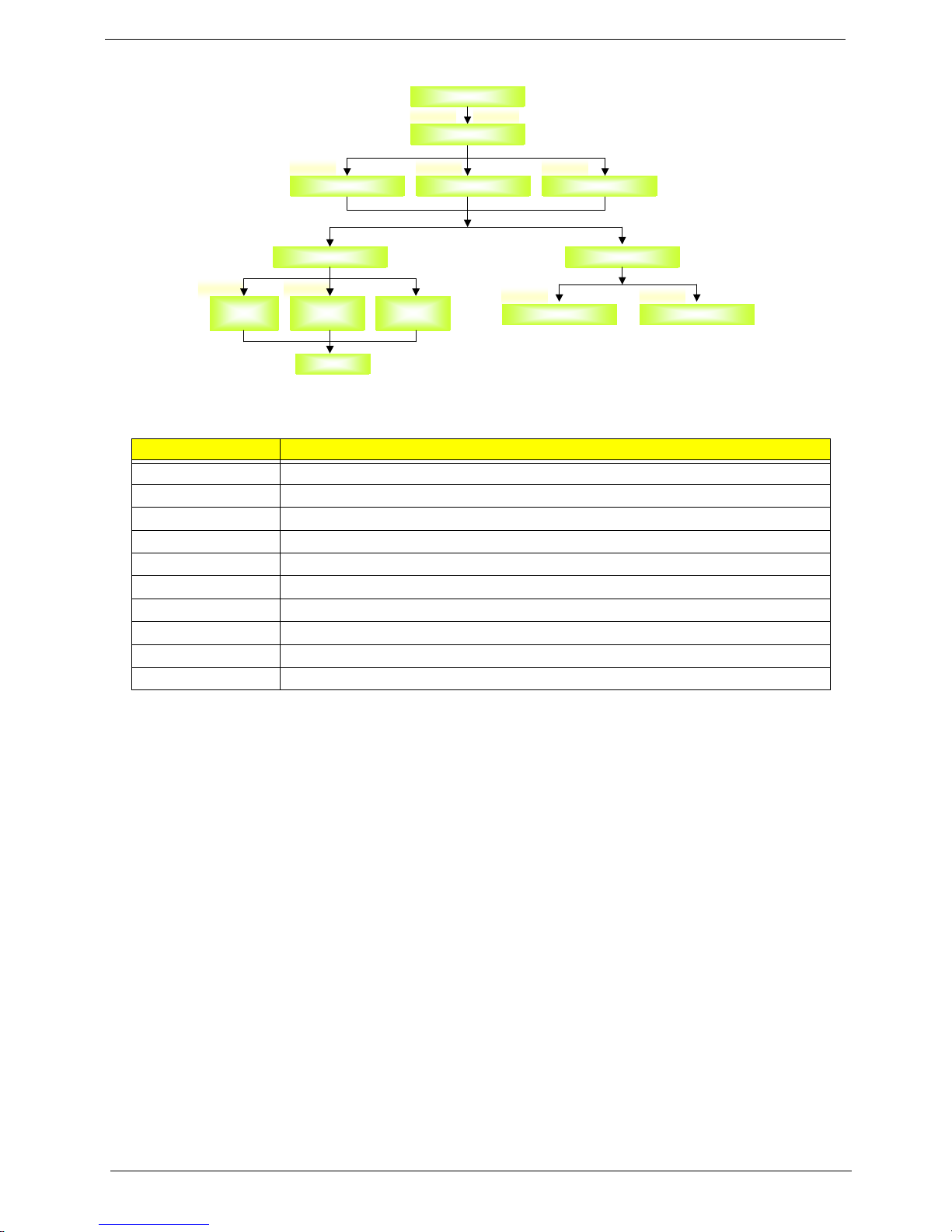
Disassembly Procedure Flowchart
The flowchart on the succeeding page gives you a graphic representation on the entire disassembly sequence
and instructs you on the components that need to be removed during servicing. For example, if you want to
remove the main board, you must first remove the keyboard, then disassemble the inside assembly frame in
that order.
I x 1
J x1
Start
E x 2
A x 1
Hard Disk
Drive Cover
Hard Disk
Drive
Bracket
Hard Disk
Drive
Hard Disk
Drive
Module
A x 2 F x 4
A x 8
Lower
Cover
Thermal
Module
CPU
Modem
Board
Optical
Disk
Drive
B x 1
D x 1
Optical Disk
Drive Module
Optical
Bracket
C x 4
G x 2
B x 2
Middle Cover
C x 1A x 1
DIMM
Plate
DIMM
Keyboard
B x 15
C x 1
A x 1
Upper Case
D x 4
Touch Pad
Bracket
Touch Pad
Board
D x 4
Touch Pad
Bracket
Touch Pad
Board
A x 2
H x 1 G x 1
FAN
G x 1
Lower
Case
G x 1
Right
Speaker
Main Board
Battery
RTC
Battery
Left
Speaker
LCD Module Wireless
LAN
Board
4Amilo Pro V2060
Screw List
Item Description
A SCREW M2XL4 (Black)
B SCREW M2.5XL6 (Black)
C SCREW M2.5XL8 (Silver)
D SCREW M2XL3 (Silver)
E SCREW M3XL4 (Silver)
F SCREW CPU SPRING (Silver)
G SCREW M2.5XL5 (Silver)
H SCREW M2XL2 (Silver)
I SCREW M2XL6 (Silver)
J SCREW NUT M2.5XL2.5 (Silver)
D x 4D x 4
G x 3
G x 1
Inverter Board
G x 1
Inverter Board
LCD Module
B x 2
Right Hinge
B x 2
Right Hinge
LCD FPC
Cable
LCD Assembly LCD Panel
D x 2
Main Antenna D x 2
Aux Antenna
D x 2
Aux Antenna
B x 2
LCD Bezel
B x 2
LCD Bezel
B x 2
Left Hinge
B x 2
Left Hinge
Left LCD
Bracket Right LCD
Bracket
LCD
This manual suits for next models
1
Table of contents