WhatsGPS S709 User manual

Model:S709
User Manual
2G Vehicle GPS Tracker

Appearance diagram
Installation method of SIM card
1. Preparation before installation
2. Product inspection: open the package to check
whether the device model is correct and whether the
accessories are complete. Otherwise, please contact
your distributor
3. SIM card selection: the device needs to insert a
GSM band SIM card. Please refer to the dealer's
opinion for the selection of GSM card
4. Installation: first open the back cover, into the SIM
card (middle card), then close the back cover. (as
shown in the figure below)

Device operating state
4. At this time, the external 9-36v power supply can be
connected
Note: the terminal GSM card needs to open the GPRS
function, and ensure that the terminal GSM card has
the tariff; If your GSM is enabled and requires PIN
code input, please refer to your mobile phone user
manual to turn off the PIN code input function.
1. Power on: the terminal will start up automatically
after the external power is connected. Before starting
up, please pay attention to whether the SIM card has
been inserted. If the SIM card is not inserted, please

light will turn on. When the external power connection
+GPS positioning +GSM is normal, the indicator light
will always be on. When the GPS +GSM is normal, but
the external power is not connected, the indicator
light flashes quickly; When GSM is normally
connected with external power and GPS is not
located, the indicator light will normally flash (1.5
seconds off and 0.5 seconds on); When the GPS
positioning + external power connection, but the GSM
network is not normal, the light will flash slowly (3
seconds flash, 0.5 seconds on); When the GSM
network is abnormal, GPS does not locate and
external power is disconnected, the indicator light
does not light.
2. Power off: unplug the power connector, the standby
battery of the device runs out, and the terminal shuts
down after power off.
disconnect the external power first and then insert the
SIM card. When the device is started, the indicator

User instruction
SMS Para Example
Add
Delete
Instructions
Instruction
returning
Successful return: set the center
number successfully!
CENTER, A,
number#
CENTER,D#
1. CENTER number Settings
2. SERVER command
CENTER,A,
18300138000#
CENTER,D#
1) Used for SMS control of power off,
restore factory Settings
2) Used for vibration alarm, speed
alarm SMS and telephone reception
3) Only one number can be set to the
center number
4) Changing the center number
requires reissuing the above
instructions
SMS Para Example
SERVER
para
Instructions
SERVER,password,
domain,port #
SERVER,8520,
www.whatsgps.com,
6801,0#
This function is to change server Settings,
need to modify the server IP domain and port.
Port range: 10~65535; Password: fixed
number, please contact the dealer
Domain: Can be either a domain/IP address.

3. APN command
4. TIMER sets the upload interval
SMS Para Example
Command
Instructions
Instruction
returning
APN, apn[account
number, password]#
1:APN,intenet,123,123#
2:APN,cmnet#
The APN instruction is used to configure the
Internet access parameters of different
countries' operators. Please check the APN
parameters of the card by yourself. For
example, if APN requires an account
password, refer to example 1; if no account
password is required, refer to example 2.
Note: many national apns are already built in.
If you can connect to the server platform, you
do not need to set it
Successful return: set APN successfully!
SMS Para Example
Command
Instructions
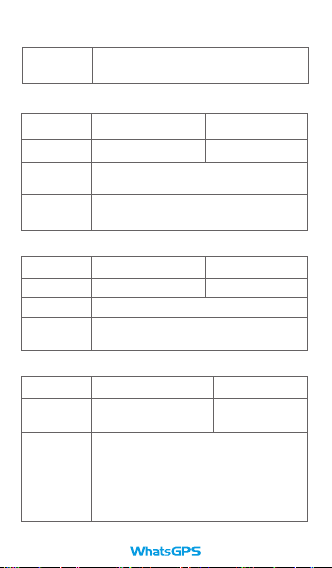
TIMER,upload time# TIMER,30#
Instruction
returning Successful return: set the IP successfully!
Time range: 10~60 seconds; If the vehicle
installed by the device is in a state of motion
for a long time every day, it is recommended
to change the upload time to 30 seconds to
save traffic 10~60 means the upload time is
within the range of 10~60, and the value
should be a multiple of 10 when set; The
default is 10 seconds.
5. Positioning location
SMS Para Example
English
Instructions
Instruction
returning
POSITION# POSITION#
The command is used to query the current
location description.
Successful return: If the language is English,
the message will return a link!
6. RESET command
SMS Para Example
English
Instructions
Instruction
returning
RESET# RESET#
The command is used to reboot device
Successful return: Reboot successfully!
7. Vibration alarm setting
SMS Para Example
Command
Instructions
VIBRATION, level,(mode) 1)VIBRATION,2,3#
2)VIBRATION,2#
Instruction
returning
Successful return: set the upload time
successfully!
Set the vibration alarm, the alarm level is 0~5,
where 0 to close the alarm, 1 to 5, the lower the
more sensitive. Alarm mode: 1. 2, SMS, 3,
phone and SMS; Default is 1 phone; The alarm
mode may not be selected, as shown in
example 2;Must set center number to receive
SMS and phone!

8. Monitoring setting
SMS Para Example
Command
Instructions
Instruction
returning
LISTEN,0/1# 1) LISTEN,1#
2) LISTEN,0#
This instruction is used to set the listening
range, 0~1, the listening function is off by
default; If need to open, according to example
1 send instructions, if need to close, according
to example 2 send instructions;
Set the listening number must be the center
number;
SIM card used in the device must have caller id
function;
Successful return: Set monitoring successfully!
9. PARAM setting
SMS Para Example
Command
Instructions
Instruction
returning
PAR,A,M# PAR,A,M#
Used to query the parameters and default
parameters set by the device
IMEI: 351190012535936
APN: cmnet
IP allocation: allocation of server information
(IP/domain) and ports
CENTER: CENTER number
LANG: language (CN/EN)
GMT: time zone (E/W8)
Instruction
returning
Successful return: Set vibration alarm
successfully!

Parameters
1). GSM frequency band: 850/900/1800/1900mhz
2). GPRS: Class12,TCP/IP
3). Working voltage: 9-36v DC
4). Operating current: 22mA (12vDC)
5). Operating current: who12ma (24vDC)
6). GPS positioning time:
cold start: 38s (Open sky)
warm start: 32s Thermal boot (Open sky)
7). Positioning accuracy: 10m (2D RM)
8). Working environment temperature: - 20 ℃ ~ + 70 ℃
9). Working environment humidity: 20% ~ 80%RH
10).Device size: 50 (L) x 29 (W) x 39 (H) mm
10. Status command
SMS Para Example
Command
Instructions
Instruction
returning
STATUS# STATUS#
This instruction is used to query the current
working state of the device
BATTERY:100% -- BATTERY status
GSM Signal:HIGH--GSM Signal strength
GPS:FIXED-- FIXED by GPS
GPS Signal:HIGH--GPS Signal strength
CHARGER:NORMAL -- in the charged state
The comma in the instruction must be an English comma; For
further instructions, please contact the distributor

Recording function description
Trouble shooting
If you need the recording function (send instructions
for the device to record a short speech and upload it
to the service platform, generally about 10 seconds),
please contact the dealer to customize this function.
Switch and power off
alarm instructions
This equipment is equipped with a backup battery,
but there is no switch to control the enabling of the
backup battery. When the user gets the device, the
backup battery is basically in the state of no power,
and it needs to be connected to the external power for
a short time to realize the power off alarm function.
Note: if the user does not load the SIM card, the
device will not work properly.
1. when the terminal displays offline or offline status in
the background.
2. to confirm whether the GSM network is normal,
please use your mobile phone to call the SIM card of
the terminal Number, according to the prompt tone to
Table of contents
Other WhatsGPS GPS manuals

WhatsGPS
WhatsGPS S288G User manual

WhatsGPS
WhatsGPS S102A User manual

WhatsGPS
WhatsGPS S102 User manual

WhatsGPS
WhatsGPS S06U User manual

WhatsGPS
WhatsGPS R11 User manual

WhatsGPS
WhatsGPS S5L User manual

WhatsGPS
WhatsGPS S100 User manual

WhatsGPS
WhatsGPS S18 User manual

WhatsGPS
WhatsGPS S116mini User manual

WhatsGPS
WhatsGPS W18L User manual