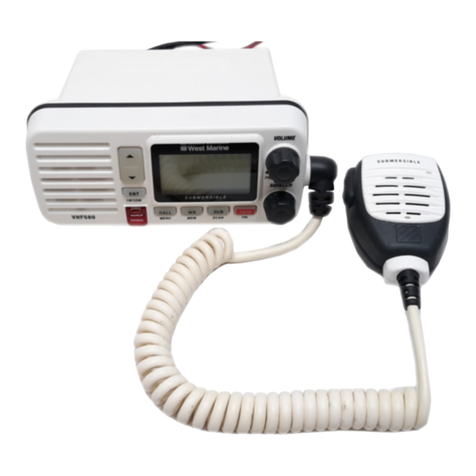
West Marine VHF500 User manual

UT01920ZZ_1 4/7/04 2:19 PM Page 1

This transmitter will operate on channels/frequencies that have
restricted use in the United States. The channel assignments
include frequencies assigned for exclusive use of the U.S.
Coast Guard, use in Canada, and use in international waters.
Operation in these frequencies without proper authorization is
strictly forbidden. For frequencies/channels that are currently
for use in the U.S. without an individual license, please contact
the FCC Call Center at 1-888-CALL-FCC.
Maritime Radio Services Operation
Warning!
For individuals requiring a license, such as commercial users, you should obtain
a license application from your nearest FCC field office.
West Marine works to reduce lead content in our PVC coated cords in our
products and accessories.
WARNING: The cords on this product and/or accessories contain lead, a
chemical known to the State of California to cause birth defects or other
reproductive harm. Wash hands after handling.
UT01920ZZ_1 4/7/04 2:19 PM Page 2

West Marine VHF500 .............................................................................5
Included with your VHF500 ....................................................................6
Controls and Indicators...........................................................................7
Installation.............................................................................................11
Choosing a Location........................................................................11
Engine Noise Suppression ..............................................................13
Antenna Considerations ..................................................................13
Antenna Selection and Installation ..................................................13
Installing the VHF500 ......................................................................14
Operation ..............................................................................................15
Power On/Off...................................................................................15
Last Channel Memory .....................................................................15
Squelch............................................................................................16
Hailing and Distress Channel 16/Channel 9 Communications .......17
Marine Distress Procedure..............................................................17
Triple Watch.....................................................................................18
Selecting a Channel .......................................................................18
Weather Channels ..........................................................................19
Entering Channel Numbers into Memory Scan...............................19
Memory Channel Scan....................................................................20
Triple Watch Alert Scan ...................................................................20
Alert Scan ........................................................................................20
Weather Alert...................................................................................21
About S.A.M.E. Weather Alert .........................................................21
Setting the Transmit (TX) Power .....................................................23
Menu Operation....................................................................................24
Digital Selective Calling (DSC)........................................................25
Distress............................................................................................25
Individual Call.............................................................................27
Group Call..................................................................................28
All Ships Call ..............................................................................29
Position Request........................................................................31
Position Send.............................................................................32
Standby ......................................................................................33
Call Wait.....................................................................................34
Contents
UT01920ZZ_1 4/7/04 2:19 PM Page 3

Setup ...............................................................................................36
Alarm Clock................................................................................36
Local Time Adjust.......................................................................39
Daylight Savings On/Off.............................................................40
Directory.....................................................................................41
FIPS ...........................................................................................45
Auto Channel Switch..................................................................48
Position Reply ............................................................................49
Channel Name ...........................................................................51
WHAM........................................................................................53
Group MMSI...............................................................................56
User MMSI .................................................................................57
System.............................................................................................59
Contrast......................................................................................59
Lamp Adjust ...............................................................................60
Key Beep ...................................................................................61
NMEA Technical Setup .........................................................................62
Optional Accessories ............................................................................62
VHF FM Marine Radio Telephone
Channel and Functions (USA Channels) ........................................63
Channel and Functions (International Channels) ...........................64
Channel and Functions (Canadian Channels)................................65
NWR-SAME Event Code......................................................................66
Specification .........................................................................................67
Troubleshooting ....................................................................................68
Care and Maintenance .........................................................................70
Three Year Limited Warranty................................................................71
UT01920ZZ_1 4/7/04 2:19 PM Page 4

5
The West Marine VHF500 is of all solid-state design with conservatively
rated, rugged components and materials compatible with the marine
environment. The transceiver utilizes a number of gaskets, sealing
rings, waterproof membranes, and other sealants to effect a waterproof
housing for protection of the electronics. It meets the most stringent
JIS7 waterproof specification. The unit may be mounted in any number
of convenient locations on your vessel by utilizing the optional flush
mount bracket (White - 500FMW, Black - 500FMB).
You are encouraged to thoroughly read the rest of this Operating Guide
to acquaint yourself with the characteristics and operation of your
transceiver so that you can contribute to the longevity of your
investment.
Keep your receipt as proof-of-purchase in case warranty service is
required.
Features, specifications, and availability of optional accessories are all
subject to change without notice.
Note: VHF500 meets JIS7 requirements. This means that the radio
and mic are rated submersible to a depth of 1 meter for 30
minutes.
West Marine VHF500
UT01920ZZ_1 4/7/04 2:19 PM Page 5

6
Included with your VHF500
VHF500
Owner s Manual
VHF500 Radio Microphone Hanger
and Screws
Mounting Bracket
and Knobs
DC Cord
Spare Fuse
250V 6A
Accessory CableMounting Hardware
UT01920ZZ_1 4/7/04 2:19 PM Page 6

7
Front panel/Microphone
1. PTT Switch - Press to transmit and release to receive.
2.12. 16/9/TRI - Press this key briefly to instantly change to Channel 16,
Channel 9 or current channel. Press this key for more than two seconds to
activate the triple Watch Feature.
3.5. CH(CHANNEL)/▲(+)/▼(–) - These keys are used to change the channel
number up/down. These buttons are also used to move the cursor in
Menu mode.
4. SELECT - In the Menu mode this is used to select the menu options.
6. MEM/UIC - Press this key briefly to place the currently selected channel
into Memory. Press this key briefly again to delete the channel from
scanning memory. Press this key for more than two seconds to change
channel modes. (USA, International, or Canadian)
7. PA - Press this key briefly to enable the PA (Public Address) feature.
8. PWR/VOL (On/Off/Volume) - Turns the unit On or Off and adjusts the
speaker volume.
9. STEP/SCAN - Press this key briefly to activate the step operation. Every
time this key is pushed, the radio will step to the next channel that has
been placed into Memory. Press this key for more than two seconds to
activate the memory channel scan feature.
10. H/L/MENU - Press this key briefly to change the transmit power to either
High (25 watts) or Low (1 watt). Press this key for more than two seconds
to enter the Menu mode.
11. WX/ALERT - Press this key briefly to listen to active NOAA Weather
channels. Press this key for more than two seconds to place the radio into
the Weather Alert mode.
13. DISTRESS - Lift the flap and press this key for 5 seconds to send a
distress signal in case of emergency.
14. SQUELCH - Rotate this knob clockwise to eliminate background noise
when a signal is not being received.
Controls and Indicators
64 9875
1410 11 12 13
23
1
UT01920ZZ_1 4/7/04 2:19 PM Page 7

8
Rear Panel Connectors
2
3
4
11. DC Jack
2. ACC Connector
3. Remote Connector
4. Antenna Connector
To VHF500
Note: DC13.8V and GND are for GPS ANT.
ACC Connector
UT01920ZZ_1 4/7/04 2:19 PM Page 8

9
1. TX (Transmit) - Indicates transmitting.
2. HI (High) - Indicates transmit output is 25 Watts.
3. C- Indicates Canadian Channel Mode.
4. DSC - Indicates the radio is in the Digital Selective calling mode.
5. TRI (Triple Watch) - Indicates Triple Watch Mode is in effect.
6. MEM (Memory) - Indicates that the channel is entered into the
Scan memory.
7. (Alarm Icon) - It appears when the alarm clock is set.
8. LO (Low) - Indicates transmit output is 1 Watt.
9. U- Indicates USA Channel Mode.
10. I- Indicates International Channel Mode.
11. WX - Indicates Weather Channel Mode has been activated.
12. ("ALT" Icon) - Indicates Weather Alert Mode has been
activated.
13. Radio Status Indicator - This area is used for Channel Name,
Menu, Frequency of active Weather Channel and messages
concerning SAME, DSC, and GPS. These messages will
continually scroll from right to the left.
14. (GPS Icon) - Indicates the radio is receiving data from an
external GPS.
15. (WHAM Icon) - Indicates the radio it is connected to the control
unit of the WHAM. (Wireless Handheld Access Microphone)
16. Channel Display - Indicates the current Channel Number.
UT01920ZZ_1 4/7/04 2:19 PM Page 9

10
NOTES: "POS SEND", "LOCAL TIME ADJUST", "DAYLITE SAVINGS", and "ALARM
CLOCK" are not displayed in Menu when external GPS receiver is not
connected.
When the radio is in one of the following modes: WX Alert mode, Channel 16/9
mode, Scan Mode, or Triple Watch mode, and the user presses the Menu key, all
the of these modes are cancelled.
The Menu mode will be cancelled if the radio receives a DSC call or any key is
pressed besides the Up arrow, Down arrow, or select keys are pressed.
UT01920ZZ_1 4/7/04 2:19 PM Page 10
Other manuals for VHF500
1
Table of contents
Other West Marine Marine Radio manuals

West Marine
West Marine VHF585 16230534 User manual

West Marine
West Marine VHF650 User manual

West Marine
West Marine VHF255 User manual

West Marine
West Marine VHF490 User manual

West Marine
West Marine VHF600 User manual
West Marine
West Marine VHF580 User manual

West Marine
West Marine VHF155 User manual

West Marine
West Marine VHF650 User manual

West Marine
West Marine VHF75 User manual

West Marine
West Marine VHF155 User manual