
Well mPBX-100 User manual

mPBX-100/100R
User Manual
Version 2.17.43.23

mPBX-100/100R User Manual
Page 2
Table of Contents
1. Introduction............................................................................................ 4
1.1 Features ............................................................................................ 4
1.2 Hardware Specifications....................................................................... 5
1.2.1 Exterior Appearance ...................................................................... 5
2. System set up......................................................................................... 7
2.1 Connection Drawing ............................................................................ 7
2.2 Connecting Ethernet Line ..................................................................... 8
2.3 Supplying Power ................................................................................. 8
3. Managing mPBX ...................................................................................... 9
3.1 Administrator Login............................................................................. 9
3.2 Status Monitor.................................................................................. 10
3.2.1 Line Status................................................................................. 10
3.3 Basic ............................................................................................... 11
3.3.1 Extension ................................................................................... 11
3.3.2 Trunk......................................................................................... 22
3.3.3 Outbound Routes ........................................................................ 35
3.3.4 Phone Provisioning ...................................................................... 38
3.4 Inbound Call Control ......................................................................... 47
3.4.1 IVR ........................................................................................... 47
3.4.2 Queues ...................................................................................... 49
3.4.3 Custom Prompts ......................................................................... 53
3.4.4 Ring Groups ............................................................................... 54
3.4.5 Inbound Routes .......................................................................... 56
3.4.6 Blacklist ..................................................................................... 60
3.5 Internal Settings............................................................................... 62
3.5.1 Options...................................................................................... 62
3.5.2Business Hours ............................................................................ 64
3.5.3 Feature Codes ............................................................................ 65
3.5.4 SIP Settings ............................................................................... 68
3.5.5 IAX Settings ............................................................................... 74
3.5.6 Voicemail Settings ....................................................................... 75
3.5.7 SMS Settings .............................................................................. 77
3.5.8 DISA ......................................................................................... 80
3.5.9 Conferencing .............................................................................. 81
3.5.10 Paging Groups .......................................................................... 82
3.5.11 DNIS Settings ........................................................................... 84
3.5.12 PIN User Settings ...................................................................... 84
3.5.13 Callback Settings....................................................................... 85
3.5.14 Speed Dial Settings ................................................................... 87
3.5.15 Music on Hold Prompts............................................................... 88

mPBX-100/100R User Manual
Page 3
3.6 Network Settings .............................................................................. 89
3.6.1 LAN Settings .............................................................................. 89
3.6.2 WAN Settings ............................................................................. 90
3.6.3 Static Route ............................................................................... 91
3.6.4 Firewall...................................................................................... 92
3.6.5 DHCP Server .............................................................................. 96
3.6.6 VLAN Settings............................................................................. 96
3.6.7 VPN Settings .............................................................................. 98
3.6.8 DDNS Settings............................................................................ 99
3.7 System Settings ............................................................................. 100
3.7.1 External Storage ....................................................................... 100
3.7.2 Password Settings ..................................................................... 100
3.7.3 System Prompts........................................................................ 101
3.7.4 Date and Time .......................................................................... 101
3.7.5 Backup and Restore................................................................... 102
3.7.6 Reset and Reboot ...................................................................... 102
3.7.7 Firmware Update....................................................................... 103
3.7.8 Alert Settings ........................................................................... 104
3.8 Reports ......................................................................................... 107
3.8.1 Call Logs .................................................................................. 107
3.8.2 System Logs............................................................................. 107
3.8.3 System Info ............................................................................. 108
4. Access MRI ......................................................................................... 110
5. Access CDR ........................................................................................ 114
6. Use mPBX 115
6.1 Make outbound call ......................................................................... 115
6.1.1 Sample Routing via PSTN Trunk .................................................. 116
6.1.2 Sample Routing via VoIP Trunk ................................................... 117
6.2 Incoming call ................................................................................. 118
6.2.1 Sample Routing to an IVR .......................................................... 118
APPENDIX A FAQ ..................................................................................... 121
APPENDIX B How to Configure External storage .......................................... 122
APPENDIX C How to Configure NAT setting ................................................. 124
APPENDIX D How to Use Auto Provision ..................................................... 126
APPENDIX E How Do I Configure Distinctive Ring Tones ............................... 129
APPENDIX F How to Use Email to SMS ....................................................... 131
APPENDIX G How to Use DID .................................................................... 133
APPENDIX H How to Use BLF Key to Choose the PSTN line. .......................... 137
APPENDIX I How to modify configuration files ............................................. 138

mPBX-100/100R User Manual
Page 4
1. Introduction
mPBX —IP-PBX for Small Businesses/Home Office
mPBX is a standalone embedded hybrid PBX for small businesses and remote
branch offices of larger organizations (1-100 users per site). mPBX also offers a
hybrid solution (a combination of VoIP applications using legacy telecom
equipment) alternative for enterprises who are not yet ready to migrate to a
complete VoIP solution.
Applications
1.1 Features
● Auto-provision
● Firewalls
● Blind Transfer
● Follow me
● BLF Support
● Interactive Voice Response (IVR)
● Blacklist
● Intercom / Zone Intercom
● Call Detail Records(CDR)
● Music On Hold
● Call Forward
● Music On Transfer
● Call Parking
● Paging / Zone Paging
● Call Recording
● PIN Users
● Call Pickup
● Queue
● Call Routing
● QOS
● Call Transfer
● Ring Group
● Call Waiting
● Route by Caller ID
● Caller ID
● Skype Integration (Skype Connect)
●Call Back
● Three-way Calling
●Conference
●Mobility Extension
●SMS to Mail
●External Storage
●Mail to SMS
●DDNS
●Speed Dial
●OpenVPN
● Define Office Time
● T.38
● Direct Inward System Access(DISA)
● Voicemail
● DIDs
● VLAN
● Distinctive Ringtone
● WAN
● Do Not Disturb(DND)
●PPPoE
●Dial by Name
●Static Route
●Alert
●integrated built-in packet capture tools
●multiple administrators
●spy function
mPBX-100/100R User Manual
Page 5
Note: the features with asterisk (*) will be supported in next version.
1.2 Hardware Specifications
1.2.1 Exterior Appearance
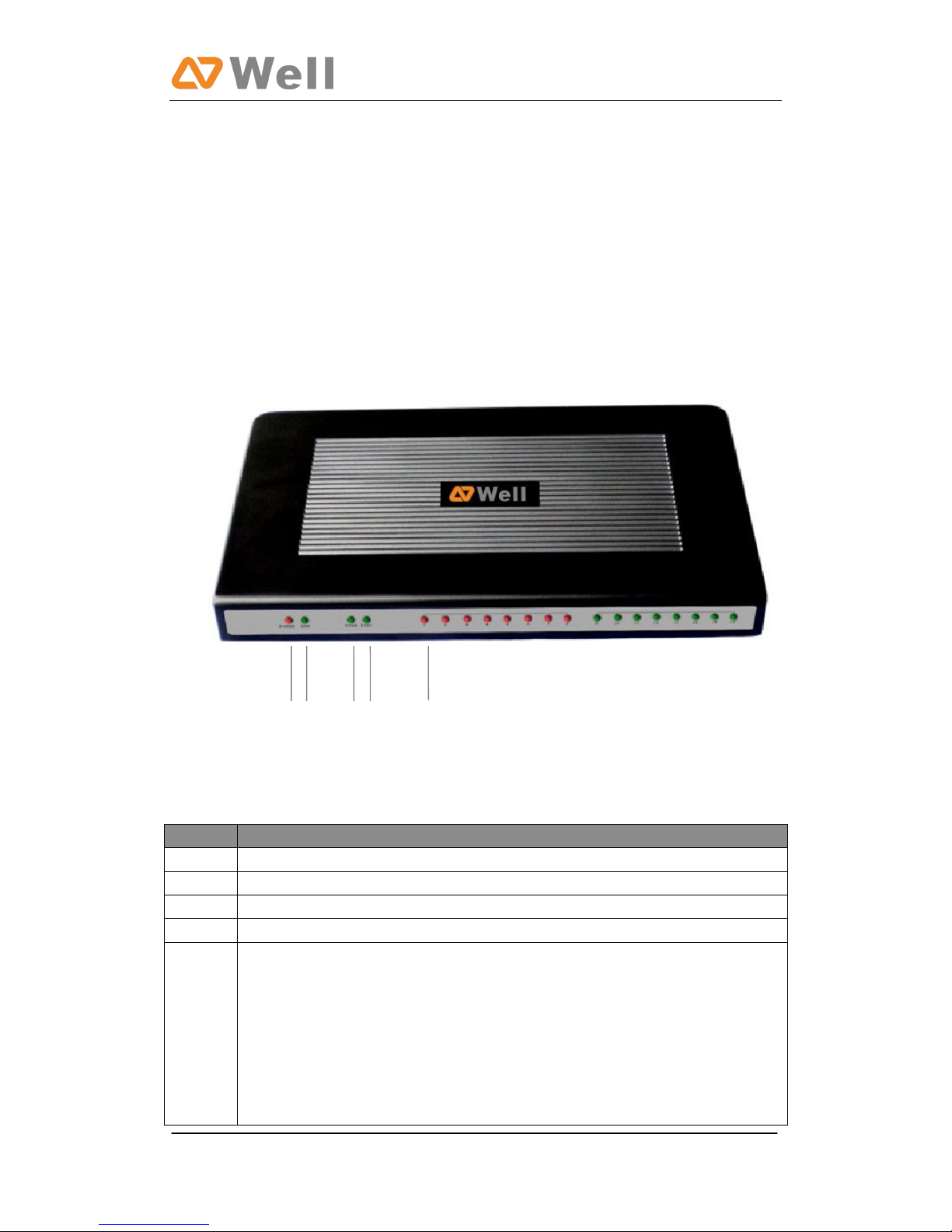
A. mPBX-100
Front Side
Figure 1-1 mPBX Front Panel Picture
No.
Identifying
①1
Green LED: Indicates correct power is being supplied to the unit
②2
Green LED: Indicates the mPBX is fully functional.
③3
Green LED: Indicates stable WAN Port connection
④4
Green LED: Indicates stable LAN Port connection
⑤5
Red LED: Indicates presence of an FXO/GSM port.
Orange LED: Indicates presence of a BRI port.
Green LED: Indicates presence of an FXS port.
LED Blinking- Red blinking: No connection between FXO port and
PSTN
LED Alternating - Red and Green (slow blink): FXO port is receiving
an incoming call.
LED Alternating - Red and Green (fast blink): FXO port is in use
①② ③④ ⑤
mPBX-100/100R User Manual
Page 6
LED Dual - Green and Red (slow blink): FXS port is ringing
LED Dual - Green and Red (fast blink): FXS port is in use
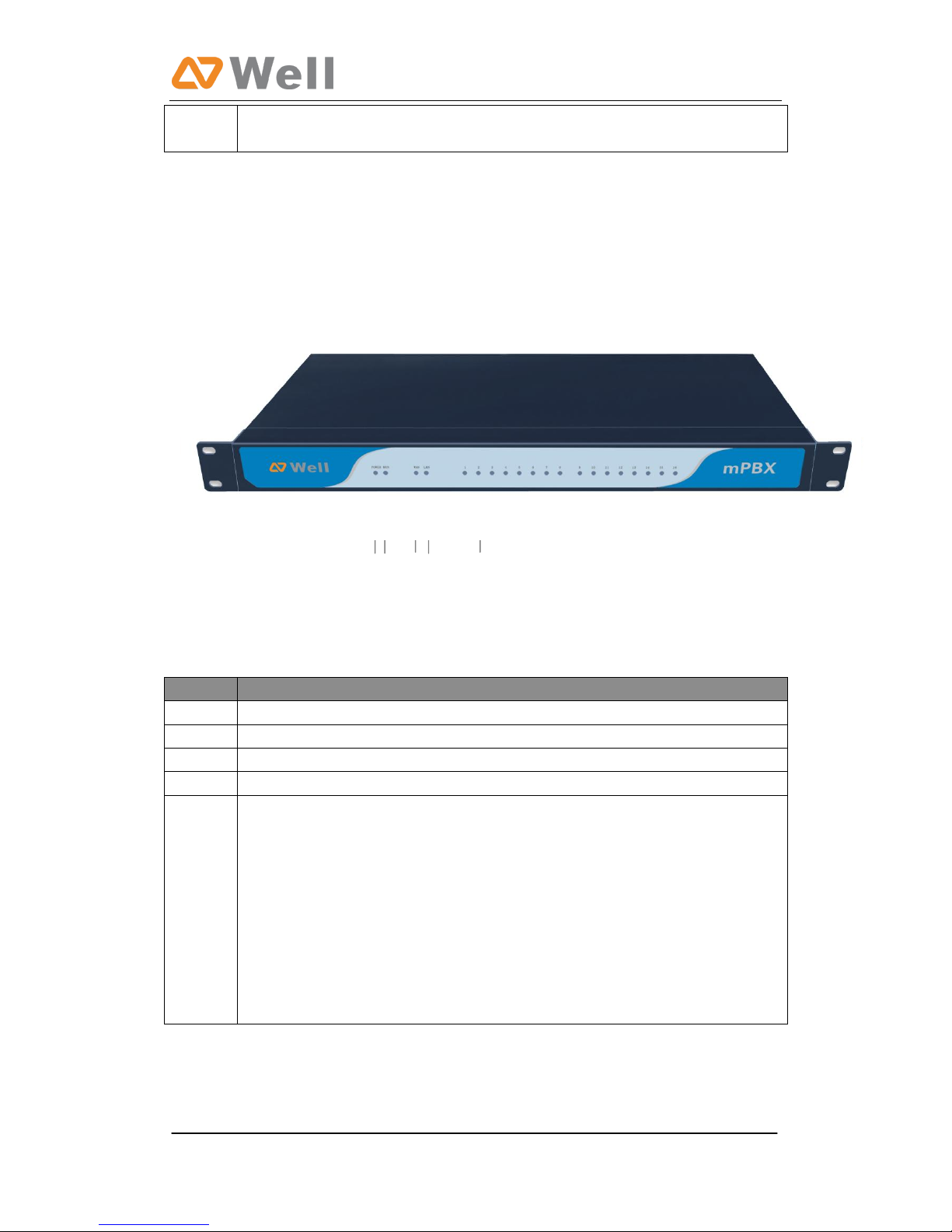
B. mPBX Pro
B. mPBX-100R
Front Side
Figure 1-2 mPBX Pro Front Panel Picture
No.
Identifying
①1
Green LED: Indicates correct power is being supplied to the unit
②2
Green LED: Indicates the mPBX Pro is fully functional.
③3
Green LED: Indicates stable WAN Port connection
④4
Green LED: Indicates stable LAN Port connection
⑤5
Red LED: Indicates presence of an FXO/GSM port.
Orange LED: Indicates presence of a BRI port.
Green LED: Indicates presence of an FXS port.
LED Blinking- Red blinking: No connection between FXO port and
PSTN
LED Alternating - Red and Green (slow blink): FXO port is receiving
an incoming call.
LED Alternating - Red and Green (fast blink): FXO port is in use
LED Dual - Green and Red (slow blink): FXS port is ringing
LED Dual - Green and Red (fast blink): FXS port is in use
①② ③④ ⑤
mPBX-100/100R User Manual
Page 7
2. System set up
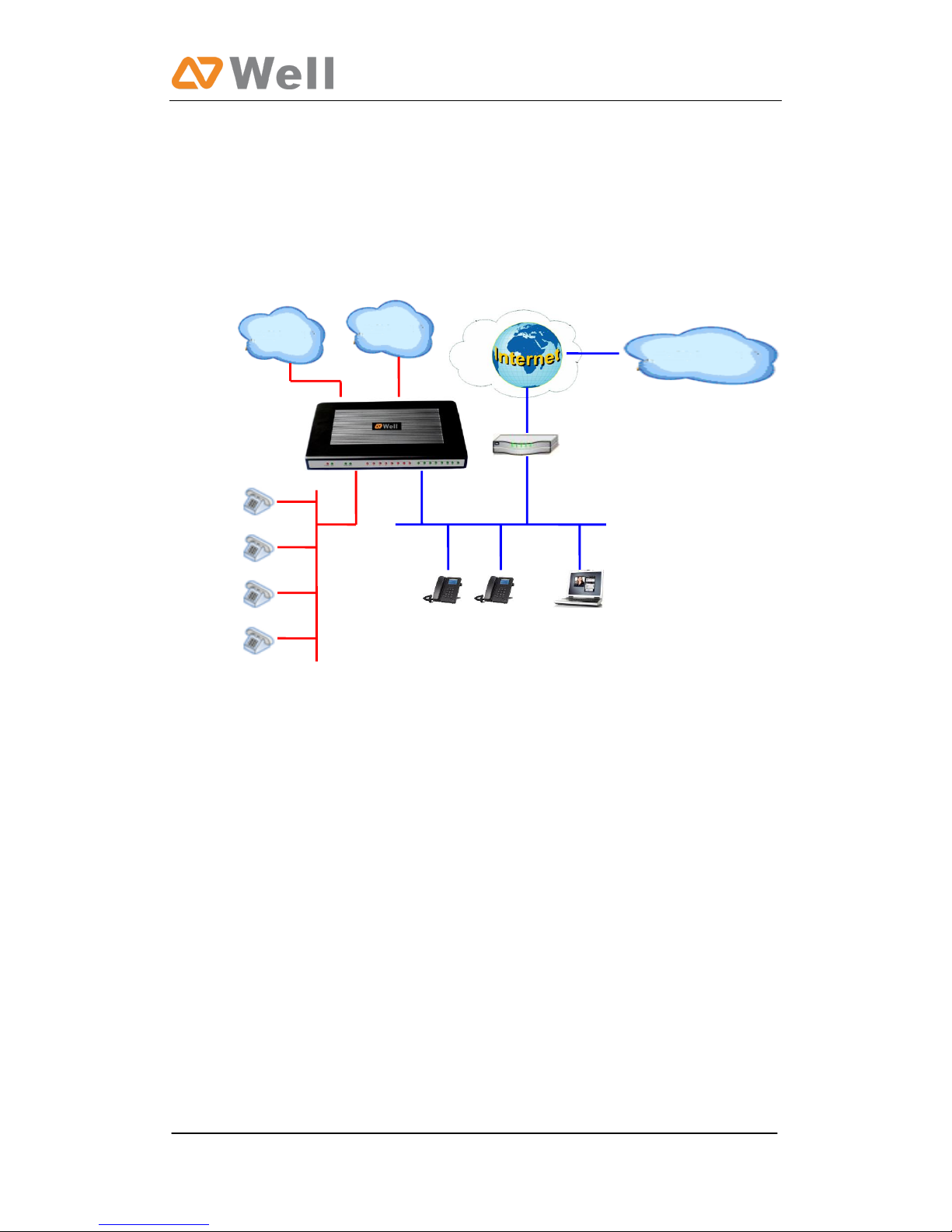
2.1 Connection Drawing
A. mPBX-100
Figure 2-1
VoIP Provider
PSTN
IP
Phone
601
602
603
604
FXS
Lines
LAN
Soft
Phone
Route
r
GSM
mPBX-100/100R User Manual
Page 8
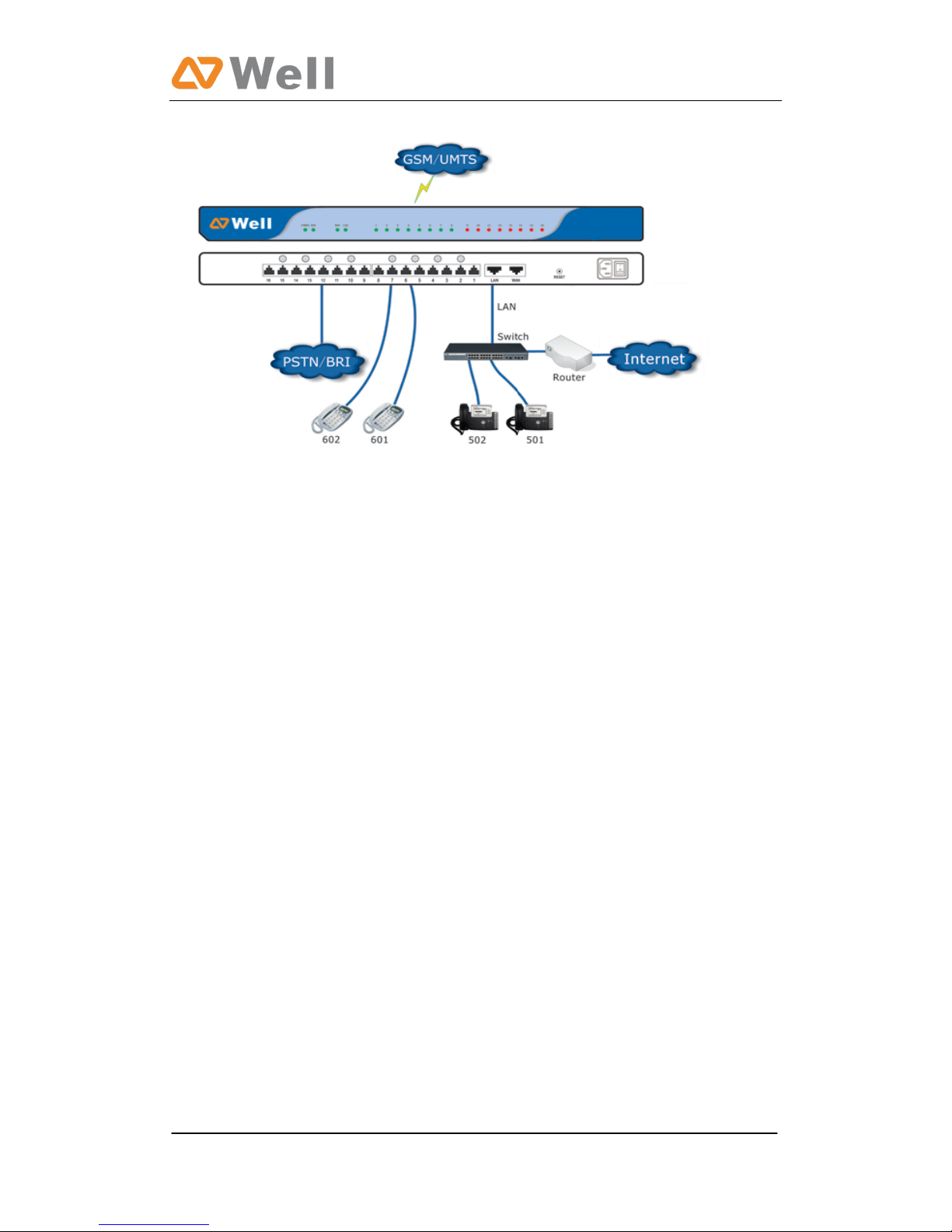
B. mPBX-100R
Figure 2-2
2.2 Connecting Ethernet Line
mPBX provides two 10/100M Ethernet ports with RJ45 interface and LED
indicator. Plug Ethernet line into mPBX’s Ethernet port, and then connect
the other end of the Ethernet line with a hub, switch, router, LAN or WAN.
Once connected, check the status of the LED indicator. A yellow LED
indicates the port is in the connection process, and a green LED indicates the
port is properly connected.
2.3 Supplying Power
mPBX utilizes the high-performance switch power supply, which supplies the
required power for the unit.
AC Input: 100~240V DC Output: 12V, 5A
Please follow the steps below to connect mPBX unit to a power outlet:
1. Connect the small end of the power cable to the power input port on the
mPBX back panel, and plug the other end of the cable into a 100V AC
power outlet.
2. Check the Power LED on the front panel. A solid green LED indicates that
power is being supplied correctly.
mPBX-100/100R User Manual
Page 9
3. Managing mPBX
3.1 Administrator Login
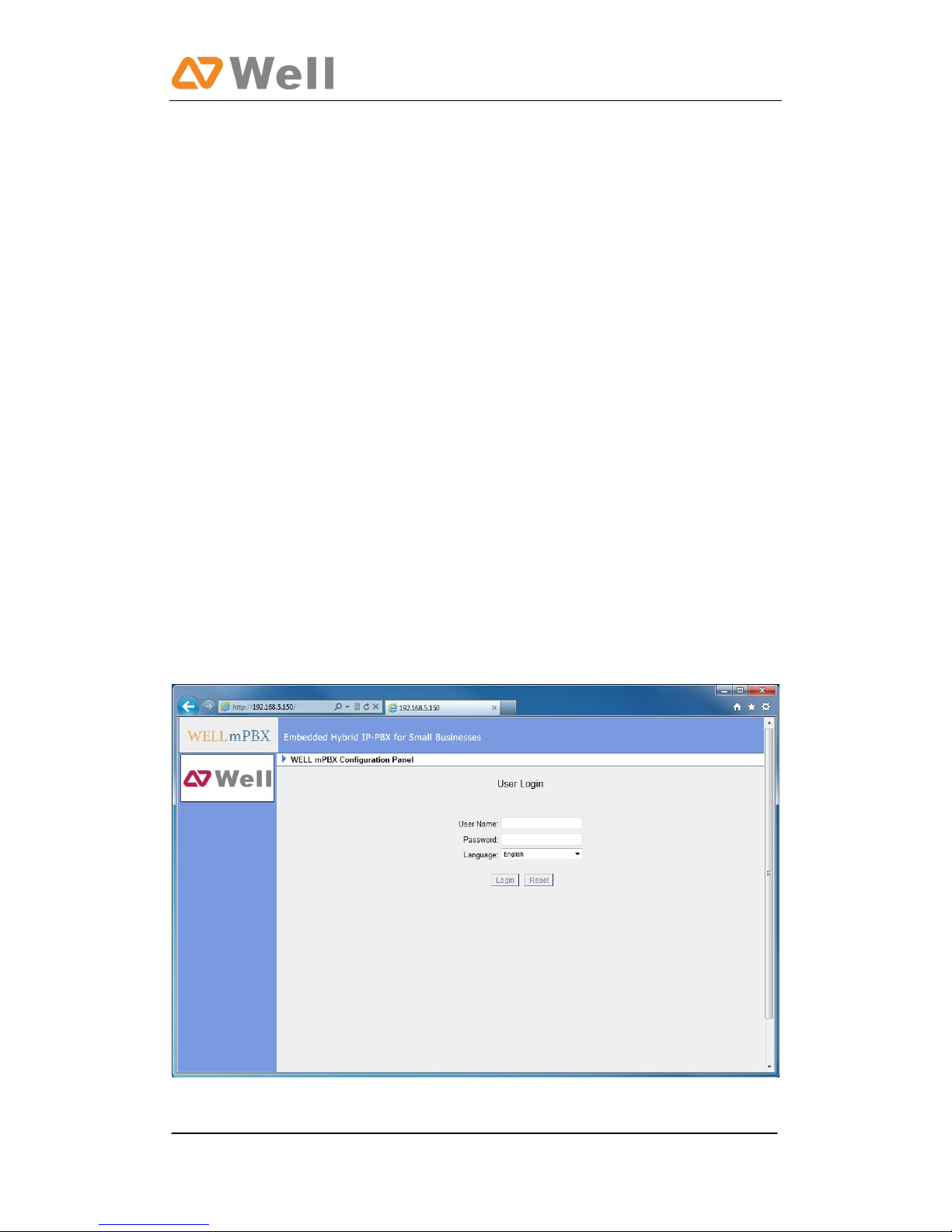
From your web browser, input the IP address of the mPBX server.
If this is the first time you are configuring mPBX, please use the default
settings below (your PC should be in the same local network with mPBX):
IP Address: http://192.168.5.150
Username: admin , Password: password
Note: mPBX supports multiple administrators in hierarchical mode
( Administrator, General Manager, CDR Manager)
·Administrator
have all authority . Username: admin , Password: password
·General Manager
have basic authority; without the advanced authority to create VoIP trunks,
reset, update, backup and restore mPBX. Username: admin , Password:
password
·CDR Manager
only have the authority to check the call recordings.
Figure 3-1
mPBX-100/100R User Manual
Page 10
3.2 Status Monitor
3.2.1 Line Status
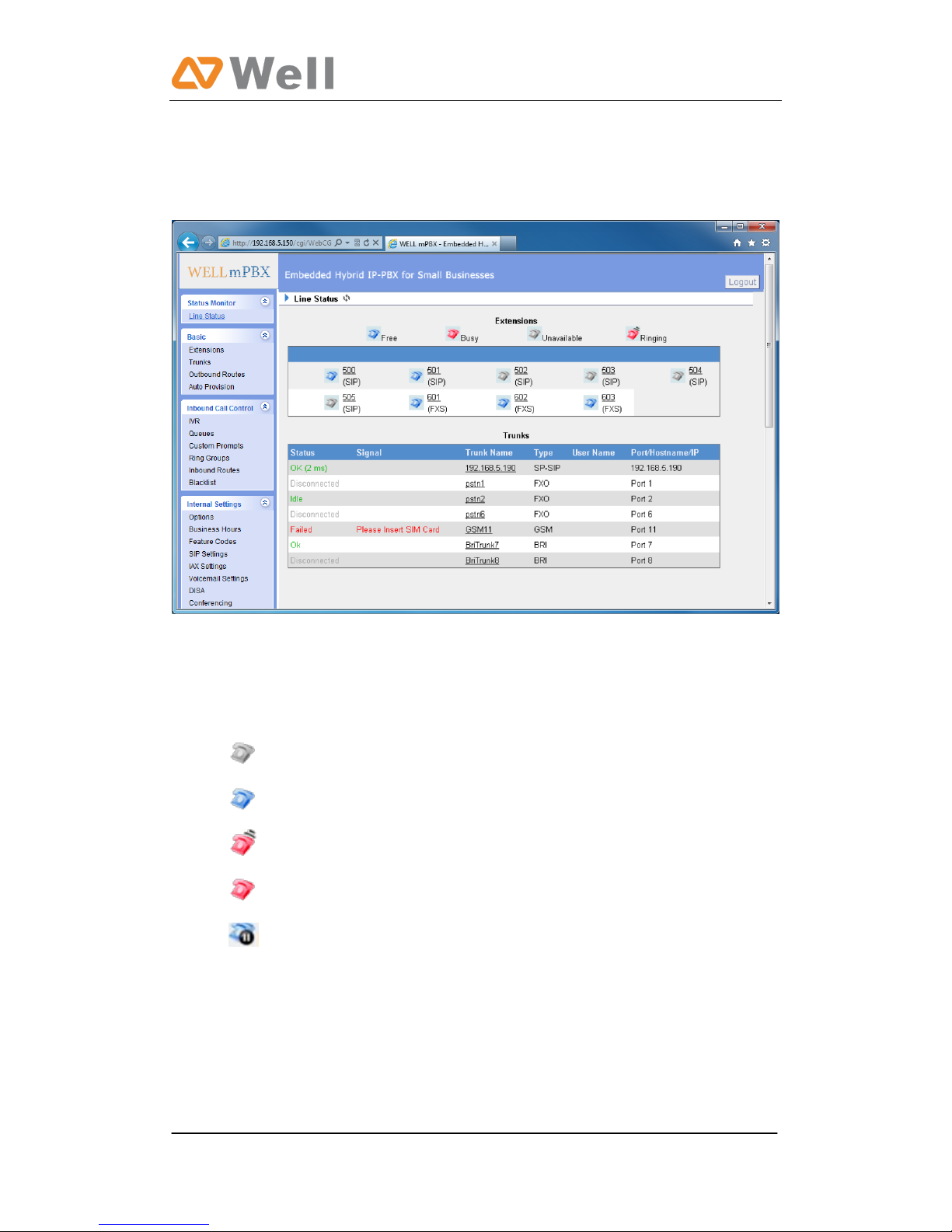
Figure 3.2.1
mPBX Status Description:
Extensions:
1) : Extension is unregistered
2) : Extension is idle
3): Extension is ringing
4): Extension is busy in a call
5): Extension is on hold
Trunks:
VOIP Trunk:
Status
Unregistered: Trunk registration failed.
Registered: Succeed registration, trunk is ready for use.
Request Send: Registering.
Waiting: Waiting for authentication.
Other manuals for mPBX-100
1
This manual suits for next models
1
Table of contents
Other Well PBX manuals


Popular PBX manuals by other brands


Rauland-Borg
Rauland-Borg Telecenter IV Installation

Grandstream Networks
Grandstream Networks UCM6208 Quick installation guide

ATCOM
ATCOM IPPBX IP02 user manual

Panasonic
Panasonic KX-TVS50 - 2 Port Voicemail System installation manual

bintec elmeg
bintec elmeg elmeg hybird 600 installation guide

Panasonic
Panasonic KX-NS300 Getting started


