Volvo V60 2014 User manual

QUICK GUIDE
WEB EDITION

Park Assist Pilot*
Lane Keeping Aid*
Start/Stop function*
Pedestrian protection*
02 Driver support in your car
03 Your driving environment
Remote control key
Keyless* lock system
Starting and switching off the engine
Parking brake
Wipers
01 Starting and driving
Adjusting the seat
Adjusting the steering wheel
Climate system controls
Headlamp control
Combined instrument panel
Infotainment system
Phone*
Internet*
External audio device
Buttons in the centre console
Settings in the menu system
Workshop/booking service*
ECO*
Refuelling
Car care
Storage spaces
AUX/USB* and 12 V sockets
04 Functions in your car
05 Tips
WELCOME TO YOUR NEW VOLVO!
This folder contains a selection of the most common functions in your particular car. The owner's manual and
other manuals contain safety instructions and all warning, important and note texts.
The following symbols mean:
Different parts are pointed out in the overview images.
Step–by–step instructions.
It is particularly important to read the owner's manual.
Warning, important and note texts, that must be read, are included on the last page.
Options are marked with an asterisk *.
The owner's manual is available as a printed manual and digitally in the car's screen, on the Web and as a
mobile app. The mobile app contains the whole owner's manual as well as instruction films and has several
search paths with text and illustrations. The mobile app can be downloaded to mobile devices from App Store or
Google play.
In addition, learn more about your car at www.volvocars.com.

How does the remote control key work? 01
Unlocks doors and tailgate and disarms the alarm.
The function can be set in MY CAR.
Locks doors and tailgate and arms the alarm.
Approach light duration.
Unlocks and disarms the alarm for the tailgate only.
Information*.
Panic function.
The remote control key can store settings for,
amongst other things, door mirrors and power
driver's seat* – see owner's manual.
How does the Keyless* lock system work?
The remote control key can remain in a pocket, for
example, the whole time.
Lock and arm the alarm
– Touch the rear section of one of the outer door handles
or press lightly on the smaller of the tailgate's two rub-
berised buttons.
Unlock and disarm the alarm
– Grip a door handle and open the door in the usual way
or press lightly on the larger of the tailgate's two rub-
berised buttons.
01
How do I start or switch off the engine? 01
Starting
Push the remote control key into the ignition switch
(does not apply to Keyless drive*).
Depress the clutch or brake pedal.
Briefly press the START/STOP ENGINE button.
Switching off
Briefly press the START/STOP ENGINE button.
Take the remote control key out from the ignition
switch.
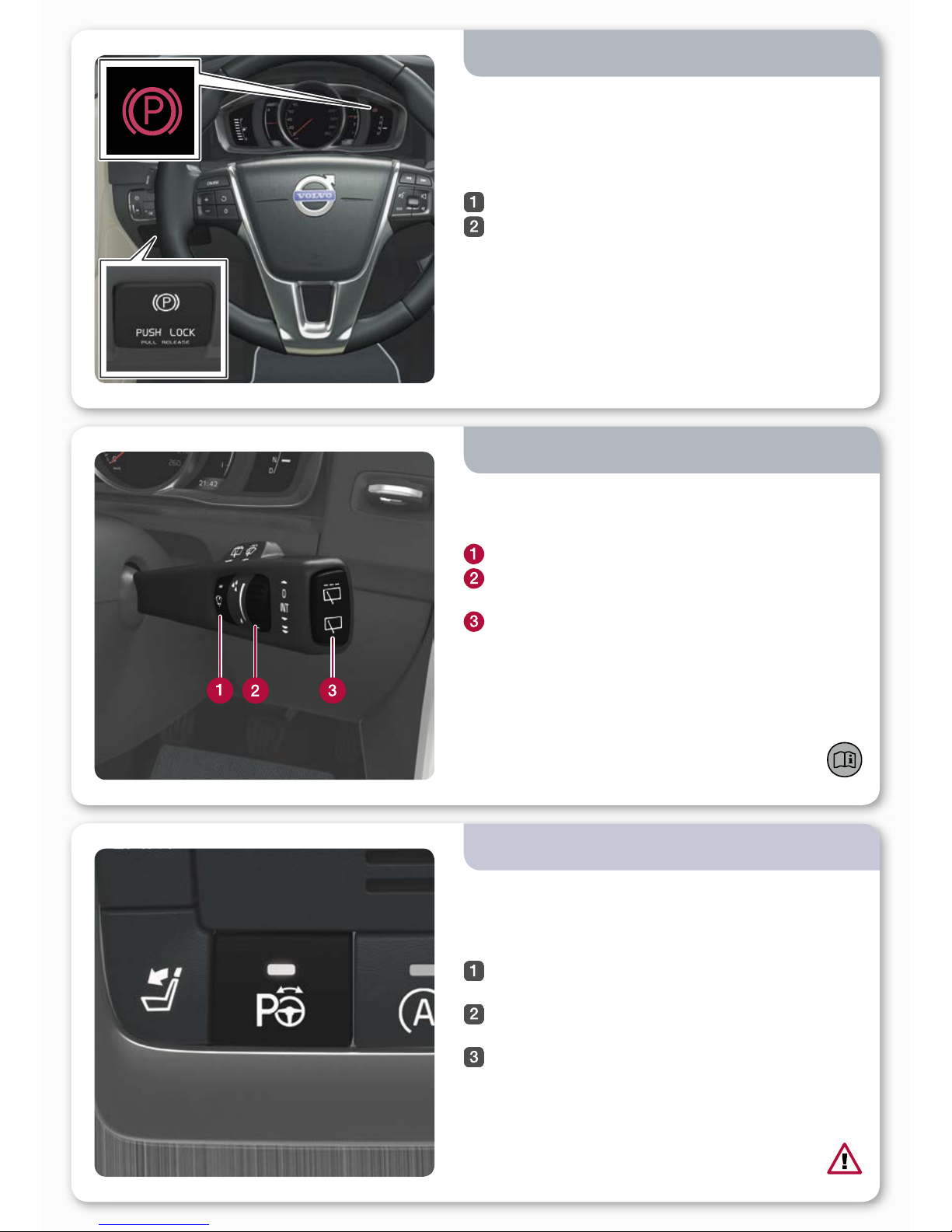
How do I use the parking brake? 01
To apply
– Press the control PUSH LOCK/PULL RELEASE – the
symbol starts to flash. Once there is a constant glow
the parking brake is applied.
To disengage
Depress the foot brake pedal.
Pull the control PUSH LOCK/PULL RELEASE.
Disengage automatically
– Drive away (for cars with automatic gearbox, the seat-
belt must be buckled).
How do I start the windscreen wipers and rain
sensor*?
Move the lever downward to start the windscreen wipers
and upward for a single sweep.
Rain sensor On/Off.
Regulates the sensor sensitivity or the intermittent
delay.
Wiper, rear window - intermittent/normal.
01
02
PAP checks the available space, and then steers in the
car. Your task is to select the gear, control the speed and
brake/stop.
Activate PAP with a press of the button. Do not drive
faster than 30 km/h.
Follow the instructions that are shown in the combi-
ned instrument panel.
Be prepared to stop the car when the graphics and
text advise this.
How do I use Park Assist Pilot PAP*?
To lift up the wiper blades they must be in service
position – see owner's manual.

What is the function of Lane Keeping Aid LKA*?
If the car is about to cross a side line the LKA will actively
steer back into the lane with a slight steering torque in the
steering wheel. If the car crosses a side line then LKA will
warn you with pulsating vibration in the steering wheel.
– Activate LKA with a press of the button.
02
It is important to understand this function – see
owner's manual.
Collision Warning with Auto Brake and Cyclist and Pede-
strian Detection, which can warn, brake and/or stop for
vehicles, cyclists and pedestrians.
The function is only an aid and does not work in all situa-
tions – for example, it does not see cyclists from the side
and pedestrians who are shorter than 80 cm or who are
partially obscured.
How does the pedestrian protection work*? 02
How do I use the Start/Stop function*? 02
Manual gearbox
Stop the engine: Declutch, move the gear lever into neu-
tral position and release the clutch pedal.
Start the engine: Depress the clutch pedal.
Automatic gearbox
Stop the engine: Stop the car with the foot brake and then
maintain the brake pressure.
Start the engine: Release foot pressure on the foot brake.
Illuminated button lamp indicates that the function is
active.

How do I adjust the steering wheel?
Release the catch.
Adjust the steering wheel forward/backward and up/
down.
Activate the catch.
03
How do I adjust the seat?
Raise/lower the front of the seat cushion.
Raise/lower the seat.
Move the seat forward/backward.
Tilt the backrest.
Lumbar support* adjustment.
Storing settings for power seat*.
Memory buttons for power seat*.
Store setting:
Hold the button depressed to store settings while
depressing one of the memory buttons. Hold the buttons
depressed until a signal is heard and text is shown in the
combined instrument panel. This stores the position of the
seat as well as the door mirrors. The position of the lumbar
support is not stored.
03
The position for the door mirrors, and memory
settings (not lumbar support) for the power seat,
can also be stored in the remote control key* – see
owner's manual.

How do I regulate the temperature? 04
Turn for individual temperature in the left/right-hand
area of the passenger compartment. The screen
shows the selected temperature.
Press AUTO for automatic control of air distribu-
tion and other functions. The screen shows AUTO
CLIMATE.
How does the headlamp control's auto mode
work? 04
How do I defrost the windscreen? 04
Press to activate the windscreen's electric heating* -
symbol (1) in the screen illuminates.
The next press also activates maximum airflow
against windscreen and side windows - symbols (1)
and (2) illuminate.
The next press switches off both of the functions –
no symbol illuminates.
Without electric heating: Press to activate/deactivate the
air flow.
AUTO mode provides the following options:
• The daytime running lights automatically switch bet-
ween daytime running lights and dipped beam.
• Main beam can be activated when dipped beam is
switched on.
• Active high beam (AHB)* – that dims and activates main
beam automatically, or adapts the main beam pattern to
traffic conditions – can be used.
• Tunnel detection* is activated.

04
How do I change the appearance of the car's
displays*?
The theme is stored in the remote control key
memory* – see the owner's manual.
Different themes can be selected with the digital* combi-
ned instrument panel, such as Performance or Eco.
To change the theme:
Press the left-hand stalk switch OK button after the
engine has been started.
Turn the lever's thumbwheel in order to select menu
option Themes and press OK.
Turn the thumbwheel to select a theme and press
OK to confirm.
How is the trip computer operated?
OK opens the trip computer's menu, activates the
selected option and extinguishes messages.
Thumbwheel scrolls between the trip computer
options.
RESET resets data in the selected trip computer
step and goes back in the menu structure.
04
How do I reset the trip meter? 04
Turn the left-hand stalk switch thumbwheel to show
trip meter T1 or T2.
Give a long press on the RESET button in order to
reset the trip meter shown.

How do I navigate in the infotainment system? 04
Press RADIO, MEDIA, MY CAR, NAV*, TEL* or * to
select the main source. The normal view for the last
active source is shown in this position.
Press OK/MENU or the thumbwheel* in the steering
wheel to access the selected source's main menu.
Turn TUNE or the thumbwheel to navigate in the
menus.
Press OK/MENU or the thumbwheel to make a
selection in the menus.
Briefly press EXIT to go back in the menu system,
cancel a function or delete entered characters.
Give a long press on EXIT to go back to normal view,
or to go from normal view to the main source view.
Tips:
To go to the shortcut menu from normal view, press once
on the main source button. Press again to go back to
normal view.
How do I switch on and off the Infotainment
system?
A short press activates the system.
A long press (until the screen switches off) deactiva-
tes.
To switch off the sound: Give a short press - the next
press reactivates.
04
Note that the whole of the Sensus system (including
navigation* and phone functions*) is started/switched off
at the same time.
For more information about operating the system –
see owner's manual.

04
In the normal view for the phone source, press OK/
MENU.
Select Make car discoverable and confirm with
OK/MENU.
Activate Bluetooth®in the mobile phone. Search for
and connect the car to the phone.
Follow the instructions in the phone and the screen.
The phone is now connected and can be controlled from
the car.
How do I connect a Bluetooth®phone*?
How do I connect to the Internet*? 04
What services do I get with Volvo ID*? 04
For further information about Volvo ID - see owner's
manual.
Volvo ID is your personal ID registered to the car which
can give you access to various services such as My Volvo
web and the facility to send an address from the map
service on the Internet directly to the vehicle.
Register or manage your Volvo ID as follows:
Press the Connect button .
Select Apps > Settings and follow the onscreen
instructions.
If registering the phone does not succeed – see
owner's manual.
For more information about connection - see
owner's manual.
Connect the mobile phone to the car (see "How do
I connect a Bluetooth®phone?") and activate tethe-
ring in the phone.
In the normal view for the MY CAR source, press
OK/MENU, select Settings > Internet settings >
Connect through.Select one of the options Car
modem,Wi-Fi or Bluetooth.
In future the car will automatically connect via the selected
Internet connection.
Table of contents
Other Volvo Automobile manuals

Volvo
Volvo V90 2018 Configuration guide

Volvo
Volvo C30 - ANNEXE 798 Quick start guide

Volvo
Volvo STD 420-0003 User manual

Volvo
Volvo 2011 S60 User manual

Volvo
Volvo S40 2005 User manual

Volvo
Volvo S60 - ANNEXE 931 User manual

Volvo
Volvo 2010 XC60 User manual

Volvo
Volvo XC90 2020 User manual

Volvo
Volvo V 70 2016 User manual

Volvo
Volvo S60 2012 Quick start guide

Volvo
Volvo XC 90 User manual

Volvo
Volvo V50 2004 User manual

Volvo
Volvo 850 T-5R User manual

Volvo
Volvo XC40 2019 User manual

Volvo
Volvo V90 - ACCESSORY PANEL User manual

Volvo
Volvo V70 SPORT User manual

Volvo
Volvo V50 User manual

Volvo
Volvo V40 2014 User manual

Volvo
Volvo XC60 2020 User manual

Volvo
Volvo XC70 2013 D5 AWD Quick start guide