
VOLKTEK NWT-707 User manual

10Base-T
to
10Base-FL Converter
(Multi-mode & Single Mode)
User’s Manual
NWT-707

COPYRIGHT
All rights reserved. No part of this publication may be reproduced, stored
in a retrieval system, or transmitted in any form or by any means, whether
electronic, mechanical, photo copying, recording or otherwise, without the
prior written permission of the publisher.
FCC WARNING
This equipment has been tested and found to comply with the limits for
class A device, pursuant to part 15 of FCC rules. These limits are
designed to provide reasonable protection against harmful interference in
a commercial installation. This equipment generates, uses and can
radiate radio frequency energy and, if not installed and used in
accordance with the instructions, may cause harmful interference to radio
communication. Operation of this equipment in a residential area is likely
to cause harmful interference, in which case, the user will be required to
correct the interference at the user’s own expense.
CE
This is a Class A product. In a domestic environment, this product may
cause radio interference in which case the user may be required to take
adequate measures.
Take special note to read and understand all content given in the warning
boxes
Warning

Table of Contents
1 Introduction .................................................................. 1
About This Guide...........................................................1
Welcome................................................................... 1
Purpose.................................................................... 1
Terms/Usage............................................................ 1
Features.........................................................................2
Specifications.................................................................3
Package Contents .........................................................4
2 Hardware Description.................................................. 5
Product Overview ..........................................................5
3 Installation.................................................................... 7
Installing Your Converter...............................................7
Location.................................................................... 8
MDI/MDI-X Connection ............................................ 9
Install the converter................................................ 10
Desktop Installation................................................ 11
Powering On Unit................................................... 12
Connecting Fiber Cable.......................................... 13
Connecting Copper Cable...................................... 14
4 LED Indicators............................................................ 15
LED Table....................................................................15
Appendix A.................................................................... 16
Cables..........................................................................16
Appendix B.................................................................... 17
About RJ-45 Cables.....................................................17
Appendix C.................................................................... 18
Mini Converter Chassis................................................18
Affixing Brackets..................................................... 19

Installing the Converter .......................................... 20
Rear view of Chassis and specifications................ 21
Appendix D.................................................................... 22
Application Diagram.....................................................22
Application Diagram I............................................. 22
Application Diagram II............................................ 23
Application Diagram III........................................... 23

10Base-T to 10Base-FL Converter
1
1 Introduction
About This Guide
Welcome
Thank you for choosing the 10Base-T to 10Base-FL Media
Converter. This device integrates Ethernet copper and
fiber segments in a highly flexible package.
Purpose
This guide discusses how to install and configure your
10Base-T to 10Base-FL Media Converter.
Terms/Usage
In this guide, the term “Converter” (first letter upper case)
refers to your 10Base-T to 10Base-FL Media Converter,
and “converter” (first letter lower case) refers to other
converters.

10Base-T to 10Base-FL Converter
2
Features
•Complies with 802.3 10Base-T/FL standard
•MDI/MDI-X push button selection for RJ-45 port
connection
•Support ST or SC fiber connector
•Extend fiber distance up to 12km with single Mode
fiber
•Compatible with other 10Base-T/FL and 10/100
devices
•Status LEDs for activity & link to easily monitor
network activity
•External power supply

10Base-T to 10Base-FL Converter
3
Specifications
Standard: IEEE 802.3u
Connector: 1 RJ-45, 1 ST for Multi-mode or SC for
Single Mode
Max.
Distance: Twisted Pair: 100m (330ft)
Multi-mode: 2km (6600feet)
Single Mode: 12km (39600feet)
Unit LEDs: Power - illuminated for normal operation
Port LEDs: Link - illuminated when connectors are
attached
Receive - flashing or illuminated when
data packets are being received
Power: External power supply, 12V DC at 0.8A
Temperature: Operating : 0 to 70°
Storage: -20 to 70°
Humidity: Operating : 10% to 90%RH
Storage : 5% to 90%RH
Emissions: FCC Part 15 of Class A & CE Approved
Dimensions: 109.2 x 73.8 x 23.4 mm (LxWxH)
Switch: Push button switch: for TP MDI/MDI-X
Connection (Go to Location)

10Base-T to 10Base-FL Converter
4
Package Contents
The 10Base-T to 10Base-FL Converter package should
include:
•One converter
•One AC adapter (for external power supply)
•Four pieces self-adhesive pads
•One user’s manual
Go to Installing Your Converter

10Base-T to 10Base-FL Converter
5
2 Hardware Description
Product Overview
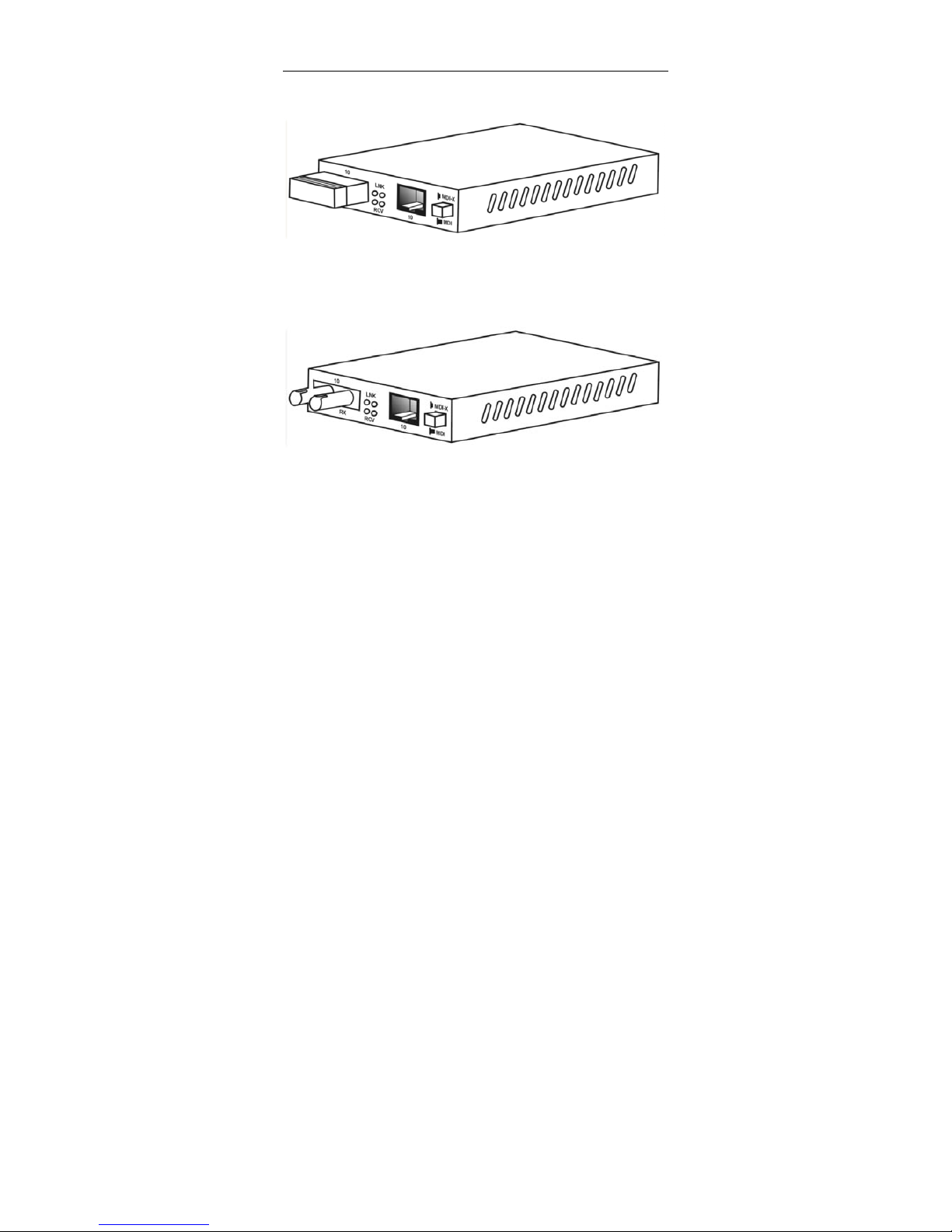
The Converter is primarily designed for network or data
installations that require the migration of cable media
between conventional coppers based wiring to Fiber
based installations. These Converters have been
specifically designed to support both a RJ-45 jack and a
ST or SC fiber optic connector. This allows it to connect
10Base-T network to the 10Base-FL (fiber) networks.
In addition, this Converter features an MDI/MDI-X
crossover “push button” switch for direct connection to a
workstation, switch or hub. This allows the network
manager freedom to configure between crossover and
straight through when establishing a connection between
RJ-45 ports. This Converter can create potential distances
of up to 12km (39600feet) with single mode fiber between
2 networking nodes.
10Base-T to 10Base-FL Converter
6
Front Panel View with SC and RJ-45 Connectors
Front Panel View with ST and RJ-45 Connectors
Table of contents
Other VOLKTEK Media Converter manuals


