Vizio E390VL User manual

VIZIO
QUICK
START
GUIDE
FULL USER MANUAL AVAILABLE AT VIZIO.COM
MODEL
nE390VL
FULL HD
• Whenconnectedtoapoweroutlet,powerisalwaysowingintoyourTV.Tototallydisconnectpower,unplugthepowercord.
• Thelightningashwitharrowheadsymbolwithinanequilateraltriangleisintendedtoalerttheusertothepresenceof
un-isolated,dangerousvoltagewithintheinsideofyourTVthatmaybeofsufcientmagnitudetoconstituteariskofelectric
shocktopersons.
• Donotoverloadpowerstripsandextensioncords.Overloadingcanresultinreorelectricshock.
• ThewallsocketshouldbeinstallednearyourTVandeasilyaccessible.
• OnlypowerofthemarkedvoltagecanbeusedforyourTV.Anyothervoltagethanthespeciedvoltagemaycausereor
electricshock.
• Donottouchthepowercordduringlightning.Toavoidelectricshock,avoidhandlingthepowercordduringelectricalstorms.
• UnplugyourTVduringalightningstormorwhenitwillnotbeusedforlongperiodoftime.ThiswillprotectyourTVfrom
damageduetopowersurges.
• DonotattempttorepairorserviceyourTVyourself.Openingorremovingthebackcovermayexposeyoutohighvoltages,
electricshock,andotherhazards.Ifrepairisrequired,contactyourdealerandreferallservicingtoqualiedservicepersonnel.
• WARNING:KeepyourTVawayfrommoisture.DonotexposeyourTVtorainormoisture.IfwaterpenetratesintoyourTV,unplug
thepowercordandcontactyourdealer.Continuoususeinthiscasemayresultinreorelectricshock.
• DonotuseyourTVifanyabnormalityoccurs.Ifanysmokeorodorbecomesapparent,unplugthepowercordandcontactyour
dealerimmediately.DonottrytorepairyourTVyourself.
• Avoidusingdroppedordamagedappliances.IfyourTVisdroppedandthehousingisdamaged,theinternalcomponentsmay
functionabnormally.Unplugthepowercordimmediatelyandcontactyourdealerforrepair.ContinueduseofyourTVmaycause
reorelectricshock.
• DonotinstallyourTVinanareawithheavydustorhighhumidity.OperatingyourTVinenvironmentswithheavydustorhigh
humiditymaycausereorelectricshock.
• FollowinstructionsformovingyourTV.EnsurethatthepowercordandanyothercablesareunpluggedbeforemovingyourTV.
• WhenunpluggingyourTV,holdtheAC/DCpoweradapter,notthecord.Pullingonthepowercordmaydamagethewiresinside
thecordandcausereorelectricshock.WhenyourTVwillnotbeusedforanextendedperiodoftime,unplugthepowercord.
• Toreduceriskofelectricshock,donottouchtheconnectorwithwethands.
• Insertbatteriesinaccordancewithinstructions.Incorrectpolaritiesmaycausethebatteriestoleakwhichcandamagethe
remotecontrolorinjuretheoperator.Donotexposebatteriestoexcessiveheatsuchassunshine,reorthelike.
• Ifanyofthefollowingoccurs,contactthedealer:
-Thepowercordfailsorfrays.
-LiquidspraysoranyobjectdropsintoyourTV.
-YourTVisexposedtorainorothermoisture.
-YourTVisdroppedordamagedinanyway.
-TheperformanceofyourTVchangessubstantially.
• Thisapparatusshallnotbeexposedtodrippingorsplashingandnoobjectsllwithliquids,suchasvases,shallbeplacedon
theapparatus.
• Themainsplugorappliancecouplerisusedasthedisconnectdevice,thedisconnectdeviceshallremainreadilyoperable.
• CAUTION-Theseservicinginstructionsareforusebyqualiedservicepersonnelonly.Toreducetheriskofelectricshock,do
notperformanyservicingotherthanthatcontainedintheoperatinginstructionsunlessyouarequaliedtodoso.
Thelightningashwitharrowheadsymbolwithinanequilateraltriangleis
intendedtoalerttheusertothepresenceofuninsulatedDANGEROUSVOLTAGE
withintheproduct’senclosurethatmaybeofsufcientmagnitude
toconstituteariskofelectricalshocktopersons.
Theexclamationpointwithinanequilateraltriangleisintendedtoalerttheuser
tothepresenceofimportantoperatingandmaintenance(servicing)instructions
intheliteratureaccompanyingtheproduct.
YourTVisdesignedandmanufacturedtooperatewithindeneddesignlimits.Misusemayresultinelectricshockorre.Toprevent
yourTVfrombeingdamaged,thefollowinginstructionsshouldbeobservedfortheinstallation,use,andmaintenanceofyourTV.
ReadthefollowingsafetyinstructionsbeforeoperatingyourTV.Keeptheseinstructionsinasafeplaceforfuturereference.
Toreducetheriskofelectricshockorcomponentdamage,switchoffthepowerbeforeconnectingothercomponentstoyourTV.
• Readtheseinstructions.
• Keeptheseinstructions.
• Heedallwarnings.
• Followallinstructions.
• Donotusethisapparatusnearwater.
• Cleanonlywithadrycloth.
• Donotblockanyventilationopenings.Installinaccordancewiththemanufacturer’sinstructions.
• Donotinstallnearanyheatsourcessuchasradiators,heatregisters,stoves,orotherapparatus(includingampliers)that
produceheat.
• Donotdefeatthesafetypurposeofthepolarizedorgrounding-typeplug.Apolarizedplughastwobladesandathirdgrounding
prong.Thewidebladeorthethirdprongareprovidedforyoursafety.Iftheprovidedplugdoesnottintoyouroutlet,consultan
electricianforreplacementoftheobsoleteoutlet.
• Protectthepowercordfrombeingwalkedonorpinched,particularlyatplugs,conveniencereceptacles,andthepointwhere
theyexitfromtheapparatus.
• Onlyuseattachments/accessoriesspeciedbythemanufacturer.
• Useonlywiththecart,stand,tripod,bracket,ortablespeciedbythemanufacturer,orsoldwiththeapparatus.
Whenacartisused,usecautionwhenmovingthecart/apparatuscombinationtoavoidinjuryfromtip-over.
• Unplugthisapparatusduringlightningstormsorwhenunusedforlongperiodsoftime.
• Referallservicingtoqualiedservicepersonnel.Servicingisrequiredwhentheapparatushasbeendamagedinanyway,
suchaswhenthepower-supplycordorplugisdamaged,liquidhasbeenspilledorobjectshavefallenintotheapparatus,the
apparatushasbeenexposedtorainormoisture,doesnotoperatenormallyorhasbeendropped.
• UnplugthepowercordbeforecleaningyourTV.
• WhenmovingyourTVfromanareaoflowtemperaturetoanareaofhightemperature,condensationmayforminthehousing.
WaitbeforeturningonyourTVtoavoidcausingre,electricshock,orcomponentdamage.
• AdistanceofatleastthreefeetshouldbemaintainedbetweenyourTVandanyheatsource,suchasaradiator,heater,oven,
amplieretc.DonotinstallyourTVclosetosmoke.OperatingyourTVclosetosmokeormoisturemaycausereorelectric
shock.
• Slotsandopeningsinthebackandbottomofthecabinetareprovidedforventilation.ToensurereliableoperationofyourTV
andtoprotectitfromoverheating,besuretheseopeningsarenotblockedorcovered.DonotplaceyourTVinabookcaseor
cabinetunlessproperventilationisprovided.
• NeverpushanyobjectintotheslotsandopeningsonyourTVcabinet.DonotplaceanyobjectsonthetopofyourTV.Doingso
couldshortcircuitpartscausingareorelectricshock.NeverspillliquidsonyourTV.
• YourTVshouldbeoperatedonlyfromthetypeofpowersourceindicatedonthelabel.Ifyouarenotsureofthetypeofpower
suppliedtoyourhome,consultyourdealerorlocalpowercompany.
• DonotapplypressureorthrowobjectsatyourTV.Thismaycompromisetheintegrityofthedisplay.Themanufacturer’s
warrantydoesnotcoveruserabuseorimproperinstallations.
• Thepowercordmustbereplacedwhenusingdifferentvoltagethanthevoltagespecied.Formoreinformation,contactyour
dealer.
• YourTVisequippedwithathree-prongedgroundedplug(aplugwithathirdgroundingpin).Thisplugwilltonlyintoa
groundedpoweroutlet.Thisisasafetyfeature.Ifyouroutletdoesnotaccommodatethethree-pronged,haveanelectrician
installthecorrectoutlet,oruseanadaptertogroundyourTVsafely.Donotdefeatthesafetypurposeofthegroundedplug.
h
IMPORTANT SAFETY INSTRUCTIONS

DO YOU HAVE QUESTIONS?
LET US HELP!
YOUR PRODUCT INCLUDES FREE LIFETIME TECH SUPPORT
Phone:
Email:
Web:
(877) 878-4946 (TOLL-FREE)
techsupport@VIZIO.com
www.VIZIO.com/support
Hours of operation:
Monday - Friday:
5
am
TO
9
pm
(pST)
Saturday - Sunday:
8
am
TO
4
pm
(pST)
The VIZIO support team is highly trained
and is based in the United States.
We can help with:
•
New Product Setup
•
Connecting Your Devices
•
Technical Problems
•
And More
We speak English • Se habla Español • Nous parlons Français
HELP VIZIO REDUCE PAPER WASTE.
DOWNLOAD THE FULL USER MANUAL AT
VIZIO.COM/SUPPORT
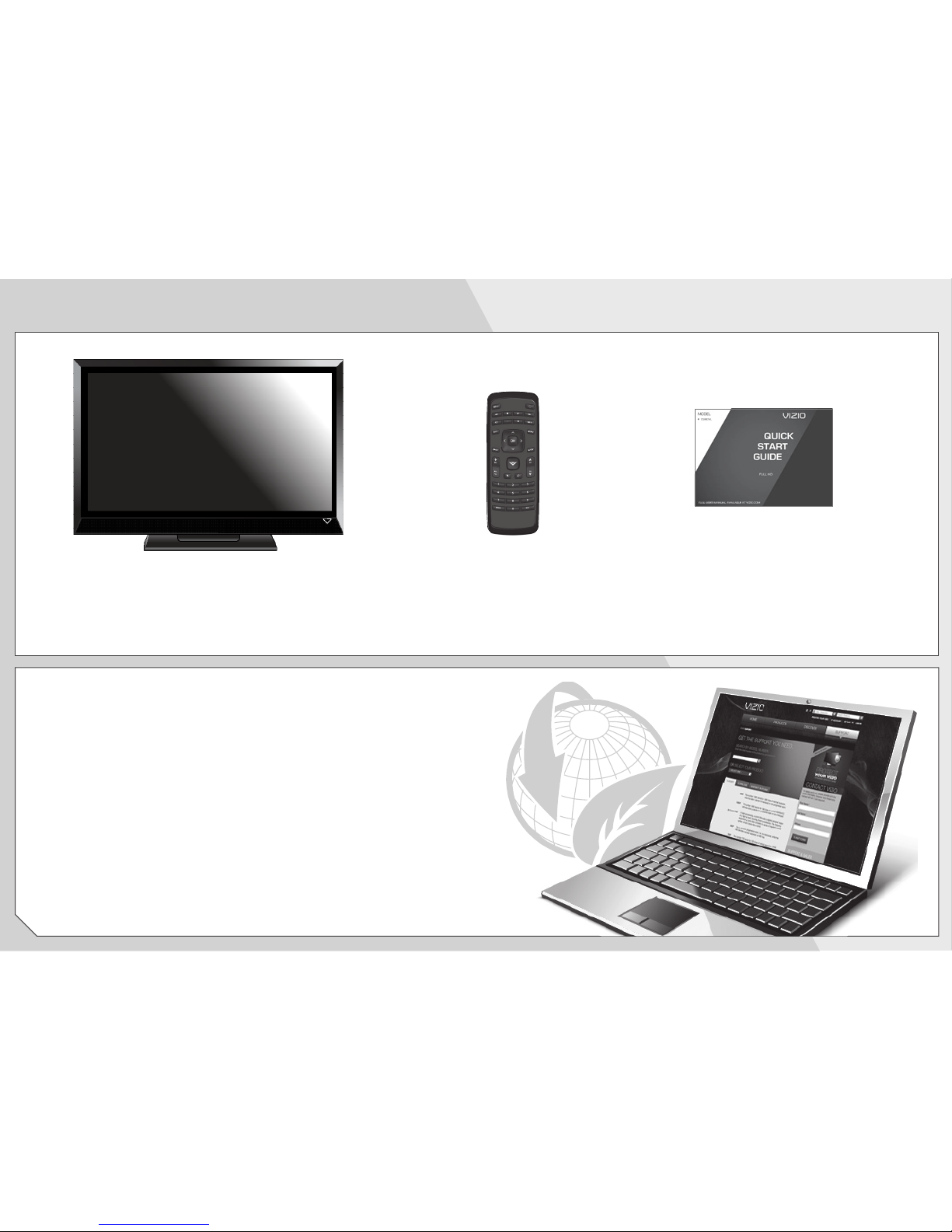
PACKAGE CONTENTS
This Quick Start GuideRemote Control
with Batteries
VIZIO LCD HDTV with Stand

USING THE REMOTE
INPUT
Change the currently-displayed input.
ARROW
Navigate the on-screen menu.
EXIT
Close the on-screen menu.
CLOSED CAPTIONS
Open the closed caption menu.
A/V CONTROLS
Control USB media player.
WIDE
Change the display mode.
MUTE
Turn the audio off or on.
BACK
Go to the previous on-screen menu.
POWER
Turn TV on or off.
MENU
Display the on-screen menu.
INFO
Display the info window.
DASH
Use with number pad to manually enter
a digital sub-channel. (For example,
18-4 or 18-5.)
CHANNEL UP/DOWN
Change the channel.
GUIDE
Display the info window.
LAST
Return to the channel last viewed.
NUMBER PAD
Manually enter a channel.
VOLUME UP/DOWN
Increase or decrease loudness of the audio.
OK
Select the highlighted menu option.
V BUTTON
Open the USB media player.

INSTALLING THE BASE
HDMI (BEST)
RGB(PC)AUDIO
RGB (PC)
R
LAUDIO
Y/VPr/CrPb/Cb
COMPONENT (BETTER)
CABLE/ ANTENNA
OPTICAL
AUDIO OUTDVT / TV
AUDIOOUT
COMPOSITE(GOOD)
HDMI (BEST)
RGB(PC)AUDIO
RGB (PC)
R
LAUDIO
Y/VPr/CrPb/Cb
COMPONENT (BETTER)
CABLE/ ANTENNA
OPTICAL
AUDIO OUTDVT / TV
AUDIOOUT
COMPOSITE(GOOD)
Tighten the thumbscrew into the base. Place the TV on a stable, level surface.
12
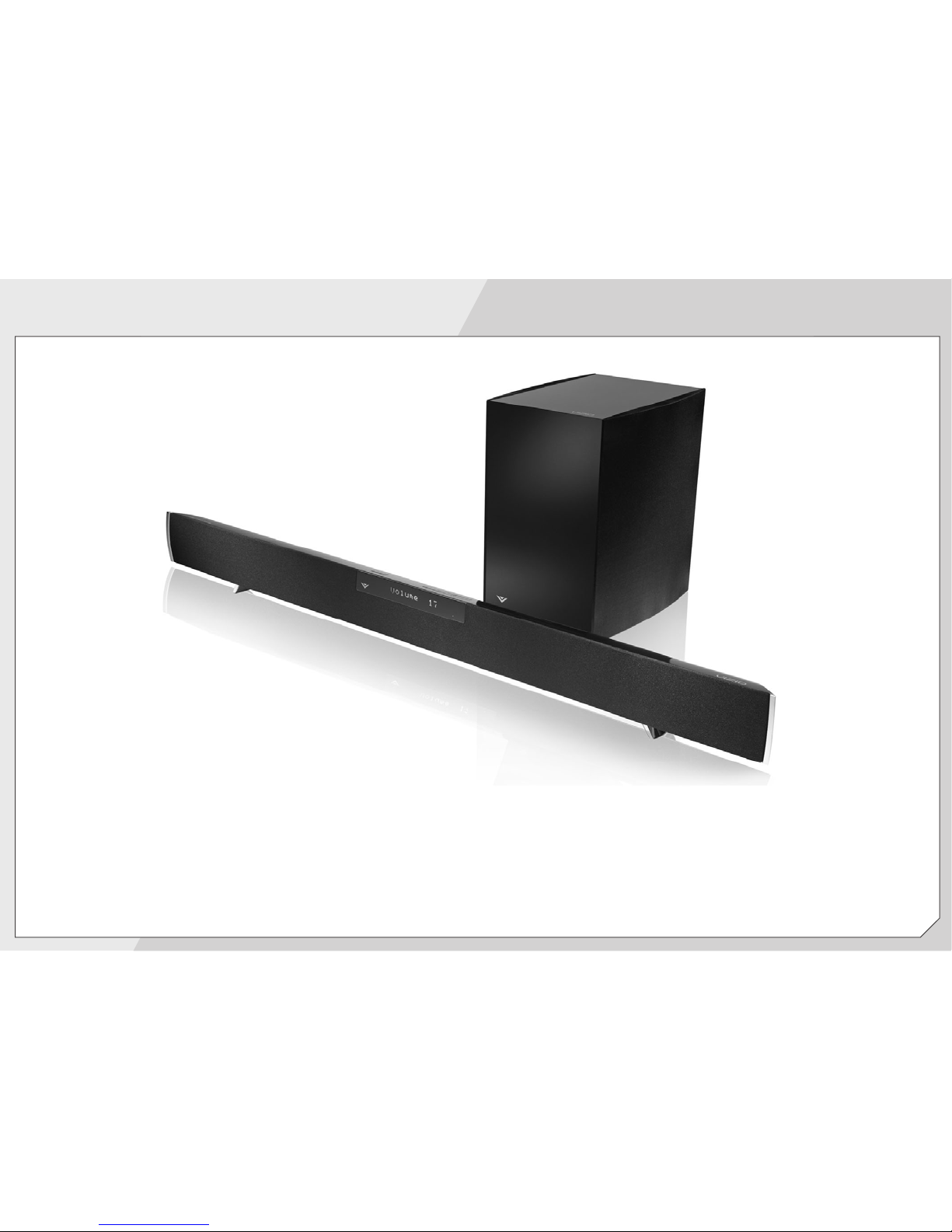
Available at www.VIZIO.com
This Product Sold Separately
The VIZIO Home Theater Sound Bar with Wireless Subwoofer delivers exceptional audio performance in a new
sleeker, slimmer design - a perfect complement for a 40” HDTV and larger. This powerful sound system is also
remarkably versatile. Its wireless subwoofer fits nearly anywhere in your home theater up to 60 ft. away, and the
sound bar offers either a table-stand or wall-mount option.
UPGRADE TO POWERFUL DIGITAL AUDIO

FIRST-TIME SETUP
Remove the battery cover by pressing gently on the
arrow and sliding away from the remote.
Insert the included batteries.
Gently slide the battery cover back into place.
2
Connect the power cord to the back of the TV.
Plug the power cord into an electrical outlet.
1

If you have an external antenna or a cable connection that
extends from a wall outlet, connect it to the TV with an
RF/Coaxial cable.
4
Turn the TV on by pressing the Power button on the
remote.
The Setup App is displayed.
Use the Arrow buttons on the remote to highlight your
preferred language and press OK.
Back of TV
Coaxial
Cable
3

5
Use the Arrow buttons on the remote to highlight Home
Mode and press OK.
6
Use the Arrow buttons on the remote to highlight your
time zone and press OK.
Use the Arrow buttons on the remote to turn daylight
saving time On or Off.
Other manuals for E390VL
2
Table of contents
Other Vizio Flat Panel TV manuals

Vizio
Vizio E550i-A0E User manual

Vizio
Vizio E551VA User manual

Vizio
Vizio M190MV Use and care manual

Vizio
Vizio VW46L User manual

Vizio
Vizio E500i-B1E User manual

Vizio
Vizio E291i-A1 User manual

Vizio
Vizio E320AR User manual
Vizio
Vizio E241i-A1W User manual

Vizio
Vizio E601i-A3E User manual

Vizio
Vizio VF551XVT1A User manual

Vizio
Vizio M422i-B1 User manual

Vizio
Vizio E500d-A0 User manual

Vizio
Vizio P42HDTV10A - 42" Plasma TV User manual

Vizio
Vizio E291i-A1 User manual

Vizio
Vizio E241i-A1W User manual

Vizio
Vizio VO47LF - 47" LCD TV User manual

Vizio
Vizio XVT323SV User manual

Vizio
Vizio E422AR Assembly instructions

Vizio
Vizio VW47LF User manual

Vizio
Vizio GV46L FHDTV20A User manual