Vision Plus VP-8865KE User manual

CPU
:
TWBZ-01-1907-0204
65-EUUB00-E135
Please read these instructions before operating
your set and retain them for future reference.
LED COLOR TV
Model:
Operating Instruction
VP-8865KE
EUUB00-E135

Please read these instructions before operating
your set and retain them for future reference.
LED COLOR TV
Model:
Operating Instruction
VP-8865KE
EUUB00-E135

PRECAUTION

WARNING
Using cabinets orstands recommended bythe manufacturer ofthe television set.
Only using furniturethat can safely support the televisionset.
Ensuring the televisionset is notoverhanging the edge of the supporting
furniture.
Not placing thetelevision set on tall furniture (forexample, cupboards or
bookcases)without anchoring both the furniture andthe television setto a
suitable support.
Not placing thetelevisions set oncloth or other materials that maybe located
between the televisionset and supporting furniture.
Educating children aboutthe dangers of climbing on furnitureto reach the
Televisionset or itscontrols.
Never place atelevision set in an unstable location.A television set mayfall,
causing serious personalinjury or death. Many injuries,particularly tochildren,
can be avoidedby taking simple precautions such as:
If your existingtelevision set isbeing retained and relocated,the same
considerations as aboveshould be applied.
IMPORTANT INFORMATION
Using cabinets orstands recommended by the manufacturer ofthe television.
Only using furniturethat can safely support the television.
Ensuring the televisionis not overhanging the edge ofthe supporting furniture.
Not placing thetelevision on tall furniture (for example, cupboards or
Bookcases)without anchoring boththe furniture and the television toa Suitable
Support.
Not standing thetelevisions on cloth or other materialsplaced between the
television and supportingfurniture.
Educating children aboutthe dangers of climbing on furnitureto reach the
television or itscontrols.
If a televisionis not positioned in a sufficiently stable location,itcan be potentially
hazardous due tofalling.Many injuries,particularly to children, can beavoided
by taking simpleprecautions such as:

CAUTION
Danger of explosionif battery isincorrectly replaced.
Replace only withthe same orequivalent type.
Batteries shall notbe exposed toexcessive heat suchas sunshine, fireor the
like.
Used batteries shouldnot be throwninto the garbagecan, please leavethem
at an appropriatedepot.
CAUTION
Where the MAINS plug or an appliance coupler is used as the disconnect
device, the disconnect device shall remain readily operable.
CAUTION
These servicing instructions are for use by qualified service personnel only.
To reduce the risk of electric shock, do not perform any servicing other than
that contained in the operating instructions unless you are qualified to do so.
Attention:
Motionless picture might cause permanent destruction to the display.
Be sure not to display motionless picture on the LED TV for more than
2 hours, because it would cause picture remnants to appear, which is
called "screen burns". To avoid suchpicture remnants, please decrease
the "contrast" and "brightness" of the display when displaying motionless
picture.
While watching TV program in 4:3 size mode for a long time, there would .
be traces on the edge of the screen's left, right and center parts because
of different transmition of the light on the screen.Similar impact on the
screen will occurwhen playing DVDor connecting gamescontrol. Products
destroyed by these reasons can't be guaranteed for maintenance.
It might cause picture remnants to display electronic gamesand motionless .
picture of PC more than a period of time.To avoid sucheffect, please
decrease the "contrast" and "brightness" when displaying motionless
picture.
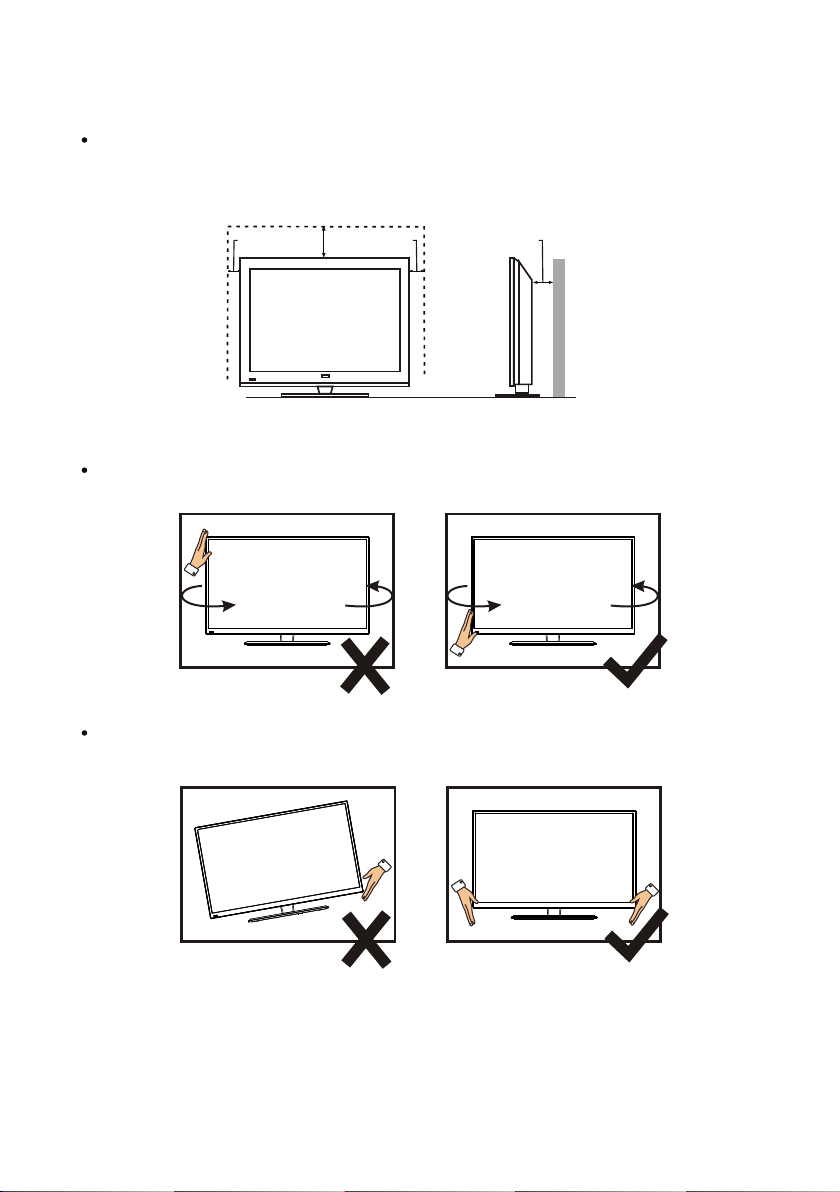
Place the TV on a firm and flat surface,leaving a space of at lease 10cm around
the set and30cm from thetop of theset to thewall or cabinet.Ensure the TV is
positioned close to the wall to avoid it falling when pushed.
10cm 30cm 10cm 10cm
When you turning the TV set,do not hold the top side of the TV set ,you should
hold the bottom side .
When you lifting the TV set,do not use one hand to handle it,you should lift the
TV set by two hands.

19
1.3 Keys
1
CONTENTS
LED COLOR TV
1. Connection and Preparation of TV..................................................
1.1 Accessories ...........................................................................
1.2 Installation of Stand................................................................
and Interfaces.................................................................
1.4 Remote Control.......................................................................
1.5 Installation of Batteries............................................................
2. Basic Operation............................................................................
2.2 Setting of Standby Mode..........................................................
2.3 Input Source
3. Technical Specification................................................................
4. Supported Signal Modes..............................................................
5. Simple Troubleshooting ..............................................................
2
2
2
3
4
5
5
5
6
20
21
.........................................................................
.....................................................................
11
..............................................................
2.1 Power ON/OFF(Optional)..........................................................5
6
2.3 Basic Operation
2.4 Menu system instruction

2 Insert the stand into thebottom socket of the TV.
1.Connection and Preparation of TV
1.1 Accessories
User Manual
Remote Control
Battery(UM-4/R03P/AAA)
Wall Mount Kit (Pre-assembled)(Optional)
1.2 Installation of Stand
1 Place the TV with the front panel facing downwards onthe soft cloth or soft
pads on adesk.
3 Insert the screws into the sockets and tighten them.
2
LED COLOR TV
(For the physical structure, please refer to the real object)

The design and specification takes actual
products as the standard
1.3 Keys and Interfaces
or or
LED COLOR TV
3
4
1. Remote sensor window
2. Power indicator
3. Speaker
Standby key
4. Power plug input
11.OPTICAL
15.EARPHONE
13.MINI VIDEO input/YPBPR input
9.HDMI1
8.HDMI2
10.RF input
12.MINI AUDIO input
7.RJ45
5. USB2
16.TF input
6. USB1
14.CI
567810 11 15
HDMI1
HDMI2
RJ45 RF IN
USB2
5V---500mA
USB1
5V---500mA
MINI
AUDIO IN
9
MINI
EARPHONE
OPTICAL TF
YPBPR IN
12 13 16
VIDEO IN
CI
14

4
1. INPUT: This button is used to switch among different
sources.
Select a source and press OK button to confirm.
2. POWER: Press this button to switch to standby
mode, and press it again to turn TV on.
3. REC LIST: Press this button to display a list of recorded
programs in DTV.
4. TV: Press this button to enter TV source.
5. Arrow buttons: Press these buttons to move cursor
up / down / left / right for menu.
6. OK LIST: Press this button to display a channel list,
or confirm your selection.
7. GUIDE: In DTV source, this button is used to start the
EPG application.
8. MORE: Press this button to display "MORE" menu.
You can use virtual buttons in "more" menu to control
TV functions as remote.
9. MENU: Press this button to display quick menu or exit
the menu.
10. HOME: Press this button to enter the main interface
directly.
11. BACK: Return to previous page.
12. MUTE: Press this button to shut off sound of the TV,
press again to restore TV sound.
13. VOL+ and VOL-: Press these buttons to adjust
TV volume.
14. Chr and CHs: Press these buttons to change
channel upward or downward. In the teletext,
these buttons are used to display the next page
and previous page.
15. I/II button/AUDIO LANG: In ATV source, the button
is used to set NICAM sound system. In DTV source,
the button is used to set the audio language.
16. Red/Green/Yellow/Blue Command: These four
buttons are used to request linked buttons with
the current menu/page. Press the Green button
can make the TV RC(TV remote controller ) as
mouse, and long press the YELLOW button can
capture screen image. Press Red button can switch
AD(Audio Discription) Function On/Off.When in
Home/Smart UI, Press Red button to open Google
search.
1.4 Remote Control
(Here is only the sketch, please in kind prevail)
LED COLOR TV
Table of contents