VDO CD 2217 G User manual

www.vdodayton.com
CD 2737B
CD 2537U
CD 2327G
CD 2217G
E8
Deutsch
Suomi
Έλληνικά
User manual
Mode d’e emploi
Bedienungsanleitung
Gebruiksaamwijzing
Instuzioni d’uso
Instrucctiones de manejo
Modo de emprego
Bruksanvisning
Betenningsveiledning
Käyttöohje
Εγχειρίδιο χρήστη
Dansk Português Español Italiano
Nederlands
Français English
Svenska

2

3
A
B
C
D
wma
SOURCE
REL
PWR
MUTE
SAM
AST
SOUND
BAND
PTY TA
AF
1
SCN
2
RPT
3
RND
4
-10
5
+10
6
ID3
AUX IN
CD 2327G
IR
1
3
2
9810 56
4
7
11 12 13 14 15 16
17
1
3
2
9810 56
4
7
11 12 13 14 15 16
17
wma
REL
SOURCE
PWR
MUTE
SAM
AST
SOUND
CD 2737B
IR
BAND
PTY
AF
TA 1
SCN
2
RPT
3
RND
4
-10
5
+10
6
ID3
AUX IN
CARD IN
18
EJ
CARD IN
EJ
18

4
F
G
1
3
2
188mm
58mm
I
H
E
1
3
2
5
12
6
4
7
8
9
10
11
R
TALK
SD
USB
J
K
The Remote Control is a separate accessory.
Please contact your dealer.

5
O
P
Q T
S
R
L
RL-
RL+
FL-
FL+
FR-
FR+
RR-
RR+
N.C.
N.C. N.C.
15A
12V
RSDVC
A
B
C
C1
C2C3
Pink
Tel.Mute
Blue
SWRC+
Brown
SWRC-
Gray
R. Amp.
BT Mic.
White
Red
L
R
Preamp
Out
Illumination Ground
Microphone Ground
Illumination Switch
Microphone-In + Talk
Illumination Power
Illumination Blink
(Headunit)
N
M
6
U V

7
English
INTRODUCTION
Before Starting
Thank you for purchasing this VDO Dayton product, which has been designed and manufactured
according to applicable Safety Regulations, following the highest standards and subjected to rigor-
ous testing. Kindly familiarize yourself with the product by reading this user manual carefully. Use the
product as intended, and keep this manual handy in your car for future reference.
Environment
This booklet is printed on low-chlorine recyclable paper.
Preventive Maintenance
To ensure good connection between the set and the detachable front, it is advisable to clean the con-
nectors periodically with a cotton swab slightly moistened with cleaning uid or alcohol.
TECHNICAL AND FUNCTION DATA
CD2217G CD2327G CD2537U CD2737B
Power Supply 12V 12V 12V 12V
Max. Power [W] 4 x 40 4 x 40 4 x 50 4 x 50
Sinus Power [W] 4 x 20 4 x 20 4 x 25 4 x 25
Quiescent Current ≤ 3mA ≤ 3mA ≤ 3mA ≤ 3mA
Illumination Switchable
(orange / green /
dual)
Switchable
(orange / green /
dual)
Switchable
(orange / green /
dual)
Switchable
(orange / green /
dual)
Steering Wheel
Remote Control
Programmable Programmable Programmable Programmable
Speed Dependent
Volume Control
Needs calibration Needs calibration Needs calibration Needs calibration
FM 3 Bands (including 1
AST band)
3 Bands (including 1
AST band)
3 Bands (including 1
AST band)
3 Bands (including 1
AST band)
MW/LW 2 MW Bands (includ-
ing 1 AST band), 1 LW
Band
2 MW Bands (includ-
ing 1 AST band), 1 LW
Band
2 MW Bands (includ-
ing 1 AST band), 1 LW
Band
2 MW Bands (includ-
ing 1 AST band), 1 LW
Band
MP3 Format
(with ID3 Tag)
Yes Yes Yes Yes
WMA Format - Yes Yes Yes
CD (with ESP) Yes Yes Yes Yes
SD / MMC - - Reads up to 2 GB
memory
Reads up to 2 GB
memory
USB - - V1.1 speed; reads up
to 2 GB memory
V1.1 speed; reads up
to 2 GB memory
Bluetooth - - - V2.0 + EDR
BT Proles ---HSP, HFP, A2DP
Preamp Out 2-Channel (2V) 2-Channel (2V) 2-Channel (2V) 2-Channel (2V)
Front Panel Flip down, Detachable Flip down, Detachable Flip down, Detachable Flip down, Detachable
Telephone Mute Single y lead cable Single y lead cable Single y lead cable Single y lead cable
Dimensions
(WxHxD)
178 x 50 x 160 mm 178 x 50 x 160 mm 178 x 50 x 160 mm 178 x 50 x 160 mm

8
CONTENT PAGE
INTRODUCTION.......................................7
Before Starting...........................................7
Environment ..............................................7
Preventive Maintenance............................7
TECHNICAL AND FUNCTION DATA .......7
CONTENT PAGE ......................................8
GENERAL INFORMATION.......................9
Disclaimer..................................................9
Class 1 Laser Product ...............................9
Disposal of batteries and accumulators
(Directive 2006/66/EC) ..............................9
FCC Compliance .......................................9
CE Compliance..........................................9
Protecting your headunit from theft .........10
CD player and care..................................10
FEATURES INFORMATION ...................10
Notes on RDS..........................................10
Notes on audio CDs ................................10
Notes on MP3 les ..................................11
Notes on WMA les .................................11
Notes on folders ......................................11
Notes on SD/MMC...................................12
Notes on USB..........................................12
Notes on Bluetooth® Technology ............12
Notes on Priority......................................12
INSTALLATION.......................................13
Connection ..............................................13
Connection in vehicles equipped with
standard ISO connectors.........................13
Connection in vehicles without
standard ISO connectors.........................13
Preparation..............................................13
Connectors (g. L, M and N) ...................13
Connector A 1).........................................13
Connector B 1) ........................................13
Preamp Out .............................................13
Wires of Steering Wheel Remote
Control (SWRC).......................................13
Wire of Telephone Mute...........................14
Wire of Remote Amplier.........................14
MOUNTING.............................................14
Metal Sleeve (g. J & K)..........................14
Connecting the Headunit (g. L & M) ......14
Mounting the Headunit (g. U & V)..........14
Front Mounting (DIN slot) ........................14
Rear Mounting (JIN slot)..........................14
Removing the Headunit (g. T & U).........14
Replacing the Fuse (g. L & M) ...............14
Interference suppression.........................14
Location of the Bluetooth Microphone
Module.....................................................15
SECURITY ..............................................15
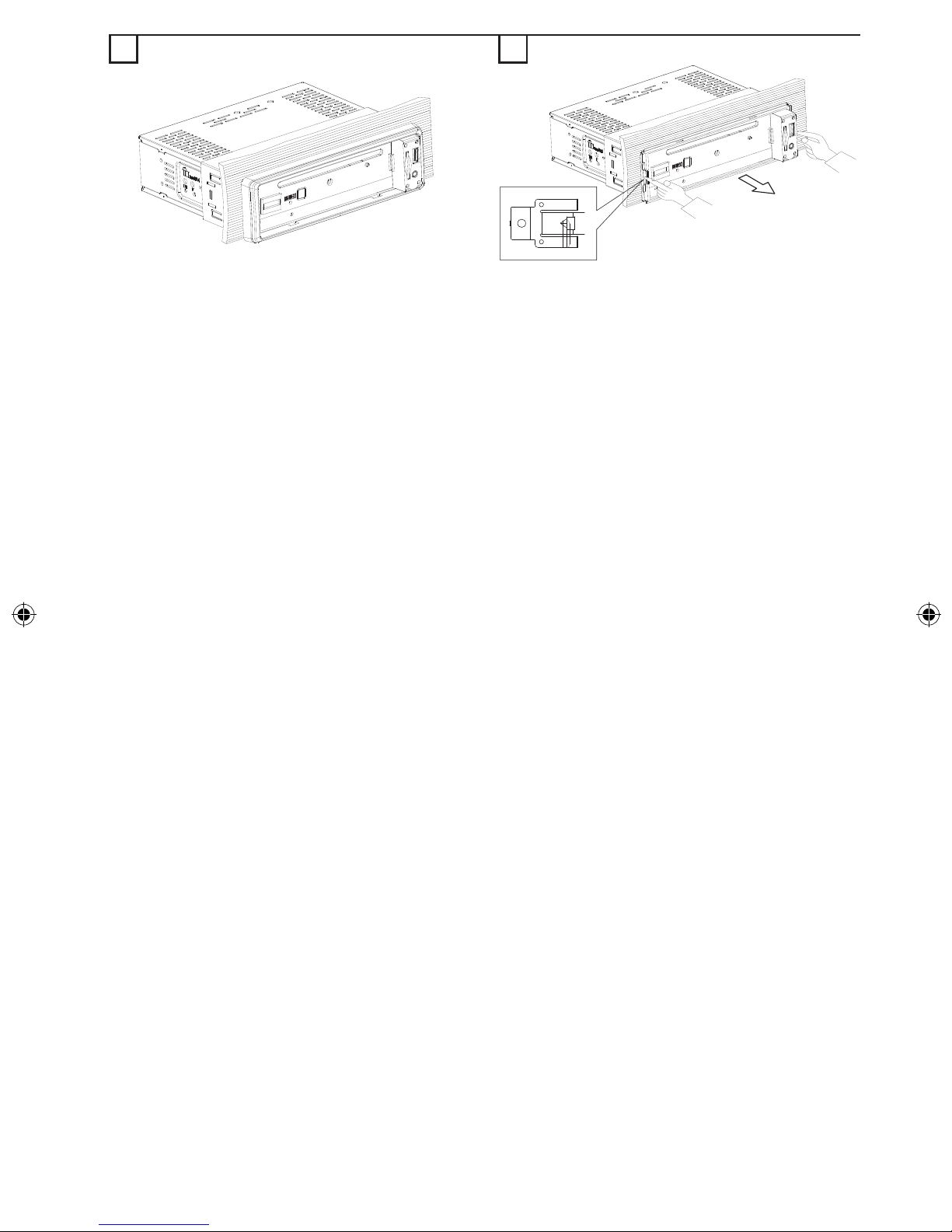
Removing the Front (g. O - Q) ..............15
Inserting the Front (g. R - T) ..................15
FRONT PANEL AND REMOTE
CONTROL...............................................16
GENERAL OPERATION.........................18
Switching On / Off....................................18
Selecting a Source ..................................18
AUDIO .....................................................18
Setting the Start-up Volume.....................18
SOUND Menu..........................................18
Mute (silence)..........................................18
Balancing the Volume for Different
Sources ...................................................18
RADIO.....................................................18
Region Setting.........................................18
AM Band..................................................19
Select a Waveband .................................19
Select a Station .......................................19
Auto-Seek Tuning....................................19
Manual Tuning.........................................19
Storing a Station......................................19
Auto Store (AST) .....................................19
Manual Store ...........................................19
RADIO DATA SYSTEM (RDS)................19
Display of Station Name (PS)..................19
Alternate Frequency (AF) ........................19
Trafc Programme (TP) and Trafc
Announcement (TA).................................19
Presetting TA Volume ..............................19
TA Activation / De-activation ....................19
Interrupting TA .........................................20
Enhanced other Network (EON)..............20
Programme Type (PTY)...........................20
Searching for a Programme Type............20
PTY Activation / De-activation .................20
RDS Regionalization ...............................20
CD OPERATION .....................................20
Loading CD into the Headunit .................20
Ejecting a CD...........................................20
Playing a CD-R or CD-RW ......................20
Playing a “Copy-Protected” non-
conforming audio CD...............................20
Listening to Music....................................21
Multi-Session Disc...................................21
TA / NEWS Interruption ...........................21
Track Selection........................................21
9
English
Class 1 Laser Product
Caution:
Any inappropriate use of the device
may expose the user to invisible la-
ser rays. Which exceed the limits for
Class 1 laser products.
Disposal of batteries and
accumulators (Directive 2006/66/EC)
In many countries it is forbidden to dispose emp-
ty batteries with normal domestic waste. Please
nd out the regulations that apply in your area
regarding the disposal of used batteries. Please
take care that damaged or leaked batteries will
be disposed in a professional way.
FCC Compliance
This device complies with part 15 of the FCC
Rules. Operation is subject to the following two
conditions: (1) This device may not cause harm-
ful interference, and (2) this device must accept
any interference received, including interference
that may cause undesired operation.
CE Compliance
Hereby, Siemens VDO Trading GmbH declares
that this device complies with the essential
requirements and other relevant provisions of
Directive 1999/5/EC.
The Declaration of Conformity is available upon
request at the following address:
Siemens VDO Trading GmbH,
Kruppstraße 105,
60388 Frankfurt am Main, Germany.
GENERAL INFORMATION
Disclaimer
The designs and specications stated in this
user manual are subjected to changes without
prior notice.
VDO Dayton accepts no responsibility for data
loss on your storage cards and/or USB devices if
the data is lost while using this headunit.
Fast-Forward or Fast-Backward a Track .... 21
Scan Feature...........................................21
Repeat Feature........................................21
Random Feature......................................21
USB AND SD/MMC OPERATION...........21
General....................................................21
Auto-Play.................................................21
Operations of USB and SD/MMC............21
TA / NEWS Interruption ...........................21
BLUETOOTH OPERATION ....................22
General....................................................22
Controls (g. K)........................................22
Pairing .....................................................22
Paired Devices ........................................22
Hands-Free Call ......................................22
Answer a call ...........................................22
Reject a call.............................................22
Hang-up a call .........................................22
Music Streaming......................................22
AUX OPERATION...................................22
SPECIAL FUNCTIONS...........................22
Clock........................................................22
Telephone Mute.......................................23
Brightness Control...................................23
Illumination Colour...................................23
Security LED............................................23
Speed Dependent Volume Control (SDVC)....23
Calibration ...............................................23
Steering Wheel Remote Control (SWRC) .....23
SOFTWARE ACCESS MENU (SAM) .....25
TROUBLESHOOTING............................28
NO POWER Verication..........................28
NO SOUND Verication...........................28
SOUND TROUBLE Verication...............28
CD ERRORS Verication ........................28
USB & SD / MMC ERRORS Verication .....28

10
Protecting your headunit from theft
The front panel can be detached from the head-
unit and stored in the provided protective case to
prevent theft.
Important:
Never use force or grip the display and the
buttons too tightly when removing or attach-
ing.
Avoid subjecting the front panel to excessive
shocks.
Keep the front panel out of direct sunlight and
high temperature.
CD player and care
Please use normal, round CDs only. If you
insert irregular, non-round, shaped CDs,
they may jam inside the headunit or not play
properly.
Check all CDs for cracks, scratches or warp-
ing before playing. Do not play CDs with one
of these symptoms.
Avoid touching or leaving ngerprints on the
recorded (non-printed) surface when han-
dling the CDs.
Always store audio CDs in their protective
covers when not in use.
Always ensure that CDs are clean and dry
before inserting.
Keep CDs out of direct sunlight and do not
expose the CDs to high temperatures.
Do not attach labels, write on or apply chemi-
cals to the surface of the CDs.
To clean a CD, wipe the CD with a soft cloth
outward from the centre.
If the heater is used in cold weather, moisture
may form on components inside the head-
unit. Condensation may cause the headunit
to malfunction. If you think that condensation
is a problem, turn off the headunit for an hour
or so to allow it to dry out and wipe any damp
CDs with a soft cloth to remove the moisture.
Road shocks may interrupt CD playback.
FEATURES INFORMATION
Notes on RDS
Many VHF stations transmit RDS (Radio Data
System) information. This radio evaluates the
RDS telegram and offers the following advan-
tages:
PS (Program Service name): Display of sta-
tion name
PTY (Programme TYpe): Station selection by
programme type
AF (Alternative Frequency): Automatic re-tun-
ing to best alternative frequency for clearer
reception
TA (Trafc Announcement): Trafc announce-
ments of reported road conditions
EON (Enhanced Other Network): Automatic
fade-in of trafc announcements of other
stations
PTY-NEWS: Fading in of messages and
items of news
Notes on audio CDs
You can play 12 cm CDs on your headunit.
The use of 8 cm CDs (with or without adapt-
ers) and of CDs with irregular shapes is not
recommended.
Please use CDs (Compact Discs) that has
this Compact Disc Digital Audio marking as
shown below.
The following CD formats are supported by the
headunit:
CD Audio (CD-DA in accordance with the
Red Book);
CD Text is not supported
CD-ROM (in accordance with Yellow Book);
CD-R/RW (in accordance with Orange Book,
part 2/3);
CD mixed mode (in accordance with Light
Yellow Book);
Only the audio tracks will be the played.
Multi-session CD (in accordance with multi-
session CD specication 1.0).
Other manuals for CD 2217 G
2
This manual suits for next models
4
Table of contents
Other VDO Car Stereo System manuals