V-tech CS6147 User manual

User’s manual
w w w.v tech.c om/hk /tel
Model: CS6147

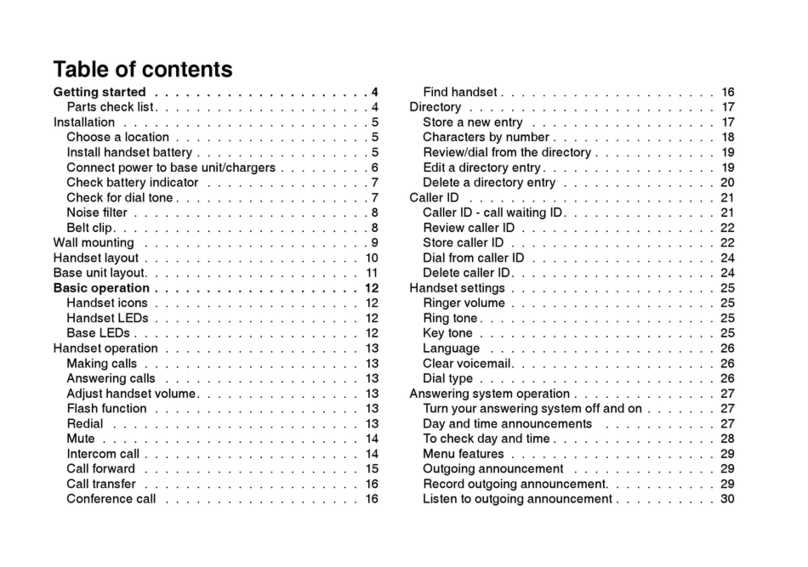
TABLE OF CONTENTS
1. IMPORTANT SAFETY INSTRUCTIONS ............................. 1
2. SET UP THE TELEPHONE ................................................. 2
2.1 Package Contents............................................................................. 2
2.2 Location ............................................................................................ 2
2.3 Connect the Corded Base Station .................................................... 3
2.4 Connect the Charger......................................................................... 3
2.5 Install and Charge the Handset Batteries ......................................... 4
3. GET TO KNOW YOUR PHONE........................................... 5
3.1 Overview of the Handset................................................................... 5
3.2 Overview of the Corded Base ........................................................... 7
3.3 Overview of the Handset Charger..................................................... 9
3.4 Handset LCD Display Icons and Symbols ........................................ 9
3.5 Handset Menu Structure ..................................................................11
3.6 Base LCD Display........................................................................... 12
3.7 Base Menu Structure ...................................................................... 13
3.8 Text and Digit Entry Table ............................................................... 14
3.8.1 English Character Set ..................................................... 14
4. USE YOUR PHONE ...........................................................15
4.1 Make an External Call..................................................................... 15
4.1.1 Preparatory Dialing........................................................... 15
4.1.2 Direct Dialing .................................................................... 15
4.1.3 Call from the Contacts ...................................................... 15
4.1.4 Call from the Call Log ....................................................... 16
4.1.5 Call from the Redial List ................................................... 16
4.1.6 Call Timer ......................................................................... 16
4.2 Make a Call from Direct Access Memory ........................................ 17
4.3 Answer a Call .................................................................................. 17
4.4 PxBOOSTER Function ................................................................... 18
4.5 End a Call ....................................................................................... 18
4.6 Adjust Earpiece and Hands Free Volume ....................................... 19
4.7 Mute a Call...................................................................................... 19
4.8 Set the Silent Mode......................................................................... 19
4.9 Keypad Lock/Unlock ....................................................................... 19
4.10 Emergency Call without Main Power .............................................. 20
4.11 Redial the Last Number................................................................... 20
4.11.1 Redial a Number from the Redial List............................. 20
4.11.2 Store a Redial Number into the Contacts ....................... 21
4.11.3 Delete a Redial Number ................................................. 21
4.11.4 Delete the Entire Redial List ........................................... 22
4.12 Find the Handset............................................................................. 22

4.13 Make an Internal Call ...................................................................... 23
4.13.1 Intercom ......................................................................... 23
4.13.2 Call All Handsets ........................................................... 23
4.13.3 Transfer an External Call ................................................ 24
4.13.4 Make a 3-way Conference Call ...................................... 24
5PRIVATE CONTACTS ......................................................... 25
5.1 Add a New Contacts Entry .............................................................. 25
5.2 Search for a Contacts Entry............................................................ 26
5.3 View a Contacts Entry..................................................................... 26
5.4 Edit a Contacts Entry ...................................................................... 27
5.5 Delete a Contacts Entry .................................................................. 28
5.6 Delete the Entire Private Contacts.................................................. 28
5.7 Check the Contacts Usage ............................................................. 29
5.8 Set the Fast Dial Numbers.............................................................. 29
5.8.1 Add or Edit the Fast Dial Number ..................................... 29
5.8.2 Delete the Fast Dial Number ............................................ 29
6
CALLER DISPLAY (NETWORK DEPENDENT)..........................................30
6.1 View the Call Log ............................................................................ 30
6.2 Store a Call Log Number into the Phonebook ................................ 31
6.3 Delete an Entry in the Call Log ....................................................... 31
6.4 Delete the Entire Call Log ............................................................... 32
7PHONE SETTINGS .............................................................33
7.1 Clock Settings ................................................................................. 33
7.2 Alarm Settings (Handset only) ........................................................ 35
7.3 Handset Settings............................................................................. 36
7.3.1 Set the Ringer Melody for Internal Calls........................... 36
7.3.2 Set the Ringer Melody for External Calls.......................... 36
7.3.3 Set the Ringer Volume...................................................... 36
7.3.4 Set Alert Tones ................................................................. 37
7.3.5 Select Base ...................................................................... 37
7.3.6 Rename the Handset........................................................ 37
7.3.7 Choose the Information to be Displayed in Idle................ 38
7.3.8 Set the Auto Answer ......................................................... 38
7.3.9 Set the Direct Memory Keys............................................. 38
7.4 Base Settings using the Handset.................................................... 39
7.4.1 De-register a Handset ...................................................... 39
7.4.2 Set the Dial Mode ............................................................. 39
7.4.3 Set the Flash Time ........................................................... 39
7.4.4 Change the System PIN Code ......................................... 40

7.5 Base Settings using the Base ......................................................... 41
7.5.1 Set the Ringer Melody for Internal Calls........................... 41
7.5.2 Set the Ringer Melody for External Calls.......................... 41
7.5.3 Set the Ringer Volume...................................................... 41
7.5.4 De-register a Handset ...................................................... 42
7.5.5 Set the Flash Time............................................................ 42
7.5.6 Set the Keytone................................................................ 43
7.5.7 Change the System PIN ................................................... 43
7.5.8 Set the Memory Keys ....................................................... 43
7.6 Registration..................................................................................... 44
7.7 Reset Your Phone ........................................................................... 45
8 ANSWERING MACHINE .................................................... 46
8.1 Switching TAM On/Off..................................................................... 46
8.2 Play Messages on TAM .................................................................. 47
8.3 Delete all Messages on TAM .......................................................... 48
8.4 Record Memos on TAM .................................................................. 49
8.5 Answering Machine Settings (Base Only)....................................... 50
8.5.1 Set the Answer Mode ....................................................... 50
8.5.2 Record your Outgoing Message (OGM)........................... 51
8.5.3 Playback the Outgoing Message (OGM).......................... 52
8.5.4 Delete a Personalized OGM (SET OGM to DEFAULT).... 53
8.5.5 Set the Answer Delay ....................................................... 53
8.5.6 Set the Recording Time of Incoming Message................. 54
8.5.7 Turn On or Off the Base Screening .................................. 54
8.5.8 Change the Compression Rate ........................................ 55
8.5.9 Activate Remote Access ................................................... 56
8.5.9.1 Change the 4-Digit Remote Access PIN........................... 56
8.5.9.2 Activate or Deactivate the Remote access ....................... 57
8.5.9.3 Reset TAM to Default Settings.......................................... 57
8.5.9.4 Remote Operations .......................................................... 58
9. DEFAULT SETTINGS ........................................................ 59
10. TROUBLESHOOTING ....................................................... 60
11. TECHNICAL SPECIFICATIONS ........................................ 63
12. CARE AND MAINTENANCE INSTRUCTIONS ................. 64

1
1. IMPORTANT SAFETY INSTRUCTIONS
When using your telephone equipment, basic safety precautions should always be
followed to reduce the risk of re, electric shock and injury, including the following:
Read and understand all the instructions.
Follow all warnings and instructions marked on the product.
Unplug this product from the wall outlet before cleaning. Do not use liquid cleaners
or aerosol cleaners. Use a damp cloth for cleaning.
Do not use this product near water (for example, near a bath tub, kitchen sink,
swimming pool).
Do not expose the telephone to direct sunlight or extreme cold environment. Do not
put the telephone close to a heating source such as radiators, cookers, etc.
Do not overload wall outlets and extension cords as this can result in the risk of re
or electric shock.
Unplug this product from the wall outlet and refer servicing to VTech under the
following conditions:
When the power supply cord or plug is damaged or frayed.
If the product does not operate normally by following the operating instructions.
If the product has been dropped and the cabinet has been damaged.
If the product exhibits a distinct change in performance.
Avoid using a telephone (other than a cordless type) during an electrical storm.
There may be a remote risk of electric shock from lightning.
Do not use the telephone to report a gas leak in the vicinity of the leak.
Use only the supplied NiMH (Nickel Metal Hydride) batteries! The operation periods
for the handsets are only applicable with the default batteries capacities
The use of other battery types or non-rechargeable batteries/primary cells can be
dangerous. These may cause interference and/or unit damages. The manufacturer will
not be held liable for damage arising from such non-compliance.
Do not use third party charging bays. The batteries may be damaged.
Please note the correct polarity while inserting the batteries.
Do not immerse batteries in water, do not place in re.
Disposal warning
When this crossed-out wheeled bin symbol is attached to a product,
it means the product is covered by the European Directive 2002/96/EC.
All electrical and electronic products/battery should be disposed of
separately from the municipal waste stream via designated collection
facilities appointed by the government or the local authorities.
The correct disposal of your old appliance/battery will help prevent potential
negative consequences for the environment and human health.
For more detailed information about disposal of your old appliance/battery, please contact
your city ofce, waste disposal service or The Shop where you purchased the product.
If you have questions about this product, or having difculty with setup or operation, call
our Customer Service Centre.
Customer Service Hotline: (852) 2666 5558
Technical Inquiry Hotline: (852) 2667 7433
1.
2.
3.
4.
5.
6.
7.
•
•
•
•
8.
9.
10.
11.
12.
13.
14.
1.
2.
3.

2
SET UP THE TELEPHONE
2. SET UP THE TELEPHONE
2.1 Package Contents
The package contains the following items:
1 Base station
1 Corded handset
1 Cordless handset
1 Charger pod with an AC power adapter
1 AC power adapter (for base unit)
2 NiMH rechargeable batteries (for handset)
2 Telephone line cords (for base unit)
User’s manual
Warranty card
2.2 Location
For maximum coverage and reduce the interference, here are some guidelines you
should consider when you place the base unit,
place it at a convenient, high, and central location with no obstructions between
the handset and base unit in an indoor environment.
place it away from electronic appliances such as televisions, microwave ovens,
radios, personal computers, wireless devices or other cordless phones.
avoid facing radio frequency transmitters, such as external antennas of mobile
phone cell stations.
avoid plugging it into the same circuit as other major household electrical
appliances because of the potential for interference. Try moving the appliance or
the base unit to another power outlet.
If the reception for a base unit location is not satisfactory, move it to another location
for better reception.
Depending on the surrounding conditions as well as spatial and structural factors, the
range may be reduced. The range indoors is normally less than outdoors.
•
•
•
•
•
•
•
•
•
-
-
-
-

SET UP THE TELEPHONE
3
2.3 Connect the Corded Base Station
Insert the DC plug of the power adapter and the telephone line cord into the base
station, as shown above.
Insert the other end of the power adapter into the wall outlet not controlled by a wall
switch and the telephone line cord into a telephone wall jack. If you have DSL high
speed internet service, a DSL lter (not included) is required.
NOTES
Always use the cables supplied with the product.
Use only the power adapter supplied with the base station.
2.4 Connect the Charger
Plug the power adapter into the wall outlet not controlled by a wall switch.
1.
2.
•
•
1.

4
SET UP THE TELEPHONE
2.5 Install and Charge the Handset Batteries
Slide open the battery compartment cover.
Place the two batteries as indicated. Respect the polarity.
Slide the battery compartment cover back.
Put the handset on the base to charge for 16 hours rst time. A beep indicates that
the handset is properly placed on the base.
NOTES
Use only the supplied NiMH rechargeable batteries.
If you do not use the handset for a long time, disconnect and remove the batteries
to prevent possible leakage.
1.
2.
3.
4.
1.
2.

SET UP THE TELEPHONE
5
3. GET TO KNOW YOUR PHONE
3.1 Overview of the Handset
1. SLIDE UP/DOWN ( )
During a call: Press to increase or decrease the earpiece volume.
2. M1/M2/M3 - DIRECT MEMORY KEYS ( / / )
In idle mode: Press and hold to dial the number stored in the memory key.
3. RIGHT SOFT KEY ( ) (CLEAR/BACK/MUTE/INTERCOM)
In main menu mode: Press to go back to idle screen.
In sub-menu mode: Press to go back to previous menu.
In sub-menu mode: Press and hold to go back to idle screen.
In editing/pre-dial mode: Press to delete a character/digit.
In editing/pre-dial mode: Press and hold to delete all the characters/digits.
During a call: Press to mute/resume the microphone.
In idle mode: Press to intercom another handset.

6
GET TO KNOW YOUR PHONE
4. UP/CALL LOG (p/CID)
In idle mode: Press to access the call log.
In menu mode: Press to scroll up the menu items.
In contacts list/redial list/call log: Press to scroll up the list.
5. DOWN/REDIAL LIST (q/REDIAL)
In idle mode: Press to access the redial list.
In menu mode: Press to scroll down the menu items.
In contacts list/redial list/call log: Press to scroll down the list.
6. TALK OFF ( )
During a call: Press to end a call and go back to idle screen.
In menu/editing mode: Press to go back to previous menu.
In menu/editing mode: Press and hold to go back to idle screen.
In idle mode: Press and hold to power off the handset.
Press and hold to power on when it is off.
7. ALPHANUMERIC KEYPAD, STAR ( ), HARSH ( )
In predial or editing mode: Press to insert a digit / character / * / #
* key in idle mode: Press and hold to enable or disable the keypad lock.
* key during a call (in Pulse mode): Press to switch to Tone mode.
# key in idle mode: Press and hold to turn on/off the ringer.
# key during a call: Press and hold to insert a ash.
0 key in idle/pre-dial mode/number editing mode: Press and hold to insert a pause.
8. MICROPHONE
9. TALK ON/SPEAKERPHONE ( )
In idle/pre-dial mode: Press to make a call. Press again to turn on the
speakerphone.
In contacts list/redial list/call log: Press to make a call to the selected entry in the
list. Press again to turn on the speakerphone.
During ringing: Press to answer a call. Press again to answer with speakerphone.
10. LEFT SOFT KEY ( ) (MENU/OK)
In idle mode: Press to access the main menu.
In sub-menu mode: Press to conrm the selection.
During a call: Press to access intercom/contacts list/redial list/ call log.
11. PxBOOSTER ( )
During a call: Press to activate/deactivate the PxBOOSTER function.
12. LED
Steadily on when the audio boost is turned on.
Flashes when there is an incoming call.
13. EARPIECE
Table of contents
Other V-tech Telephone manuals

V-tech
V-tech LS1850-B User manual

V-tech
V-tech DECT 6.0 DS6201 User manual
V-tech
V-tech i6763 Setup guide
V-tech
V-tech i5868 User manual

V-tech
V-tech S1100 User manual

V-tech
V-tech ia5870 User manual

V-tech
V-tech ia5824 Setup guide

V-tech
V-tech A2210-NS User manual

V-tech
V-tech ip5856 Setup guide

V-tech
V-tech ia5865 User manual

V-tech
V-tech CM18045 User manual

V-tech
V-tech LS1400-B User manual
V-tech
V-tech i6727 Setup guide

V-tech
V-tech i6772 Setup guide

V-tech
V-tech ip5852 User manual

V-tech
V-tech SIP Contemporary Series User manual

V-tech
V-tech FS6325A User manual

V-tech
V-tech vt20-2438 User manual

V-tech
V-tech IP8100-1 User manual

V-tech
V-tech VS 113 User manual