
Unigraf UCD-240 User manual


UCD Console for UCD-340 User Manual | Unigraf Oy
2.
Copyright
This manual, Copyright © 2019 Unigraf Oy. All rights reserved
Reproduction of this manual in whole or in part without a written permission of
Unigraf Oy is prohibited.
Notice
The information given in this manual is verified in the correctness on the date of issue. The
authors reserve the rights to make any changes to this product and to revise the information
about the products contained in this manual without an obligation to notify any persons about
such revisions or changes.
Edition
UCD-240 User Manual, Version 1
Date: 29.4.2019
Company Information
Unigraf Oy
Piispantilankuja 4
FI-02240 ESPOO
Finland
Tel. +358 9 859 550
mailto:info@unigraf.fi
https://www.unigraf.fi
http://www.unigraf-china.cn

UCD Console for UCD-340 User Manual | Unigraf Oy
3.
Trademarks
Unigraf, UCD and TSI are trademarks of Unigraf Oy.
DisplayPort™ and the DisplayPort™ logo are trademarks owned by the
Video Electronics Standards Association (VESA®) in the United States and other countries.
USB™, USB Type-C™ and USB-C™ are trademarks of USB Implementers Forum Inc.
HDCP is a trademark of Digital Content Protection LLC.
Windows® 10, Windows® 8, Windows® 7 and Windows® XP are trademarks of
Microsoft Corporation.
All other trademarks are properties of their respective owners.
Limited Warranty
Unigraf warrants its hardware products to be free from defects in workmanship and materials,
under normal use and service, for twelve (12) months from the date of purchase from Unigraf
or its authorized dealer.
If the product proves defective within the warranty period, Unigraf will provide repair or
replacement of the product. Unigraf shall have the whole discretion whether to repair or
replace, and replacement product may be new or reconditioned. Replacement product shall be
of equivalent or better specifications, relative to the defective product, but need not to be
identical. Any product or part repaired by Unigraf pursuant to this warranty shall have a
warranty period of not less than 90 days, from the date of such repair, irrespective of any
earlier expiration of original warranty period. When Unigraf provides replacement, then the
defective product becomes the property of Unigraf.
Warranty service may be obtained by contacting Unigraf within the warranty period. Unigraf
will provide instructions for returning the defective product.
CE Mark
UCD-200 products meet the essential health and safety requirements, is in conformity with and
the CE marking has been applied according to the relevant EU Directives using the relevant
section of the corresponding standards and other normative documents.

UCD Console for UCD-340 User Manual | Unigraf Oy
4.
Table of Contents
Copyright ................................................................................................... 2
Notice ........................................................................................................ 2
Edition ....................................................................................................... 2
Company Information ................................................................................ 2
Trademarks ............................................................................................... 3
Limited Warranty ....................................................................................... 3
CE Mark .................................................................................................... 3
About This Manual ........................................................................................... 6
Purpose ..................................................................................................... 6
Product and Driver Version ....................................................................... 6
Notes ......................................................................................................... 6
Introduction ...................................................................................................... 7
Product Description ................................................................................... 7
UCD-340 Product Features ....................................................................... 7
Functional Description ................. Virhe. Kirjanmerkkiä ei ole määritetty.
UCD-340 ................................................................................................... 8
External USB-C Power Test Unit .............................................................. 9
Installation.......................................... Virhe. Kirjanmerkkiä ei ole määritetty.
Unpacking ................................... Virhe. Kirjanmerkkiä ei ole määritetty.
Installation Package ................................................................................ 13
Software Installation ................................................................................ 14
Unigraf Electrical Test Cable ................................................................... 11
Firmware Update ........................................................................................... 15
Updated Modules .................................................................................... 16
License Manager ........................................................................................... 17
Licensing ....................................................................................... 17
License Manager GUI ................................................................... 17
Managing Licenses ....................................................................... 18
UCD Console GUI ......................................................................................... 19
Device Selection ..................................................................................... 19
Select Role .............................................................................................. 19
Source DUT Testing Tab ............................................................................... 20
Sink DUT Testing Tab ....................... Virhe. Kirjanmerkkiä ei ole määritetty.
Appendix A. Product Specification .................................................................................. 77
UCD-240 ................................................................................................. 77
CRC Based Video Test Set – DP RxVirhe. Kirjanmerkkiä ei ole määritetty.
CRC Based Single Reference Frame Video TestVirhe. Kirjanmerkkiä ei ole
määritetty.
CRC Based Single Frame Video Stability TestVirhe. Kirjanmerkkiä ei ole
määritetty.
CRC Based Sequence of Reference Frames TestVirhe. Kirjanmerkkiä ei ole
määritetty.
CRC Based Continuous Sequence of Reference Frames TestVirhe.
Kirjanmerkkiä ei ole määritetty.
Link Test Set – DP Rx ................. Virhe. Kirjanmerkkiä ei ole määritetty.
Link Training at All Supported Lane Counts and Link RatesVirhe. Kirjanmerkkiä
ei ole määritetty.

UCD Console for UCD-340 User Manual | Unigraf Oy
5.
USBC Electrical Test Set – DP Rx and DP TxVirhe. Kirjanmerkkiä ei ole määritetty.
Up Face Port CC and Vconn TestVirhe. Kirjanmerkkiä ei ole määritetty.
AUX (SBU) Lines Test ...... Virhe. Kirjanmerkkiä ei ole määritetty.
DUT as Power Sink ........... Virhe. Kirjanmerkkiä ei ole määritetty.
DUT as Power Source ...... Virhe. Kirjanmerkkiä ei ole määritetty.
TSI Programming ........................................................................................... 46
Operator feedback during test execution ................................................ 46
Operator feedback implementation in TSI ..................................... 46
Selecting which application TSI will run ........................................ 46
External application requirements ................................................. 47
Request parameters ..................................................................... 48
Request parameter details ............................................................ 52
Operator Feedback configuration items ........................................ 54
Extended scripting engine ....................................................................... 57
Getting started ........................................................................................ 57
Defining test equipment devices ................................................... 57
Commands.................................................................................... 57
Defining command macros ........................................................... 59
Running TSI.EXE .......................................................................... 60
Output ........................................................................................... 67
Running Tests ............................................................................... 68
Devices ......................................................................................... 69
Version History ........................................................................................ 78

UCD Console for UCD-340 User Manual | Unigraf Oy
6.
ABOUT THIS MANUAL
Purpose
This guide is the User Manual for UCD-240, USB-connected interface test units for testing
the features of USB Type-C interface.
UCD Console can be used in a PC with Windows® 10 Windows® 8 or Windows® 7
operating system.
The purpose of this guide is to
Provide an overview of the product and its features.
Provide instruction for the user on how to install the software and the drivers.
Introduce the HW features of the UCD-240 units.
Provide instructions for the user how to use UCD Console software.
Provide examples on how to perform automated tests with UCD-240 test tool.
Product and Driver Version
This manual explains features found in UCD Console Software Package 1.7.0 Please
consult Unigraf for differences or upgrades of previous versions.
Please consult the Release Notes document in the installation package for details of the SW
and FW versions and changes to previous releases.
Notes
On certain sections of the manual, when important information or notification is given, text
is formatted as follows. Please read these notes carefully.
Note This text is an important note

UCD Console for UCD-340 User Manual | Unigraf Oy
7.
INTRODUCTION
Product Description
UCD-240 is a Test Automation tool for testing USB-C DisplayPort Alt Mode products.
UCD-240 Product Features
Test unit for testing power delivery and DP Alt Mode functions of USB-C interface
Automated tests for USB-C™ DisplayPort™ Alt Mode
Electrical Test to verify whole USB-C connector with single cable insert
Monitoring and control of data and power delivery roles of the USB-C interface
High resolution DP alt mode video and audio capture up to 4K / UHD 60 Hz
Compatible with HDCP versions 1.3 and 2.2
Optional Power Test Unit for testing high voltage and power options
High speed USB 3.0 host PC interface
Please refer to Product Specifications in the appendix of this document for details.
UCD Console for UCD-340 User Manual | Unigraf Oy
8.
UCD-240
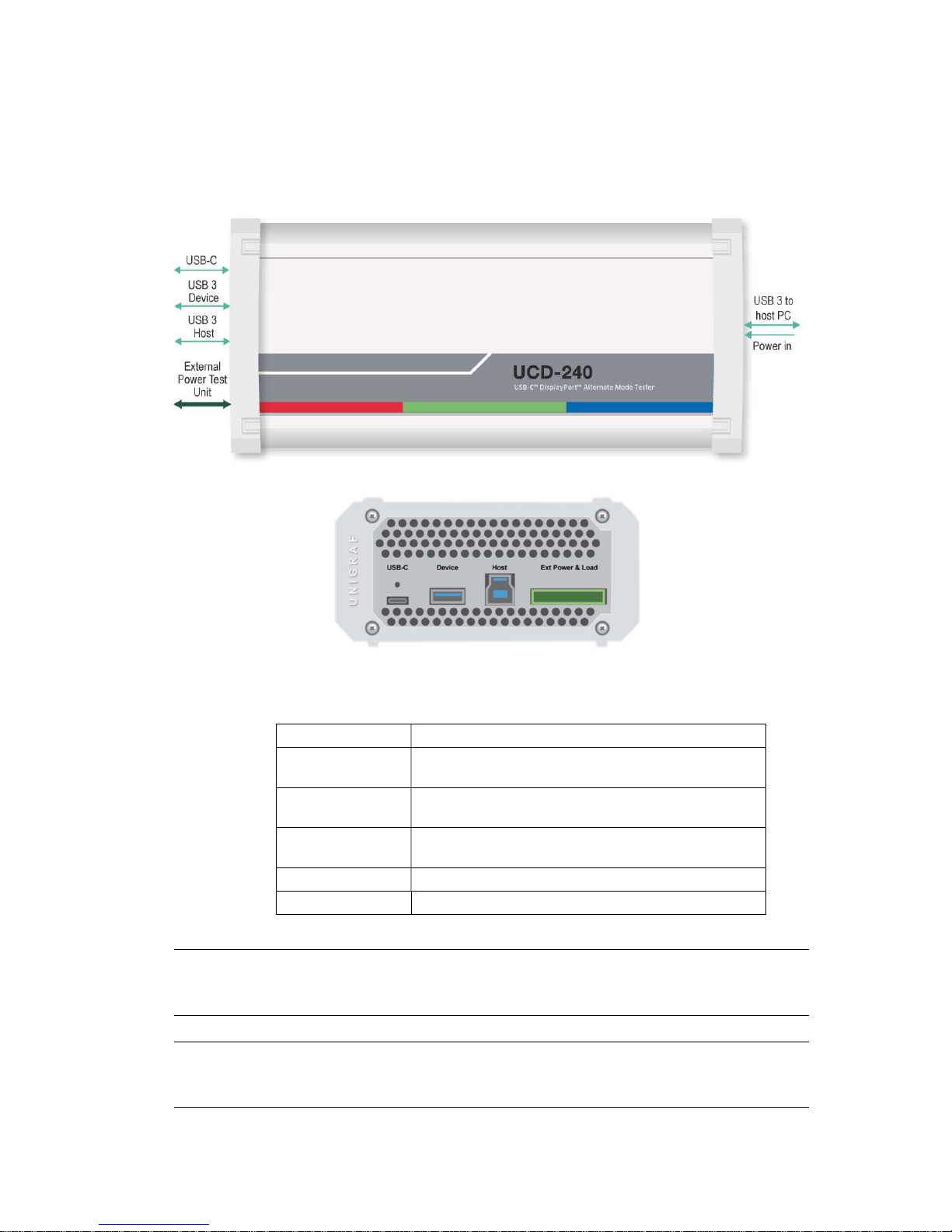
The image below describes the connections in UCD-240 unit.
Name Description
USB-C USB Type-C Connection to the evaluated device (DUT)
USB 3 Device USB Type-A connector for an auxiliary USB 3.1 “Device” for
data pass-through
USB 3 Host USB Type-B connector for an auxiliary USB 3.1 “Host” for
data pass-through
External
Power Test Unit
Connector for Unigraf’s “USB-C External Power Test Unit”
Power in +12 Vdc Power Supply Input
USB 3 to host PC USB 3.0 connection to the controlling PC
Note Capturing and sourcing high resolution video modes, especially 4K video modes set
stringent requirements on the video cables and connectors. Please contact Unigraf for
assistance and details about evaluated cables.
Warning In order to avoid possible damage to UCD-240 unit and the PC, please always attach the
power cord (Power In) to UCD-240 unit first, and after that connect the USB cable to
your PC.
UCD Console for UCD-340 User Manual | Unigraf Oy
9.
External USB-C Power Test Unit
Unigraf External USB-C Power Test Unit enables testing extended USB power options.
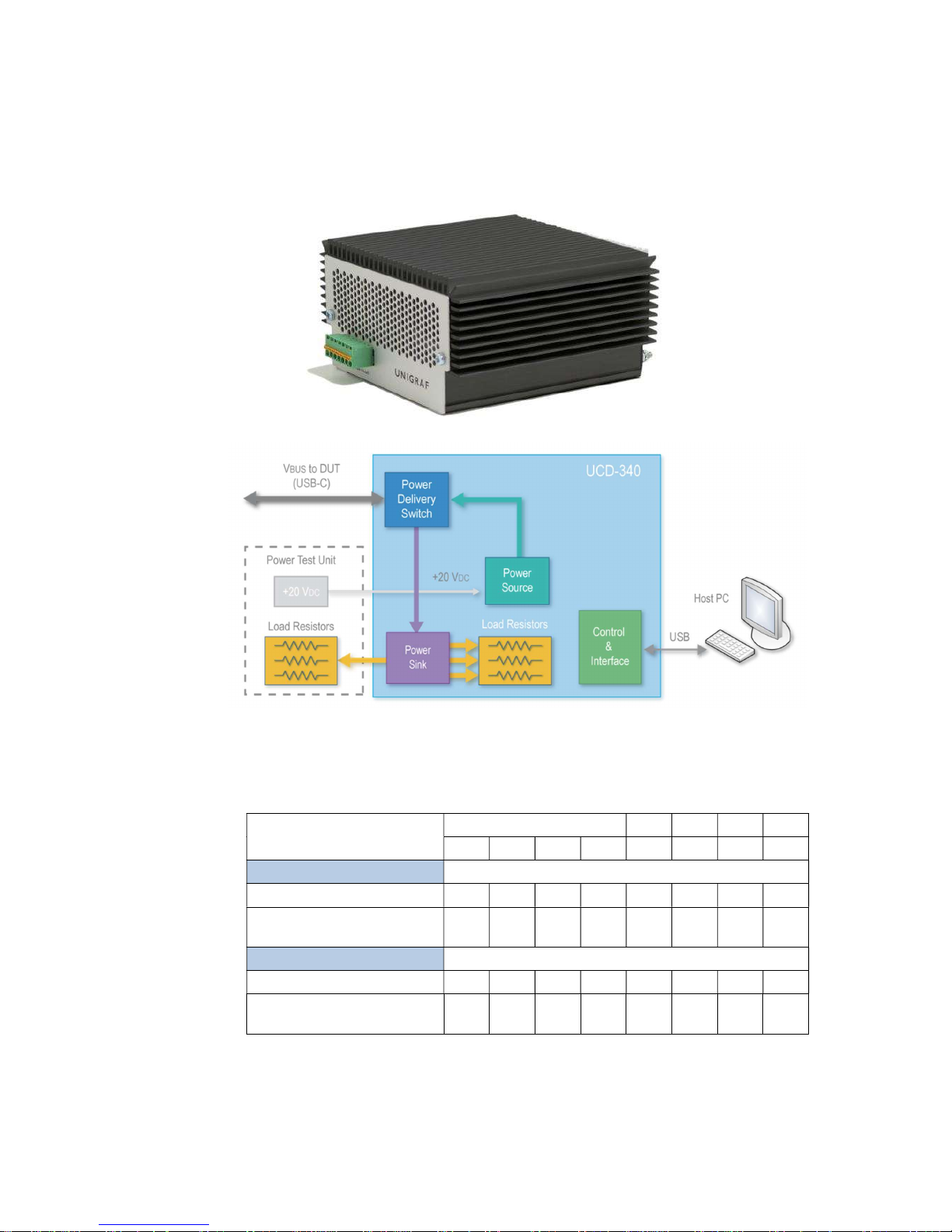
Please find below a matrix describing Power Source and Power Sink options of UCD-340
internally and with attached Unigraf External Power Test Unit. Please find description of
controlling the power options with UCD Console later in this manual.
5 V 9 V 12 V 15 V 20 V
0.5 A 0.9 A 1.5 A 3 A 3 A 3 A 3 A 5 A
Vbus Source capability
UCD-240
UCD-240 with
External USB-C Power Test Unit
Vbus Sink capability
UCD-240
UCD-240 with
External USB-C Power Test Unit

UCD Console for UCD-340 User Manual | Unigraf Oy
10.
UNPACKING
The UCD-240 product shipment contains:
The UCD-240 unit
AC/DC Power supply (100 to 240 Vac 50/60 Hz input, +12 Vdc output)
USB 3.0 compliant cable
USB-C to USB-C test cable
Unigraf Electrical test cable with units including Electrical Test
USB 3.0 Memory Stick
Unigraf USB Flash Drive
The USB Flash drive delivered with UCD-240 device includes the following items:
o Test Sequences and macros
o UCD-240 Software installation package
o Tutorial Videos
o UCD-240 Quick Guide
o Data Sheet
o Test Content (mp4 video)
o High/Low resolution reference images
o User Manual download link
o TSI manual download link
Table of contents
Other Unigraf Test Equipment manuals


