Uniden UH064SX-2NB User manual

UH064SX-2NB
UHF CB Transceiver
For more exciting new products please visit our website:
Australia: www.uniden.com.au
New Zealand: www.uniden.co.nz

Controls & Indicators
Included in your Package
• UH064SX-NBRadio(2)
• OperatingGuide
• BeltClip(2)
• ChargingCradlewithACAdaptor
• NiMHBatteryPack(2)
• EarpieceMic(2)
1 Antenna
2 PTT(Push-To-Talk)Key
3 MonitorKey
4 Keylock/CallKey
5 Memory/ScanKey
6 Channel/PowerHi-LoKey
7 Speaker
8 HeadsetJack
9 Select/PowerOn-OffKey
10 Volume/SelectUpKey
11 Volume/SelectDownKey
12 Microphone
13 ReceiveIndicator
14 TransmitIndicator
15 ChannelIndicator
16 DCSONIndicator
17 ScanIndicator
18 MemoryIndicator
19 PriorityChannelIndicator
20 CTCSSONIndicator
21 BatteryLevelIndicator
22 HITransmitIndicator
23 LoTransmitIndicator
24 CTCSSandDCSCode/Volume
LevelIndictor
25 VolumeSettingIndicator
26 VOXIndicator
27 BusyChannelLockoutIndicator
28 KeypadLockIndicator
29 ChargingLEDs
1UHFCBTransceiverUNIDENUH064SX-2NB
Optional Accessories
• SpeakerMicrophone
• VoxHeadset•CarryCase
• CommercialAccessories

Getting Started
NOTE
Unidendoesnotrepresentthisproducttobewaterproof.
DonotexposethisproducttoRainorMoisture.
Battery Installation
YourUH064SX-2NBunitusestheincludedNiMHbatterypackforpower.
Theunitcanbepoweredwithoptional4AAAALKALINEbatteries.
NOTE
Ifyoudon’tusetheUH064SX-2NBforlongperiods,Uniden
recommendremovingthebatteries.TheUH064SX-2NBis
designedtoretaintheprevioususersettings.Thisfeature
willcontinuetouseasmallamountofbatterypowerwhile
theunitisswitchedoff.
OLD
NEW
Toavoiddamagetotheunitdonotmixoldandnew
batteries.
To install the batteries:
1. Makesureyourradioisoff.
2. Releasethebatterycoverclip,thenremovethe
batterycover.
3. InsertNiMHbatterypackaccordingtothe
orientationonthebatterypack.
OR
Insert4AAAALKALINEbatteries(notincluded)
accordingtothepolaritysymbolsinsidethe
batterycompartment.
4. Alignthebatterycovertabswiththe
UH064SX-2NBtabholesthenreplacethecoverclip.
NOTE
Donotchargealkalineornonrechargeablebatteries.
2UHFCBTransceiverUNIDENUH064SX-2NB

Getting Started
3UHFCBTransceiverUNIDENUH064SX-2NB
Installing the Charge Cradle
1. PlugtheACadaptorintotherearofthechargecradleandintothe
mainspower.
2. PlacetheUH064SX-2NBintothechargecradle.Thechargelightwill
comeontoindicatetheunitischarging.
3. BeforeoperatingtheUH064SX-2NB,chargethebatterypackfor
16hours.
NOTE
Donotchargealkalineornonrechargeablebatteries.
User License Information
NOTE
ThecitizenbandradioserviceislicencedinAustraliaby
ACMARadio-communications(CitizenBandRadio
Stations)ClassLicenceandinNewZealandbyMED
GeneralUserLicenceforCitizenBandRadioandoperation
issubjecttoconditionscontainedinthoselicences.
Getting Started
Belt Clip
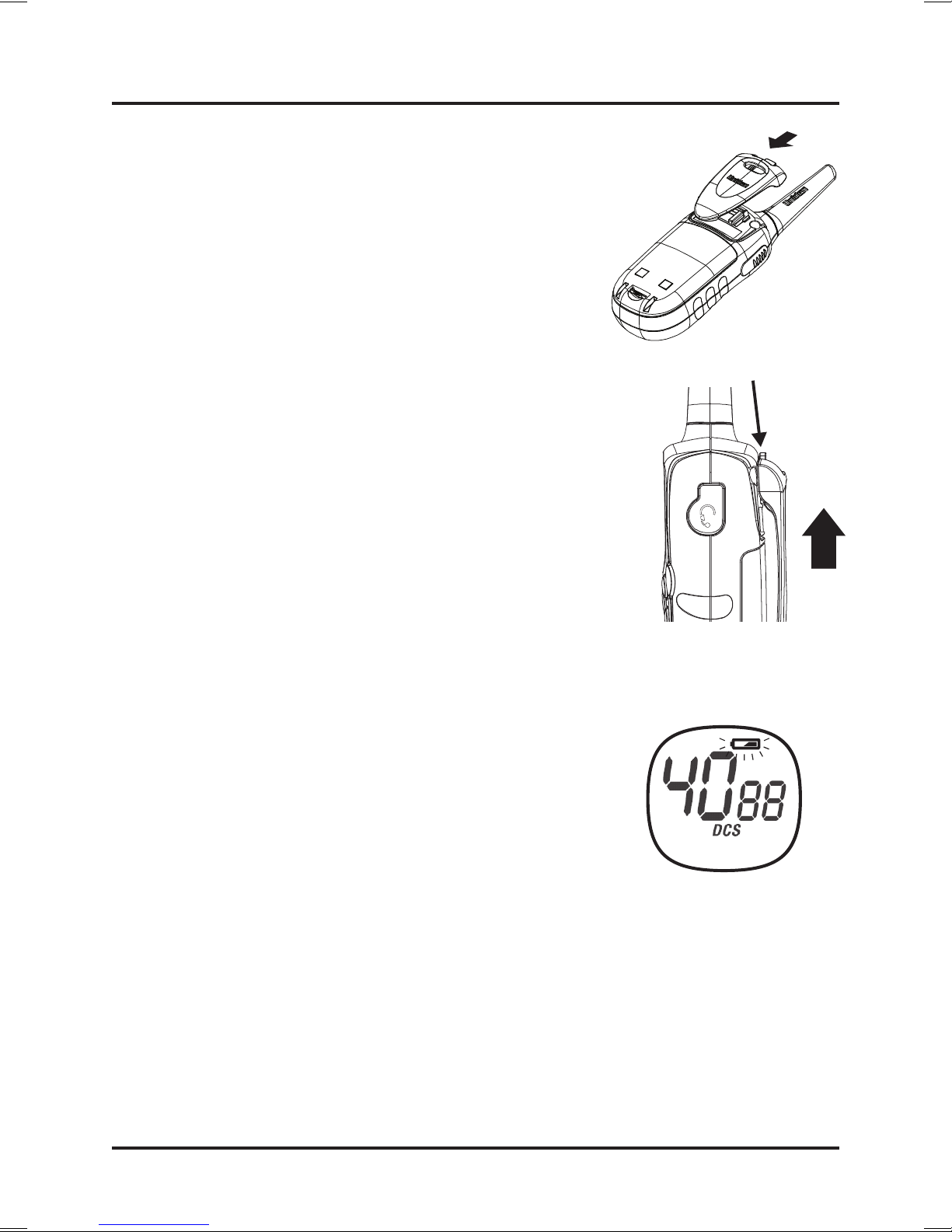
To attach the belt clip:
Slidethebeltclipuntilitsnapsintoplace.
To remove the belt clip:
Toremovethebeltclip,pressandhold
beltcliplocker,slidethebeltclipatthe
sametimeuntilreleased.
Low Battery Alert
Ifthebatterylevelbecomeslow,thebattery
indicatoricononthedisplaybeginsashing.
Whenthebatteriesintheunitarelow,theunit
willgointoabatteryLowmode.TheTransmit
modeisdisabled.Replacethealkaline
batteriesimmediatelyorifyouareusingthe
NiMHbatterypack,placetheradioonthe
chargecradletorecharge.Fullchargewilltake
upto16Hrs.
Back Light
TheUH064SX-2NBhasanautomaticdisplaybacklightwhichremainson
for10secondsafterakeypress(allkeysexceptPTTkey).Thebacklight
willworkevenifthekeypadislockedbutwillnotworkduringlowbattery
alertmode.
4UHFCBTransceiverUNIDENUH064SX-2NB
BeltClipLocker

Operation
5UHFCBTransceiverUNIDENUH064SX-2NB
Power On/Off
1. PressandholdSELECT/ keytoturntheradioon.
Achannelnumberwillappearonthedisplay.
2. PressandholdSELECT/ keytoturntheradiooff.
Volume
Press or keytoincreaseordecreasethe
volumelevel.‘VOL’iconappearsonthedisplay
whilevolumeisbeingadjusted.
Thereare8volumelevels.Level0(NoAudio)to
Level7(MaximumVolume).
Adjusting the Key Beeps
Yourradioemitsabeepeachtimeoneofthekeys
(exceptforthePTTkey)ispressed.
1. ToturnOFFthisbeep:Pressandhold /CALLkeywhileturning
ontheradio.
2. ToturnONthisbeep:Pressandhold /CALL keywhileturning
ontheradio.
Roger Beep
RogerBeepisaBEEPthatissenttonotifytheendoftransmission(bothPTT
andVOXtransmission.)RogerBeepcanbeheardthroughthespeakerwhen
KeyBeepison.RogerBeepistransmittedevenifKeyBeepisturnedoff.
However,RogerBeepwillnotbeheardfromthespeaker.
1.ToturnOFFRogerBeep:Pressandhold keywhileturningontheradio.
2.ToturnONRogerBeep:Pressandhold keywhileturningontheradio.
Keylock On/Off
1.Press /CALL keyfor1.5secondstoenterkeylockonmode.
2.Press /CALL keyfor1.5secondswhileinKeylockmodetoexit
theKeylockmode.
NOTE
WhileinKeylockonmode,theUH064SX-2NBcanstill
receiveandtransmit.
Operation
6UHFCBTransceiverUNIDENUH064SX-2NB
Selecting a Channel
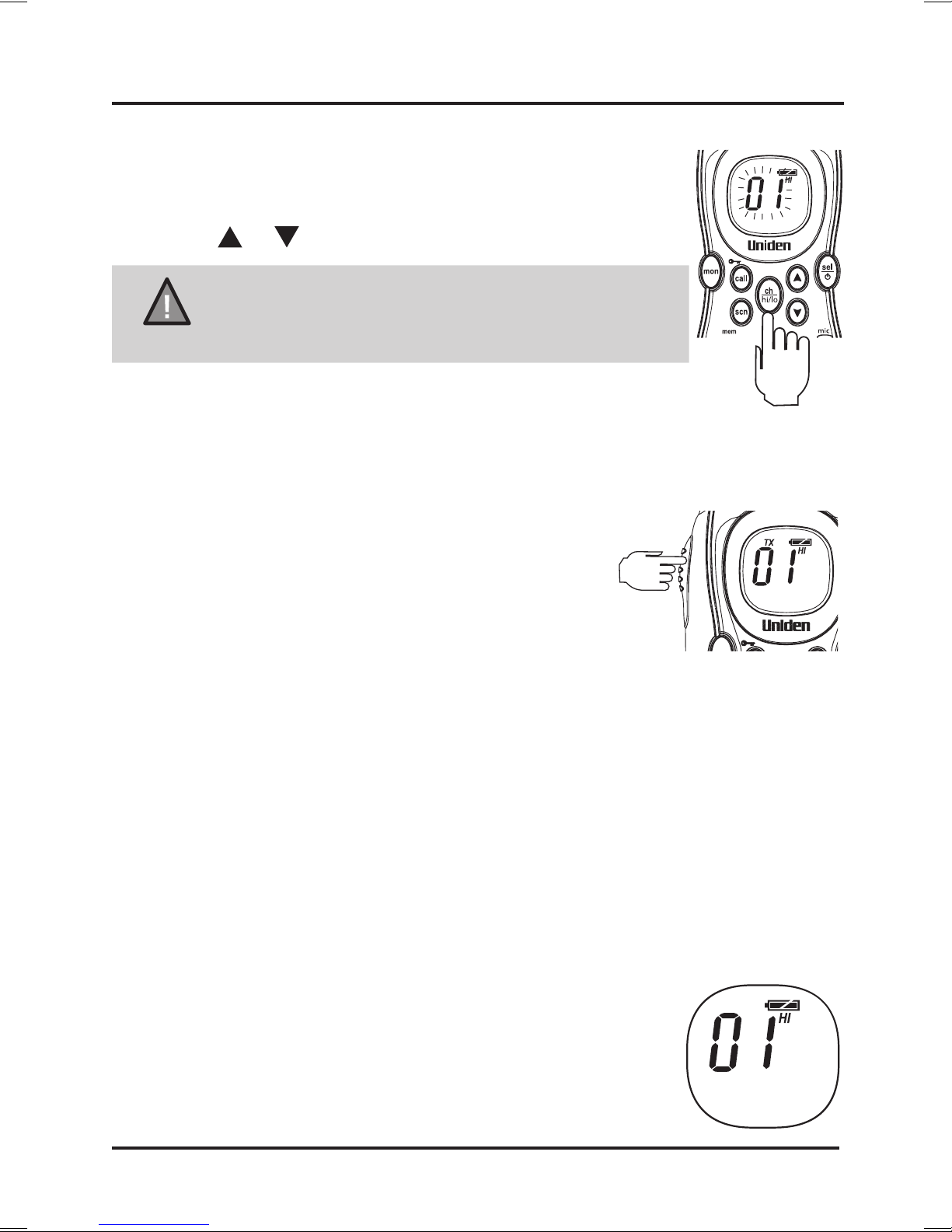
1. PressCH / HI / LOkeymomentarilytoactivatechannel
selectmode.Thedisplayedchannelwillash.
2. Press or keytoselectthedesiredchannel.
NOTE
Refertochannelguidelinesonpage12.
ForAustralia,Channels05and35are
reservedforEmergencyCalls.
3. PressCH / HI / LOkeymomentarilytoexitchannel
selectmode.Ifnokeyispressedwithin5secthe
UH064SX-2NBwillexitfromthechannelselectmode.
To Transmit and Receive
TheUH064SX-2NBusestheUHF-CBChannels
(Channels 22 and 23 are for telemetry and
telecommand applications. Transmit is
inhibited on these channels).
1. Beforeyoutransmit,listenforactivityonthe
selectedchannel.
2. Whenthechannelisclear,pressandholdthePTTkeytotransmit.
TXiconappearsonthedisplay.
Holdtheradiowithmicrophoneapproximately5cminfrontofyourmouth
withtheantennaatapproximately45°angleawayfromyourhead.Speak
inaclear,normalconversationalvoice.
3. Whenyouhavenishedspeaking,releasethePTTandlistenfora
response.TX iconthendisappearsonthedisplay.Whilereceiving,
theRX iconisdisplayed.
Transmit Hi/Lo Power Select
PressandholdCH / HI / LOkeytoselectdesiredtransmit
level.HI iconwillappearonthedisplayformaximum
transmitlevel.LO iconwillappearonthedisplayfor
minimumtransmitlevel.TheRFtransmitpowerofthe
UH064SX-2NBisselectablebetween2.0W(Hi)
and0.5W(Lo).

Operation
Automatic Squelch Feature
TheUH064SX-2NBisequippedwithanAutomaticSquelchSystem
whichshutsoffweaktransmissionsandunwantednoise.
Monitor
Thisfeatureenablesuserstolistenforweaksignalsonthecurrent
channelatthepressofakey.
To use monitor
1. PressMONkey.TheRX iconwillash.
2. Releasewithin1.5secondsandtheunitexits
Monitormode.
3. PressandholdMON keyfor2secondsforcontinuouslistening.
Thereceivercircuitwillstayopen,lettinginboththenoise&weak
signals.TheRX iconashesinthisstatus.
4. ToreturntonormalReceivemodepressMONkey.TheRX icon
disappearsorstopsashinginthisstatus.
Scanning
ThescanfunctionscansallchannelswhicharestoredintheSCAN
CHANNELMEMORYandstopsatanactivechannel.IfaPRIORITY
channelhasbeenselectedthenthischannelwillbemonitoredforactivity
every3seconds.Whenthesignalstops,theUH064SX-2NBwaits
2seconds(ReplyDelay)beforescanningresumes.
To initiate scanning;
1. PressMEM / SCNkeymomentarilytobegin
scanning.
TheSCANiconisdisplayed.
2. PressSELECT / ,MEM / SCN , /CALL
orPTTkeytocancel.
Whenscanstopsatabusychannel,pressing
CH / HI / LOkeywillresumescan.
7UHFCBTransceiverUNIDENUH064SX-2NB

Operation
Reply Delay
Whilescanning,theUH064SX-2NBstopsatabusychannelandreceives
atransmission.Whenthereceivedsignalisover,theunitwillwaitfor2
secondsforthereturnofthesignal,otherwise,theradioresumesscanning.
To Operate in Duplex Mode (Repeaters)
TheDuplexfunctionenablesyoutoaccesslocalrepeaterstations.You
canonlyactivateDuplexfromCH01-CH08andCH41-CH48.
UHFCBRepeatersareusedtoretransmitorrelayyoursignal.Repeaters
willextendtherangeofyourradioandovercometheshieldingeffect
causedbysolidobstructions.
NOTE
Contactyourretailerforalistofrepeatersavailableinyour
area.
Operation With the Aid of a Repeater
1.PressSELECT / keysixtimes. appearsonthedisplay.
2.Press or tochange to forCH01-CH08and to for
CH41-CH48.
3.PressSELECT / toconrm
Todeactivatetheduplexoperationrepeatactivationprocessandchange
to or to .UH064SX-2NBwillreturntonormaloperation.
NOTE
If or ispressedwhenthechannelisnotfrom
CH01-CH08orCH41-CH48,anerrortonesounds.
8UHFCBTransceiverUNIDENUH064SX-2NB

Operation
CTCSS & DCS
(Continuous Tone Coded Squelch System) & (Digital Coded Squelch)
CTCSSisafeaturethatallowsagrouptotalktoeachother
withouthearingotherusersonthesamechannel.
1. PressSELECT / keymomentarilytoenterCTCSS
mode.ThecurrentselectedCTCSStoneashes.
2. Press keytoselecttherequiredCTCSS
tone(OFFor1-38).
3. PressSELECT / keysixtimestoconrmthe
selectedsettingandexittostandbymode.
ForchannelswithaCTCSStonesetting,theCTCSStoneisdisplayed
belowthechannelindicator.ForchannelswiththesettingofCTCSS
OFF,therewillbenodisplaybelowthechannelindicator.
DCSisadigitalextensionofCTCSS.Itprovides104extra,digitally
coded,squelchcodesthatfollowafterthe38CTCSScodes.CTCSS
1-38,followedbyDCS1-99plusDCS100-104(representedbyo0-o4on
thedisplay).
1. PressSELECT / keymomentarilytoenterCTCSS/DCSmode.
2. Use keytoselectaDCScode.TheDCScodes
followonaftertheCTCSScodes.TheDCSiconwill
replacetheCTCSScodeonthedisplay.
3. PressSELECT / keysixtimestoconrmthe
selectedsettingandexittostandbymode.
TheDCSiconwillappearwhenselected.Toturn
offDCSselectCTCSSOFFandnodisplaywillshow
belowthechannelindicator.
NOTE
Channels05and35areusedforemergencychannels.
CTCSSandDCSwillnotoperateonthesetwochannels.
9UHFCBTransceiverUNIDENUH064SX-2NB
Table of contents
Other Uniden Transceiver manuals

Uniden
Uniden Sundowner UH-100 User manual

Uniden
Uniden UH835S User manual

Uniden
Uniden SEA-WASP MC-4300 User manual

Uniden
Uniden XTRAK40 User manual

Uniden
Uniden Benjamin User manual

Uniden
Uniden SMH250D User manual

Uniden
Uniden UH9000S User manual

Uniden
Uniden UH9000 User manual

Uniden
Uniden UH8060NB User manual

Uniden
Uniden UH8010S+ANT User manual

Uniden
Uniden BearTracker 885 User manual

Uniden
Uniden sundowner UH-088 User manual

Uniden
Uniden UH8050S User manual

Uniden
Uniden UH950S User manual

Uniden
Uniden MHS245 User manual

Uniden
Uniden JACKSON User manual

Uniden
Uniden UH076DLX User manual

Uniden
Uniden UH076SX-NB User manual

Uniden
Uniden MHS127 User manual

Uniden
Uniden UH037SX-2NB User manual