Uniden ALP9094 User manual

Uniden ALP9094
4-Line Alpha/Numeric Pager
owners manual
UPZZ01671ZZ

FCC Information
Your pager can interfere with the operation of other
electrical devices even when it is functioning properly.
To determine if your pager is causing interference, turn
the pager off while observing the affected device. If the
interference goes away, it was probably caused by your
pager. To eliminate the interference, move the pager
away from the affected device.
If the interference cannot be eliminated, the FCC requires
that you stop using your pager.
Modifying or tampering with your pager’s internal
components can cause a malfunction and void your FCC
authorization to operate it. If your pager is not
performing as it should, contact your pager service.
This device complies with Part 15 of FCC Rules.
Operation is subject to the following two conditions:
(1) this device may not cause any harmful interference,
and (2) this device must accept interference received,
including interference that may cause undesired
operation.
Clearvue
Ô
is a proprietary trademark of Uniden America
Corporation.
©1998 Uniden America Corporation All rights reserved.
Printed in the Philippines

Important
Your pager is capable of storing messages and telephone
numbers totaling up to 100,000 characters. To prevent
the loss of important data due to battery failure, replace
the battery before the power level becomes too low.
Battery life will vary depending on several factors,
including:
●The amount of time the Clearvue illuminated display
is active.
●The amount of time the pager is “ON.”
1
Contents
Important.......................1
Introduction .....................2
Using this Owners Guide ...............2
Installing the Battery .................3
Turning Your Pager On ................4
Low Battery Warning .................4
Controls .......................5
Standby Display....................6
Clearvue Illuminated Display .............7
Receiving and Displaying Personal Messages ......8
The Function Menu ..................9
Mail Drop History ..................16
Using The Phone Directory .............18
The Setup Options Menu ...............21

Introduction
Congratulations on your purchase of the ALP9094 four
line alpha/numeric pager. This compact, state-of-the-art
pager has many features, including:
●20 Folder Locations for Mail Drops
●40 Personal Message Locations
●Clearvue Illuminated Display
●Multiple Alert Tones
●Silent or Vibrating Alerts
●Time and Date Alarms
●Out-of-Range Indicator
●Phone Directory
To ensure that you understand all of your pager’s
features and capabilities, please read this owners manual
carefully before you use your pager.
Visit our internet site at: www.uniden.com
Using this Owners Guide
●When you see the word “press,” press and release the
specified key. If needed to “press and hold,” you will
be prompted to do so.
●The displays in this owners manual are general
representations of what you will see. Your paging
service provider may change the wording.
2
Installing the Battery
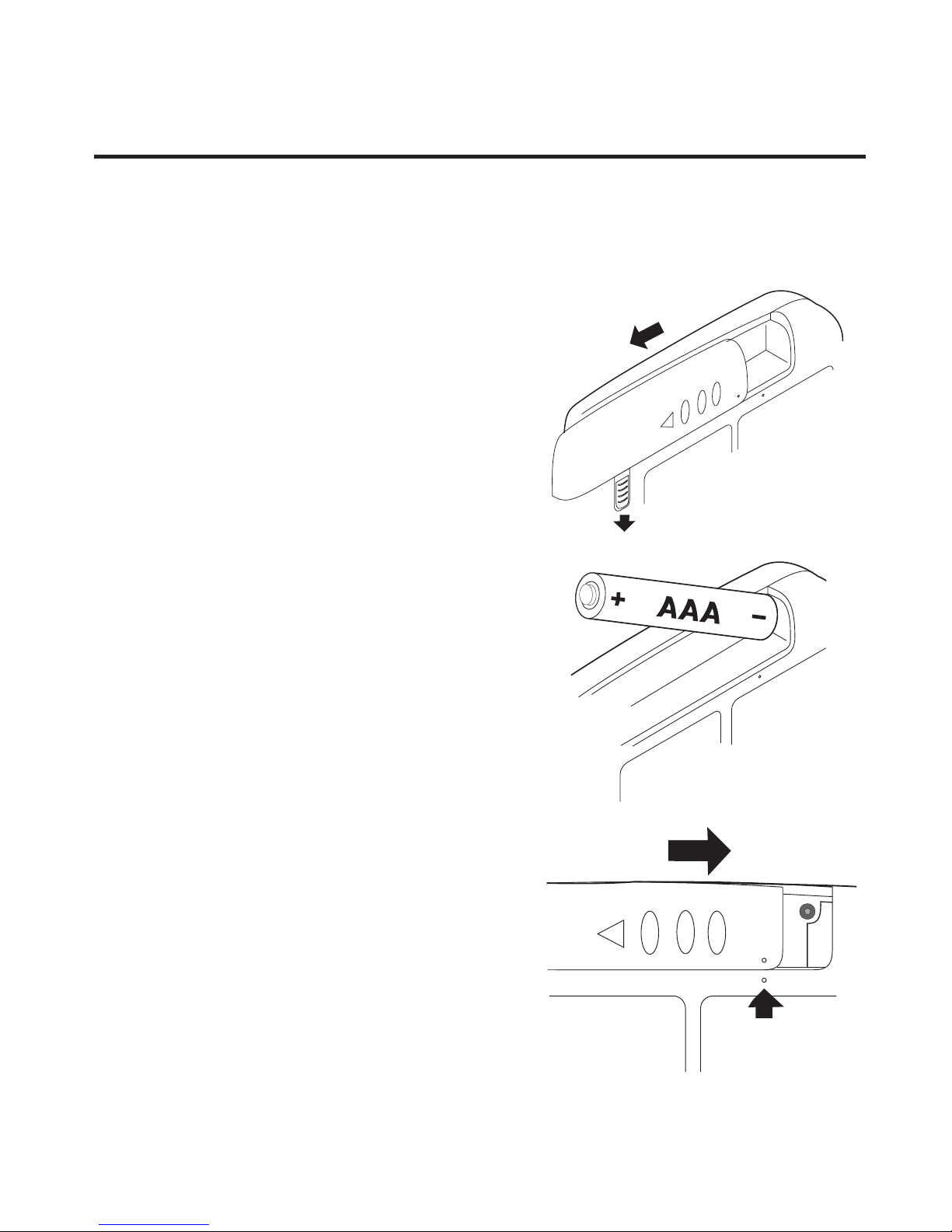
Your pager requires one 1.5 VDC, AAA battery for power.
Caution: Only use the battery specified above.
1. Release the battery
compartment lock.Slide and
lift off the battery cover.
2. Insert the AAA battery into
the compartment according
to the polarity symbols (+)
and (–) marked inside.
3. Match the dots on the
pager and battery cover.
Slide the battery cover on,
then slide the lock-tab
down.
3

Turning Your Pager On
Press and hold Nfor approximately two seconds.
The display will temporarily go blank and then show the
standby display (see page 6).
Turning Your Pager Off
1. At the standby display, press Nto go the Function
menu (page 9).
2. Press >to select POWER OFF ().
3. Press Nagain and your pager is in the standby mode.
Low Battery Warning
When battery power is low, this symbol ( ) appears in
the bottom center of the display, and – once every 30
minutes – a low beep sounds that lasts four seconds.
When this happens:
●Replace the battery as soon as possible to prevent data loss.
●You will have to press Ntwice (instead of normally
pressing once) at the Standby display to go to the
Function menu (page 9).
4
NOTE
The built-in memory saver will store messages and
settings for approximately two minutes while you
change the battery - or after the battery loses power.

Controls
1. Backward Menu/Page Scroll Key (<)
2. Forward Menu/Page Scroll Key (>)
3. Enter Key (N)
4. Speaker
5. Scroll Down Key (▼)
6. Display (see next page)
7. Scroll Up Key (▲)
8. Strap attachment
5

Standby Display
1. Time
2. Message Status - Displays CALL,MAIL, Low Battery
, and FULL. This symbol (-----) indicates no
messages or calls. This symbol ( ) indicates all
messages have been read.
3. Alarm ( ) - Indicates an alarm has been set.
4. Audio Alert ( ) - This displays when a tone has been
selected for message alert. The Silent Alert ( ) and
Vibrate ( ) icons are also displayed here.
5. Signal Meter Strength ( ) - Flashes when there is
no signal.
6. Carrier Logo - The logo of the assigned carrier is
displayed here.
6

Clearvue Illuminated Display
Your pager is equipped with the Clearvue illuminated
display. To activate this display, perform the following steps:
1. With your pager on, push and hold any key
(<,>,▲,▼,orN) for two seconds.
2. The backlight illuminates and remains on for
approximately 20 seconds.
7
TIP
Pressing any key during this 20 second period
keeps the display illuminated. If no key is pressed
for 20 seconds, the illuminated display shuts off.
NOTE
Frequent use of the illuminated display will
shorten the battery life.

Receiving and Displaying Personal Messages
Your pager can store up to 40 messages in the order that
they’re received. If the memory is full when a new
message arrives, FULL appears in the bottom center of
the display. The newest message then replaces the oldest
in memory.
●If Quickview is off when a message is received, your
pager will sound an alarm. You will then need to
press >or <to display the personal message
menu. A cursor will appear to the left of the first new
message.
●If Quickview is on when a message is received, your
pager will sound an alarm (if the alarm is on) and the
message will be displayed immediately.
●Move through your message line by line (with the ▼▲
keys) or page by page (with the >< keys).
●Be sure to delete (or move to a folder) unwanted
messages after you’ve read them. Your pager starts
replacing the oldest messages when the memory
becomes full.
8
Table of contents
Other Uniden Pager manuals