Turbo TDH-18 User manual
☆ Please read and retain these instructions for future reference
LCD Dehumidifier
TDH-18
Instruction Manual
LCD 抽濕機使用說明書
KU
k7115

TDH-18
Contents 目錄
Page
Where to position ___________________
Before use_________________________
Parts _____________________________
Operation _________________________
Drainage __________________________
Maintenance _______________________
Trouble shooting ____________________
Specification _______________________
Product Warrant Card
________________
使用位置 _________________________
使用前 ___________________________
產品簡介 _________________________
操作 _____________________________
排水 _____________________________
疑難小百科 _______________________
技術規格 _________________________
2
3
4
5, 6
7, 8
9, 10
11
22
23
12
13
14
1 , 16
17, 18
19, 20
21
22
23
品保養證 _______________________
產品保養 _________________________
產
1
k7115

TDH-18
Where to position
When positioning the dehumidifier, ensure that it is placed on a level
surface and that there is a minimum of 10 cm (4") of space on either
side of the unit to allow for efficient airflow.
This dehumidifier is fitted with castors for extra mobility, if you move the
unit, it should first be switched off and the water tank emptied.
We do not recommend the use of an extension lead, so please try to
ensure that the unit is sufficiently close to a fixed mains socket. If it is
necessary to use an extension lead, please ensure the diameter of the
wires of the cable is at least 1.5 mm2.
When the dehumidifier is in operation, outside doors and windows
should be closed when necessary for most efficient use .
2
k7115

TDH-18
Before use
Caution!
Always keep the unit in vertical position.
Leave the unit to stand for one hour before connecting to the
mains supply after transport or when it has been tilted (e.g.
during cleaning).
Keep all foreign objects away from the air intake or output
openings.
The mains supply must conform to the specification shown on the
rating plate at the back of the unit.
If the supply cord is damaged, it must be replaced by an
approved service representative or a similar qualified person in
order to avoid a hazard.
Never use the plug to start and stop the unit. Always use switch
on the control panel.
Before moving the unit, first switch off, then unplug and empty
the water tank.
Don't use bug sprays or other flammable cleaners on the unit.
Never pour or spray water over the unit.
IMPORTANT!
Do not use this unit at ambient temperatures below 5oC, to prevent the
possibility of a heavily ice up evaporating coil.
3
k7115
TDH-18
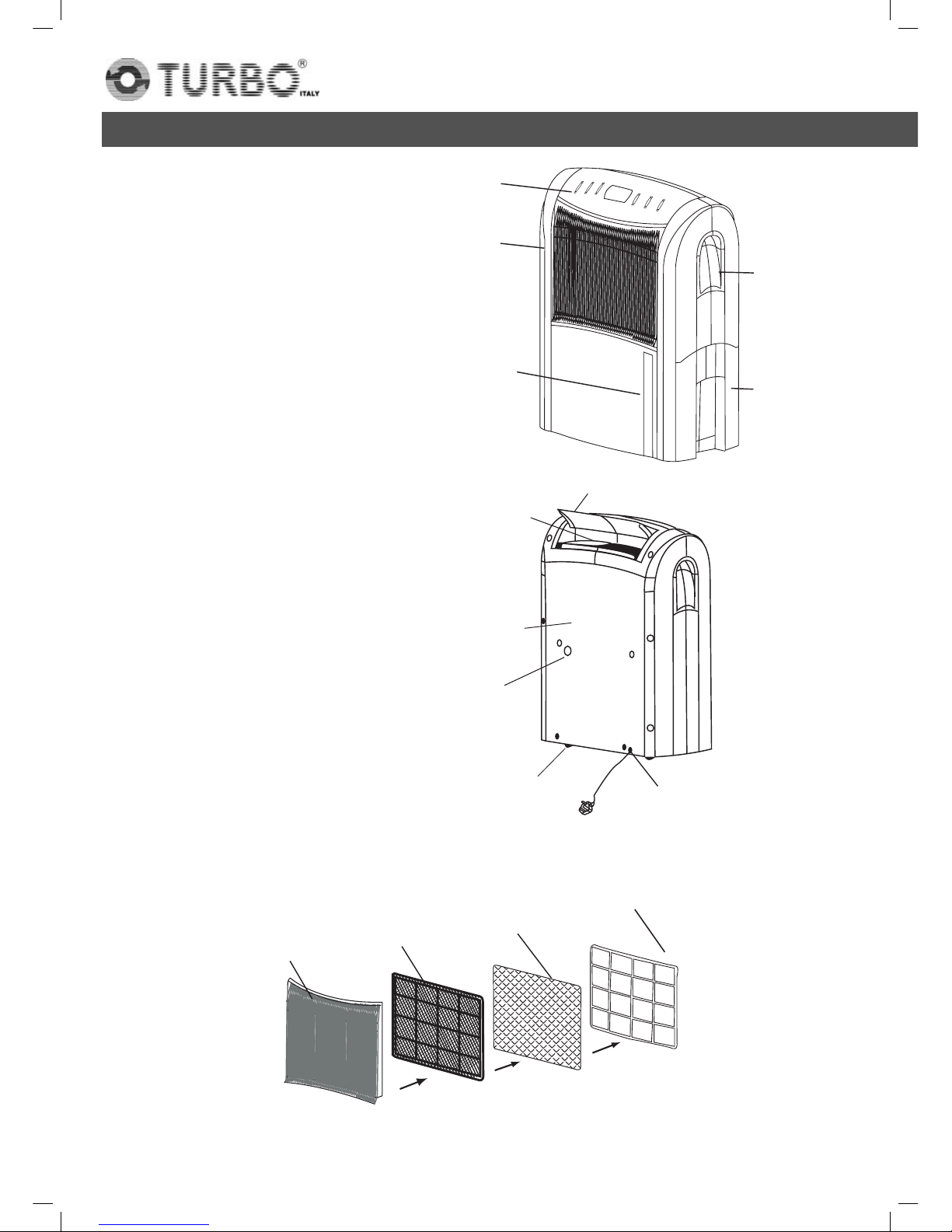
Parts
Front
1. Control panel
2. Air inlet / Filters
3. Water level window
4. Handle
5. Water tank
Rear
6. Clothes drying guider
7. Air outlet
8. Rear plate
9. Hole for continous
drainage
10. Caster
11. Power cord
Assembly of the filters
Grille Washable
filter
Activated
carbon filter
Filter fixer
4
k7115
TDH-18
Operation
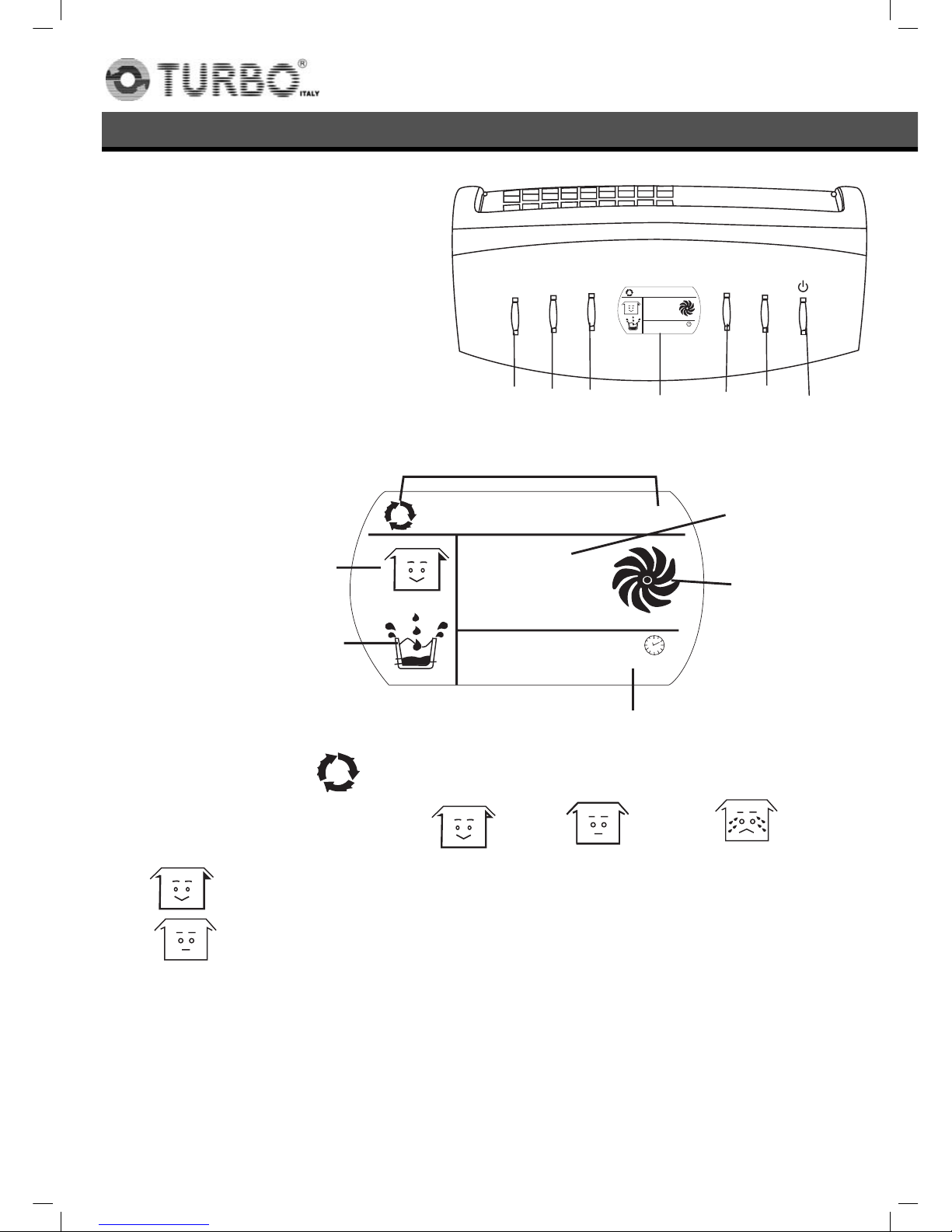
Control panel
1. Not functioned for this model
2. Not functioned for this model
3. Timer
4. Display window
5. Speed button
6. Humidity selection button
7. ON/OFF button
Display window
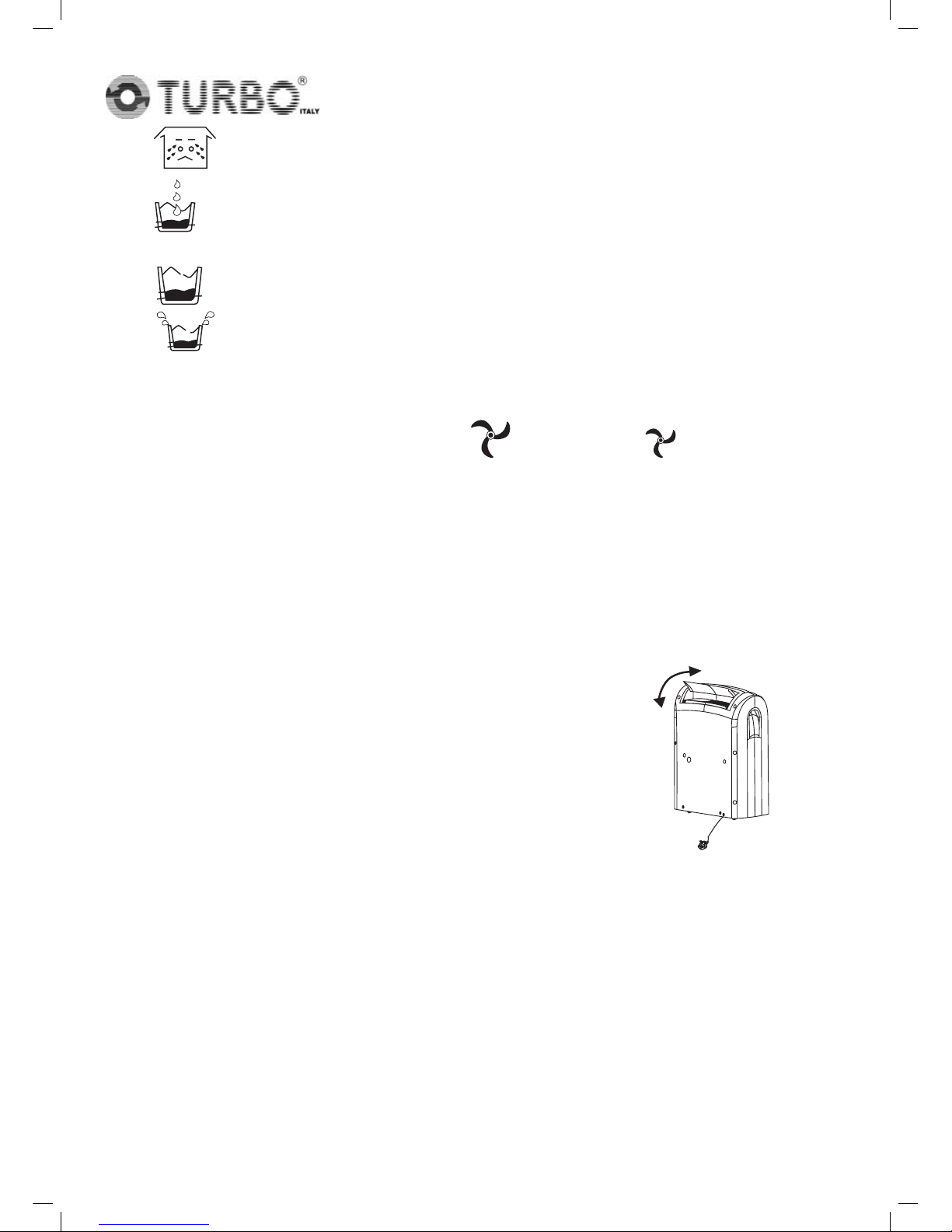
1. Humidity setting: continuous de-humidifying , 50%, 60%, 70%, 80%
2. Ambient humidity condition: good fair, bad
means 50% ≤ambient room humidity ≤70%
means 30% ≤ambient room humidity < 50% or 70% < ambient
room humidity ≤80%
KU
7,0(5
63(('
+80
KU
5
6
5
k7115
TDH-18
means the ambient room humidity is higher than 80%.
3. compressor is in progress. In case the de-frost function is working, the
water drops will flash.
compressor is not in progress.
water full.
4. Timer indicator, 1 to 24 hours.
5. Current relative humidity display.
6. Fan speed/ventilation indicator: high speed, low speed.
Operation
1. Plug the unit into a correct mains socket.
2. Press button ON/OFF to turn on the unit. The compressor will start to work
in continuous mode.
3. Press button HUMIDITY to set the room humidity you need: continuous
de-humidifying , 50%, 60%, 70% or 80%
4. Press the speed button to choose the ventilation
speed, high or low.
5. To turn off the unit, press button ON/OFF again.
6. The direction of the air outlet can be adjusted by
hand.
6
k7115
oC) by pressing “HUM” button at least 2
seconds.
7. Room temperature indicator,can display the room temperature
in Celsius degree (
It will resume to display the room humidity after 12 seconds.
TDH-18
Drainage
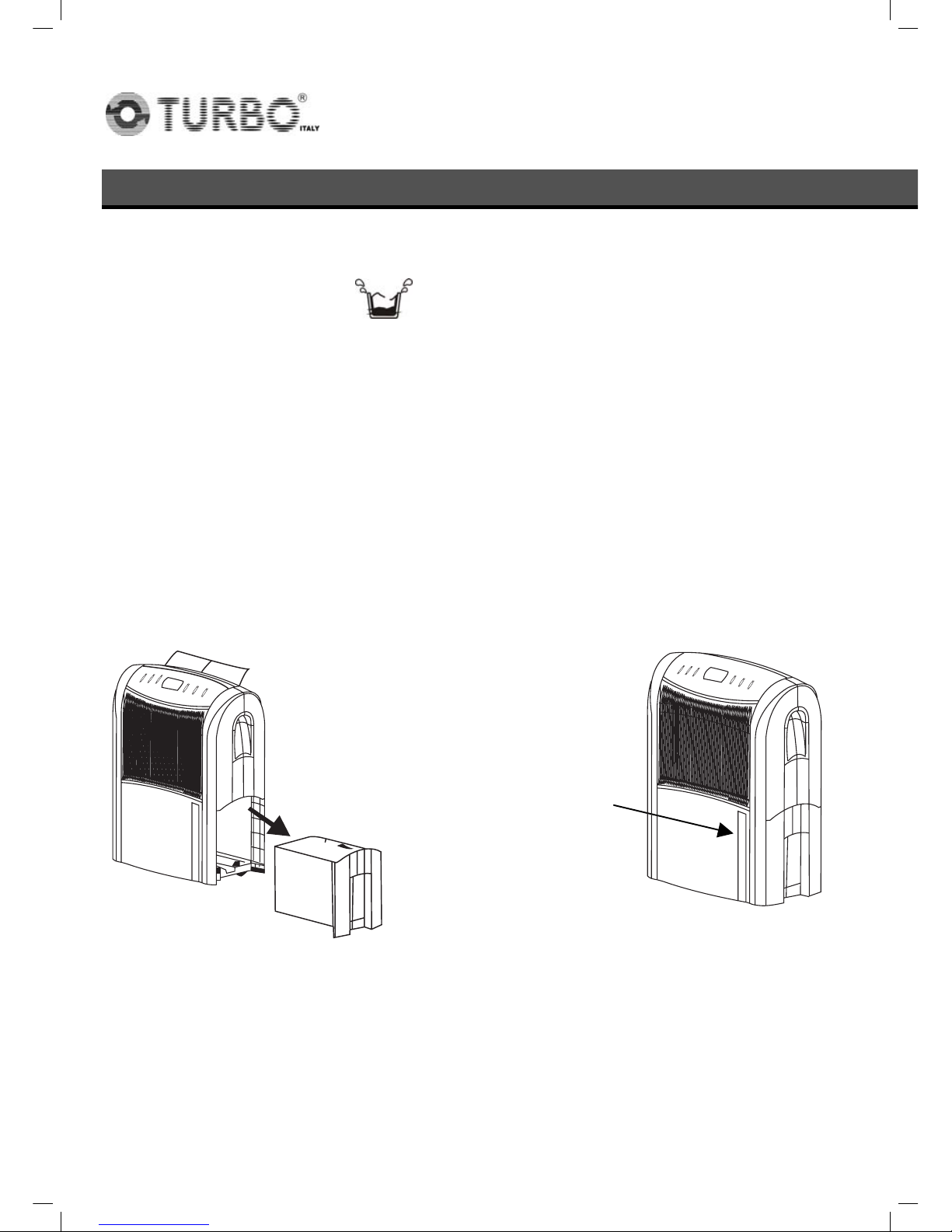
While the water tank is full, the compressor will stop for self-protection and:
The sign of water full will flash.
The unit will buzz. * For stopping the buzz, you may press the ON/OFF
button to turn off the unit
The water level window will turn to red.
To move the water tank, pull it out squarely from the unit by using the
handle at the water tank. (FIG.1)
After empting the water tank, place the water tank into space. Make sure
it is properly positioned, in order for the 'water full' sign to go out and your
dehumidifier is operating. (FIG.2)
.
FIG.1 FIG.2
7
k7115
TDH-18
Continuous drainage
When the dehumidifier is operated at very high humidity levels, the water tank
will require more frequent drainage. In this situation, it may be more
convenient to set the unit up for continuous drainage with the following
procedures:
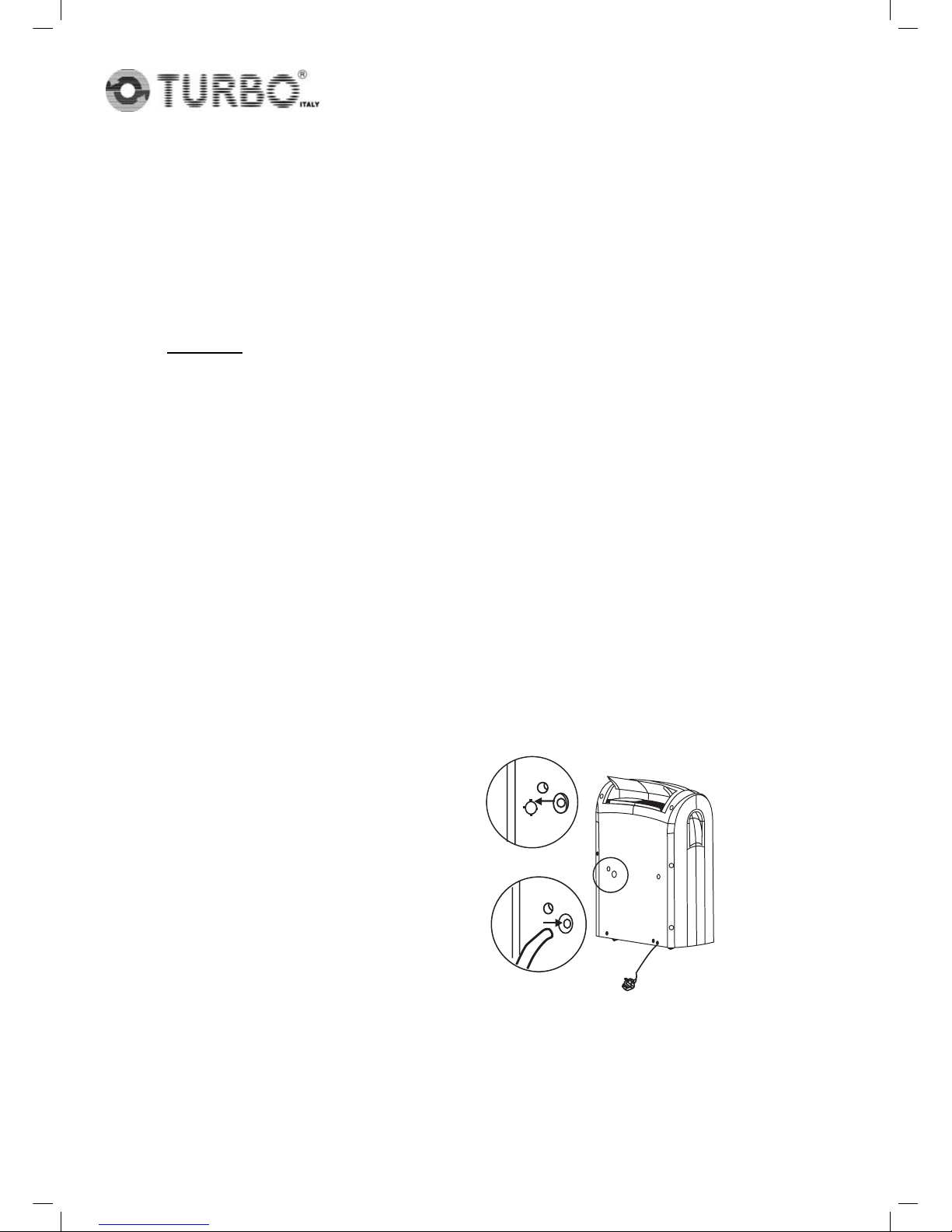
1. Cut the outlet at the unit back. (FIG.3).
* Caution:
When the outlet is cut off, the said portion would leave as a hole and
cannot be covered by any plug.. If cover the said portion by plug,
the drainage water cannot go down to the water tank.
2. Connect the drain hole with a water tube of inner diameter 12mm.
(FIG.4)
* Please note, the water tube is not supplied with the unit.
3. Ensure the water will always drain away freely and the tube will remain in
place.
FIG. 3
FIG. 4
prevent the water tube from freezing.
Note! In very cold weather conditions, precautions should be
taken to
8
k7115

TDH-18
Maintenance
Always unplug the unit from the mains before carrying out any
maintenance or cleaning of the unit.
CLEANING THE BODY
Use soft cloth to wipe the unit clean.
Don't ever use volatile chemicals, gasoline, detergents, chemically
treated clothes, or other cleansing solutions. All these could possibly
hurt the cabinet.
CLEANING THE FILTER
For washable filter - Use a vacuum cleaner or tap the filter lightly for
easy cleaning. If the filter is particularly dirty, use warm water with a
small amount of medium strength.
For activated carbon filter - This
filter is not washable. Its life span is
variable and depends on the
ambient conditions where the
appliance is used. The filter
should be checked periodically
(about every 6 months) and
replaced if necessary.
Grille Washable
filter
Activated
carbon filter
Filter fixer
9
k7115
Table of contents
Other Turbo Dehumidifier manuals